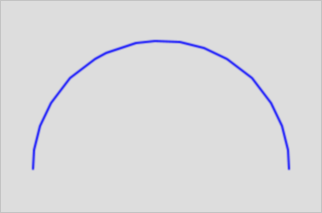
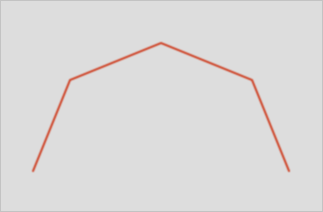
Converts a geometry containing curves to its linear equivalent: CircularString to LineString, or CurvedPolygon to Polygon. Use this function when a downstream tool or system does not support circular geometry types.
Each curved segment is linearized by dividing each quarter circle into 32 segments by default. The tolerance and toleranceType parameters let you control the approximation precision.
Syntax
geometry ST_CurveToLine(geometry curveGeom, float tolerance, integer toleranceType, integer flags)Parameters
| Parameter | Type | Description |
|---|---|---|
curveGeom | geometry | The curved geometry to convert. |
tolerance | float | The tolerance value. Default: 0. |
toleranceType | integer | How the tolerance value is interpreted. Default: 0. See valid values below. |
flags | integer | Bitfield that controls output symmetry. Default: 0. See valid values below. |
toleranceType values
| Value | Meaning |
|---|---|
0 (default) | tolerance sets the maximum number of segments per quadrant. |
1 | tolerance sets the maximum deviation between the approximated line and the original curve, in source units. |
2 | tolerance sets the maximum angle in radians between generated radii. |
flags values
| Value | Meaning |
|---|---|
0 (default) | Default behavior. |
1 | Output is a symmetric object regardless of input direction. |
2 | Retains angles to prevent angle or segment length reduction when generating symmetric output. Has no effect when the symmetric output flag (1) is not set. |
Examples
Compare default and custom tolerance
SELECT
  ST_CurveToLine(g),                  -- default: 32 segments per quadrant
  ST_CurveToLine(g, pi()/4, 2)        -- custom: max angle pi/4 radians between radii
FROM (
  SELECT 'CIRCULARSTRING(0 0, 0.5 0.5, 1 0)'::geometry AS g
) AS test;