Computes a geometry covering all points whose distance from the input geometry is less than or equal to the given distance, using the spatial reference system (SRS) of that geometry.
Syntax
geometry  ST_Buffer(geometry  g1, float radiusOfBuffer);
geometry  ST_Buffer(geometry  g1, float radiusOfBuffer, integer numSegQuarterCircle);
geometry  ST_Buffer(geometry  g1, float radiusOfBuffer, text bufferStyleParameters);
geography ST_Buffer(geography g1, float radiusOfBufferInMeters);
geography ST_Buffer(geography g1, float radiusOfBuffer, integer numSegQuarterCircle);
geography ST_Buffer(geography g1, float radiusOfBuffer, text bufferStyleParameters);
Parameters
| Parameter | Description |
|---|---|
g1 | The geometry or geography object. |
radiusOfBuffer | The buffer radius. Valid only for geometry objects. The unit is determined by the SRS of the geometry. |
radiusOfBufferInMeters | The buffer radius in meters. Valid only for geography objects. |
numSegQuarterCircle | The number of line segments used to approximate a quarter circle. Default value: 7. |
bufferStyleParameters | Style options for the buffer, specified as space-separated key-value pairs. See Buffer style options. |
Buffer style options
Pass these options as key-value pairs in the bufferStyleParameters argument (for example, 'quad_segs=4 endcap=flat').
quad_segs=<integer>— Number of line segments used to approximate a quarter circle. Default:8. A higher value produces a smoother curve.endcap=round|flat|square— End cap style for buffered lines. Default:round.join=round|mitre|bevel— Join style at line vertices. Default:round.mitre_limit=<float>— Maximum mitre ratio. Default:5.0. Applies only whenjoin=mitre.side=both|left|right— Which side of a LineString to buffer.leftorrightproduces a single-sided buffer relative to the line direction. Has no effect on point or polygon objects.
Usage notes
Negative radius behavior
If you specify a polygon object and set the radius of the buffer to a negative value, the ST_Buffer function shrinks the polygon inward instead of expanding it.
Geography objects
For geography inputs, ST_Buffer internally projects the geography into a suitable planar SRS, computes the buffer, and reprojects the result back to WGS 84. The projection is chosen in this order of preference: Universal Transverse Mercator (UTM), Lambert Azimuthal Equal Area (LAEA), Universal Polar Stereographic (UPS), and Mercator (worst case).
Z coordinates
ST_Buffer ignores Z coordinates. Even for 3D input, the result is always a 2D geometry.
Radius searches
For proximity queries such as "find all points within 500 meters of this location," use ST_DWithin instead of ST_Buffer. ST_DWithin leverages spatial indexes directly, while ST_Buffer first generates a polygon and then performs a containment check, which bypasses index acceleration and is significantly slower.
Examples
Results returned with different values of quad_segs
SELECT ST_Buffer('POINT(0 0)'::geometry, 1),
       ST_Buffer('POINT(3 0)'::geometry, 1, 'quad_segs=2');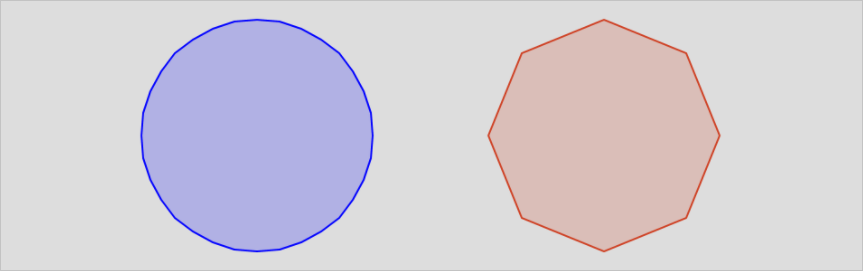
Results returned with different values of endcap
SELECT ST_Buffer('LINESTRING(0 0,0 3)'::geometry,  1, 'endcap=round'),
       ST_Buffer('LINESTRING(6 0,6 3)'::geometry,  1, 'endcap=flat'),
       ST_Buffer('LINESTRING(12 0,12 3)'::geometry, 1, 'endcap=square');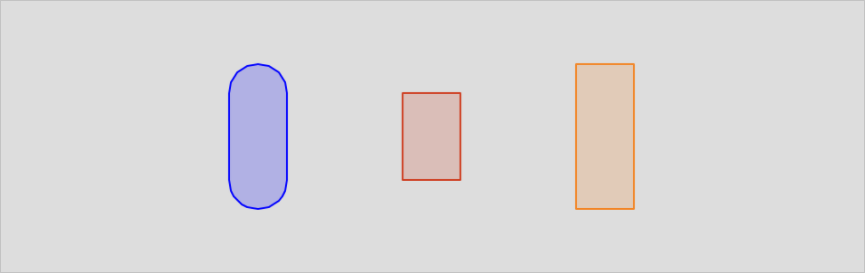
Results returned with different values of join
SELECT ST_Buffer('LINESTRING(0 0,3 0,3 3)'::geometry,  1.2, 'join=round'),
       ST_Buffer('LINESTRING(6 0,9 0,9 3)'::geometry,  1.2, 'join=mitre'),
       ST_Buffer('LINESTRING(12 0,15 0,15 3)'::geometry, 1.2, 'join=bevel');
Results returned with different values of mitre_limit
SELECT ST_Buffer('LINESTRING(0 0,3 0,3 3)'::geometry,  1.2, 'join=mitre mitre_limit=1.0'),
       ST_Buffer('LINESTRING(6 0,9 0,9 3)'::geometry,  1.2, 'join=mitre mitre_limit=0.5'),
       ST_Buffer('LINESTRING(12 0,15 0,15 3)'::geometry, 1.2, 'join=mitre mitre_limit=0.1');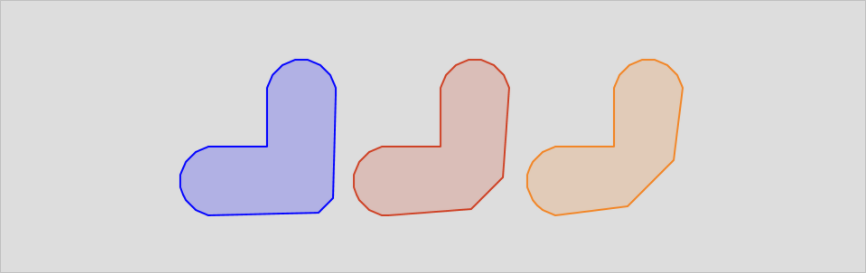
Results returned with different values of side
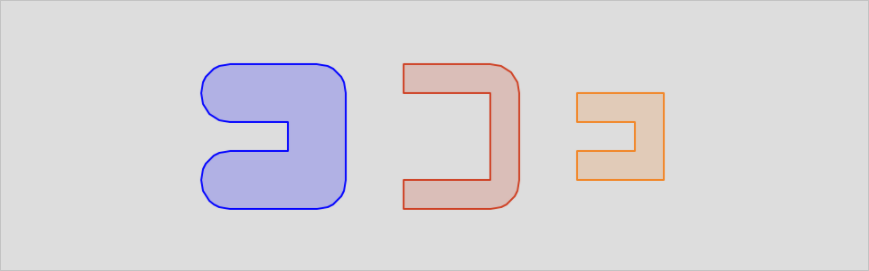
SELECT ST_Buffer('LINESTRING(0 0,3 0,3 3,0 3)'::geometry,   1, 'side=both'),
       ST_Buffer('LINESTRING(6 0,9 0,9 3,6 3)'::geometry,   1, 'side=right'),
       ST_Buffer('LINESTRING(12 0,15 0,15 3,12 3)'::geometry, 1, 'side=left');