RDS long-term memory gives AI applications persistent, cross-session memory backed by Alibaba Cloud RDS for PostgreSQL. Built on the open source Mem0 project, it stores vector, graph, and relational data in a single database instance — so your AI can remember users, learn over time, and retrieve context without reprocessing full conversation histories.
Background
Traditional AI applications are stateless: each conversation starts from zero. This creates three problems for developers:
-
Context loss: Users must repeat their background and preferences in every session.
-
No personalization: The model cannot adapt to long-term behavior patterns.
-
High token cost: Passing full conversation history to maintain context drives up large language model (LLM) inference costs.
RDS long-term memory solves these problems with intelligent memory management that persists across sessions and retrieves only the relevant context for each request.
Features
| Feature | What it gives you |
|---|---|
| Unified hybrid storage | Vector, graph, and relational data in one RDS for PostgreSQL instance — no separate vector database to provision |
| Enterprise vector search | pgvector extension with Hierarchical Navigable Small World (HNSW) and Inverted File (IVFFlat) indexes; supports cosine similarity and Euclidean distance; combine vector search with SQL filter conditions in a single query |
| Native graph database | Apache AGE (A Graph Extension) extension with full Cypher query language support, Neo4j-compatible; automatically extracts entities and relationships from conversations to build a knowledge graph; ACID-compliant |
| Mem0 API compatibility | Drop-in compatible with the Mem0 SDK and REST API — migrate a self-hosted mem0ai application by changing the endpoint URL and API key |
Use cases
-
Personalized AI assistants: Remember a user's name, occupation, preferences, and past instructions across sessions to deliver a consistent, personalized experience.
-
Customer service: Record the full context of support issues across sessions so users never have to repeat themselves.
-
Knowledge-intensive applications: Build and accumulate domain-specific knowledge graphs for education, research, or legal consulting use cases.
-
Relationship analysis: Track relationships between people and tasks (for example, "Li Si is Zhang San's mentor") to support team collaboration and project management workflows.
Billing
Compute resources for the long-term memory service are currently free. You are charged for:
-
RDS for PostgreSQL instance fees — the underlying storage and compute.
-
Model invocation fees — pay-as-you-go fees for API calls to the built-in LLM and embedding models.
The official billing start date will be announced separately.
Quick start
Already using self-hosted mem0ai? To migrate, setMEM0_HOSTto your RDS long-term memory endpoint andMEM0_API_KEYto the ServiceKey you obtain in Step 2. No other code changes are needed.
Step 1: Create a long-term memory project
-
Log on to the RDS console. In the left navigation pane, click Long-term memory.
-
On the instance list page, click Create Project.
-
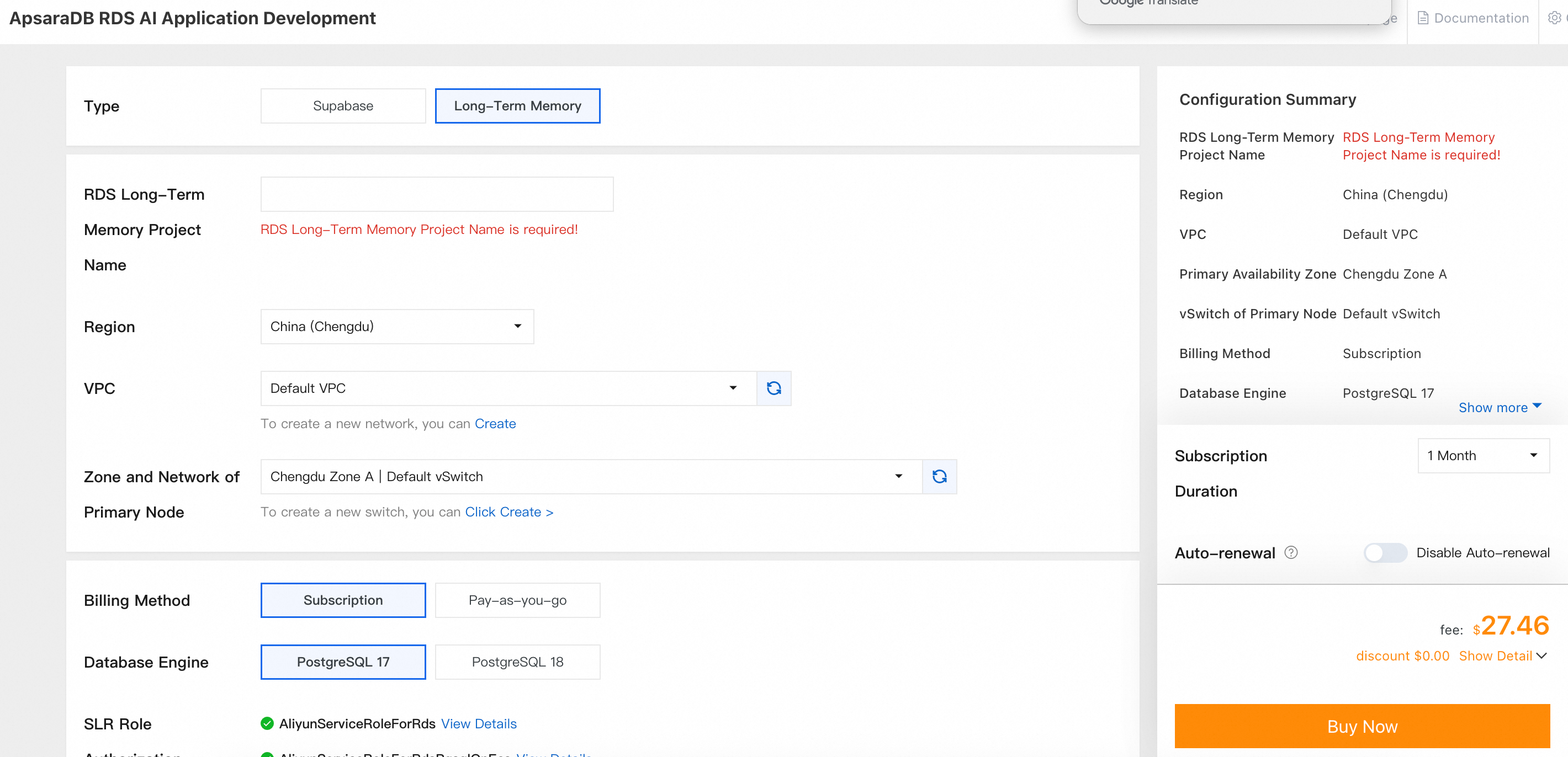
Select the Long-Term Memory type and complete the remaining configurations.
-
After the purchase completes, wait for the instance status to change to Running.
Step 2: Get the endpoint and API key
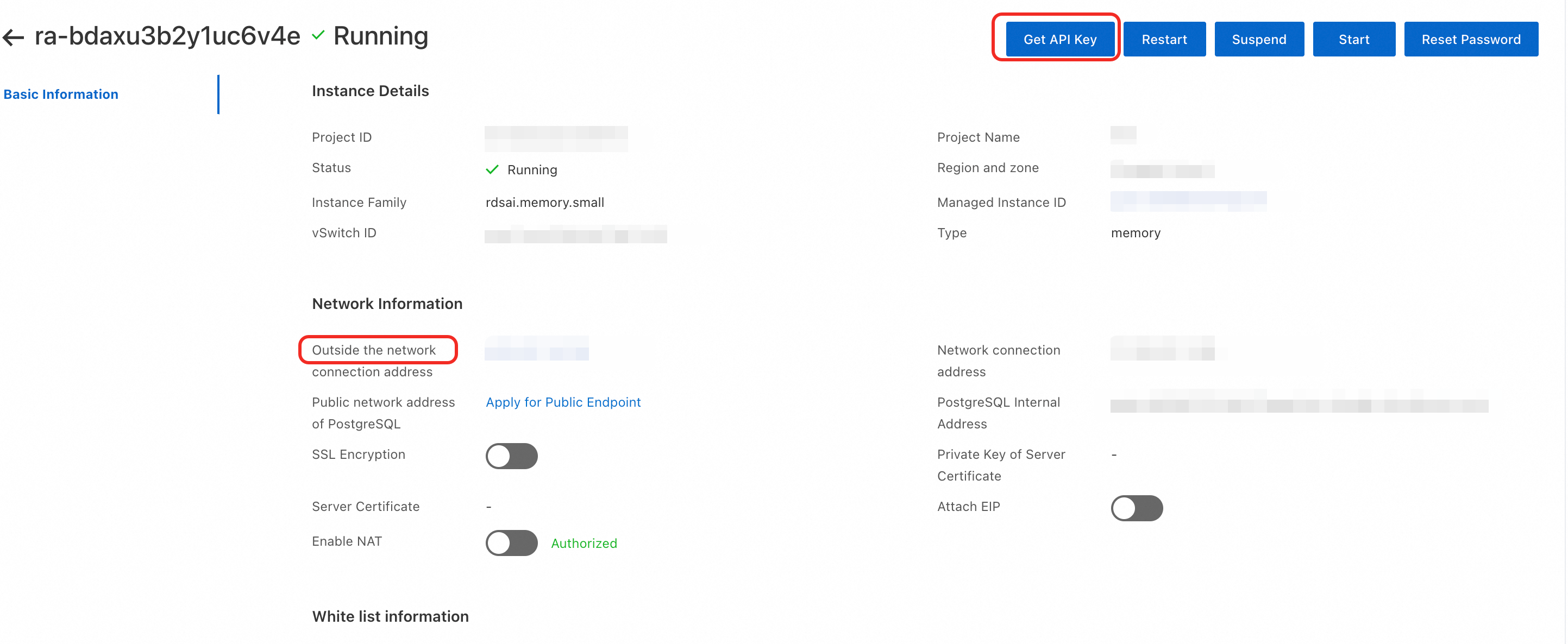
Endpoint: On the Long-term memory list page, click the Project ID of your instance to open the instance details page. On the Basic Information tab, copy the value under Outside the network connection address.
Use this address as the Mem0 SDK host in the formathttp://<public_endpoint>/memory/. For example:http://<public_endpoint>/memory/v1/memories/.
API key: On the same Basic Information tab, click Get API Key in the upper-right corner to retrieve the ServiceKey.
Step 3: Configure the network
Enable public network access
-
On the instance details page, go to the Basic Information tab.
-
Under Network Information, turn on the Attach EIP switch.
Add your client IP to the whitelist
-
On the Basic Information tab, find the White list information section.
-
Click Create Whitelist and add the IP address of your client or test server.
Step 4: Integrate the SDK
Install the SDK
pip3 install mem0aiSet environment variables
export MEM0_HOST="http://<your-host>:80/memory"  # Service endpoint
export MEM0_API_KEY="<your-api-key>"              # API key
Replace <your-host> with the endpoint from Step 2 and <your-api-key> with your ServiceKey.
Vector storage (without graph)
Use this mode for standard semantic search over stored memories.
Python example code
Vector + graph storage (with graph)
Pass enable_graph=True to also extract entities and relationships from conversations and store them as a knowledge graph. Use graph search to retrieve both semantic memories and inferred relationships.
enable_graph=False (the default) returns only the results array. enable_graph=True returns both results and relations.
API reference
All examples use the Authorization: Token <your-api-key> header for authentication.
API directory
| Operation | Method | Endpoint |
|---|---|---|
| Add memories | POST | /v1/memories/ |
| Get all memories | POST | /v2/memories/ |
| Search memories | POST | /v2/memories/search/ |
| Get a memory | GET | /v1/memories/{id}/ |
| Update a memory | PUT | /v1/memories/{id}/ |
| Delete a memory | DELETE | /v1/memories/{id}/ |
| Delete all memories | DELETE | /v1/memories/ |
Add memories
Stores a new memory. The service analyzes messages to generate a session summary and semantic memory entries.
curl -X POST "http://<host>/memory/v1/memories/" \
  -H "Authorization: Token <api-key>" \
  -H "Content-Type: application/json" \
  -d '{
    "messages": [
      {"role": "user", "content": "My name is Alex and I work at Acme Corp"}
    ],
    "user_id": "user_001",
    "agent_id": "my_agent",
    "enable_graph": false
  }'
Search memories
Returns the most relevant memories for a query string, ranked by semantic similarity.
curl -X POST "http://<host>/memory/v2/memories/search/" \
  -H "Authorization: Token <api-key>" \
  -H "Content-Type: application/json" \
  -d '{"query": "Where does Alex work?", "user_id": "user_001"}'
To include graph relationship data, add "enable_graph": true and optionally a "limit" value:
curl -X POST "http://<host>/memory/v2/memories/search/" \
  -H "Content-Type: application/json" \
  -H "Authorization: Token <api-key>" \
  -d '{
    "query": "Alex job",
    "user_id": "user_001",
    "enable_graph": true,
    "limit": 10
  }'
Get all memories
Retrieves all stored memories for a user, agent, or session.
curl -X POST "http://<host>/memory/v2/memories/" \
  -H "Authorization: Token <api-key>" \
  -H "Content-Type: application/json" \
  -d '{"user_id": "user_001"}'
To include graph data, add "enable_graph": true to the request body.
Get a memory
Retrieves the details of a single memory by ID.
curl -X GET "http://<host>/memory/v1/memories/<memory-id>/" \
  -H "Authorization: Token <api-key>"
Delete a memory
Deletes a specific memory by ID.
curl -X DELETE "http://<host>/memory/v1/memories/<memory-id>/" \
  -H "Authorization: Token <api-key>"