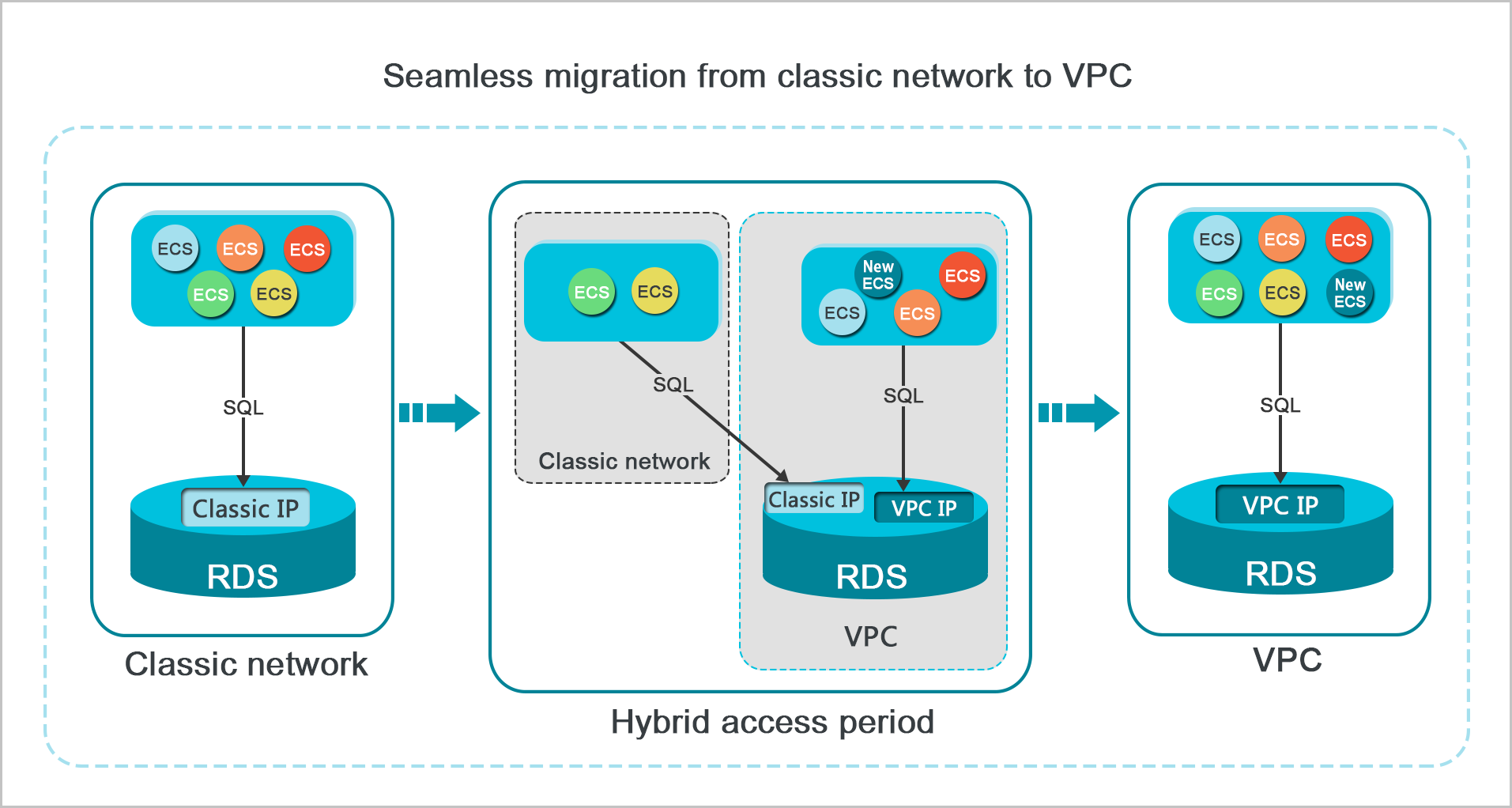
The hybrid access solution lets your RDS instance accept connections from both classic network ECS instances and virtual private cloud (VPC) ECS instances simultaneously. Use this solution to migrate from the classic network to a VPC without interrupting active connections.
How it works
When you switch an RDS instance directly from the classic network to a VPC without hybrid access, two things happen: a transient connection lasting less than 30 seconds, and all classic network ECS instances immediately lose internal network access to the instance.
With hybrid access enabled, RDS retains the original internal classic network endpoint and generates a new internal VPC endpoint. Classic network connections continue to work until the endpoint's expiration date. This gives your applications time to cut over to the VPC endpoint on their own schedule.
Once the classic network endpoint expires, the system releases it automatically. Before that happens, update your applications to use the VPC endpoint.
For security and performance purposes, we recommend that you use only the VPC type. You must specify a validity period for the hybrid access mode.
Prerequisites
Before you begin, ensure that you have:
-
An RDS instance currently running on the classic network
-
An available VPC and vSwitch in the same zone as the RDS instance. To create these, see Manage a VPC
Switch to VPC with hybrid access
-
Go to the RDS Instances page, select the region at the top, and click the instance ID.
-
In the left-side navigation pane, click Database Connection.
-
Click Switch To VPC.
-
In the dialog box, select a VPC and a vSwitch, then choose whether to retain the classic network endpoint.
-
Select the VPC where your ECS instances reside. If your ECS instances are in a different VPC, they cannot reach the RDS instance over the internal network unless you connect the two VPCs through Cloud Enterprise Network (CEN) or VPN Gateway.
-
If no vSwitch exists in your selected VPC, create one in the same zone as the RDS instance before proceeding. See Manage a vSwitch. The following table compares the two options for handling the classic network endpoint:
-
During the hybrid access period, switching back to the classic network and cross-zone migration are both unavailable.
Reserve Original Classic Network Endpoint (hybrid access)
Do Not Reserve Original Classic Network Endpoint (direct switch)
Transient connections
No instance switchovers. Classic network connections stay open until the endpoint expires.
Instance switchovers occur. All classic network connections close immediately.
Internal endpoints
Two endpoints: the classic network endpoint is retained, and a VPC endpoint is auto-generated.
One endpoint: the connection string stays the same, but the network type changes to VPC.
Internal access
ECS instances can connect via either endpoint. After the classic network endpoint expires, only the VPC endpoint is available.
After the switch, only the VPC endpoint is available.
Public endpoint
Unchanged.
-
-
Add the internal IP addresses of your VPC-type ECS instances to an IP address whitelist of the VPC network type on the RDS instance. If no VPC-type whitelist exists, create one.
-
(Optional) On the Database Connection page, confirm that a new endpoint appears with Network Type set to VPC.
Manage the classic network endpoint expiration date
During the hybrid access period, you can change the expiration date of the classic network endpoint at any time. The new deadline takes effect immediately and is calculated from the day you make the change—not from the original expiration date.
Example: The endpoint is set to expire on August 18, 2017. On August 15, 2017, you extend the validity period by 14 days. The new expiration date becomes August 29, 2017 (14 days from August 15).
To change the expiration date:
-
Go to the RDS Instances page, select the region at the top, and click the instance ID.
-
In the left-side navigation pane, click Database Connection.
-
On the Instance Connection tab, click Change Expiration Time.
-
Select a new expiration time and click OK.
Configure hybrid access for read-only instances
Migrate the primary RDS instance to a VPC first, then configure hybrid access for each read-only instance separately.
The VPC you can assign to a read-only instance depends on its disk type:
-
Local disks: Any VPC is supported.
-
Standard SSDs or ESSDs: Only the primary instance's VPC is supported.
Frequently asked questions
Does changing the network type from classic network to VPC affect the public endpoint or internet access?
No. The classic-to-VPC change only affects internal endpoints. The public endpoint and internet connectivity remain unchanged throughout the migration.