Direct computation on trajectory and geometry objects is expensive. GanosBase uses the BoxNDF data type to represent bounding boxes — multi-dimensional spatio-temporal cubes that serve as faster approximations for spatial and temporal queries.
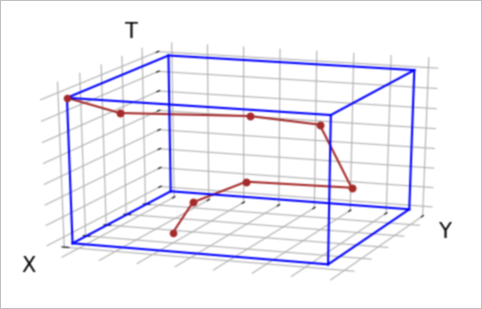
A BoxNDF is defined by the minimum and maximum values on up to four axes: x, y, z (space), and t (time). A box can span any subset of these axes — for example, x/y only, or all four.
The figure below shows a trajectory and its bounding box on the x, y, and t axes.
Calculate a bounding box
Use ST_MakeBox to get the bounding box of a geometry or a trajectory. Both support an optional time range to restrict the result to a specific period.
Geometry — full bounding box and time-scoped bounding box:
WITH geom AS (
    SELECT (
        'POLYGON((12.7243236691148 4.35238368367118,12.9102992732078 1.49748113937676,'
        || '12.5926592946053 1.67643963359296,12.0197574747333 3.19258554889152,'
        || '12.7243236691148 4.35238368367118))'
    )::geometry a
)
SELECT
    ST_MakeBox(a),                                                                         -- full bounding box
    ST_MakeBox(a, '2000-01-01 00:00:10'::timestamp, '2000-01-01 02:13:20'::timestamp)     -- bounding box scoped to a time range
FROM geom;
Trajectory — full bounding box and time-scoped bounding box:
WITH traj AS (
    SELECT ST_makeTrajectory(
        'STPOINT',
        'LINESTRING(0 0, 50 50, 100 100)'::geometry,
        tsrange('2000-01-01 00:00:00'::timestamp, '2000-01-01 00:01:40'::timestamp),
        '{"leafcount":3,
          "attributes":{
            "velocity":     {"type":"integer","length":2,"nullable":true, "value":[120,130,140]},
            "accuracy":     {"type":"float",  "length":4,"nullable":false,"value":[120,130,140]},
            "bearing":      {"type":"float",  "length":8,"nullable":false,"value":[120,130,140]},
            "acceleration": {"type":"string", "length":20,"nullable":true,"value":["120","130","140"]},
            "active":       {"type":"timestamp","nullable":false,
                             "value":["Fri Jan 01 11:35:00 2010","Fri Jan 01 12:35:00 2010","Fri Jan 01 13:30:00 2010"]}
          },
          "events":[{"2":"Fri Jan 02 15:00:00 2010"},{"3":"Fri Jan 02 15:30:00 2010"}]
        }'
    ) a
)
SELECT
    ST_MakeBox(a),                                                                                  -- full bounding box
    ST_MakeBox(a, '1999-12-31 23:00:00'::timestamp, '2000-01-01 00:00:30'::timestamp)              -- bounding box scoped to a time range
FROM traj;
Use bounding boxes to speed up queries
For expensive computations like trajectory similarity, a two-phase approach avoids scanning the full dataset:
Use the bounding box as a coarse spatial and temporal filter to discard irrelevant data.
Run the precise computation only on the remaining candidates.
Example: Finding trajectories similar to a query trajectory using Longest Common Subsequence (LCSS) similarity.
Phase 1 — filter by bounding box intersection:
All trajectories whose bounding box overlaps the query trajectory's bounding box are candidates. The && operator applies the filter and uses any available index on traj.
-- Set the spatial reference identifier (SRID) of all trajectories to 4326
UPDATE trajectory_table SET traj = ST_SetSRID(traj, 4326) WHERE ST_SRID(traj) != 4326;

WITH query AS (
    SELECT '{"trajectory":{"version":1,"type":"STPOINT","leafcount":3,
             "start_time":"2020-04-11 17:42:30","end_time":"2020-04-11 17:45:00",
             "spatial":"SRID=4326;LINESTRING(114.35 39.28 4,114.36 39.28 4,114.35 39.29 4)",
             "timeline":["2020-04-11 17:42:30","2020-04-11 17:43:30","2020-04-11 17:45:00"],
             "attributes":{"leafcount":3,"intensity":{"type":"integer","length":4,"nullable":true,
                           "value":[80,30,50]}}}}'::trajectory q
)
SELECT ST_lcsDistance(traj, q, 500), trajectory_table.*
FROM trajectory_table, query
WHERE traj && q
ORDER BY ST_lcsDistance(traj, q, 500);
Phase 1 + spatial and temporal expansion — filter by expanded bounding box:
To catch trajectories within 500 meters and 1 hour of the query trajectory, expand the query's bounding box before filtering. Use ST_ExpandSpatial and ST_ExpandTemporal to expand the box on the right side of the operator — this preserves index usage on the traj column.
-- Set the SRID of all trajectories to 4326
UPDATE trajectory_table SET traj = ST_SetSRID(traj, 4326) WHERE ST_SRID(traj) != 4326;

WITH query AS (
    SELECT '{"trajectory":{"version":1,"type":"STPOINT","leafcount":3,
             "start_time":"2020-04-11 17:42:30","end_time":"2020-04-11 17:45:00",
             "spatial":"SRID=4326;LINESTRING(114.35 39.28 4,114.36 39.28 4,114.35 39.29 4)",
             "timeline":["2020-04-11 17:42:30","2020-04-11 17:43:30","2020-04-11 17:45:00"],
             "attributes":{"leafcount":3,"intensity":{"type":"integer","length":4,"nullable":true,
                           "value":[80,30,50]}}}}'::trajectory q
)
SELECT ST_lcsDistance(traj, q, 500), trajectory_table.*
FROM trajectory_table, query
WHERE traj && ST_ExpandTemporal(ST_ExpandSpatial(ST_MakeBox(q), 500.0/110000), 3600)
ORDER BY ST_lcsDistance(traj, q, 500);Trajectories use longitude and latitude coordinates. At the equator, 1 degree is approximately 110 km, so 500 meters equals 500.0/110000 degrees. One hour equals 3,600 seconds.
Intersection operators
All four operators work on trajectories, geometries, and BoxNDF objects. When the left operand is a plain column reference — not wrapped in a function call — the operator uses any available index on that column.
| Operator | Dimensions checked | Index-accelerated |
|---|---|---|
&& | x, y | Yes |
&/& | x, y, z | Yes |
&#& | x, y, t | Yes |
&/#& | x, y, z, t | Yes |
Example — using && with an index:
-- Does traj_col intersect the bounding box? The index on traj_col is used.
SELECT * FROM trajectory_table WHERE traj_col && ST_MakeEnvelope(0, 0, 1, 1);Wrapping the column in a function call prevents index usage. For example, ST_Buffer(traj_col) && ST_MakeEnvelope(0, 0, 1, 1) does not use the index on traj_col. To expand a search area while keeping index usage, expand the *other* side of the expression with ST_ExpandSpatial or ST_ExpandTemporal instead of calling ST_Buffer on the trajectory column.