Trajectory SQL is a GanosBase extension for ApsaraDB RDS for PostgreSQL that models and queries the movement of objects through space and time. This topic introduces the core data types and concepts you need before writing spatio-temporal queries.
Trajectory objects
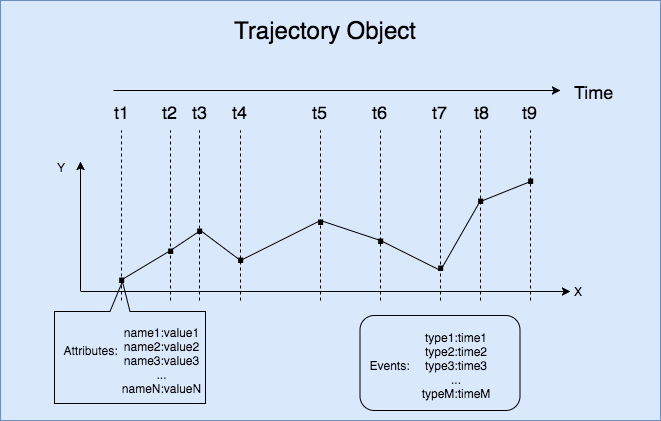
A trajectory represents the complete movement record of an object — where it was, when it was there, and what was happening at each moment. Trajectory SQL structures this record into the following components:
| Concept | Description |
|---|---|
| Trajectory Point | A snapshot of a moving object at a specific moment: its location (in 2D or 3D coordinates) plus any number of attribute fields (such as speed or fuel level). |
| Trajectory Object | The complete high-dimensional record of a moving object, combining time, space, attributes, and events. |
| Trajectory Timeline | The ordered sequence of timestamps in a trajectory. Timestamps must be consecutive. |
| Trajectory Spatial | The spatial geometry of a trajectory path, typically represented as a LineString. |
| Trajectory Leaf | The spatial location of a moving object at a single point in time — equivalent to one Trajectory Point's location. |
| Trajectory Attributes | Per-point attribute data recorded along the trajectory, such as velocity and direction. Each attribute has one value per Trajectory Point. |
| Trajectory Attribute Field | A named attribute column in the trajectory (for example, speed). The field has exactly as many values as there are Trajectory Points. |
| Trajectory Field Value | The value of a specific Trajectory Attribute Field at a specific point in time. |
| Trajectory Events | Discrete events that occurred along the trajectory — for example, a refueling stop, a breakdown, or a door-lock event on a vehicle route. Each event records an event type ID and a timestamp. |
Example: A delivery vehicle's trajectory contains Trajectory Points recorded at regular intervals. Each Trajectory Point stores the vehicle's GPS coordinates (Trajectory Leaf), and Trajectory Attribute Fields such as speed_kmh and engine_temp record sensor readings at each point. When the vehicle stops for fuel, that stop is captured as a Trajectory Event.
The following figure shows the trajectory of a moving object.
BoxNDF objects
Spatio-temporal computations on raw trajectory data are expensive. The BoxNDF data type provides a lightweight approximation — a multi-dimensional bounding box — that can accelerate queries by narrowing the search space before applying precise trajectory operations.
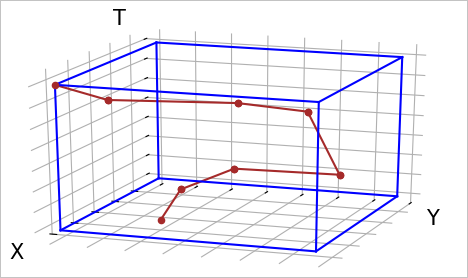
A BoxNDF object is a cube defined by the minimum and maximum values on up to four axes: x, y, z (space), and t (time). Not all axes are required — a BoxNDF can cover just x and y, or all four axes simultaneously.
Use a BoxNDF to:
-
Specify a query region: Define the spatial and temporal bounds you want to search within.
-
Approximate a trajectory or geometry: Use its bounding box as a fast pre-filter before running precise intersection or containment checks.
The following figure shows the bounding box of an object moving along the x-axis, y-axis, and t-axis.
Time value data types
PostgreSQL supports three time-related data types. Choose based on your use case:
| Type | Description | When to use |
|---|---|---|
| TIMESTAMP | A point in time with no time zone information. | Use this in the GanosBase trajectory module. All trajectory timestamps use TIMESTAMP. |
| TIMESTAMPTZ | A point in time with time zone information. | Use this when your application must handle data across multiple time zones. |
| INTERVAL | A duration (for example, 30 days, 1 month). | Use this for date arithmetic — adding or subtracting durations from a TIMESTAMP value. |
The GanosBase trajectory module stores and queries timestamps using the TIMESTAMP type.
A TIMESTAMP value uses the format YYYY-MM-DD HH:MM:SS, for example 2000-01-01 10:00:00.
Common time value operations:
-- Create a TIMESTAMP value.
SELECT '2000-01-01 10:00:00'::timestamp;

-- Convert a UNIX timestamp to TIMESTAMP. Requires the ganos_trajectory extension.
SELECT ST_UnixEpochToTS(1649765331);

-- Convert a TIMESTAMP to a UNIX timestamp.
SELECT ST_TsToUnixEpoch('2022-04-12 12:08:51');

-- Add an INTERVAL to a TIMESTAMP.
SELECT '2000-01-01 10:00:00'::timestamp + '30 day'::interval;

-- Subtract an INTERVAL from a TIMESTAMP.
SELECT '2000-01-01 10:00:00'::timestamp - '1 month'::interval;
Geometry types
GanosBase supports points, lines, and polygons in both 2D and 3D space. The geometry type is compatible with PostGIS interfaces, and the trajectory module supports spatial computations between trajectories and geometry objects.
Basic geometry construction
The following examples use Well-Known Text (WKT) notation to construct geometry objects:
-- Construct a point at (2, 4).
SELECT 'POINT(2 4)'::geometry;

-- Construct a line through (2,4), (0,0), and (5,3).
SELECT 'LINESTRING(2 4, 0 0, 5 3)';

-- Construct a triangular polygon with vertices at (3,3), (5,5), and (2,2).
SELECT 'POLYGON(3 3, 5 5, 2 2, 3 3)';

-- Approximate a circle: center (0,1), radius 3.
-- For circular range queries, use ST_DistanceWithin instead of ST_Buffer.
SELECT ST_Buffer('POINT(0 1)', 3);
Coordinates and spatial reference systems
Choose your coordinate approach based on the area your data covers:
-
Plain Cartesian coordinates (no SRID): Use when your data is confined to a small, bounded area where you can treat the surface as flat. Euclidean distance calculations are fast and accurate enough for local-scale data.
-
Geographic coordinates with SRID 4326 (WGS84): Use when your data uses latitude and longitude — for example, GPS coordinates that span large areas. With geographic coordinates, Euclidean distance is not meaningful; use surface-of-Earth distance calculations instead.
-- Construct a point at longitude 2, latitude 4, using WGS84.
SELECT 'SRID=4326;POINT(2 4)'::geometry;

-- Construct a line with WGS84 coordinates.
SELECT 'SRID=4326;LINESTRING(2 4, 0 0, 5 3)';

-- Construct a polygon with WGS84 coordinates.
SELECT 'SRID=4326;POLYGON(3 3, 5 5, 2 2, 3 3)';

-- Approximate a circle at (0,1) with radius 3, then assign SRID 4326.
SELECT ST_SetSRID(ST_Buffer('POINT(0 1)', 3), 4326);
Projected coordinate systems
Geographic coordinates (latitude and longitude) express positions as angles, not distances. To measure distances in meters, convert to a projected coordinate system (PCS) using ST_Transform.
Two common projections:
| Projection | EPSG code | Description | Best for |
|---|---|---|---|
| Spherical Mercator | EPSG:3857 | Measures in meters; widely used in web mapping services | General web map applications |
| Gauss-Kruger | EPSG:4479 | A more accurate meter-based projection for China | High-accuracy distance calculations in China |
-- Convert WGS84 coordinates to Spherical Mercator (meters).
SELECT ST_Transform('SRID=4326;POINT(114 39)'::geometry, 3857);

-- Convert WGS84 coordinates to Gauss-Kruger (meters, accurate for China).
SELECT ST_Transform('SRID=4326;POINT(114 39)'::geometry, 4479);