When an ApsaraDB RDS for MySQL instance runs out of storage due to temporary files, it enters the Locked state automatically to prevent data loss. In this state, write operations are blocked. This topic describes how to unlock the instance and prevent the issue from recurring.
Why temporary files exhaust storage
Temporary files are generated when MySQL executes queries that involve sorting (ORDER BY), grouping (GROUP BY), or joining tables. Binary log (binlog) cache files for large transactions also consume storage while the transactions wait to be committed.
When storage is full, ApsaraDB RDS for MySQL locks the instance automatically.
Unlock the instance
Option 1: Expand storage (recommended)
Expand the storage capacity of the instance. The instance unlocks automatically within about 5 minutes after the expansion takes effect.
For instructions, see Change the specifications of an ApsaraDB RDS for MySQL instance.
Option 2: Clear temporary files by version
If expanding storage is not an option, use the approach that matches your MySQL version:
-
MySQL 5.7 or earlier: Restart the instance. See FAQ if the Restart Instance button is dimmed.
-
MySQL 8.0: When the instance is locked, all sessions are terminated automatically and their transactions are rolled back. Storage is released after the rollback completes. The rollback duration depends on the queries that are executed by the sessions in the transaction.
Option 3: Identify and kill sessions (if still locked)
If the instance remains locked after trying the options above, use Data Management (DMS) to identify and terminate the sessions consuming storage.
-
Connect to the instance using Data Management (DMS).
-
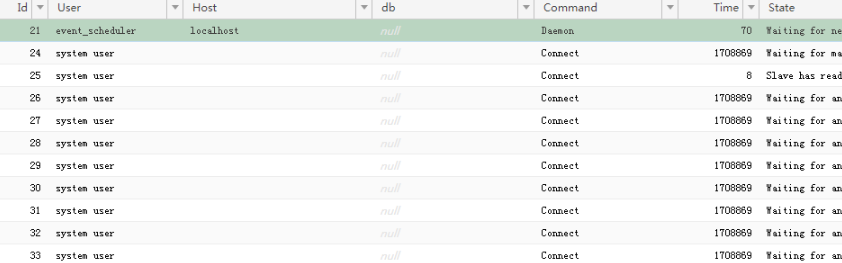
Run the following statement to list active sessions:
show processlist -
Sort the results by the State column. Look for sessions with "Copy to tmp table" or "Sending data" in the State column, and record their IDs.
-
Terminate each session by running the following statement, replacing
[$ID]with the session ID:kill [$ID];
Before terminating a session, confirm that doing so will not affect your services.
Prevent the instance from locking again
Once the instance is unlocked, take the following steps to prevent a recurrence.
Enable automatic storage expansion
Configure automatic storage expansion so the system expands storage when usage reaches a threshold. For instructions, see Configure automatic storage expansion for an ApsaraDB RDS for MySQL instance.
Reduce temporary file generation
-
Optimize queries to avoid frequent use of
ORDER BYandGROUP BYon large datasets. -
Use
EXPLAINto check whether a query uses an internal temporary table. Look for "Using temporary" in theExtrafield:explain select * from alarm group by created_on order by default;
-
You can increase
tmp_table_sizeandmax_heap_table_sizebased on your business requirements, but this is not recommended. Prioritize memory availability over disk savings.
Reduce binlog cache usage
-
Break large transactions into smaller ones, and avoid running large transactions in parallel across multiple connections.
-
Use short-lived connections to run large transactions; this reduces the amount of storage tied up in binlog cache files.
-
You can increase
binlog_cache_sizebased on your business requirements, but we recommend that you do not increasebinlog_cache_sizeto save disk storage.
Monitor disk usage
Keep disk usage below 80%. Delete unnecessary data regularly, or split large datasets across multiple instances. Set up alerts to detect high disk usage before the instance locks.
What's next
If the instance is still in the Locked state after clearing temporary files, other file types may be consuming storage. See:
FAQ
The Restart Instance button is dimmed on the Basic Information page. How do I restart the instance?
Trigger a restart by modifying a parameter that requires a restart:
-
Go to the Instances page, select the region where the instance resides, find the instance, and click its ID.
-
In the left-side navigation pane, click Parameters.
-
On the Editable Parameters tab, find any parameter with Yes in the Force Restart column and change its value to trigger a restart.