This topic describes how to view memory usage and provides causes and solutions for common memory issues.
Background information
Memory usage and the buffer pool hit rate are key metrics for an ApsaraDB RDS for MySQL instance. High memory usage can lead to memory exhaustion. A low buffer pool hit rate means many data pages are not found in the buffer pool and must be read from disk. This increases I/O throughput and latency.
View memory usage
You can view active threads in the RDS Management Console in several ways:
Monitoring and Alerts
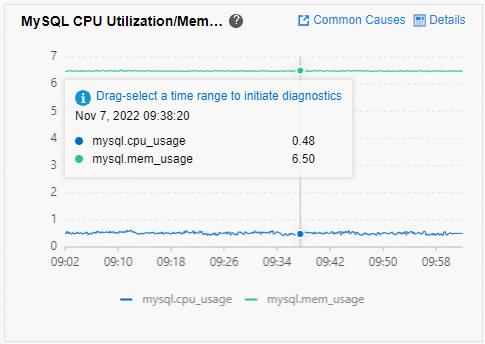
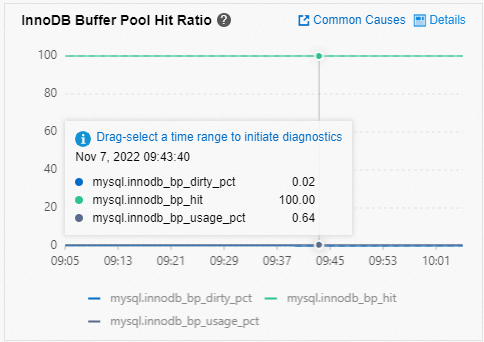
In the console, go to the Monitoring and Alerts page. On the Standard Monitoring tab, you can view the instance's MySQL CPU/Memory Usage and InnoDB Buffer Pool Hit Rate.
Database Autonomy Service (DAS)
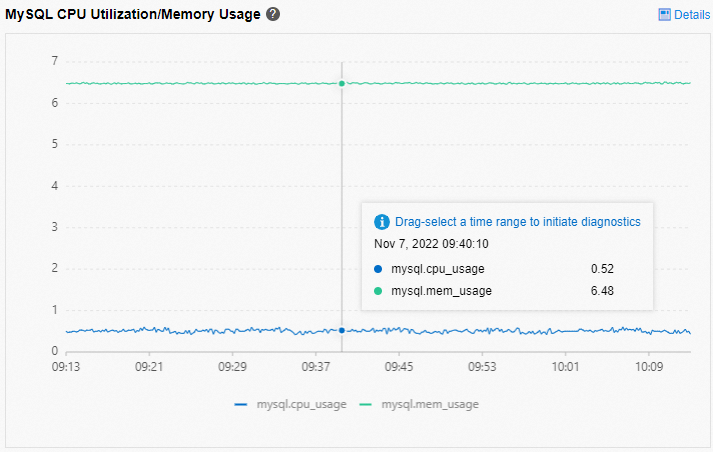
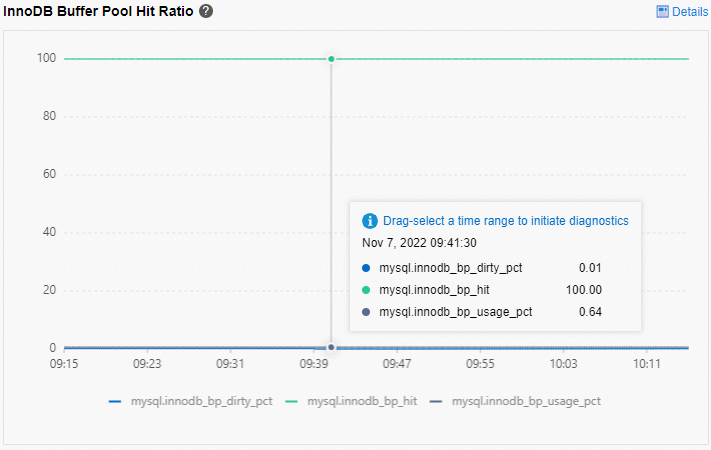
In the console, go to the page. Click the Performance Trend tab to view the MySQL CPU/Memory Usage and InnoDB Buffer Pool Hit Rate.
You can also use performance_schema to set memory instruments. This lets you view memory usage statistics in memory summary tables. For more information, see the official MySQL documentation.
To enable memory monitoring at instance startup, modify the performance_schema parameter in the console. Set it to ON for RDS for MySQL 5.6. Set it to 1 for RDS for MySQL 5.7 and 8.0. For more information, see View instance parameters. Restart the instance for the changes to take effect.
To enable memory monitoring during instance runtime, run the following command:
update performance_schema.setup_instruments set enabled = 'yes' where name like 'memory%';
The following tables summarize memory consumption from various dimensions:
memory_summary_by_account_by_event_name: Summarizes events by account (a combination of user and host) and event name.
memory_summary_by_host_by_event_name: Summarizes events by host and event name.
memory_summary_by_thread_by_event_name: Summarizes events by thread and event name.
memory_summary_by_user_by_event_name: Summarizes events by user and event name.
memory_summary_global_by_event_name: Summarizes events by event name.
Common causes of high memory usage in RDS for MySQL
The InnoDB Buffer Pool typically consumes the most memory. The maximum memory usage of the buffer pool is limited by its configuration parameters. However, a significant amount of memory is also dynamically allocated and adjusted during request execution. This includes memory for in-memory temporary tables, the prefetch cache, the table cache, hash indexes, and row lock objects. For more information about memory usage and parameter limits, see the official MySQL documentation.
Multi-statement queries
MySQL supports sending multiple SQL statements together, separated by semicolons (;). MySQL processes each SQL statement sequentially. However, some allocated memory is released only after all SQL statements have finished executing.
If you send many multi-statement queries at once, for example, several hundred megabytes, the cumulative memory consumed by various objects during execution can become very large. This can easily lead to memory exhaustion for the MySQL process.
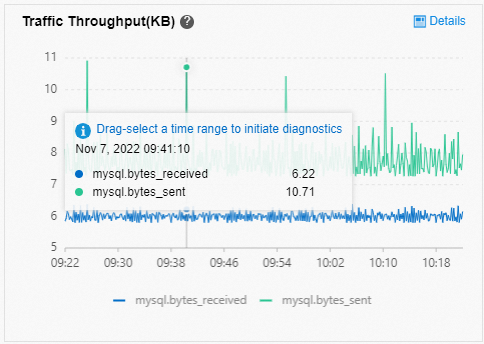
Typically, a large batch of multi-statement queries causes a sudden spike in network traffic. You can check for this pattern using network traffic monitoring and SQL Explorer. Avoid using multi-statement queries in your application logic.
Buffer pool issues
All data pages for tables are stored in the buffer pool. When a query runs, if the required data pages are found in the buffer pool, no physical I/O occurs. This makes SQL execution efficient. The buffer pool uses a Least Recently Used (LRU) algorithm to manage data pages. All dirty pages are placed in the flush list.
By default, the InnoDB Buffer Pool size for RDS for MySQL is set to 75% of the instance's memory. This is usually the largest portion of memory that the instance consumes.
Common issues related to the buffer pool:
Insufficient data page pre-warming can cause high query latency. This issue often occurs after an instance restart, when reading cold data, or when the buffer pool hit rate is low. To resolve this, you can upgrade the instance type or pre-warm data before sales promotions.
Too many dirty pages accumulate. When the distance between the oldest Log Sequence Number (LSN) of an unflushed dirty page and the current LSN exceeds 76%, user threads are triggered to sync and flush dirty pages. This severely degrades instance performance. To optimize, balance the write load, avoid excessively high write throughput, adjust dirty page flushing parameters, or upgrade the instance type.
The innodb_buffer_pool_instances parameter is set too low for a high-memory instance. Under high Queries Per Second (QPS) loads, lock contention in the buffer pool can become intense. For high-memory instances, set the innodb_buffer_pool_instances parameter to 8, 16, or higher.
Temporary tables
The size of in-memory temporary tables is limited by the tmp_table_size and max_heap_table_size parameters. If a table exceeds these limits, it is converted to a disk temporary table. If many connections create large temporary tables at the same time, it can cause a sudden memory spike. MySQL 8.0 introduced a new temptable engine. The total size of all in-memory temporary tables allocated by all threads cannot exceed the value of the temptable_max_ram parameter. The default value for temptable_max_ram is 1 GB. If this limit is exceeded, tables are converted to disk temporary tables.
Other reasons
If an instance has many tables or a high QPS, the table cache can also consume significant memory. Avoid creating too many tables on an instance or setting the table_open_cache parameter too high.
The memory used by the adaptive hash index is 1/64 of the buffer pool size by default. If you query or write very large Binary Large Object (BLOB) fields, memory is dynamically allocated for these large objects, which increases overall memory usage.
Many other issues can cause memory usage to increase. If memory usage increases abnormally or the instance runs out of memory, see the official MySQL documentation to identify the cause.