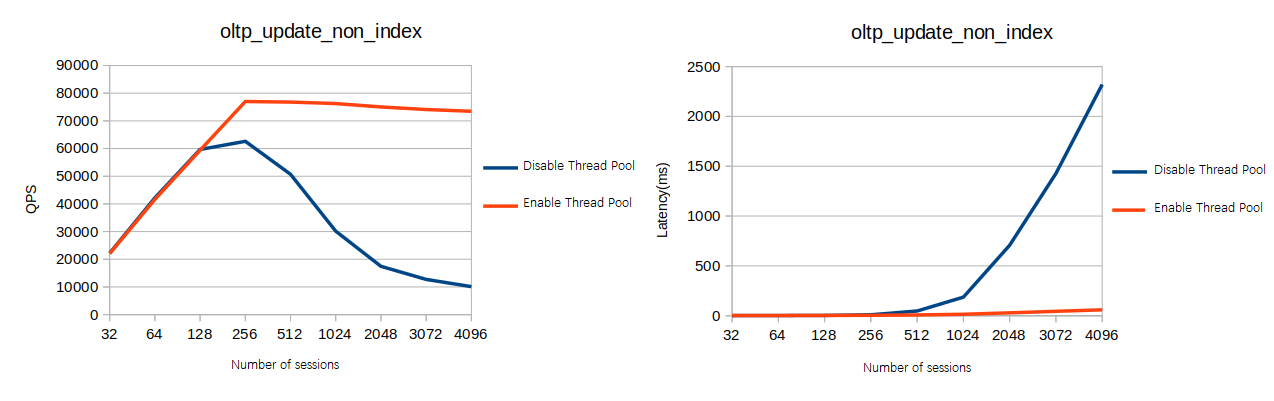
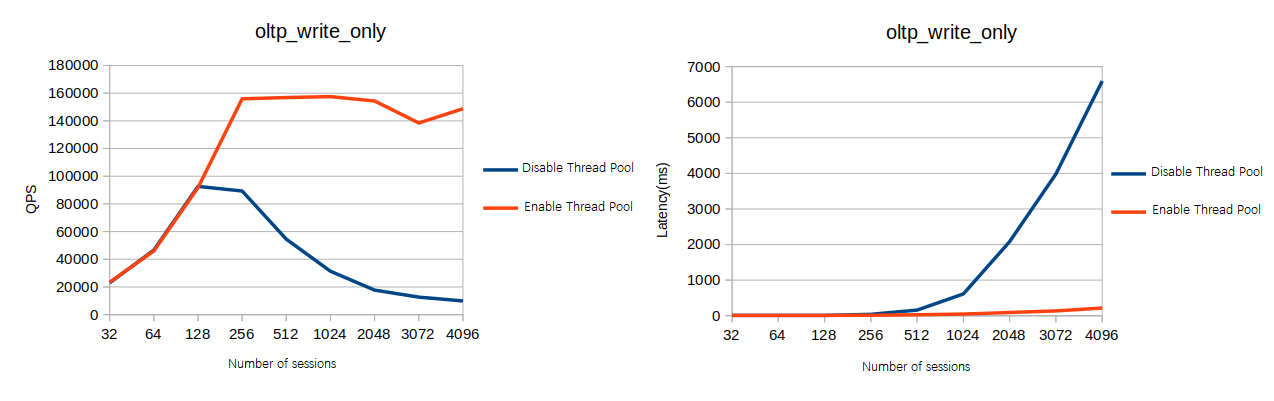
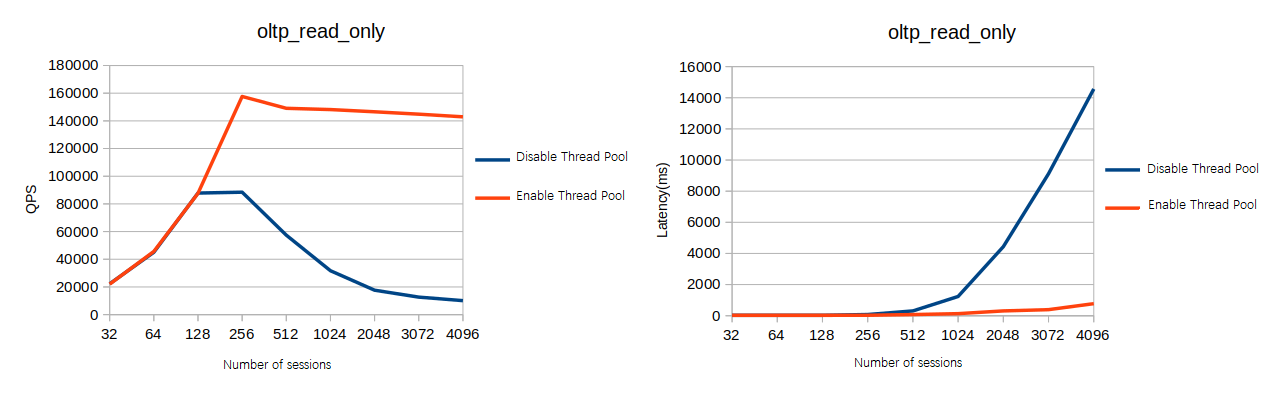
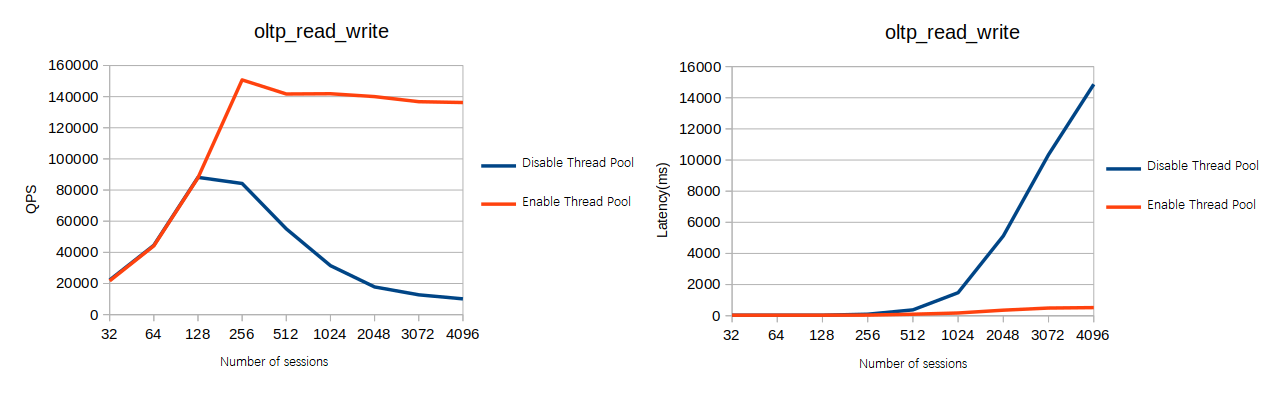
To maximize the performance of ApsaraDB for RDS, Alibaba Cloud provides a thread pool. This feature separates threads from sessions, allowing a small number of threads to handle tasks for a large number of active sessions.
Benefits
The default MySQL connection model is one-thread-per-session. When a large number of sessions connect, this model can lead to significant resource contention. The overhead from system thread scheduling and frequent cache invalidation can cause a sharp decline in performance.
The thread pool in ApsaraDB for RDS implements a priority and concurrency control mechanism for different types of SQL operations. It keeps the number of concurrent threads at an optimal level, ensuring high performance even under high-concurrency workloads. The main benefits of the thread pool are:
- Under high concurrency, the thread pool keeps the number of active threads within an optimal range. This reduces excessive thread scheduling and cache invalidation.
- For concurrent transactions, the thread pool reduces resource contention by assigning different priorities to SQL statements and transactions and controlling their concurrency.
- The thread pool prioritizes administrative SQL statements, ensuring that operations such as creating new connections, management, and monitoring run reliably even under high system load.
- The thread pool assigns a lower priority to complex SQL statements and enforces a maximum concurrency limit. This prevents too many complex SQL statements from exhausting system resources and making the database service unavailable.
Prerequisites
Your RDS instance runs MySQL 5.6, 5.7, 8.0, or 8.4.
Thread pool parameters
You can configure the thread pool using the following three parameters in the console. For more information, see Configure instance parameters.
| Parameter | Description |
| loose_thread_pool_enabled | Specifies whether to enable the thread pool feature. Valid values:
Default value: ON. Note
|
| loose_thread_pool_size | The number of thread groups. Default value: 4. Threads in the pool are evenly distributed among these groups for management. |
| loose_thread_pool_oversubscribe | The number of active threads allowed in each thread group. Default value: 32. An active thread is a thread that is executing an SQL statement, excluding the following cases:
|
Thread pool status
show status like "thread_pool%";Example:
mysql> show status like "thread_pool%";

+----------------------------+-------+
| Variable_name              | Value |
+----------------------------+-------+
| thread_pool_active_threads | 1     |
| thread_pool_big_threads    | 0     |
| thread_pool_dml_threads    | 0     |
| thread_pool_idle_threads   | 19    |
| thread_pool_qry_threads    | 0     |
| thread_pool_total_threads  | 20    |
| thread_pool_trx_threads    | 0     |
| thread_pool_wait_threads   | 0     |
+----------------------------+-------+
8 rows in set (0.00 sec)
The following table describes the status variables.
| Parameter | Description |
| thread_pool_active_threads | The number of active threads in the thread pool. |
| thread_pool_big_threads | The number of threads in the thread pool that are executing complex queries. Complex queries include those with subqueries, aggregate functions, or clauses like GROUP BY and LIMIT. |
| thread_pool_dml_threads | The number of threads in the thread pool that are executing DML statements. |
| thread_pool_idle_threads | The number of idle threads in the thread pool. |
| thread_pool_qry_threads | The number of threads in the thread pool that are executing simple queries. |
| thread_pool_total_threads | The total number of threads in the thread pool. |
| thread_pool_trx_threads | The number of threads in the thread pool that are executing transactions. |
| thread_pool_wait_threads | The number of threads in the thread pool that are waiting for disk I/O or for transactions to commit. |
SysBench tests
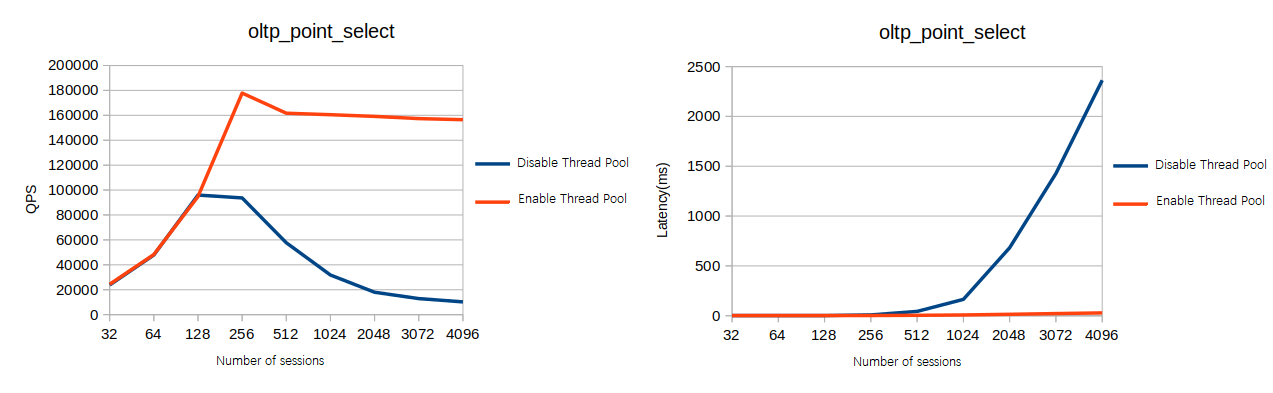
The following figures show a performance comparison between scenarios with the thread pool enabled and disabled. The test results indicate that the thread pool provides a significant performance advantage in high-concurrency workloads.