Associate an Elastic Compute Service (ECS) security group with your RDS instance to grant all ECS instances in that group access to the database — without managing individual IP addresses in the whitelist.
Prerequisites
Before you begin, ensure that you have:
-
An RDS for MySQL instance running MySQL 8.0, 5.7, or 5.6
-
An ECS security group with the same network type as your RDS instance (for example, both VPC)
Security groups vs. IP address whitelists
Both methods can be active simultaneously. All IP addresses in configured whitelists and all ECS instances in configured security groups are granted access to the RDS instance.
| Method | Best for |
|---|---|
| IP address whitelist | Granting access to specific IP addresses or CIDR blocks |
| Security group | Granting access to all ECS instances in a group, managed centrally |
For more information about IP address whitelists, see Configure an IP address whitelist for an ApsaraDB RDS for MySQL instance.
Limitations
-
The security group must have the same network type as the RDS instance. If the RDS instance uses Virtual Private Cloud (VPC), add only VPC-type security groups.
-
After you change the network type of an RDS instance, all configured security groups become invalid. Reconfigure the security groups to match the new network type.
-
Each RDS instance supports a maximum of 10 security groups.
-
Security groups are not supported in some regions. For instances in those regions, use an IP address whitelist instead.
Add a security group
Use this procedure when your ECS application instances need access to the same RDS database. Instead of listing each ECS private IP address in the whitelist, add the ECS security group that contains those instances.
-
Go to the Instances page. In the top navigation bar, select the region where your RDS instance resides. Find the instance and click its ID.
-
In the left-side navigation pane, click Whitelist and SecGroup. On the page that appears, click the Security Group tab.
-
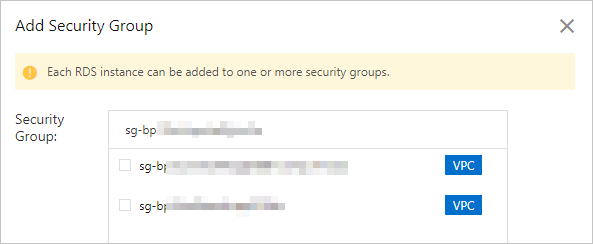
Click Add Security Group.
NoteSecurity groups with a VPC tag contain ECS instances in virtual private clouds. Select the group that matches your RDS instance network type.
-
Select the security group and click OK.
What's next
API reference
| Operation | Description |
|---|---|
| DescribeSecurityGroupConfiguration | Query ECS security groups associated with an instance. |
| ModifySecurityGroupConfiguration | Modify ECS security groups associated with an instance. |