ApsaraDB RDS for MySQL provides high-frequency snapshot backup to enhance data security. If data is lost or corrupted, you can restore your instance to a specific point in time.
Prerequisites
-
The ApsaraDB RDS for MySQL instance must meet the following requirements:
-
Major engine version: MySQL 8.0 or MySQL 5.7
-
Edition: High-availability Edition or Cluster Edition
-
Storage type: ESSD or high-performance cloud disk
-
-
Before you use the RDS backup service for the first time, you must authorize the AliyunServiceRoleForDBS service-linked role (SLR) with your Alibaba Cloud account. For more information, see How do I create a service-linked role for Data Disaster Recovery?.
Billing
Backups are free if their total size is within the free quota. You are charged for backup storage that exceeds the free quota. For more information, see Backup fee.
How it works
-
If high-frequency snapshot backup is disabled, you can set the backup frequency to a maximum of once per day.
-
If this feature is enabled, you can set the backup frequency to a value from every 15 minutes to every 12 hours.
-
If you also enable cross-region backup, all high-frequency backups are retained in the destination region. However, local backups follow the policies described in the following table.
The snapshot retention policy varies based on the snapshot backup frequency:
|
Snapshot frequency |
Retention policy |
|
Minute-level frequency |
All snapshots from the last hour are retained. For snapshots older than one hour, only the first snapshot that completes each hour is retained. For snapshots older than 24 hours, only the first snapshot that completes each day after 00:00 is retained. For example, if you set the frequency to every 15 minutes, the four snapshots created within one hour are all retained. For the period between 1 and 24 hours ago, 23 hourly snapshots are retained. For the period beyond 24 hours but within the last week, six daily snapshots are retained. In total, 33 snapshots are kept for a week. |
|
Hour-level frequency |
All snapshots from the last 24 hours are retained. For snapshots older than 24 hours, only the first snapshot that completes each day after 00:00 is retained. For example, if you set the frequency to every 6 hours, the four snapshots created within 24 hours are all retained. For the period beyond 24 hours but within the last week, six daily snapshots are retained. In total, 10 snapshots are kept for a week. |

Enable high-frequency snapshot backup
On the page of your instance, click Edit in the Basic Backup section to set the snapshot frequency.
-
This feature must be enabled with single-digit second backup. If you enable this feature while single-digit second backup is disabled, the system automatically enables it.
-
For information about other parameters, see Automatic backup.
-
After high-frequency snapshot backups are created, you can use them to restore your instance. The backup data is also uploaded to Object Storage Service (OSS) in the background. In the Task Center, you can track the upload progress by viewing Back Up Snapshot to OSS tasks.
NoteBefore a high-frequency snapshot backup set is uploaded to Object Storage Service (OSS), it is stored with single-AZ redundancy. After it is uploaded to OSS, the redundancy mechanism depends on the instance's region. If the instance is in a region where you can create ZRS buckets, the backup set uses multi-AZ redundancy by default. Otherwise, it uses single-AZ redundancy.
Select the Increase snapshot frequency checkbox, and then select Every 15 minutes from the frequency drop-down list.
Related operations
-
You can also configure the snapshot frequency through the BackupInterval parameter in the ModifyBackupPolicy API.
-
Comprehensive backup and recovery strategies: Backup solutions overview, data recovery overview.
Appendix: Technical metrics
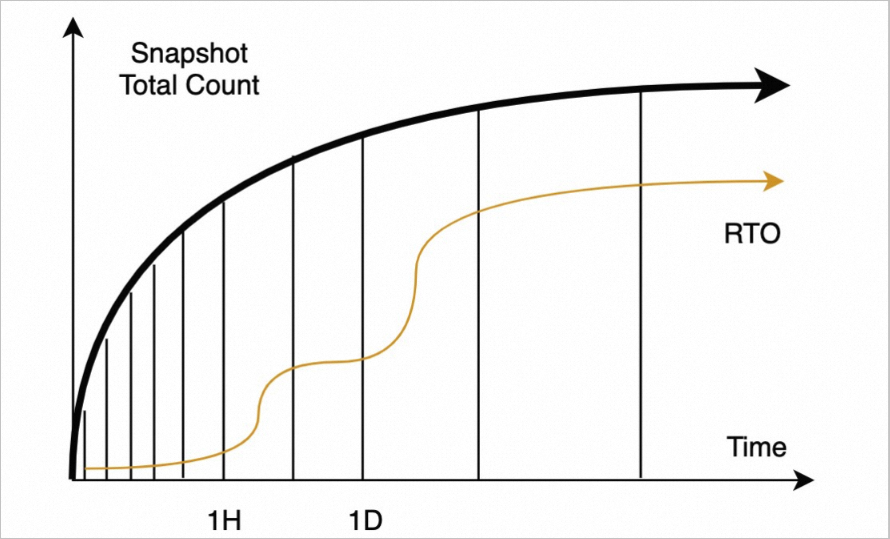
The backup frequency determines the total number of snapshots retained over a period, which affects the recovery time objective (RTO).
-
Over a short period, snapshots are taken frequently, creating a high density of restore points. This allows you to recover an instance from a recent snapshot by applying fewer logs, significantly reducing the RTO.
-
As time passes, the total number of snapshots plateaus. Fewer backups are retained long-term, which greatly reduces costs.