AliSQL supports the Instant Modify Column Charset feature. This feature changes only metadata, avoiding a table rebuild. This significantly reduces operation time and improves efficiency.
Feature overview
Background: In community MySQL, the default implementation of the UTF-8 character set is utf8mb3. Because the utf8mb3 character set uses a maximum of three bytes per character, data loss occurs when storing four-byte characters, such as emojis. Although community MySQL changed its default character set to utf8mb4 starting from version 8.0, modifying the character set of columns in existing tables still typically requires a time-consuming table rebuild.
Overview: AliSQL supports the Instant Modify Column Charset feature. Instead of a table rebuild, which involves creating a temporary table and copying data, this feature modifies only metadata. This allows the character set modification to complete in seconds.
Algorithm: Both algorithms complete the operation by modifying only metadata. When you use the Instant Modify Column Charset feature, MySQL 5.7 supports only the INPLACE algorithm. MySQL 8.0 supports both the INPLACE and INSTANT algorithms.
Prerequisites
To use the Instant Modify Column Charset feature, your instance must meet one of the following database version requirements. If the minor engine version does not meet the requirement, you can upgrade the minor engine version.
MySQL 8.4
MySQL 8.0: minor engine version 20230630 or later.
MySQL 5.7: minor engine version 20251031 or later.
MySQL 8.0 (minor engine version 20230630 or later) and MySQL 8.4 support both the INPLACE and INSTANT algorithms. MySQL 8.0 (with a minor engine version earlier than 20230630) supports only the INPLACE algorithm.
The Instant Modify Column Charset feature has the following limitations:
Column type: You can convert the character set only for
CHARandVARCHARcolumns.Character set: Only conversions from
utf8/utf8mb3toutf8mb4are supported.Storage engine: Only the
InnoDBstorage engine is supported.Indexed columns: You cannot modify an indexed column.
Partition keys: You cannot modify a column that is part of a partition key.
Column length: The modification must not cause the column's maximum storage length to cross the 256-byte boundary. The length must remain either entirely below 256 bytes or entirely at or above 256 bytes. For a conversion from
utf8/utf8mb3toutf8mb4:For the
utf8/utfbmb3character set, which uses 3 bytes per character, the 256-byte threshold is 85 characters.For the
utf8mb4character set, which uses 4 bytes per character, the 256-byte threshold is 63 characters.
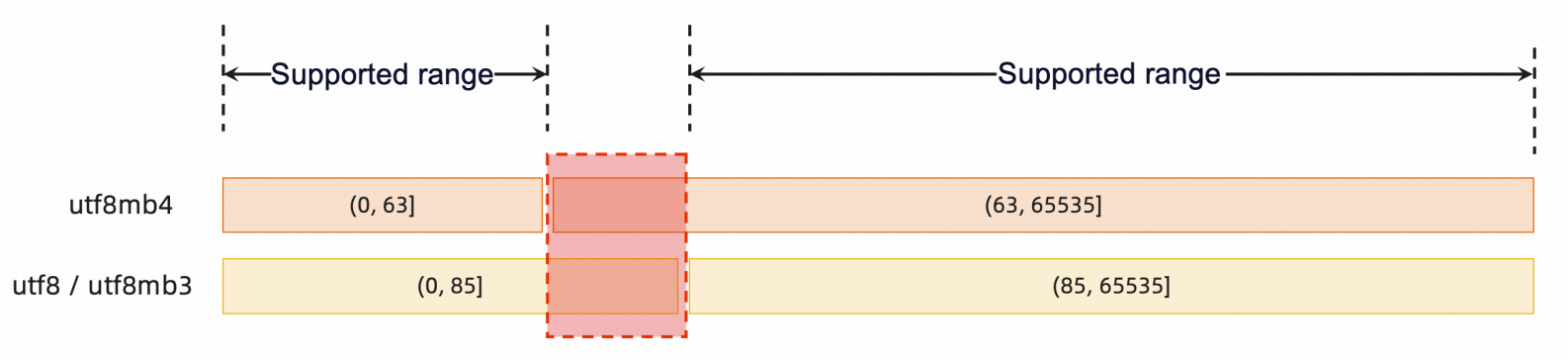
Therefore, the Instant Modify Column Charset feature is supported only when the defined column length (in characters) is within the range of (0, 63] or (85, 65535].
Parameter management
Parameters
Modify the following parameters only if you use MySQL 8.0 and need to specify the INSTANT algorithm:
Parameter | Description |
|
|
|
|
Modify parameters
Go to the Instances page. In the top navigation bar, select the region in which the RDS instance resides. Then, find the RDS instance and click the ID of the instance.
In the left-side navigation pane, click Parameter Settings.
On the Editable Parameters tab, search for the parameter that you want to modify and change its value.
Click OK, and then click Submit Parameters. In the dialog box that appears, specify when the new parameter values take effect.
Procedure
This procedure uses an example table t1 with the following schema:
CREATE TABLE `t1` (
  `id` int NOT NULL,
  `c1` char(10) DEFAULT NULL,
  `c2` varchar(10) DEFAULT NULL,
  `c3` char(100) DEFAULT NULL,
  `c4` varchar(100) DEFAULT NULL,
  PRIMARY KEY (`id`)
) ENGINE=InnoDB DEFAULT CHARSET=utf8;
Specify an algorithm
You can specify the INPLACE or INSTANT algorithm when you modify the column character set.
Inplace algorithm
-- Specify the INPLACE algorithm to modify the character set of the c1 and c2 columns to utf8mb4.
ALTER TABLE `t1` MODIFY `c1` char(10) CHARACTER SET utf8mb4 DEFAULT NULL, ALGORITHM=INPLACE;
ALTER TABLE `t1` MODIFY `c2` varchar(10) CHARACTER SET utf8mb4 DEFAULT NULL, ALGORITHM=INPLACE;

-- View the result.
SHOW CREATE TABLE `t1`\G
*************************** 1. row ***************************
       Table: t1
Create Table: CREATE TABLE `t1` (
  `id` int(11) NOT NULL,
  `c1` char(10) CHARACTER SET utf8mb4 DEFAULT NULL,
  `c2` varchar(10) CHARACTER SET utf8mb4 DEFAULT NULL,
  `c3` char(100) DEFAULT NULL,
  `c4` varchar(100) DEFAULT NULL,
  PRIMARY KEY (`id`)
) ENGINE=InnoDB DEFAULT CHARSET=utf8
1 row in set (0.00 sec)
Instant algorithm
-- Specify the INSTANT algorithm to modify the character set of the c3 and c4 columns to utf8mb4.
ALTER TABLE `t1` MODIFY `c3` char(100) CHARACTER SET utf8mb4 DEFAULT NULL, ALGORITHM=INSTANT;
ALTER TABLE `t1` MODIFY `c4` varchar(100) CHARACTER SET utf8mb4 DEFAULT NULL, ALGORITHM=INSTANT;

-- View the result.
SHOW CREATE TABLE `t1`\G
*************************** 1. row ***************************
       Table: t1
Create Table: CREATE TABLE `t1` (
  `id` int(11) NOT NULL,
  `c1` char(10) CHARACTER DEFAULT NULL,
  `c2` varchar(10) CHARACTER DEFAULT NULL,
  `c3` char(100) CHARACTER SET utf8mb4 DEFAULT NULL,
  `c4` varchar(100) CHARACTER SET utf8mb4 DEFAULT NULL,
  PRIMARY KEY (`id`)
) ENGINE=InnoDB DEFAULT CHARSET=utf8
1 row in set (0.00 sec)
Automatic algorithm selection
If you do not specify an algorithm, MySQL automatically selects the most appropriate one.
-- Modify the character set of the c1 column to utf8mb4 without specifying an algorithm.
ALTER TABLE `t1` MODIFY `c1` char(10) CHARACTER SET utf8mb4 DEFAULT NULL;