Character sets and collations control how ApsaraDB RDS for MySQL stores and compares string data. Mismatches between character sets at different levels—server, database, table, and column—are a common source of encoding errors and case-sensitivity bugs. This document explains collation naming conventions, how to inspect current settings, and how to change character sets at each level.
Collation naming conventions
A collation name starts with the name of its associated character set and ends with one of the following suffixes:
| Suffix | Meaning |
|---|---|
_ci |
Case-insensitive |
_cs |
Case-sensitive |
_bin |
Binary comparison based on code points; always case-sensitive |
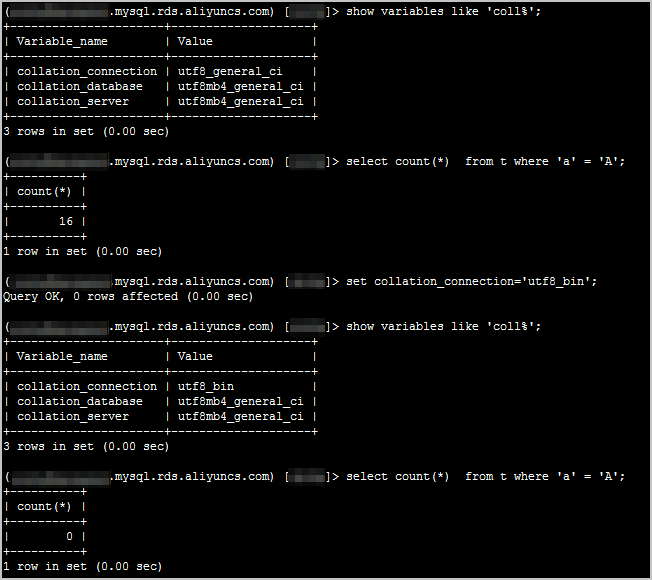
Example: With collation_connection set to utf8_general_ci, the values a and A are treated as equal. With utf8_bin, they are not.
Character set inheritance
Character sets cascade down through levels: server > database > table > column. A column with no explicit character set inherits from its table; the table inherits from its database; and the database inherits from the server.
This means changing a table's character set does not affect columns that already have an explicit character set—those must be updated separately.
Inspect character set settings
Use the following SQL statements to inspect current character set and collation settings on your RDS instance:
-- Inspect current settings
SHOW GLOBAL VARIABLES LIKE '%char%';         -- Character set parameters of the RDS instance
SHOW GLOBAL VARIABLES LIKE 'coll%';          -- Collation parameters of the current session
SHOW CHARACTER SET;                           -- Character sets supported by the RDS instance
SHOW COLLATION;                               -- Collations supported by the RDS instance
SHOW CREATE TABLE table_name \G              -- Character set of a specific table
SHOW CREATE DATABASE database_name \G        -- Character set of a specific database
SHOW CREATE PROCEDURE procedure_name \G      -- Character set of a stored procedure
SHOW PROCEDURE STATUS \G                     -- Character set settings of all stored procedures
SHOW FULL FIELDS FROM table_name;            -- Character set of each column in a table
ALTER DATABASE db_name DEFAULT CHARSET utf8;                            -- Changes the character set of a database
CREATE DATABASE db_name CHARACTER SET utf8;                             -- Specifies a character set for a database during creation
ALTER TABLE tab_name DEFAULT CHARSET utf8 COLLATE utf8_general_ci;     -- Changes the character set and collation of a table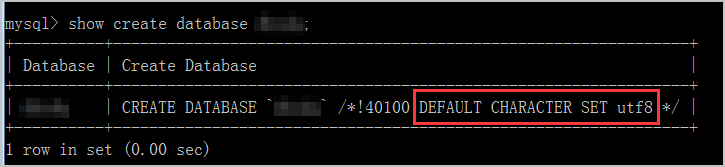
Modify the character_set_server parameter
The character_set_server parameter sets the server-level default character set. Changing it affects all databases created after the change takes effect.
Modifying character_set_server requires restarting the RDS instance. Schedule this change during off-peak hours.
-
Log on to the ApsaraDB RDS console.
-
In the top navigation bar, select the region where the RDS instance resides.

-
Find the RDS instance and click the instance ID.
-
In the left-side navigation pane, click Parameters.
-
On the Editable Parameters tab, find
character_set_serverand click the icon in the Running Parameter Value column. Enter the new value in the dialog box and click OK.
 -
Click Apply Changes. In the dialog box, click OK and wait for the RDS instance to restart.
This change only takes effect for databases created after a privileged account is created for the RDS instance.
Change character sets using SQL
Syntax
To change the character set at the database, table, or column level, use the following statements:
-- Change the character set of a database
ALTER DATABASE <database_name> CHARACTER SET <charset_name> COLLATE <collation_name>;

-- Change the character set of a table (converts all columns that have no explicit character set)
ALTER TABLE <table_name> CONVERT TO CHARACTER SET <charset_name> COLLATE <collation_name>;

-- Change the character set of a specific column
ALTER TABLE <table_name> MODIFY <column_name> <data_type> CHARACTER SET <charset_name> COLLATE <collation_name>;
Example
Change the character set of the dbsdq database, the tt2 table, and the c2 column to utf8mb4:
ALTER DATABASE dbsdq CHARACTER SET utf8mb4 COLLATE utf8mb4_unicode_ci;
USE dbsdq;
ALTER TABLE tt2 CONVERT TO CHARACTER SET utf8mb4 COLLATE utf8mb4_unicode_ci;
ALTER TABLE tt2 MODIFY c2 VARCHAR(10) CHARACTER SET utf8mb4 COLLATE utf8mb4_unicode_ci;
Usage notes
-
Column changes apply immediately to all rows. When you change the character set of a column, the new character set takes effect on every existing row in that column.
-
`ALTER TABLE` acquires a metadata lock (MDL). The lock is held for the duration of the operation, which blocks concurrent writes to the table.
-
Specify character sets at the correct level. You can specify character sets for servers, databases, tables, and fields. Server-level, database-level, and table-level character sets use the default settings. If you want to specify a character set for an object, you must separately change the character set of that object; otherwise, the server-level character set is used by default.
-
Changing a database's character set does not update existing tables or columns. Change each object separately. Use
SHOW CREATE TABLE table_name;orSHOW FULL FIELDS FROM table_name;to verify the current character set of each column before and after the change.