The Binlog in Redo feature improves database performance by writing binary log content to the redo log at transaction commit, which reduces synchronous disk I/O operations.
Prerequisites
Database version:
MySQL 8.4
MySQL 8.0: The minor engine version must be 20200430 or later. To upgrade the minor engine version of your instance, see Upgrade the minor engine version.
Set the
sync_binlogparameter of the instance to1and thebinlog_order_commitsparameter toOFF. For more information, see Set instance parameters.Set the data replication mode of the instance to asynchronous replication. For more information, see Query and modify the data replication mode.
Background information
In mission-critical MySQL scenarios, to ensure data security, the binary log and redo log must be synchronously flushed to disk when a transaction commits. This means the following two parameters must both be set to 1:
sync_binlog = 1;
innodb_flush_log_at_trx_commit = 1;
Standard MySQL requires two synchronous disk I/O operations for each transaction commit: one for the binary log and one for the redo log. This requirement reduces commit efficiency, an impact that is more pronounced on cloud disks.
To improve transaction commit efficiency, AliSQL introduced the Binlog in Redo feature, which is enabled by setting the persist_binlog_to_redo=ON parameter and is disabled by default. When a transaction commits, this feature merges the binary log content with the redo log and writes them together. Only one synchronous I/O operation is needed to persist the redo log, which also flushes the binary log data to disk. This design eliminates the two separate I/O operations required in standard MySQL for the binary log and redo log, significantly reducing latency and increasing throughput.
Additionally, Binlog in Redo uses batch processing and a group commit mechanism to mitigate lock contention from GTID allocation in high-concurrency scenarios. This approach reduces lock conflicts and ensures high performance.
A background thread asynchronously writes the binary log file, appending data in batches periodically. This avoids the file system pressure caused by real-time fsync calls and improves overall I/O efficiency. Even if the database restarts unexpectedly, the system can automatically restore the integrity of the binary log file by replaying the binary log data stored within the redo log, ensuring data consistency.
The Binlog in Redo feature does not change the binary log format. Replication and third-party tools based on the binary log are not affected.
Notes
After enabling the Binlog in Redo feature, to restore a high-performance local disk instance to a self-managed database using a physical backup file, you must use the XtraBackup tool provided by RDS. To install the XtraBackup tool, see Tool preparation.
Parameters
persist_binlog_to_redo
Enables or disables the Binlog in Redo feature. This is a global system variable. Valid values:
onoroff. Changes to this parameter take effect immediately without restarting the instance.NoteTo enable this feature, in addition to setting
persist_binlog_to_redotoon, you must also setbinlog_order_commitstooffand set the data replication mode of the instance to asynchronous replication.For more information about how to set instance parameters, see Set instance parameters.
For more information about how to set the data replication mode, see Query and modify the data replication mode.
If the
sync_binlogparameter of your instance is not set to 1, the Binlog in Redo feature is not enabled even if you configure the preceding parameters. In this case, we recommend that you use the Binlog Parallel Flush feature to optimize the performance of your instance.sync_binlog_interval
The interval at which binary logs are asynchronously persisted. This is a global system variable and takes effect only when
persist_binlog_to_redo = on. The default value is 50, and the unit is milliseconds (ms). In most cases, the default value is sufficient. Changes to this parameter take effect immediately without restarting the instance.
Performance benchmarks
Test environment
Application server: An Alibaba Cloud ECS instance
RDS instance specifications: 32 cores, 128 GB memory, ESSD cloud disk
Instance type: High-availability Edition (data replication mode: asynchronous replication)
Test cases
The following built-in Sysbench test cases were used:
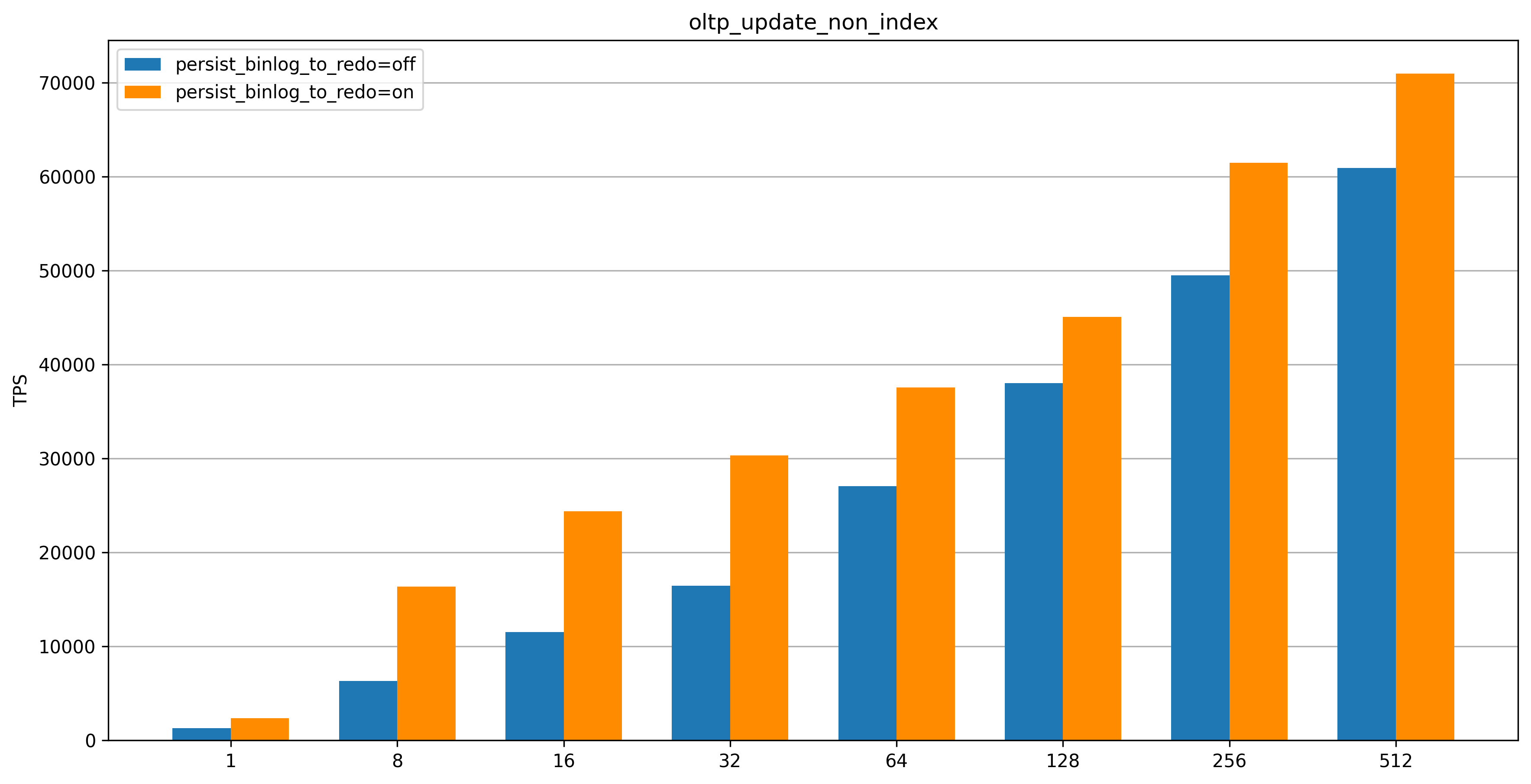
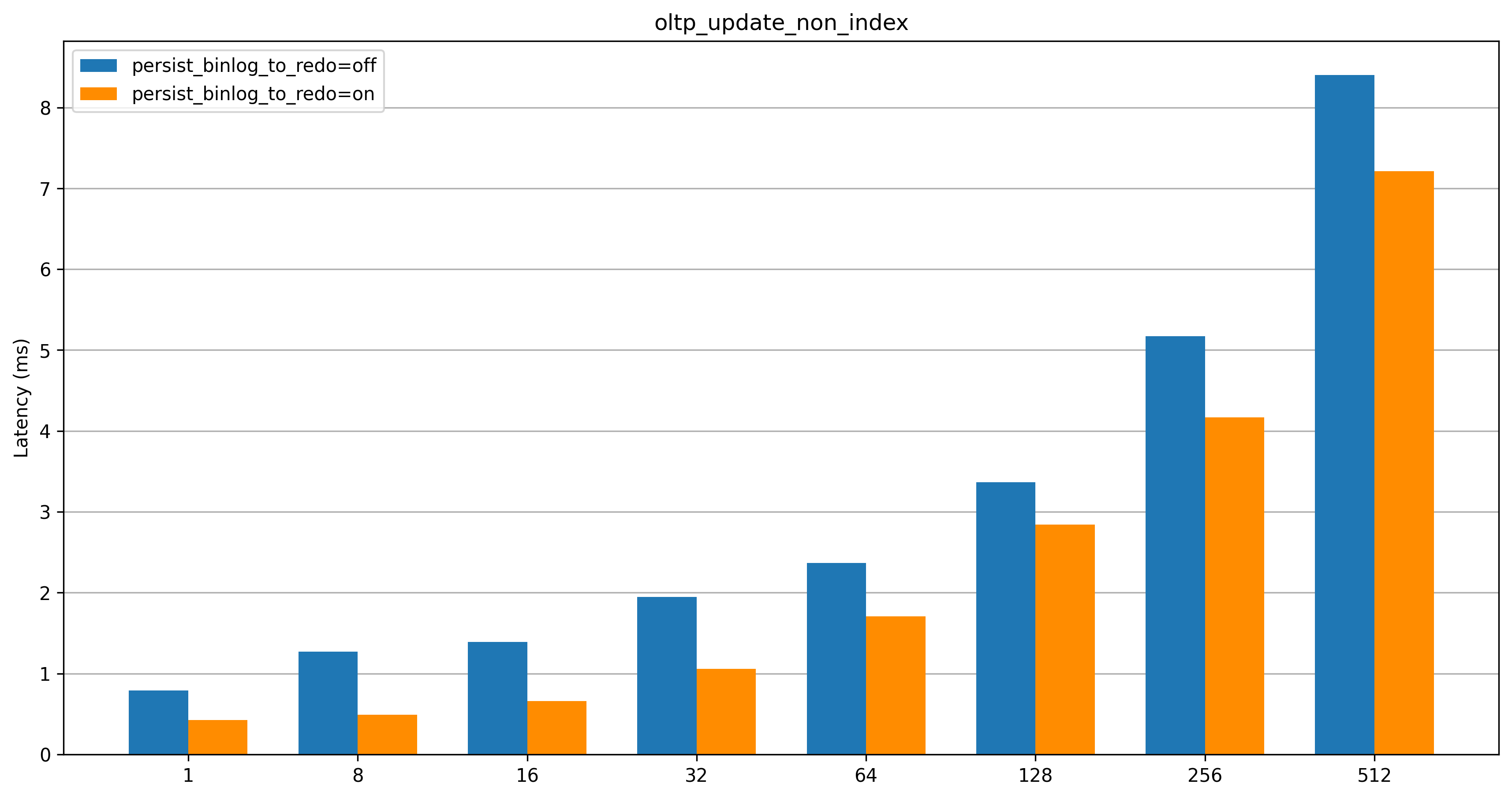
oltp_update_non_index
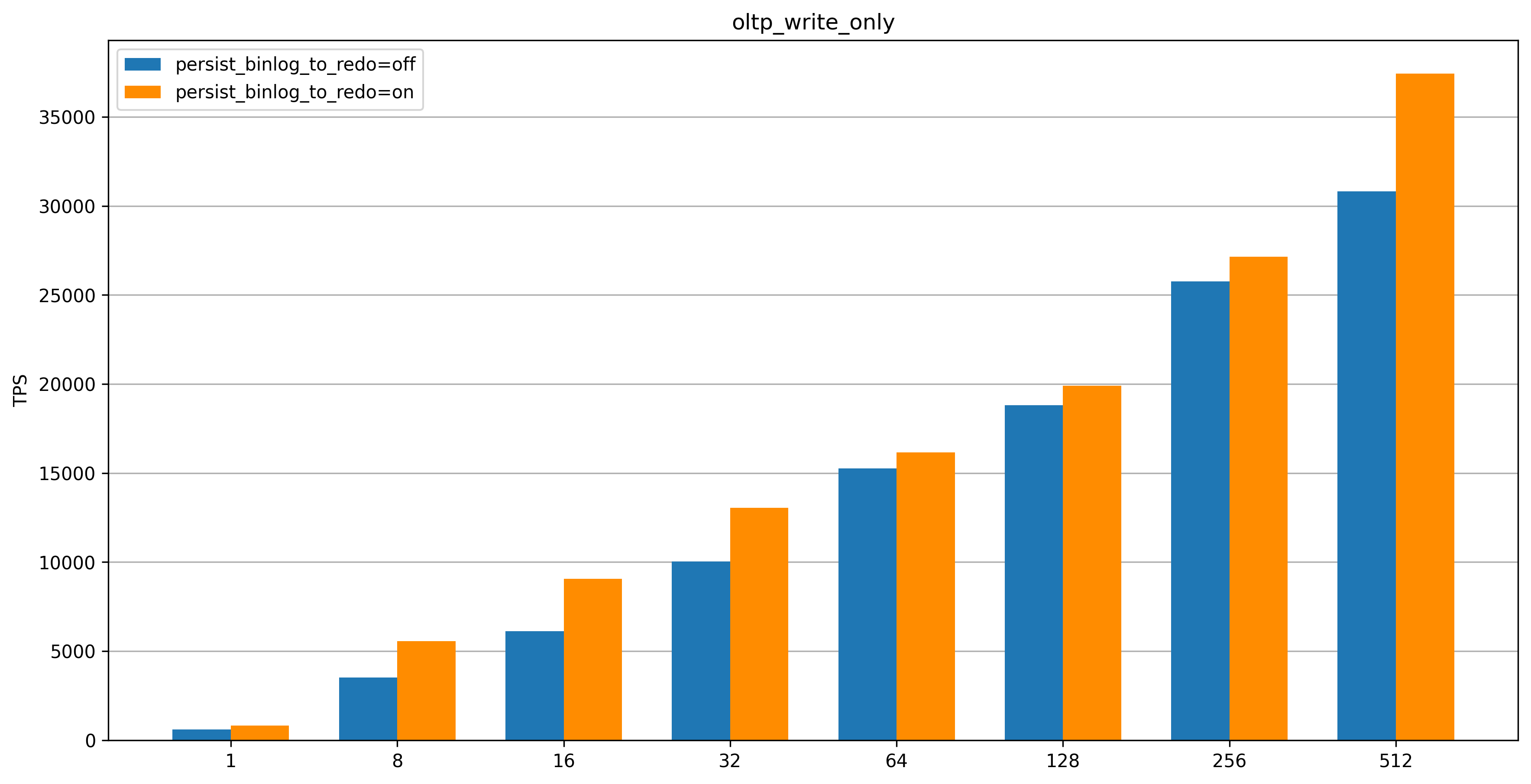
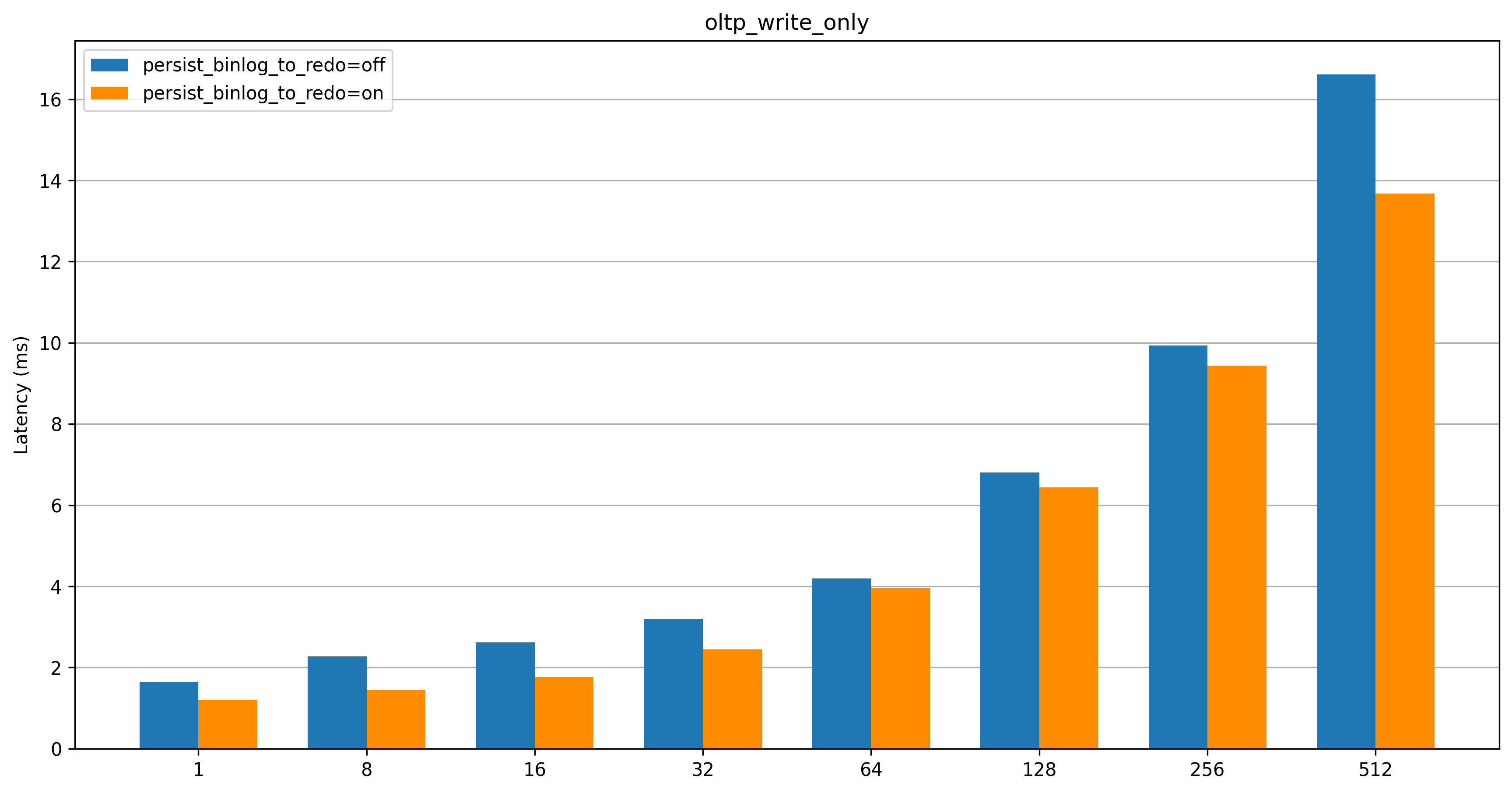
oltp_write_only
Test results
oltp_update_non_index
After Binlog in Redo is enabled, TPS increases significantly in low-concurrency scenarios and noticeably in high-concurrency scenarios, with lower latency.
oltp_write_only
After Binlog in Redo is enabled, TPS increases substantially in both low-concurrency and high-concurrency scenarios, with lower latency.
Conclusions
The
oltp_update_non_indextest case contains only single-statement transactions, so it commits more often. In contrast,oltp_write_onlycontains multi-statement transactions (twoUPDATEstatements, oneDELETEstatement, and oneINSERTstatement), so it commits less often. As a result, the performance improvement foroltp_update_non_indexis more significant than foroltp_write_only.At fewer than 64 concurrent connections, the Binlog in Redo feature significantly improves performance and reduces latency. This makes it effective for most production workloads.
At more than 256 concurrent connections, the Binlog in Redo feature provides higher peak performance and lower latency, enabling it to better handle sudden traffic spikes.