Before you create a global active database cluster for the first time, authorize Data Transmission Service (DTS) to access cloud resources by creating the AliyunDTSDefaultRole role and attaching the AliyunDTSRolePolicy policy to it. This authorization does not affect the performance of your RDS instance.
If the required permissions are already granted to your Alibaba Cloud account, skip this topic and go directly to Create a global active database cluster.
Prerequisites
Before you begin, make sure that you have:
-
An Alibaba Cloud account. If you don't have one, create an Alibaba Cloud account.Create an Alibaba Cloud account
-
Access to your Alibaba Cloud account (root account) to perform this authorization.
Policy description
The AliyunDTSRolePolicy policy grants the AliyunDTSDefaultRole role permission to manage the following cloud resources on behalf of DTS: ApsaraDB for RDS, ECS, PolarDB, ApsaraDB for MongoDB, ApsaraDB for Redis, PolarDB-X, DataHub, and Elasticsearch.
For the full policy document, see AliyunDTSRolePolicy.
For background on policy structure and syntax, see Policy structure and syntax.
Method 1 (recommended): Use the authorization shortcut
Log on to Alibaba Cloud using your Alibaba Cloud account and go to the Cloud Resource Access Authorization page. Click Confirm Authorization Policy. When a success message appears, the authorization is complete and you can proceed to create the cluster.
Method 2: Use the RAM console
-
Log on to the Resource Access Management (RAM) console.
-
Optional: In the left-side navigation pane, choose Identities > Roles.
-
In the search box next to Create Role, enter AliyunDTSDefaultRole and click the search icon.
If the role is not found, use Method 1 instead.
-
Click the role name in the search results.
-
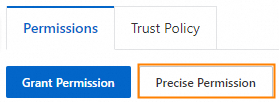
On the Permissions tab, click Precise Permission.
-
Optional: In the Precise Permission panel, select System Policy for the Type parameter.

-
In the Policy Name field, enter AliyunDTSRolePolicy.
-
Click OK.
-
To verify the authorization, click the
 icon on the right side of the Permissions tab to refresh the page.
 -
Click Close.