This error occurs because the sql_mode parameter is modified in your MySQL instance, causing the GROUP BY clause to be treated strictly. There are two common triggers: the mode is set in the instance parameters, or a client driver modifies it silently for your session.
Cause 1: ONLY_FULL_GROUP_BY is set in the instance parameters
When ONLY_FULL_GROUP_BY is included in the sql_mode parameter, MySQL rejects any SELECT statement that references a non-aggregated column not listed in the GROUP BY clause. For example, the following query triggers the error:
SELECT name, address, MAX(age) FROM t GROUP BY name;
-- ERROR 1055 (42000): Expression #2 of SELECT list is not in GROUP BY clause
-- and contains nonaggregated column 'mydb.t.address' which is not functionally
-- dependent on columns in GROUP BY clause; this is incompatible with
-- sql_mode=only_full_group_by
Solution: Remove ONLY_FULL_GROUP_BY from the instance parameters
This disables the strict check globally for the instance.
Log on to the ApsaraDB RDS console and click your instance ID.
In the left-side navigation pane, click Parameters.
Find
sql_mode, removeONLY_FULL_GROUP_BYfrom its value, and save the change.
For detailed steps, see Modify the parameters of an ApsaraDB RDS for MySQL instance.
Cause 2: A client driver modifies sql_mode for the session
Some client drivers automatically modify sql_mode for the current session before running certain operations. The ADO.NET driver, for example, changes the value of the sql_mode parameter before executing an INSERT statement that needs to return an auto-increment column value, and does not restore sql_mode after the INSERT completes.
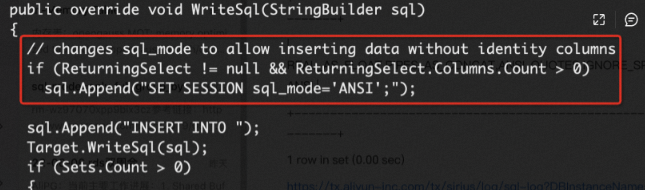
If the same session then runs a SELECT ... GROUP BY query, it fails with error 1055.
Solution: Add the following statement in your application code after the INSERT and before the subsequent query to reset sql_mode to the default:
SET session sql_mode = default;