Obtain server tracking parameters
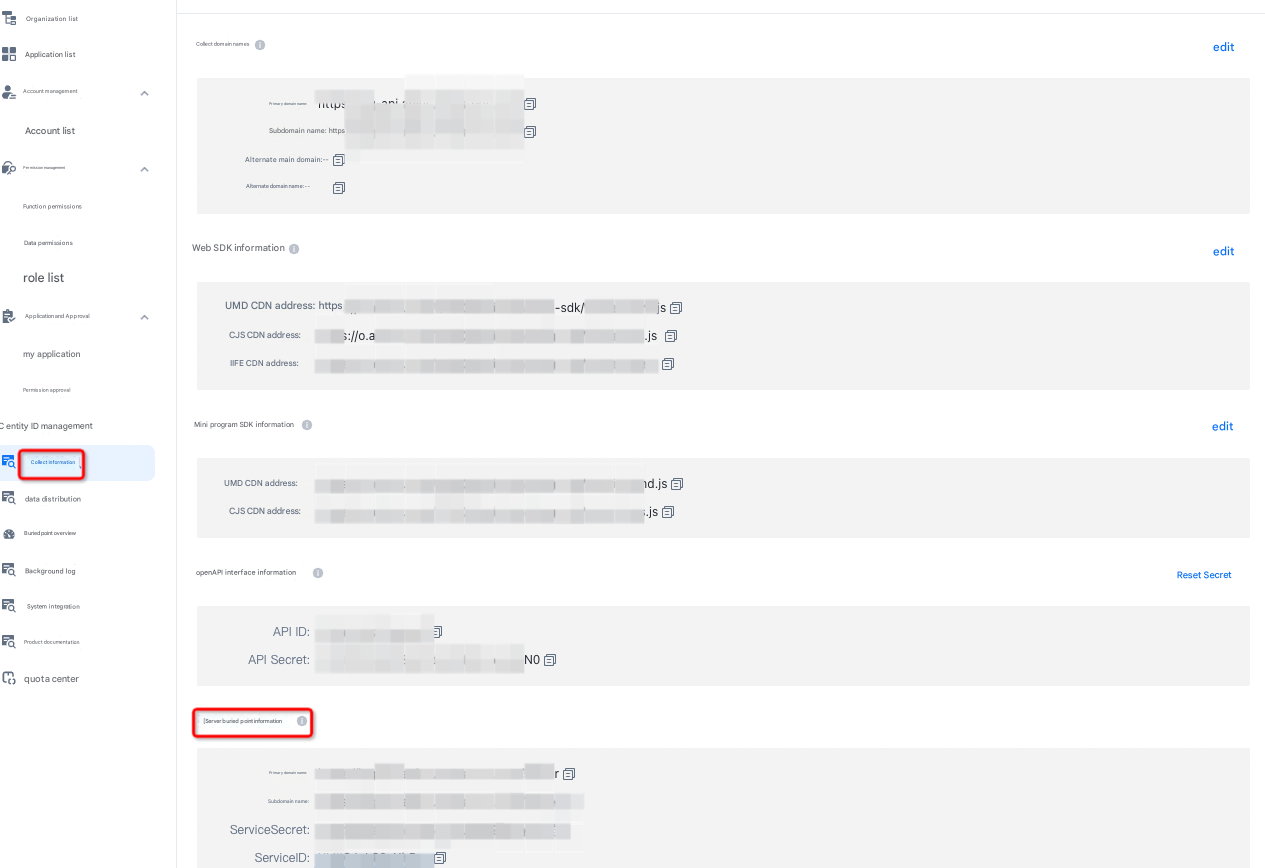
Go to the management console --> Click track Information
Primary domain: the address for reporting server-side tracking data
Secondary domain: The default domain is the same as the primary domain. Private deployment customers can provide secondary domains as alternate domains.
The ServiceSecret and ServiceID are verification parameters. Do not disclose the secret.
Note: Because the above information involves system security, it can only be seen with administrator rights!
Request
API address: https://<Data collection endpoint + Port>/server
request parameters content-type:application/json
Request parameters
Report event request JSON parameters
JSON field name (The upper and lower case must be consistent.) | Data type | Required | The field description. | Examples |
sign | string | Yes | Verify the signature | f564cae6a8ad458648id9d607a124322 |
app_id | string | Yes | serviceID in the corresponding server tracking | OA8kI9Jis7YJNh5uh |
appkey | string | Yes | Application key, obtained from QT management background | 9moqdsuia8hvxm7k8shf82n |
id | string | Yes | Event encoding, the encoding set by the user when creating an event in the QT background | click |
umid | string | At least one of the two must be uploaded. We recommend that you upload the puid as much as possible to ensure that the IDMapping during analysis meets business requirements. | The device ID. | djajdjdk1 |
puid | string | The user ID. | user_001 | |
page_name | string | No | Page name | page_index |
ts | string | Yes | The timestamp that is reported in milliseconds. | 1659493170125 |
cusp | object | No | Parameters | {"foo": "bar"} |
gp | object | No | Global Properties | {"foo": "bar"} |
sdk_type | string | Yes | The SDK type. The static field is httpapi. | httpapi |
server_ts | string | No, the QT server can automatically generate it. If you manually upload a file, the time when the file is uploaded to the QT server prevails. The time when the file is uploaded to the QT server is no longer automatically generated. | Server timestamp in milliseconds | 1659493170125 |
uuid | string | No. The factor used to generate the log_id (supported by V2.4.17) | If you want the log_id to be unique, you can report a unique UUID for each log entry. The QT server uses the UUID to generate the log_id. | 1234567890 |
log_id | string | No, the QT server automatically generates | The log identifier. The default generation mode is uuid generation. If the uuid is not reported, a timestamp is used to generate a random id. | 1234567890 |
Event Protocol
{
  "sign":"27 c95768438645138cfb010ded871091", // Required. The signature.


  "app_id":"xxxxxxxxx", // The service ID in the server tracking information.

  "appkey":"1344444", // Required. The appkey of the application.
  "id" : "get_coupons", // Required. The event code.
  "umid" : "edfafs", // The ID of the device.
  "puid" : "123456", // The ID of the logon user.
                                              // You must upload at least one of the umid and puid.

  "page_name":"home_page", // Optional. The page encoding.
  "ts" : "1614667799165", // Required. The timestamp when the event occurred.
  "cusp" : { // Custom event parameters
    "p1" : "1",
    "p2" : "2",
    "p3" : "3"
  },

  "sdk_type":"httpapi", // static field. The tracking service automatically adds this field.
  "server_ts":"1614667799165", // If you specify this parameter, the value of the parameter is used. If you do not specify this parameter, the timestamp of the log tracking service is automatically used. The log tracking service automatically adds this parameter.
  "_id":'123344' // The unique code of the log. The tracking service automatically adds this field.
}
Report user property request JSON parameters
JSON field name (The upper and lower case must be consistent.) | Data type | Required | The field description. | Examples |
sign | string | Yes | Verify the signature | f564cae6a8ad458648id9d607a124322 |
app_id | string | Yes | serviceID in the corresponding server tracking | OA8kI9Jis7YJNh5uh |
appkey | string | Yes | Application key, obtained from QT management background | 9moqdsuia8hvxm7k8shf82n |
id | string | Yes | The event code for reporting user attributes. The value is fixed as $$_ user_profile. | $$_user_profile |
umid | string | No | The device ID. | djajdjdk1 |
puid | string | Yes | The user ID. | user_001 |
ts | string | Yes | The timestamp that is reported in milliseconds. | 1659493170125 |
cusp | object | Yes | The user attribute. | {"name": "tom", "gender": "1"} |
sdk_type | string | Yes | The SDK type. The static field is httpapi. | httpapi |
server_ts | string | No, the QT server can automatically generate it. If you manually upload a file, the time when the file is uploaded to the QT server prevails. The time when the file is uploaded to the QT server is no longer automatically generated. | Server timestamp in milliseconds | 1659493170125 |
uuid | string | No. The factor used to generate the log_id (supported by V2.4.17) | If you want the log_id to be unique, you can report a unique UUID for each log entry. The QT server uses the UUID to generate the log_id. | 1234567890 |
log_id | string | No, the QT server automatically generates | The log identifier. The default generation mode is uuid generation. If the uuid is not reported, a timestamp is used to generate a random id. | 1234567890 |
User Attribute Message Protocol
{
  "sign":"27 c95768438645138cfb010ded871091", // Required. The signature.
  "app_id":"xxxxxxxxx", // Required. This parameter corresponds to the service ID in the server tag information.


  "appkey":"1344444", // Required. The appkey of the application.
  "id" : "$$_user_profile", // Required. The ID is a user attribute.
  "umid" : "edfafs", // Optional. The ID of the device.
  "puid" : "123456", // Required. The account ID of the logon user.
  "ts" : "1614667799165", // Required. The timestamp when the event occurred.
  "cusp" : { // Required. Custom user attributes
    "gender" : "1", // The gender.
    "birthday" : "1988-12-24" // Date of birth
  },


  "sdk_type" : "httpapi", // static field. The tracking service automatically adds this field.
  "server_ts":"1614667799165", // If you specify this parameter, the value of the parameter is used. If you do not specify this parameter, the timestamp of the log tracking service is automatically used. The log tracking service automatically adds this parameter.
  "_id":'123344' // The unique code of the log. The tracking service automatically adds this field.
}
Sign generation rule description
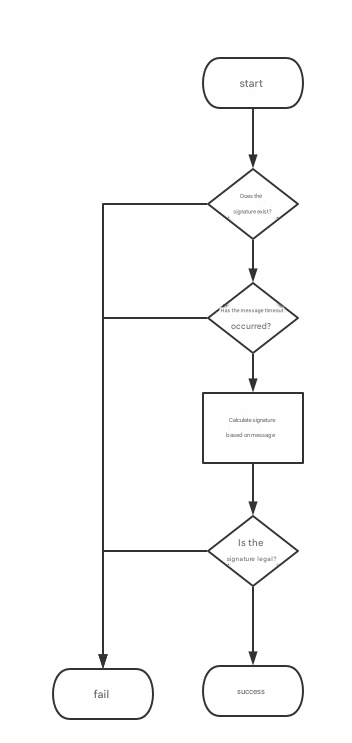
First, encapsulate the keys and values of all request fields except the sign field into a map object
To serialize this map object into a JSON string, the keys need to be sorted according to natural sorting, i.e. ascii code. java can use jsonobject. tojsonstring (mapobject, SerializerFeature. mapsortfield),(note: json needs to be compressed to remove spaces between fields, such as the following code block)
Get serviceSecret
sign = MD5 (JSON string generated after sorting + serviceSecret)
Put the calculated sign into the original map object and serialize it into a JSON string, which is the final complete JSON request message.
sign verification flowchart
Response parameters
Response data content-type:application/json
The response JSON string contains two fields: code and message
code | message | Description |
Httpapi_300_200 | Report success | Success |
Httpapi_300_101 | Illegal signature | Signature verification failed. For more information, see Sign generation rules. |
Httpapi_300_102 | The reported data type is not in JSON format. | The data format request parameters is not in JSON format |
Httpapi_300_103 | Missing required fields | Check whether required parameters are omitted by referring to the request parameter table |
Httpapi_300_104 | The user attribute is missing a required field | Check whether required parameters are omitted by referring to the request parameter table |
Httpapi_300_105 | Invalid event ID | Incorrect event ID |
Httpapi_300_106 | Incorrect ak/sk |
Java Demo Reference
package com.aliyun.app.quickaplus.mock.once_mock;
import com.alibaba.fastjson.JSON;
import com.alibaba.fastjson.JSONObject;
import com.alibaba.fastjson.serializer.SerializerFeature;
import com.aliyun.app.quickaplus.mock.util.MD5Util;
import okhttp3.*;
import java.io.IOException;
/**
* Server ApiDemo
*
* @author chengtao
*/
public class ServiceApiDemo {
    /**
    * Primary domain
    */
    private static final String API_URL = "*****";
    /**
    * Corresponds to the ServiceID in the server tracking information.
    */
    private static final String SERVICE_ID = "*******";
    /**
    * Corresponds to the ServiceSecret in the server tracking information.
    */
    private static final String SERVICE_SECRET = "*******";
    /**
    * Client logs
    */
    private static final OkHttpClient client = new OkHttpClient();
/**
* Main function
*
* @param args parameters
*/
    public static void main(String[] args) {
        String srcJsonString = getMockData();
        JSONObject json = JSON.parseObject(srcJsonString);
        // Add the service ID to the message.
        json.put("app_id",SERVICE_ID);
        // Add ts to the message.
        json.put("ts", String.valueOf(System.currentTimeMillis()));
        //Calculate the signature
        String sign = MD5Util.md5(JSONObject.toJSONString(json,
        SerializerFeature.MapSortField) + SERVICE_SECRET);
        json.put("sign", sign);
        String desJsonString = JSON.toJSONString(json,
        SerializerFeature.DisableCircularReferenceDetect);
        Request request = new Request.Builder()
        .url(API_URL + "/server")
        .post(RequestBody.create(desJsonString,
        MediaType.parse("application/json")))
        .build();
        try {
            Response response = client.newCall(request).execute();
            if (!response.isSuccessful()) {
                System.out.printf("[DEMO] Failed to send log %s%n", response);
            } else {
                System.out.printf("[DEMO] Sent successfully %s%n",
                response.body().string());
            }
        } catch (IOException e) {
            e.printStackTrace();
        }
    }
/**
* Obtain MockData.
*
* @return The return value.
*/
    private static String getMockData() {
        return "{\n" +
        " \"appkey\": \"1344444\",\n" +
        " \"id\": \"get_coupons\",\n" +
        " \"umid\": \"uuid()\",\n" +
        " \"puid\": \"puid1\",\n" +
        " \"page_name\": \"home_page\",\n" +
        " \"cusp\": {\n" +
        " \"p1\": \"1\",\n" +
        " \"p2\": \"2\",\n" +
        " \"p3\": \"3\"\n" +
        " },\n" +
        " \"gp\": {\n" +
        " \"p1\": \"1\",\n" +
        " \"p2\": \"2\",\n" +
        " \"p3\": \"3\"\n" +
        " },\n" +
        " \"sdk_type\": \"httpapi\"\n" +
        "}";
    }
}
Python Demo Reference
# The correct signature format.
{"appkey": "4b6G49PAkLUb4212","cusp":{"p1":"1","p2":"2","p3":"3"},"gp":{"p1":"1","p2":"2","p3":"3"},"id":"get_coupons","page_name":"home_page","puid":"puid1","sdk_type":"httpapi","umid":"uuid()"}tEkNnx8VDuR0mwEl3hXd7aozYh8Q2qS4
# The signature format is invalid.
{"appkey": "AppKey in your environment", "cusp": {"p1": "1", "p2": "2", "p3": "3"}, "gp": {"p1": "1", "p2": "2", "p3": "3"}, "id": "get_coupons", "page_name": "home_page", "puid": "puid1", "sdk_type": "httpapi", "umid": "uuid()"}tEkNnx8VDuR0mwEl3hXd7aozYh8Q2qS4
import json
import hashlib
import http.client
import ssl
import time
# service_id
service_id =service_id in your environment
# service_secret
service_secret =service_secret in your environment
# Configure the tracking service.
qlc_end_point =address of the receiving service in your environment
# Message of Mock
def get_millisecond():
# Obtain a 13-bit timestamp in milliseconds.
millis = int(round(time.time() * 1000))
return str(millis)
ts1 = get_millisecond()
print(ts1)
data = {
# The code must be deleted when it is published. The code must be the same as the DebugKey that is entered in the "Tracking Verification-Server Verification"
"dk":"",
# Your appkey
"appkey":"",
"app_id": service_id,
"id": "get_coupons",
"umid": "uuid1",
"puid": "puid2",
"page_name": "home_page",
"ts": ts1,
"cusp": {
"card_type": "self-managed",
"scene": "Active purchase",
"card_level": "Experience member",
"carrier": "Enough apps",
"card_no": "d7tyk",
"user_id": "zsfMzsvHyA==",
"card_name": "7-day experience card",
"resource_id": "eedf17067cf64be299a844bbc8101426"
},
"gp": {
"p1": "1",
"p2": "2",
"p3": "3"
},
"sdk_type": "httpapi"
}
def sort_dict(d):
# The primary key of the sorted dictionary.
sorted_dict = {k: sort_dict(v) if isinstance(v, dict) else v for k, v in sorted(d.items())}
return sorted_dict
# Sort keys by lexicographic order.
sorted_data = sort_dict(data)
sorted_dict = dict(sorted_data)
#string = json.dumps(sorted_dict, separators=(',', ':')) + service_secret
string = json.dumps(sorted_dict,ensure_ascii=False, separators=(',', ':')) + service_secret
print(string)
data['sign'] = hashlib.md5(string.encode('utf-8')).hexdigest()
data = json.dumps(data)
protocl,domain = qlc_end_point.split('://')
if (protocl == 'http'):
conn = http.client.HTTPConnection(domain)
if (protocl == 'https'):
conn = http.client.HTTPSConnection(domain)
conn.request("POST", "/server", body=data, headers={"Content-Type": "application/json"})
response = conn.getresponse()
print(response.read().decode())
conn.close()MD5Util class code
package com.aliyun.app.quickaplus.mock.util;

import java.security.MessageDigest;

/**
 * md5 encryption tool class
 *
 * @author zheng.zhang
 */
public class MD5Util {

    public static String md5(String s) {
        char hexDigits[] = {'0', '1', '2', '3', '4', '5', '6', '7', '8', '9', 'a', 'b', 'c', 'd', 'e', 'f'};
        try {
            byte[] btInput = s.getBytes();
            // Obtain the MessageDigest object of the MD5 digest algorithm.
            MessageDigest mdInst = MessageDigest.getInstance("MD5");
            // Update the digest with the specified bytes
            mdInst.update(btInput);
            // Obtain the ciphertext.
            byte[] md = mdInst.digest();
            // Convert the ciphertext into a hexadecimal string.
            int j = md.length;
            char str[] = new char[j * 2];
            int k = 0;
            for (int i = 0; i < j; i++) {
                byte byte0 = md[i];
                str[k++] = hexDigits[byte0 >>> 4 & 0xf];
                str[k++] = hexDigits[byte0 & 0xf];
            }
            return new String(str);
        } catch (Exception e) {
            return null;
        }
    }

    /**
     * Unit testing
     */
    public static void main(String[] args) {
        StringBuilder dtskey = new StringBuilder("abc12390");
        dtskey.append('\0').append("~!@#$%^&*()_+");
        System.out.println(MD5Util.md5(dtskey.toString()));
        System.out.println(MD5Util.md5("20121221"));
        System.out.println(MD5Util.md5("Encryption"));
    }
}