1. Configure feature switches
All configuration classes are enabled by default. To disable specific features, configure them before initializing the appkey.
The priority of these switches is lower than the switches configured in the console under "Switch and Sampling Configuration". If you change switches or sampling rates in the console, the changes take effect and override these local settings on the next app startup.
Feature switches are divided into two configuration classes:
-
The UMAPMConfig class contains crash and freeze configurations.
-
The UMEFSConfig class covers startup analysis, network analysis, memory analysis, H5 page analysis, OOM exceptions, native page analysis, and log recovery.
1.1 UMAPMConfig class switch
The UMAPMConfig class enables or disables individual UMAPM modules.
@interface UMAPMConfig : NSObject<NSCopying>

+(UMAPMConfig*)defaultConfig;

/**
 * The Crash&Catton monitoring switch is turned on by default.
 */
@property (nonatomic,assign) BOOL crashAndBlockMonitorEnable;

/*
 * Catton monitoring parameters
 * The interval at which heartbeat detection is sent. Unit: seconds.
 * The interval range is [1,4]. If the interval is exceeded, the default value 2 is used.
 */
@property (nonatomic, assign) float sendBeatInterval;

/*
 * Catton monitoring parameters
 * The time interval for detecting a stuck state is in seconds.   (Detect checkBeatInterval seconds after sending heartbeat)
 * The interval range is [1,4]. If the interval is exceeded, the default value 2 is used.
 */
@property (nonatomic, assign) float checkBeatInterval;

/*
 * Catton monitoring parameters
 * How many times in a row that no heartbeat is considered to trigger Caton
 * The interval range is [1,4]. If it exceeds the range, the default value 3 is used. Note that this parameter must be an integer.
 */
@property (nonatomic, assign) NSInteger toleranceBeatMissingCount;

@end|
Configure a module |
Configuration Variable Name |
Default Value |
|
Crash & freeze module |
crashAndBlockMonitorEnable |
YES |
Example
- (BOOL)application:(UIApplication *)application didFinishLaunchingWithOptions:(NSDictionary *)launchOptions {

     UMAPMConfig* config = [UMAPMConfig defaultConfig];
     config.crashAndBlockMonitorEnable = YES;
     [UMCrashConfigure setAPMConfig:config];

     [QTConfigure setCustomDomain:@"Your collection service domain name" standbyDomain:@""];
     [QTConfigure initWithAppkey:@"Your appkey" channel:@"App Store"];
}
1.2 UMEFSConfig class
UMEFSConfig enables or disables individual UMEFS modules.
@interface UMEFSConfig : NSObject

+(UMEFSConfig*)defaultConfig;

/**
 * Start the module monitoring switch, which is turned on by default.
 */
@property (nonatomic,assign) BOOL launchMonitorEnable;

/**
 * Memory module monitoring switch, turned on by default
 */
@property (nonatomic,assign) BOOL memMonitorEnable;

/**
 * Network module monitoring switch, enabled by default
 */
@property (nonatomic,assign) BOOL networkEnable;

/**
 * The switch of the H5 access module is turned on by default.
 */
@property (nonatomic,assign) BOOL javaScriptBridgeEnable;

/**
 * The OOM module monitoring switch is turned on by default.
 */
@property (nonatomic,assign) BOOL oomMonitorEnable;

/**
 * The native page module monitoring switch is turned on by default.
 */
@property (nonatomic,assign) BOOL pageMonitorEnable;

/**
 * The switch of the log salvage module is turned on by default.
 */
@property (nonatomic,assign) BOOL logCollectEnable;

/**
 * The ID of the log recovery module.
 */
@property (nonatomic,copy) NSString *logCollectUserId;

/**
 * Initialize the active sending PV.
 */
@property (nonatomic, assign) BOOL initSendPVEnable;

/**
 * Used to connect the front and back links.
 */
@property (nonatomic, strong) NSDictionary* rumConfig;

@end
Module description
|
Configure a module |
Configuration Variable Name |
Default Value |
|
Startup module switch |
launchMonitorEnable |
YES |
|
Network Module Switch |
networkEnable |
YES |
|
Memory Module Switches |
memMonitorEnable |
YES |
|
H5 module switch |
javaScriptBridgeEnable |
YES |
|
OOM module switch |
oomMonitorEnable |
YES |
|
Native page module switch |
pageMonitorEnable |
YES |
|
Log recovery module switch |
logCollectEnable |
YES |
|
Log recovery module userId |
logCollectUserId |
Empty |
|
Send PV on initialization |
initSendPVEnable |
NO |
|
Front-to-back end tracing |
rumConfig |
Empty |
Initialization example
#import <UMEFS/UMEFS.h>
#import <UMEFS/UMEFSConfig.h>
#import <UMEFS/UMEFSConfigure.h>
#import <QTCommon/QTCommon.h>

- (BOOL)application:(UIApplication *)application didFinishLaunchingWithOptions:(NSDictionary *)launchOptions {

    UMEFSConfig* configForEFS = [UMEFSConfig defaultConfig];
    configForEFS.networkEnable = YES;
    configForEFS.launchMonitorEnable = YES;
    configForEFS.memMonitorEnable = YES;
    configForEFS.javaScriptBridgeEnable = YES;
    configForEFS.oomMonitorEnable = YES;
    configForEFS.pageMonitorEnable = YES;
    configForEFS.logCollectEnable = YES;
    configForEFS.logCollectUserId = @"The ID of the log recovery module.";
    configForEFS.initSendPVEnable = YES;
    configForEFS.rumConfig = @{
        @"injectTraceHeader": @"traceparent",
        @"needTracedUrls":@[@"/v1/trace", @"^/v1/trace$", ...],
        @"ignoredUrls": @[@"/v1/trace", @"^/v1/trace$", ...],
    };
    [UMEFSConfigure setAPMConfig:configForEFS];

    [QTConfigure setCustomDomain:@"Your collection service domain name" standbyDomain:@""];
    [QTConfigure initWithAppkey:@"Your appkey" channel:@"App Store"];

    return YES;
}
2. Configure function modules
2.1 collapse analysis
After you integrate the common and apm plug-ins, the crash analysis feature is available.
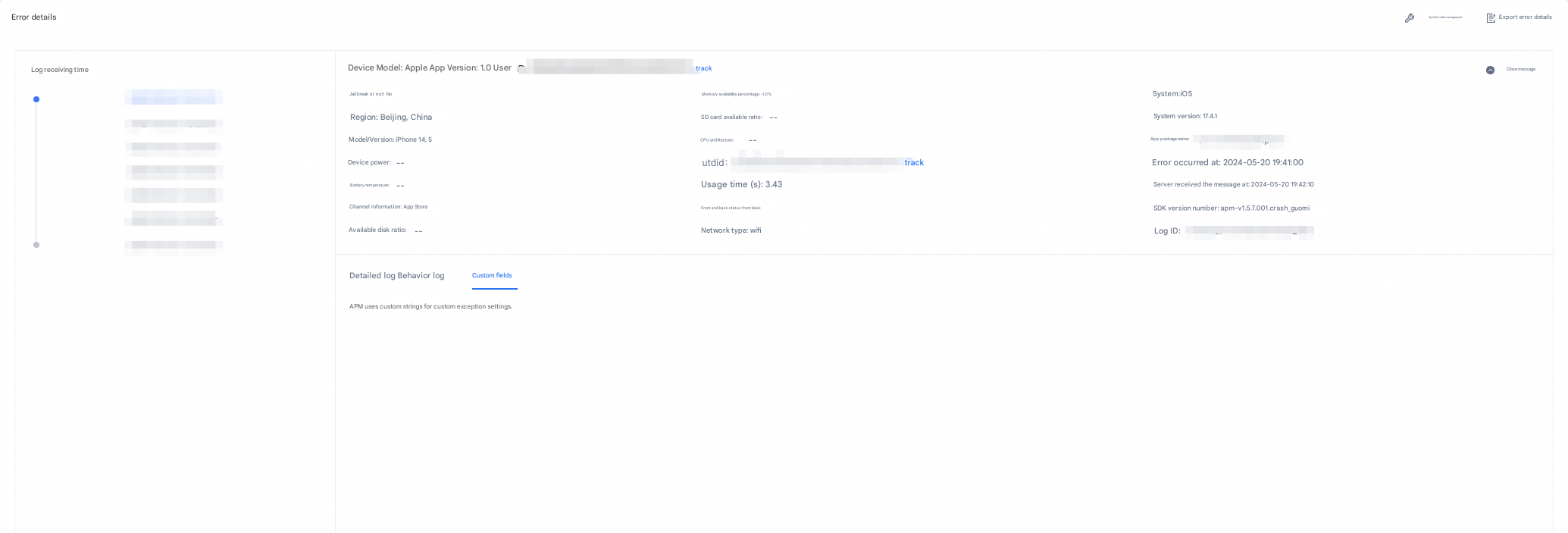
Optional: crash callback. You can view crash callbacks on the Error Details > Custom Fields tab.
When a crash occurs, this callback lets you attach business-context data. The interface returns a string that is written to the crash file and uploaded to the server. The string is limited to 256 characters.
Callback interface:
// The return string cannot be larger than 256 bytes. The larger part will be truncated.
+(void)setCrashCBBlock:(CallbackBlock_Nullable)cbBlock;
Example:
#import <UMAPM/UMCrashConfigure.h>

[UMCrashConfigure setCrashCBBlock:^NSString*_Nullable{

    return @ "Custom string on crash";
}];
After the data is uploaded, you can view the callback information on the Error Details > Custom Fields tab.
The following figure shows an example:
Note the following when testing:
1. The app must not be in debug mode when a crash is triggered.
2. The crash log is uploaded on the next startup, which also must not be in debug mode.
Both steps require debug mode to be disabled. Otherwise, crash monitoring and identification are affected.
In Release mode, connecting the test device to Xcode via a data cable also affects data reporting.
2.2 custom exceptions
Upload custom exceptions.
Interface functions:
/**
 * Report custom errors
 * The length of the @ name name must be no more than 256 bytes.
 * @reason The length of the cause of the error is limited to 256 bytes, which exceeds truncation.
 * @stackTrace The length of the stack is within the limit of 100*1024 bytes, which exceeds truncation.
 *
 * @example:
 * // The unique identifier of the log type.
 NSString* name = @"myUnity";
 NSString* reason = @"csharp exception";

 NSArray* stackTrace = [NSArray arrayWithObjects:
 @"msg: Exception: Exception, Attempted to divide by zero.",
 @"UnityDemo+ExceptionProbe.NormalException () (at <unknown>:0)",
 @"UnityDemo.TrigException (System.Int32 selGridInt) (at <unknown>:0)",
 @"UnityDemo.OnGUI () (at <unknown>:0)",
 nil];
 *
 *[UMCrashConfigure reportExceptionWithName:name reason:reason stackTrace:stackTrace];
 *
 *
 */
+(void)reportExceptionWithName:(NSString* _Nonnull)name reason:(NSString* _Nonnull)reason stackTrace:(NSArray* _Nonnull)stackTrace;
Example:
#import <UMAPM/UMCrashConfigure.h>

NSString* name = @"myUnity";
NSString* reason = @"csharp exception";

NSArray* stackTrace = [NSArray arrayWithObjects:
 		       @"msg: Exception: Exception, Attempted to divide by zero.",
 		       @"UnityDemo+ExceptionProbe.NormalException () (at <unknown>:0)",
                       @"UnityDemo.TrigException (System.Int32 selGridInt) (at <unknown>:0)",
 		       @"UnityDemo.OnGUI () (at <unknown>:0)",
                       nil];

[UMCrashConfigure reportExceptionWithName:name reason:reason stackTrace:stackTrace];
Feature demonstration example: 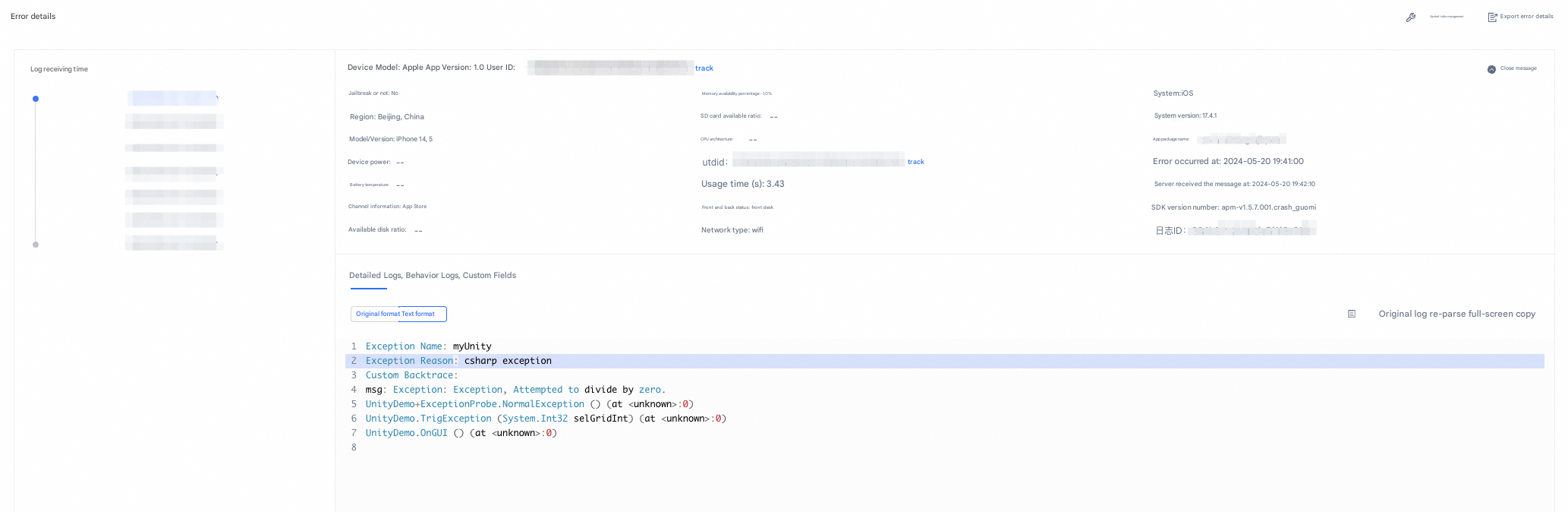
2.3 Freeze Analysis
To enable freeze analysis, you must integrate the UMAPM.framework and UMEFS.framework libraries.
Set the crashAndBlockMonitorEnable option to YES to enable the freeze module.
Example:
#import <UMAPM/UMAPMConfig.h>
#import <UMAPM/UMCrashConfigure.h>
#import <QTCommon/QTCommon.h>

- (BOOL)application:(UIApplication *)application didFinishLaunchingWithOptions:(NSDictionary *)launchOptions {

    UMAPMConfig* config = [UMAPMConfig defaultConfig];
    config.crashAndBlockMonitorEnable = YES;
    [UMCrashConfigure setAPMConfig:config];

    [QTConfigure setCustomDomain:@"Your collection service domain name" standbyDomain:@""];
    [QTConfigure initWithAppkey:@"Your appkey" channel:@"App Store"];
}
2.4 Startup analysis
2.4.1 Definition of startup phase
Startup monitoring covers cold start and warm start:
Cold start
By default, the following four predefined phases are monitored:
-
Pre-initialization: from process start (exec) to the designated +load execution.
-
Initialization: from the designated +load to the finishLaunching phase.
-
Application build: from finishLaunching to FirstVC.viewDidLoad(). Child views must also be built in viewDidLoad.
-
First page load: from FirstVC.viewDidLoad() to FirstVC.viewDidAppear().
Warm start
-
From applicationWillEnterForeground() to applicationDidBecomeActive().
2.4.2 Monitoring methods
Startup monitoring supports automatic and manual modes.
You can use both modes together. Manual tracking takes precedence.
2.4.2.1 Automatic Mode
Initialize the appkey to get started.
Optionally, set the first ViewController to ensure the cold-start first-page loading time is measured correctly.
The related API is as follows:
+(void)setRootVCCls:(Class)cls;// DidFinishLaunching the first sentence to set the RootViewControllerExample:
#import <UMAPM/UMLaunch.h>

[UMLaunch setRootVCCls:[ViewController class]];
Note:
If not set, we will look for [UIApplication sharedApplication] delegate's window rootViewController for the monitor lifecycle.
2.4.2.2 Manual Mode
Manual mode only supports tracking during the cold start / first-launch phase.
The related API is as follows:
/*
 * Manually set three predefined end times (the initialization duration ends, the application building duration ends, and the page loading duration ends). * /
+(void)setPredefineLaunchType:(UMPredefineLaunchType)predefineLaunchType;
The three predefined cold-start phase tracking points are:
1. End of initialization (UMPredefineLaunchType_DidFinishLaunchingEnd).
2. End of application build (UMPredefineLaunchType_ViewDidLoadEnd).
3. End of first-page load (UMPredefineLaunchType_ViewDidAppearEnd).
The corresponding enumeration variables are:
// The predefined type of the cold start.
typedef NS_ENUM(NSInteger,UMPredefineLaunchType){
 UMPredefineLaunchType_DidFinishLaunchingEnd,// set in the last sentence of the didFinishLaunchingWithOptions
 UMPredefineLaunchType_ViewDidLoadEnd,// the last call to the viewDidLoad function of the first ViewController
 UMPredefineLaunchType_ViewDidAppearEnd // the last call to the viewDidAppear function of the first ViewController
};
Example on the end of the initialization duration
Place the tracking point at the end of the didFinishLaunchingWithOptions callback to ensure accuracy.
#import <UMAPM/UMLaunch.h>

- (BOOL)application:(UIApplication *)application didFinishLaunchingWithOptions:(NSDictionary *)launchOptions {

   [QTConfigure initWithAppkey:@"Your AppKey" channel:@"App Store"];

   // bury the last point in the didFinishLaunchingWithOptions to ensure accuracy
   [UMLaunch setPredefineLaunchType:UMPredefineLaunchType_DidFinishLaunchingEnd];

   return YES;
}
Example on the end of the first page loading duration
Place the tracking point in the viewDidAppear function of the first ViewController to ensure accuracy.
#import <UMAPM/UMLaunch.h>

- (void)viewDidAppear {

  [super viewDidAppear];

  // The last tracking point in viewDidAppear.
  [UMLaunch setPredefineLaunchType:UMPredefineLaunchType_ViewDidAppearEnd];
 }
Custom stage tracking point
Custom stage tracking is available only during the cold start phase. Use it to measure the execution time of a specific function or code block for finer-grained startup analysis.
Note:
1. beginLaunch and endLaunch must be called in pairs.
2. Both must be called before the viewDidAppear method. Calls made after viewDidAppear are ignored.
3. Each beginLaunch / endLaunch parameter must not exceed 10 characters.
4. A maximum of 10 beginLaunch / endLaunch pairs are allowed. Pairs beyond this limit are discarded.
The related API is as follows:
/*
 * Users set their own custom phase in the cold or hot start phase
 * @note BeginLaunch and endLaunch must be called together.
 * If the call time period is not called before the end of the page loading duration, it will not be reported.
 */
+ (void)beginLaunch:(NSString *)methodName;
+ (void)endLaunch:(NSString *)methodName;
Example:
#import <QTCommon/QTCommon.h>
#import <UMAPM/UMLaunch.h>

- (BOOL)application:(UIApplication *)application didFinishLaunchingWithOptions:(NSDictionary *)launchOptions {

    [UMLaunch beginLaunch:@"initCommon"];
    [QTConfigure initWithAppkey:@"Your AppKey" channel:@"App Store"];
    [UMLaunch endLaunch:@"initCommon"];
    [UMLaunch setPredefineLaunchType:UMPredefineLaunchType_DidFinishLaunchingEnd];

    return YES;
}
2.5 Network Analysis
2.5.1 Network analysis scope
-
The network module supports the iOS URL Loading System on iOS 8 and later.
-
NSURLSession supports capturing most common HTTP and HTTPS network requests.
-
NSURLConnection APIs (used in earlier iOS versions) and socket-level capture are not supported.
-
All versions of AFNetworking are supported.
Note: Integrating a third-party SDK that uses NSURLProtocol may cause crashes due to system-version incompatibility. For more information, see Section 2.5.3.
2.5.2 Captured data
The network module captures the start and end time of each network stage, upstream and downstream traffic, and the corresponding URL.
Note:
Enable the network configuration before the app initiates any network requests. Otherwise, some requests may not be captured.
Conflicts may occur when this network library is used alongside other third-party network libraries, which can cause the network module to malfunction.
1. Review the enableNetworkForProtocol function description and call it as needed.
Example:
#import <UMEFS/UMEFS.h>
#import <UMEFS/UMEFSConfig.h>
#import <UMEFS/UMEFSConfigure.h>
#import <QTCommon/QTCommon.h>

- (BOOL)application:(UIApplication *)application didFinishLaunchingWithOptions:(NSDictionary *)launchOptions {

    NSLog(@"UMEFS version:%@",[UMEFSConfigure getVersion]);
    UMEFSConfig* configForEFS = [UMEFSConfig defaultConfig];
    configForEFS.networkEnable = YES;
    configForEFS.launchMonitorEnable = YES;
    configForEFS.memMonitorEnable = YES;
    configForEFS.javaScriptBridgeEnable = YES;
    configForEFS.oomMonitorEnable = YES;
    [UMEFSConfigure setAPMConfig:configForEFS];

    [QTConfigure setCustomDomain:@"Your collection service domain name" standbyDomain:@""];
    [QTConfigure initWithAppkey:@"Your AppKey" channel:@"App Store"];

    return YES;
}
2. Check whether the log check takes effect
When the network module is active, Xcode prints the following log. If UMAPM_NetworkSampling shows YES, the network module is enabled and sampling is in effect.
2021-09-13 14:24:24.962273+0800 QTAPMDemo[386:36277] UMAPM_NetworkEnable(1:1):1 2021-09-13 14:24:24.977290+0800 QTAPMDemo[386:36277] UMAPM_NetworkSampling(1,1):YES
After the log appears, send a network request to verify that the backend receives it. Use the following sample code. After the request is sent, check the corresponding URL on the backend console.
// Because the Get request is cached, the content of the response is directly obtained and returned locally.
#define NetworkURL @"https://www.aliyun.com/"

NSMutableURLRequest *request = [[NSMutableURLRequest alloc] initWithURL:[NSURL URLWithString:NetworkURL]];
request.HTTPMethod = @"GET";
[request addValue:@"application/html" forHTTPHeaderField:@"Content-Type"];

NSURLSessionDataTask* dataTask = [[NSURLSession sharedSession] dataTaskWithRequest:request completionHandler:^(NSData * _Nullable data, NSURLResponse * _Nullable response, NSError * _Nullable error) {

  if (data) {
      NSString* str = [[NSString alloc] initWithData:data encoding:NSUTF8StringEncoding];
      NSLog(@"str:%@",str);
  } else if (error) {
      NSLog(@"error:%@",error);
  }
}];
[dataTask resume];
2.5.3 NSURLProtocol compatibility
A dedicated switch is provided for the network analysis module on iOS 13 and earlier to prevent crashes caused by conflicts between NSURLProtocol and the APM SDK network module. Use the enableNetworkForProtocol function.
For details on the issue, see: https://developer.umeng.com/docs/193624/detail/352123
Function description:
/**
 * @brief sets the separate switch of APM's network module for iOS13 and below systems to avoid crashes caused by conflicts between network modules that integrate NSURLProtocol and APM SDK at the same time.
 * If you need to call this operation, call this operation before you initialize the network module of the APM SDK.
 *
 * @param enable specifies the switch. YES: captures iOS13 and the following specific network requests. This is enabled by default. NO: iOS 13 and the following specific network requests are not captured.
 *
 * @note Cause: If you integrate NSURLProtocol and the network module of APM SDK, you initialize the network module of APM SDK first, and then initialize registerClass of NSURLProtocol, which will cause the crash in iOS13 and later versions. Currently, it can be determined that the problem is caused by iOS system API, and iOS14 does not have this problem. (Initialize the registerClass of NSURLProtocol first, and then initialize the network module of APM SDK, which will not cause problems.)
 * Compatible with iOS13 and the following initialization codes:
 * @example:
 * // Make sure that NSURLProtocol is initialized in the APM SDK.
 * [NSURLProtocol registerClass:[UMURLProtocol class]];
 * UMAPMConfig* config = [UMAPMConfig defaultConfig];
 * config.networkEnable = YES;
 * [UMCrashConfigure setAPMConfig:config];
 * [QTConfigure initWithAppkey:@"Your AppKey" channel:@"App Store"];
 *
 * @note
 * This switch is turned on by default. When you integrate the network modules of both NSURLProtocol and APM SDK, you can call this switch as needed. If you follow the preceding initialization sequence, you do not need to call this switch.
 *
 * @note After this function is disabled and takes effect, the network module will not be completely disabled, but specific network requests will not be captured. If developers can know the scenario of integrating NSURLProtocol and APM network modules at the same time, it is recommended to adjust the initialization smoothly to be compatible with all scenarios and test compatibility in iOS13 and below versions.
 * @note: In other scenarios, you do not need to call this function.
 */
+(void)enableNetworkForProtocol:(BOOL)enable;
Example:
#import <UMEFS/UMEFSConfigure.h>

[UMEFSConfigure enableNetworkForProtocol:YES];
2.6 Memory Analysis
Before you initialize the SDK, set the memMonitorEnable property of the UMEFSConfig instance to YES. By default, this property is enabled.
#import <UMEFS/UMEFS.h>
#import <UMEFS/UMEFSConfig.h>
#import <UMEFS/UMEFSConfigure.h>
#import <QTCommon/QTCommon.h>

- (BOOL)application:(UIApplication *)application didFinishLaunchingWithOptions:(NSDictionary *)launchOptions {

    UMEFSConfig* configForEFS = [UMEFSConfig defaultConfig];
    configForEFS.networkEnable = YES;
    configForEFS.launchMonitorEnable = YES;
    configForEFS.memMonitorEnable = YES;
    configForEFS.javaScriptBridgeEnable = YES;
    configForEFS.oomMonitorEnable = YES;
    configForEFS.pageMonitorEnable = YES;
    [UMEFSConfigure setAPMConfig:configForEFS];

    [QTConfigure setCustomDomain:@"Your collection service domain name" standbyDomain:@""];
    [QTConfigure initWithAppkey:@"Your AppKey" channel:@"App Store"];

    return YES;
}
2.7 OOM exception
Set the oomMonitorEnable option to YES to enable the OOM module.
Note:
1. The app must not be in debug mode when an OOM is triggered.
2. OOM data is uploaded on the next startup, which also must not be in debug mode.
Both steps require debug mode to be disabled. Otherwise, OOM monitoring and identification are affected.
To enable the OOM module, you must integrate the UMAPM.framework and UMEFS.framework libraries.
In Release mode, connecting the test device to Xcode via a data cable also affects data reporting.
Example:
#import <UMEFS/UMEFS.h>
#import <UMEFS/UMEFSConfig.h>
#import <UMEFS/UMEFSConfigure.h>
#import <QTCommon/QTCommon.h>

- (BOOL)application:(UIApplication *)application didFinishLaunchingWithOptions:(NSDictionary *)launchOptions {

    UMEFSConfig* configForEFS = [UMEFSConfig defaultConfig];
    configForEFS.networkEnable = YES;
    configForEFS.launchMonitorEnable = YES;
    configForEFS.memMonitorEnable = YES;
    configForEFS.javaScriptBridgeEnable = YES;
    configForEFS.oomMonitorEnable = YES;
    configForEFS.pageMonitorEnable = YES;
    [UMEFSConfigure setAPMConfig:configForEFS];

    [QTConfigure setCustomDomain:@"Your collection service domain name" standbyDomain:@""];
    [QTConfigure initWithAppkey:@"Your appkey" channel:@"App Store"];

    return YES;
}
2.8 H5 page analysis
Before you initialize the SDK, set the javaScriptBridgeEnable property of the UMEFSConfig instance to YES. By default, this parameter is enabled.
#import <UMEFS/UMEFS.h>
#import <UMEFS/UMEFSConfig.h>
#import <UMEFS/UMEFSConfigure.h>
#import <QTCommon/QTCommon.h>

- (BOOL)application:(UIApplication *)application didFinishLaunchingWithOptions:(NSDictionary *)launchOptions {

    UMEFSConfig* configForEFS = [UMEFSConfig defaultConfig];
    configForEFS.javaScriptBridgeEnable = YES;
    [UMEFSConfigure setAPMConfig:configForEFS];

    [QTConfigure initWithAppkey:@"Your AppKey" channel:@"App Store"];

    return YES;
}
After integrating the APM SDK with the H5 page embedded in your app, set the app package name whitelist. In the bridging scenario, you do not need to configure a receiving domain for the H5 page.
Example:
import { init } from '@umengfe/apm';
init({
  pageFilter: {
    mode: 'ignore',
    rules: []
  },
  pid: 'Your AppKey',
  pkgList:['Your app package nay']
});
2.9 Native page analysis
Module switch
Before you initialize the SDK, set the pageMonitorEnable property of the UMEFSConfig instance to YES. By default, this parameter is enabled.
#import <UMEFS/UMEFS.h>
#import <UMEFS/UMEFSConfig.h>
#import <UMEFS/UMEFSConfigure.h>
#import <QTCommon/QTCommon.h>

UMEFSConfig* configForEFS = [UMEFSConfig defaultConfig];
configForEFS.pageMonitorEnable = YES;
[UMEFSConfigure setAPMConfig:configForEFS];

// Initialize QTConfigure.
[QTConfigure initWithAppkey:@"Your AppKey" channel:@"App Store"];
Custom tracking point
Use custom tracking points to measure the execution time of a function or code block for finer-grained page analysis.
Note:
1. trackBegin and trackEnd must be called in pairs.
2. Both must be called before viewDidAppear ends. Calls made after viewDidAppear are ignored.
3. Each trackBegin / trackEnd parameter must not exceed 10 characters.
4. A maximum of six trackBegin / trackEnd pairs are allowed per methodName.
@interface UMPage : NSObject

+ (void)trackBegin:(NSString *)methodName viewController:(UIViewController *)vc;
+ (void)trackEnd:(NSString *)methodName viewController:(UIViewController *)vc;

@end
2.10 Log recovery
2.10.1 Module switch
Before you initialize the SDK, set the logCollectEnable property of the UMEFSConfig instance to YES. By default, this parameter is enabled.
If you need a custom user ID (identifying ID), you can set the logCollectUserId:
-
The logCollectUserId is valid within the lifecycle of a single cold start and cannot be changed.
-
logCollectUserId length cannot exceed 128 bytes
2.10.2 Log tracking interface
The log tracking interface provides five log severity levels. You can filter logs by level on the platform.
@interface UAPMLog : NSObject

+ (void)verbose:(NSString *)tag format:(NSString *)format, ... NS_FORMAT_FUNCTION(2,3);

+ (void)debug:(NSString *)tag format:(NSString *)format, ... NS_FORMAT_FUNCTION(2,3);

+ (void)info:(NSString *)tag format:(NSString *)format, ... NS_FORMAT_FUNCTION(2,3);

+ (void)warn:(NSString *)tag format:(NSString *)format, ... NS_FORMAT_FUNCTION(2,3);

+ (void)error:(NSString *)tag format:(NSString *)format, ... NS_FORMAT_FUNCTION(2,3);

@end
Import the header file:
#import <UMEFS/UAPMLog.h>Parameter limits:
-
Tag limit: 64 bytes
-
msg limit: 1024 bytes
Example:
[UAPMLog verbose:@"verbose_test" format:@"Test verbose type logs"];
[UAPMLog debug:@"debug_test" format:@"Test debug log"];
[UAPMLog info:@"info_test" format:@"Test info type log"];
[UAPMLog warm:@"warn_test" format:@"Test a warm log"];
[UAPMLog error:@"error_test" format:@"Test error type log"];
2.11 Front-to-back end tracing
This feature is not required. To use this feature, you need to access the EFS SDK 2.3.0 version or later.
This feature injects custom headers into HTTP requests initiated by iOS applications to support front-to-back end tracing scenarios.
Call example
#import <UMEFS/UMEFS.h>
#import <UMEFS/UMEFSConfig.h>
#import <UMEFS/UMEFSConfigure.h>
#import <QTCommon/QTCommon.h>

- (BOOL)application:(UIApplication *)application didFinishLaunchingWithOptions:(NSDictionary *)launchOptions {

    UMEFSConfig* configForEFS = [UMEFSConfig defaultConfig];
    ...
    configForEFS.rumConfig = @{
        @"injectTraceHeader": @"traceparent",
        @"needTracedUrls":@[@"/v1/trace", @"^/v1/trace$", ...],
        @"ignoredUrls": @[@"/v1/trace", @"^/v1/trace$", ...],
    };
    [UMEFSConfigure setAPMConfig:configForEFS];

    [QTConfigure setCustomDomain:@"Your collection service domain name" standbyDomain:@""];
    [QTConfigure initWithAppkey:@"Your appkey" channel:@"App Store"];

    return YES;
}
Detailed Description
|
Property |
Meaning |
Default |
Type |
|
injectTraceHeader |
The SDK injects the specified request header into iOS network requests and auto-generates the relevant protocol fields. |
Empty |
Enumeration Value
|
|
needTracedUrls |
URL whitelist for end-to-end monitoring. Empty by default. |
nil. When set, only request URLs matching the rules receive the injected header. |
Array type, element support
|
|
ignoredUrls |
URL blacklist for end-to-end monitoring. Empty by default. |
null. When set, request URLs matching the rules are excluded from header injection. |
Array type, element support
|
|
injectSDKRequest |
Whether to inject the request header into SDK internal requests. Default: NO (no injection). |
NO. The request header is not injected into SDK internal request URLs. |
Boolean type |
3. Configure the symbol table
3.1 What is a symbol table
A symbol table maps memory addresses to function names, file names, and line numbers. Each entry has the format: <start address> <end address> <function> [<file name: line number>]. To quickly and accurately locate the crash code location, the symbol table is used to parse and restore the crash stack.
3.2 Why upload a symbol table
Upload a symbol table so the system can parse and restore crash stacks to pinpoint the crash code location.
Example:
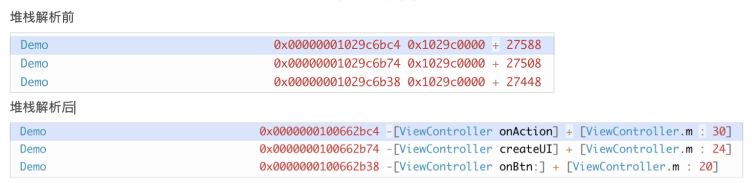
Performance monitoring provides a manual upload of symbol tables
3.3 iOS symbol table configuration
What is a dSYM file?
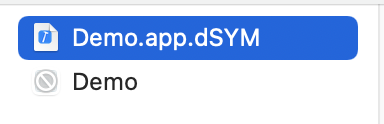
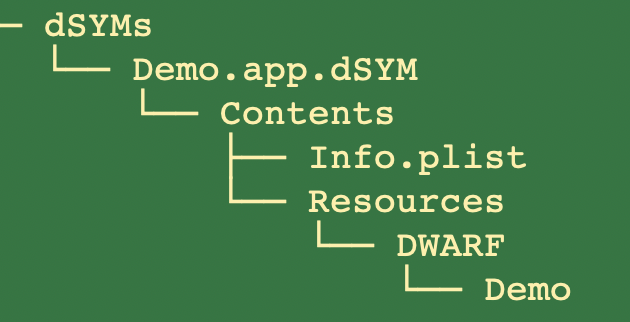
In iOS, dSYM files are object files that contain debug information. They store file names, method names, and line numbers. dSYM files map hexadecimal function addresses in executable files, enabling crash file analysis to obtain specific crash information. The file name is typically: xxx.app.dSYM, where xxx is the application binary name, as shown below:
You can view the dSYM file and the directory schema in the Xcode package.
How to locate the dSYM file:
Locate in Project
In most cases, the compiled dSYM file is in the same directory as the app file. The following steps describe how to locate it using Xcode.
-> Enter XCode;
-> Open the project (compiled);
-> Find the "Product" item in the left column;
-> Right-click xxx.app
-> Click "Show in Finder";
As shown in the following figure:
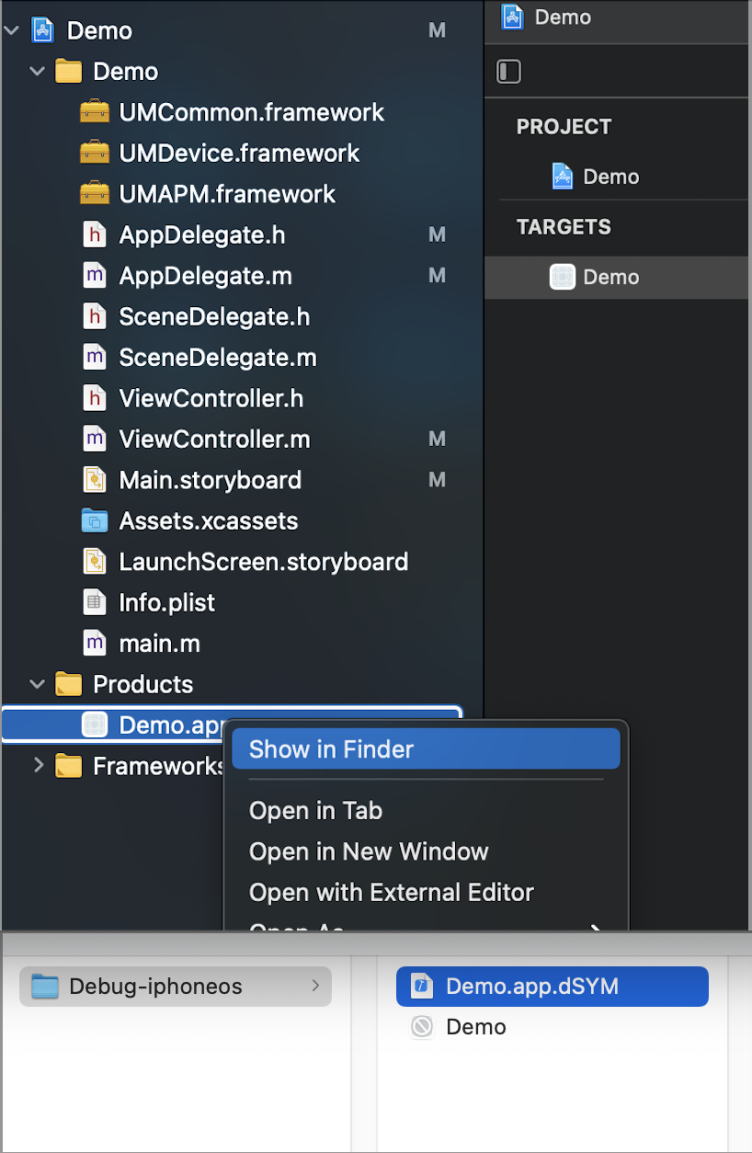
If you have multiple dSYM files, you can specify the directory where the dSYM files are located or the project directory when you use the tool.
3.4 Other symbol table issues
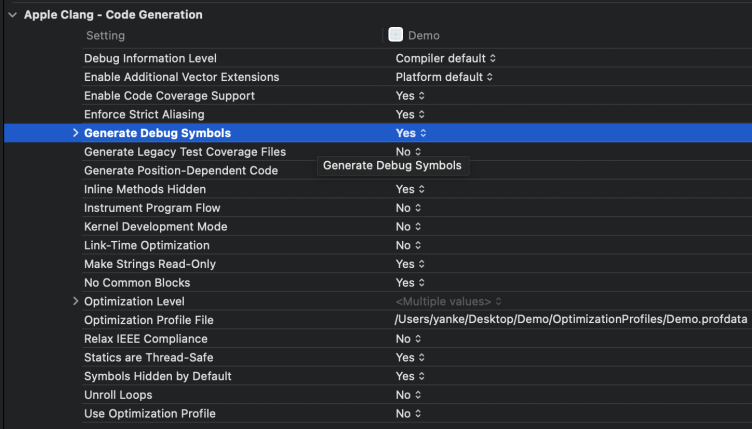
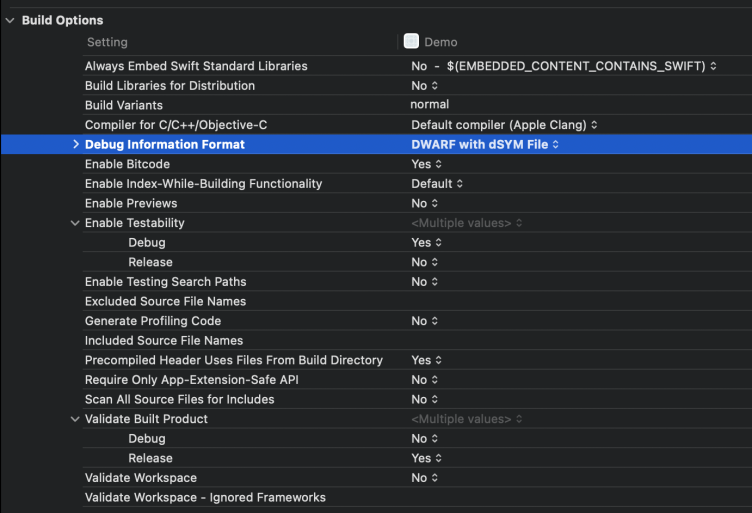
1. No dSYM file generated after Xcode compilation?
By default, Xcode generates a dSYM file for Release builds but not for Debug builds. Configure the following Xcode settings:
XCode -> Build Settings -> Code Generation -> Generate Debug Symbols -> Yes
XCode -> Build Settings -> Build Option -> Debug Information Format -> DWARF with dSYM File
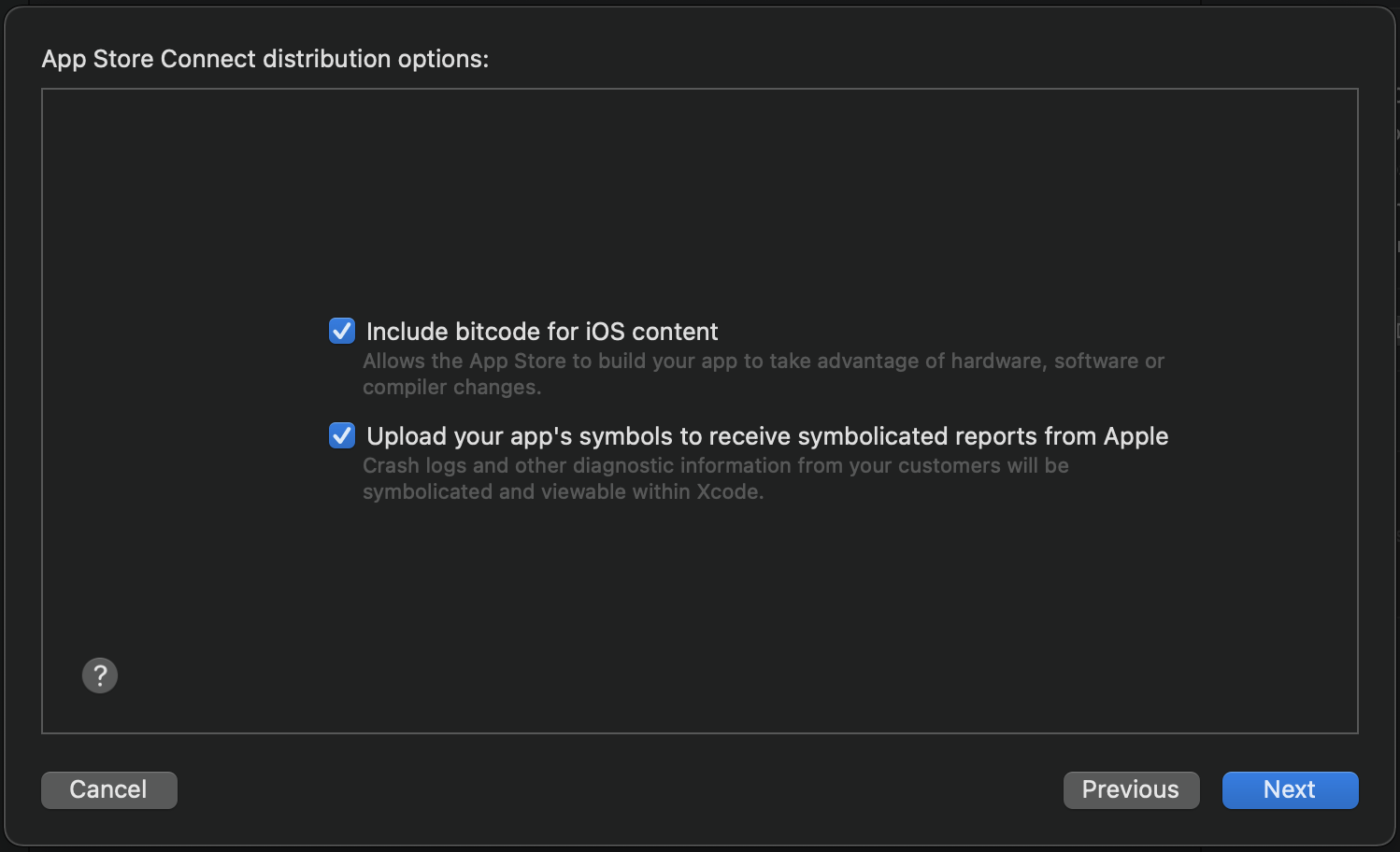
2. What do I need to pay attention to after I enable Bitcode?
-
When uploading to the App Store, declare that the symbol file (dSYM file) should be generated:
-
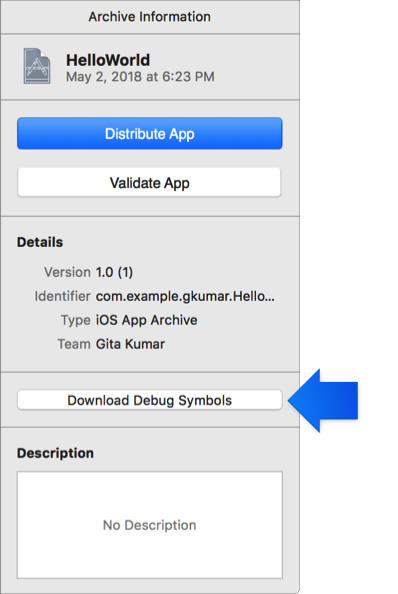
Before configuring the symbol table file, download the dSYM file for this version from the App Store, as shown below.
Note:
Do not use locally generated dSYM files to create symbol table files. Local compilation hides symbol table information, so using these files produces restored results like "__hidden#XXX".
3. How to verify that the dSYM file matches the UUID in the crash stack?
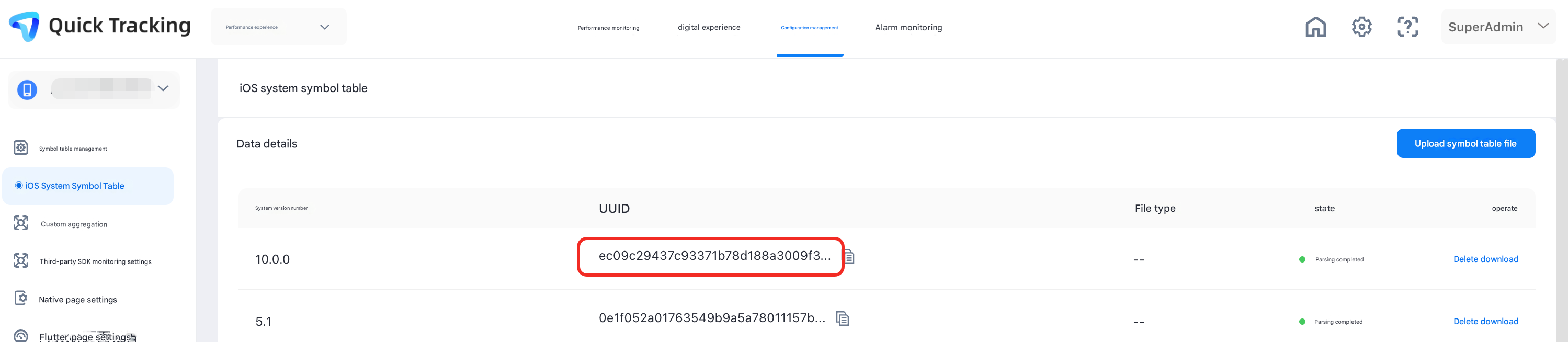
To accurately restore a crash stack, the UUID of the uploaded symbol table file must match the UUID of the corresponding app. Only matching UUIDs produce correct stack restoration.
Verify that the UUID shown in APM Symbol Table Management matches the UUID in the Binary Images section of the crash stack. Trailing zeros in the Symbol Table Management UUID can be ignored.

4. How to view the UUID of a dSYM file?
Run the following command to view the UUID:
xcrun dwarfdump --uuid <dSYM file>
View the UUID of a symbol table file:
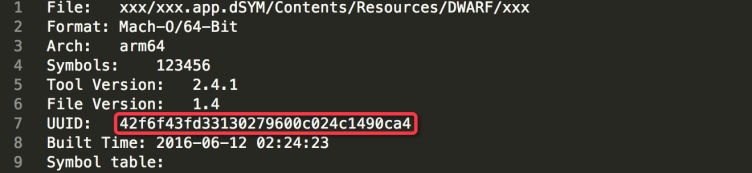
The UUID of the symbol table file matches the dSYM file UUID. View it using the symbol table tool:
Generate a symbol table file (.zip) ---> Decompress the symbol table file (.symbol) ---> Use a text editor to open the symbol table file
For large symbol table files, use a text editor such as Sublime Text to open them.
5. How to retrieve the dSYM file for an app published to the App Store?
Retrieve via Xcode:
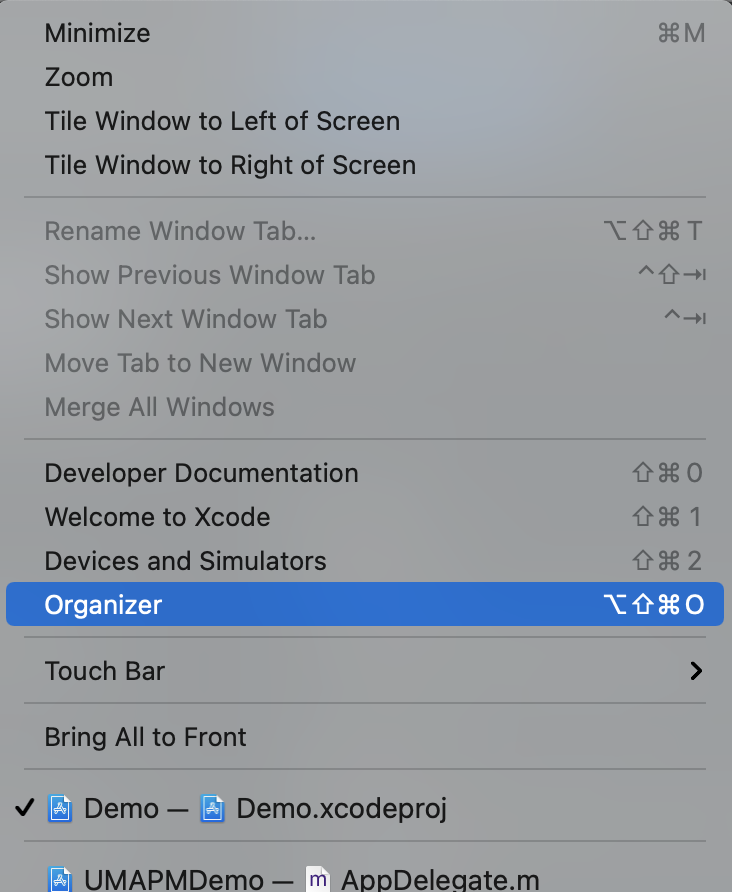
1. Open the Xcode top menu bar-> Window -> Organizer window:
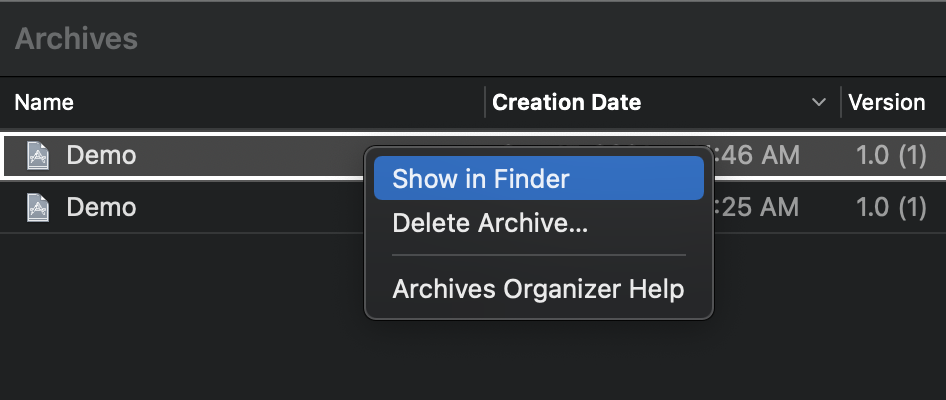
2. Find the published archive package, right-click the archive package, and then select Show in Finder.
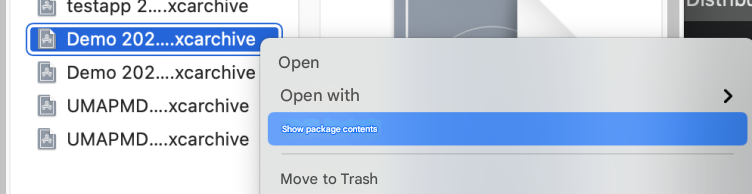
3. Right-click the target archive file and choose Show Package Content from the shortcut menu.
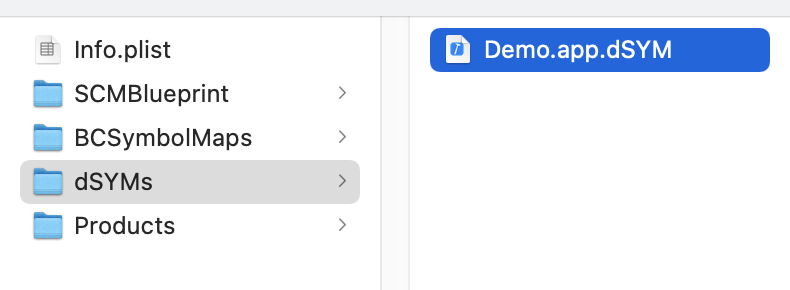
4. Select the dSYMs directory. The directory contains the downloaded dSYM file.
Retrieve via iTunes Connect:
1. Log on to the iTunes Connect;
2. Go to the TestFlight page.
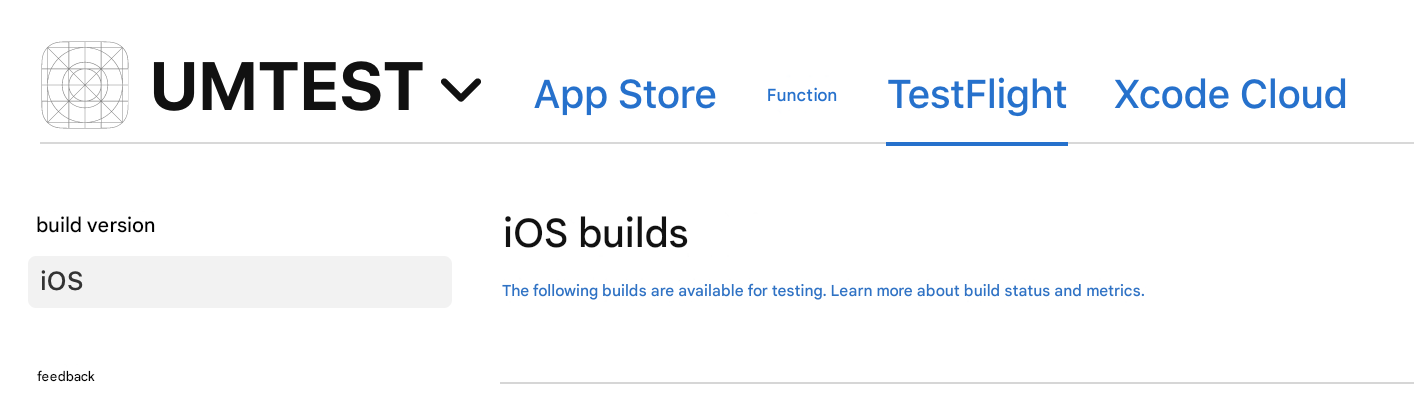
3. Select a version and click Download dSYM to download the dSYM file.
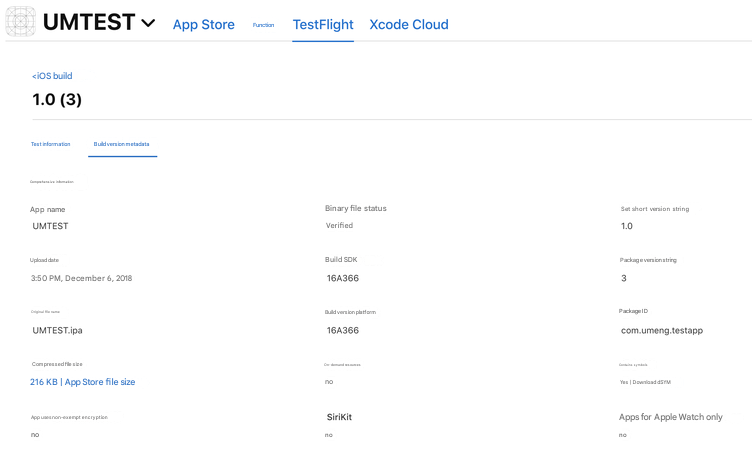
Retrieve via the mdfind tool:
On the U-APM error details page, find the crash UUID.
Then run the mdfind command in the Mac shell to locate the dSYM file:
mdfind"com_apple_xcode_dsym_uuids == <UUID>"
Note: If you use mdfind, you must convert the UUID to the following format: 12345678-1234-1234-1234-xxxxxxxxxx
For example, if the UUID of the dSYM file is: E30FC309DF7B3C9F8AC57F0F6047D65F, run the following command to locate the dSYM file:
mdfind"com_apple_xcode_dsym_uuids == E30FC309-DF7B-3C9F-8AC5-7F0F6047D65F"|12345678-1234-1234-1234-xxxxxxxxxxxx|
Back up the dSYM file every time you build or publish an app version.

Supported upload method: manual upload in the console (up to 400 MB).
3.5 Using the symbol table in the product
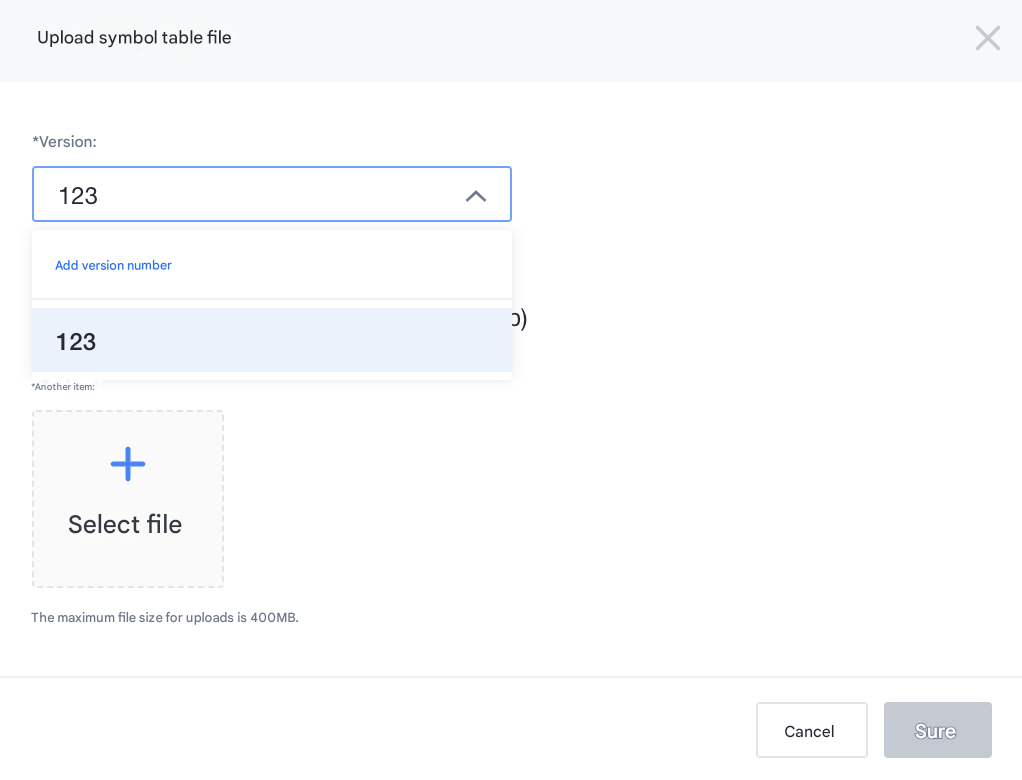
Version selection
Select a version from the drop-down list or enter one manually.
-
If error data for a version has already been reported to U-APM, select the version from the symbol table upload drop-down list.
-
For a new version, manually enter the exact version number and click Add Version Number.
-
Compress the symbol table files together as described in the documentation.
-
Log on to the platform, find the application for which you want to upload the symbol table, and click Settings to go to the Application Settings page.
-
Click Upload to upload the compressed symbol table file.