Overview of SDK access
Step | Integrated content | Location in this article | Required |
The first step | Obtain the SDK | View "Step 1 Download SDK" | Required |
Step 2 | Development configuration | View the "Step 2: Configure a whitelist for a mini program domain name" | Required |
Step 3 | SDK integration | View the document "Step 3 Integration-Mode 1 and Mode 2, and choose the integration method according to your own mini program" | Required |
Step 4 | Set initialization parameters | View the document [Step 3 initialization parameter description-appKey, set the unique identifier of the application " | Required |
View the document [Step 3 Initialize parameter description-dsn, set the receiving service address " | Required |
You need to obtain the appKey before integration.
1. Download the SDK
Download the SDK installation package, decompress the ZIP package, and put it in the source code project of the mini program for reference.
2. Development configuration
2.1 WeChat Mini Program Background Configuration
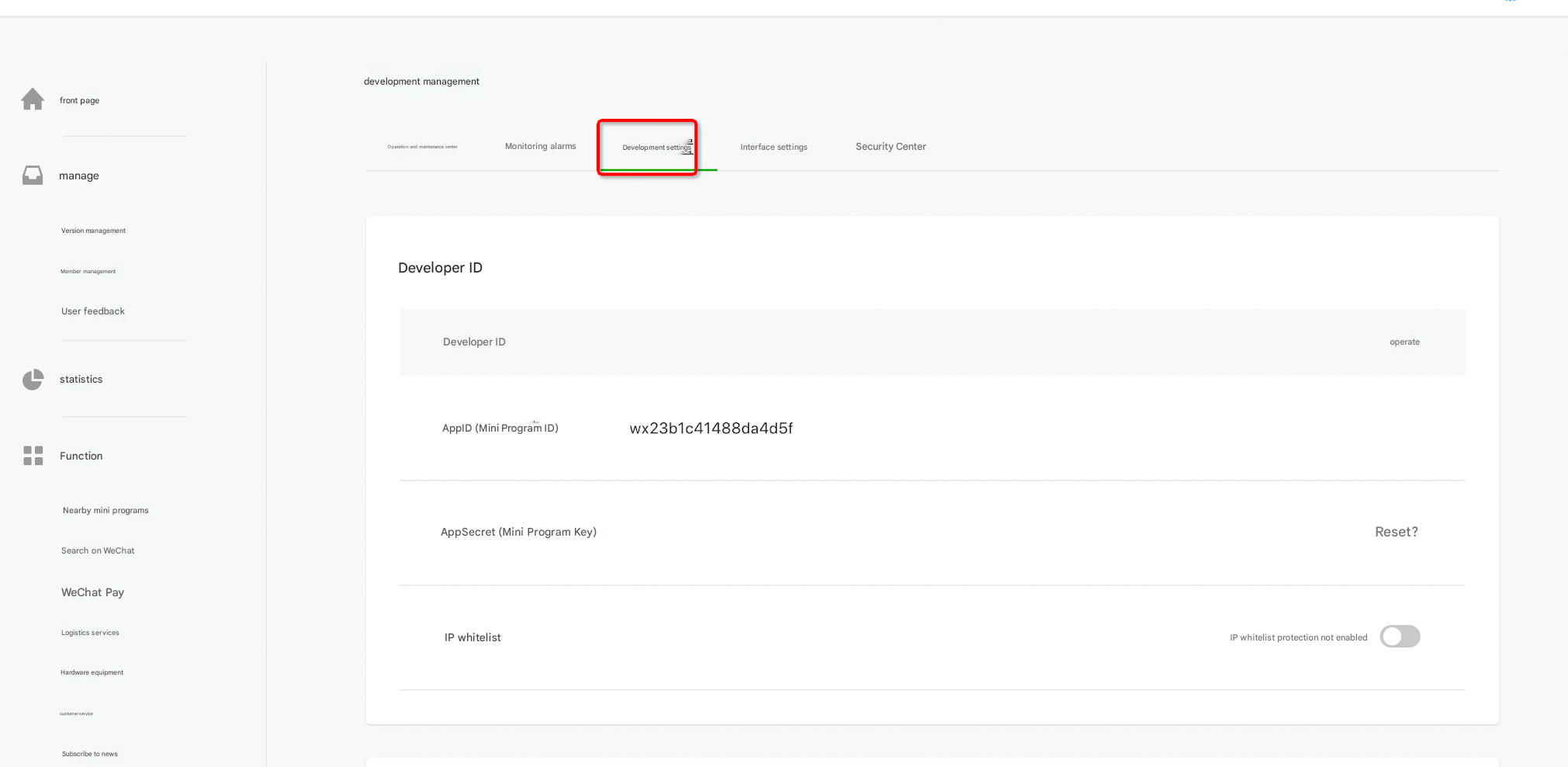
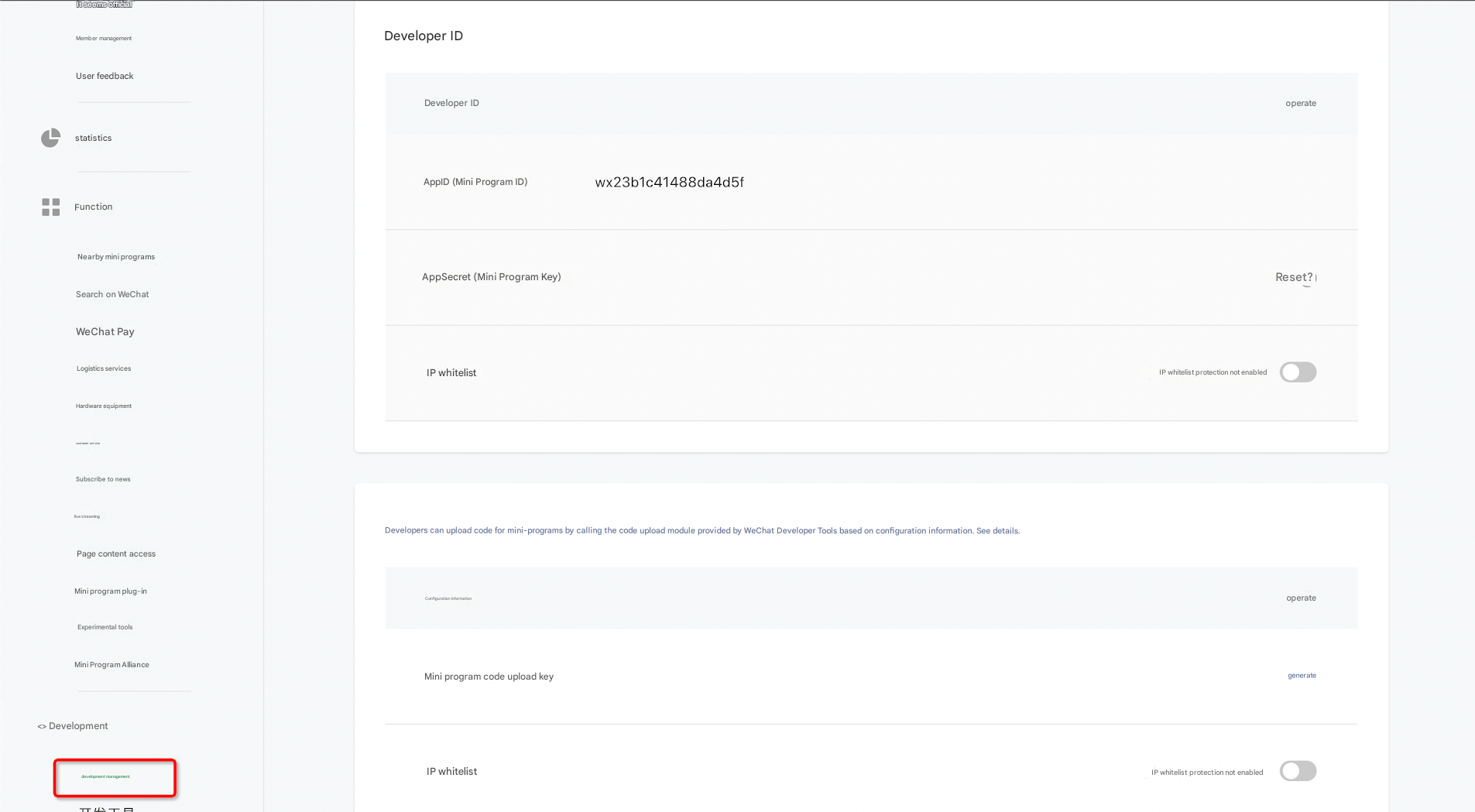
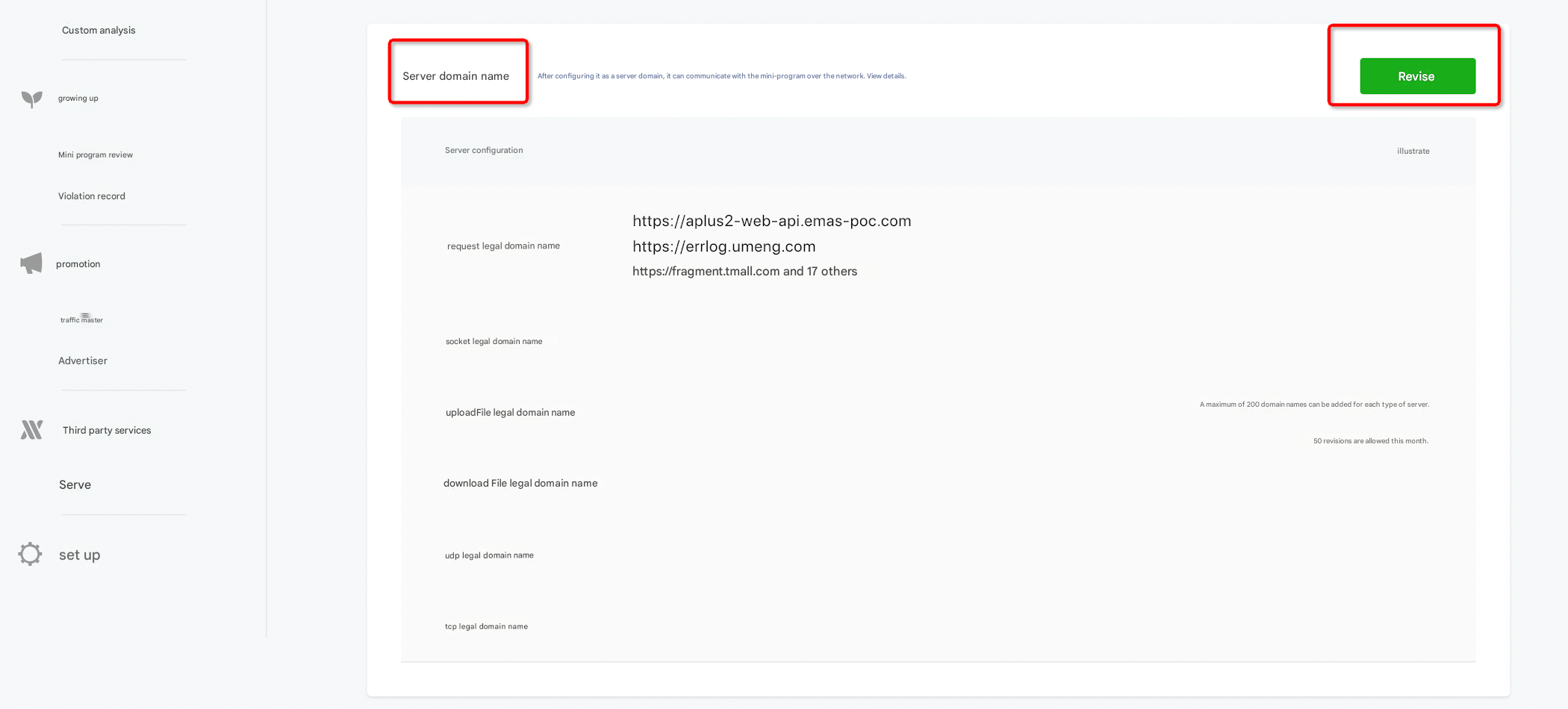
Add the domain name whitelist of the WeChat mini program.
Operation entry: Development Management-Development Settings-Server Domain Name-Modify-Enter the request valid domain name
The following figure shows the operation in WeChat:
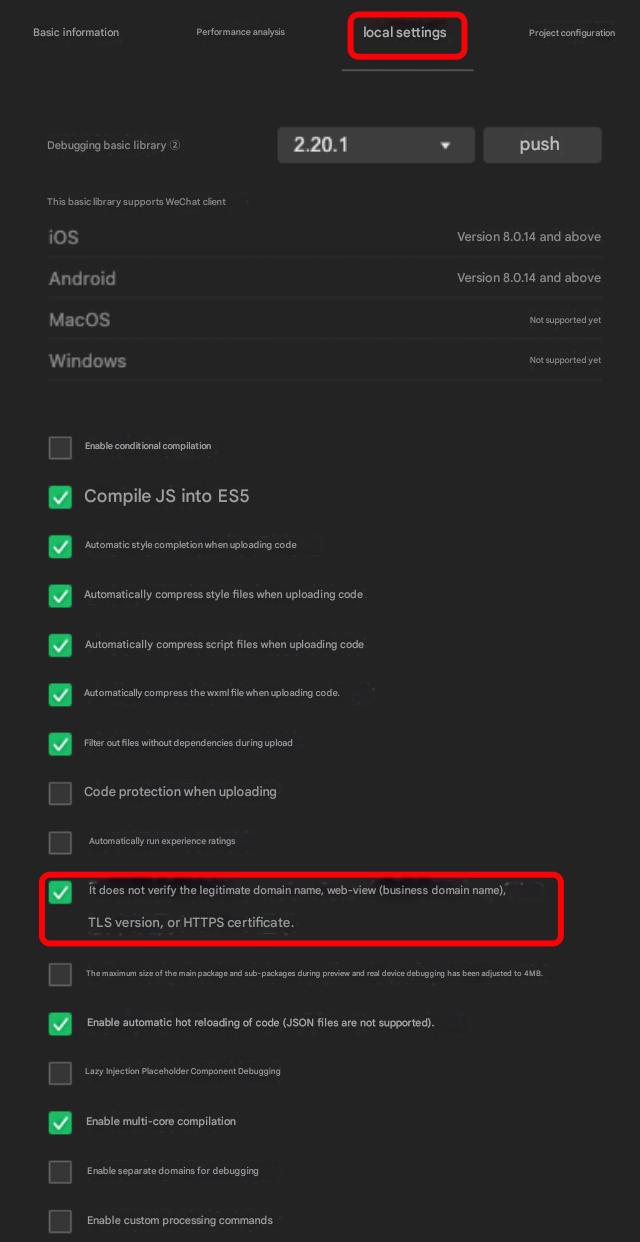
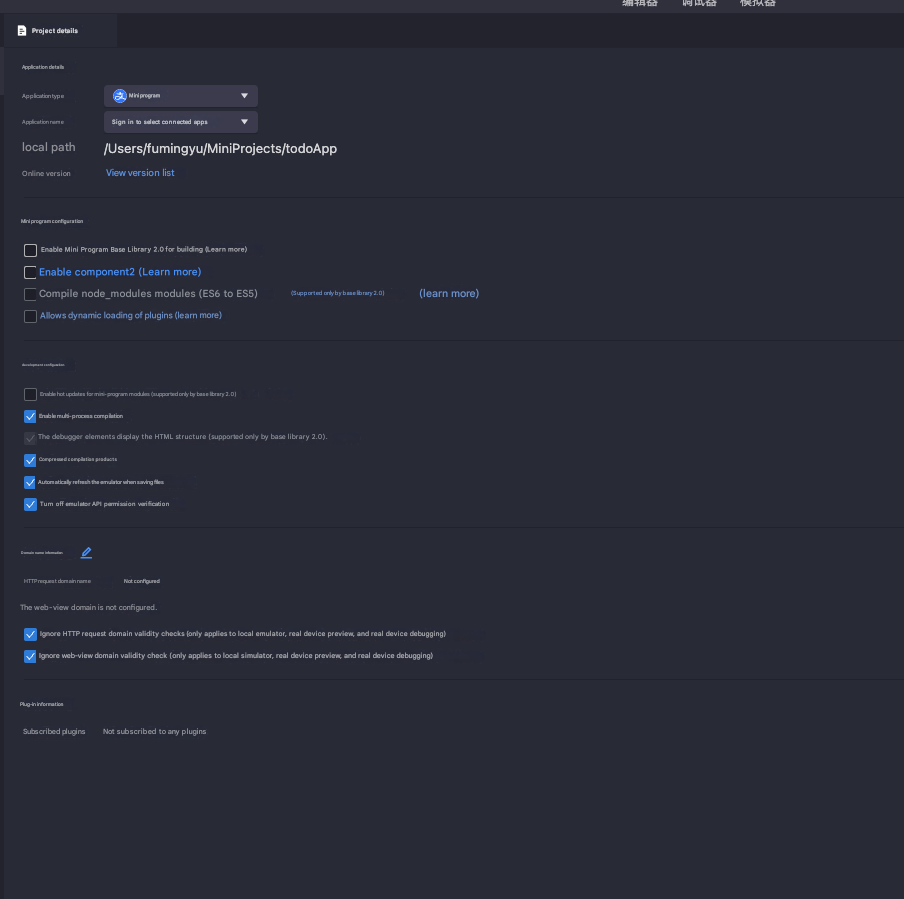
If you cannot configure a domain name whitelist for the time being, you can first select Don't verify valid domain names in the mini program editor panel during the development phase.
The procedure is shown in the following figure:
2.2 Alipay configuration
configure a domain name whitelist (the domain name whitelist is the collected domain name deployed by apm service).
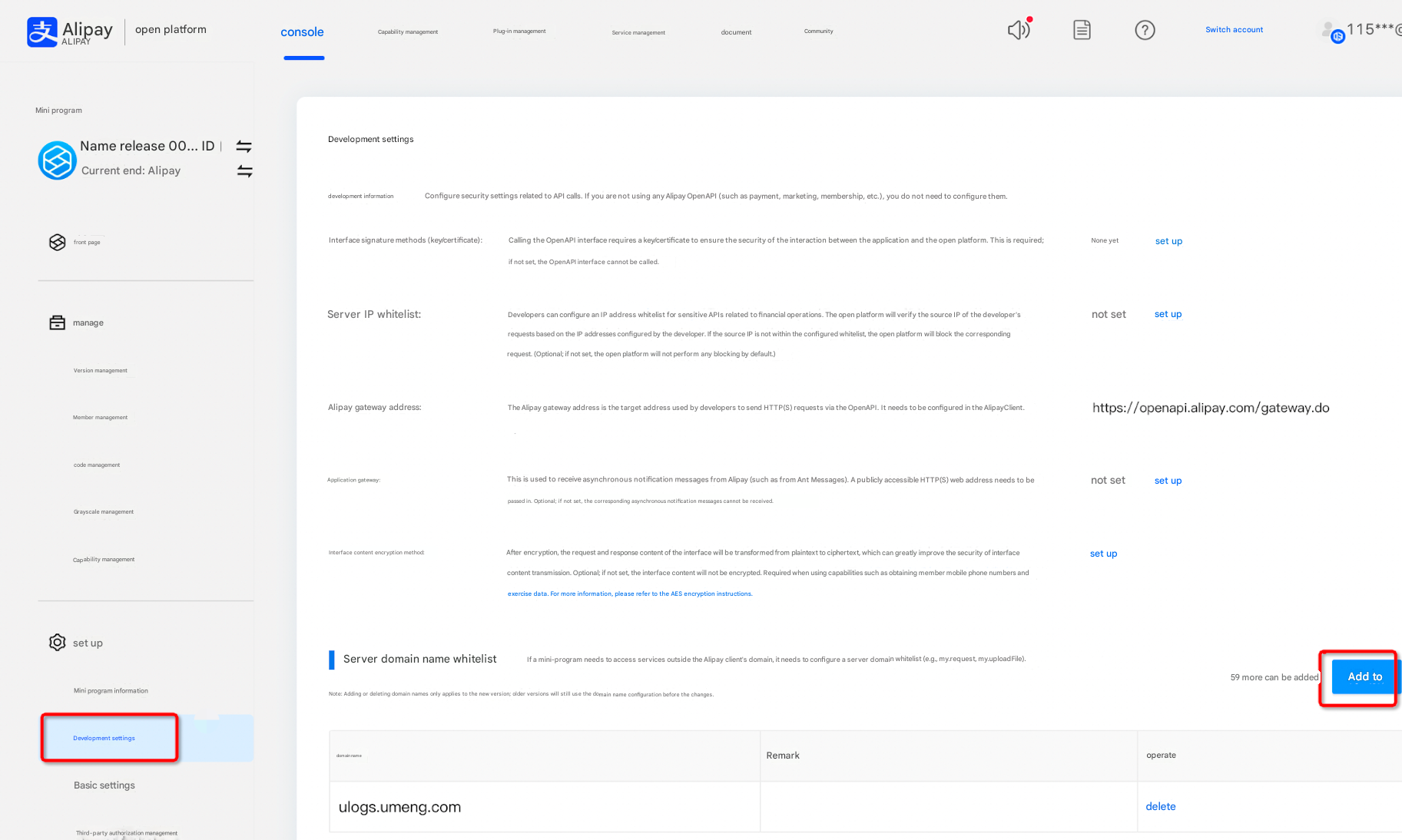
If you cannot configure a domain name whitelist for the time being, you can first select Don't verify valid domain names in the mini program editor panel during the development phase.
3. Integrate the SDK
The sdk downloaded in step 1 is referenced at the beginning of the top of app.js. The integration method is the same as WeChat. WeChat refers to files beginning with wx and payment refers to files beginning with alipay. The integration is carried out in the following way.
As shown in the figure, cjs is a commonjs package, which is generally referenced by require in native applets, and esm is an es module package, which is generally referenced by import. developers choose the appropriate introduction method according to their own business conditions.
3.1 Method 1: Declarative writing, suitable for native applet development
ESM introduction method
// The ESM introduction method import {init} from ./build/wx.esm.
import { init } from './build/wx.esm'

init({
  appKey: 'The unique identifier of your application',
  dsn: 'Collection domain name',
  debug: true, // Enable debug logging.
  version:'x.y.z' // Set the application version number.
})
commonjs introduction method
// Use the following methods to introduce commonjs:
require('./build/wx.cjs');
App({
  umengConfig: {
    appKey: 'The unique identifier of your application',
    dsn: 'Collection domain name',
    debug: true, // Enable debug logging.
    version:'x.y.z' // Set the application version number.
  }
});
3.2 Mode 2 Command Writing
Applicable to uni-app, taro and other tripartite frameworks
// Use the following methods to introduce commonjs:
const uapm = require('./build/wx.cjs');
uapm.init({
  appKey: 'The unique identifier of your application',
  dsn: 'Collection domain name',
  debug: true, // Enable debug logging.
  version:'x.y.z' // Set the application version number.
});
4. Initialization parameters
name | Required | Meaning | Type | Support Platform |
appKey | Yes | The unique identifier of the application. | string | WeChat Alipay |
dsn | Yes | Apm mini program collection service deployment address and domain name | string | WeChat Alipay |
debug | No | Whether to print debug logs | boolean | WeChat Alipay |
version | No | The version of the developer application. If you do not specify this parameter, the version of the mini program is automatically obtained. If you specify this parameter, the version specified by the developer is used. | string | WeChat Alipay |
pageFilter | No | The page filter. You can use the blacklist and whitelist to filter page logs. If the page is hit, all logs including error requests on the page are filtered. | IFilter | WeChat Alipay |
errorFilter | No | The error filter. You can use the blacklist or whitelist to filter error log. | IFilter | WeChat Alipay |
apiFilter | No | The request filter. You can use the blacklist and whitelist to filter request logs. | IFilter | WeChat Alipay |
rumConfig | No | Full-link request header injection configuration | RumConfig | WeChat Alipay |
IFieler type description
pageFilter, errorFilter, and apiFilter all inherit from the IFilter interface and are used for the following filter targets, respectively:
pageFilter: used to filter page paths (path)
errorFilter: used to filter stack information
apiFilter: URL used to filter requests
You can configure a whitelist or blacklist policy for a collection item. You can select one of the two policies:
If you select the whitelist method, only pages that meet the rules are collected.
If you select the blacklist method, pages that meet the rule will be excluded and will not be collected.
This parameter is not required. This parameter is used to determine whether to filter logs. The following table shows the parameters.
Property | Meaning | Default | Type |
mode | Match Mode If you set the value to ignore, the rule is not reported in blacklist mode. If you set the value to match, the rule is reported in whitelist mode. | ignore | enumerated value ignore | match |
rules | The set of matching rules. If the type is string, the rule is hit when the page URL contains the string. If the type is Funtion, the function returns true to indicate that the rule is hit and false to indicate that the rule is not hit. If the type is array, the rule is hit. If the type is array, the relationship between the rules is OR. If any rule is hit, the rule set is hit. | []. The default value indicates that the blacklist is empty and all logs are reported. | string | RegExp | Function | Array<string | RegExp | Function> |
Description of the RumConfig type
This parameter is not required. This parameter is used to determine whether to filter logs. The following table shows the parameters.
Property | Meaning | Default | Type |
injectTraceHeader | The SDK injects the corresponding request header into the mini program network request and automatically generates the relevant protocol field. | undefined | Enumeration Value 'traceparent' | 'b3' | 'sw8' | 'sentry-trace' | undefined |
needTracedUrls | The whitelist of URLs for end-to-end monitoring. Default value: null. | null. The default value indicates that the whitelist is empty. If you set this parameter, only request URLs that meet the specified rules are injected into the request header. | Array<string | RegExp> |
ignoredUrls | Urls injection blacklist for end-to-end monitoring. Default value: null. | null. This default value indicates that the blacklist is empty. If you set this value, only request URLs that meet the rule are not injected into the request header. | Array<string | RegExp> |
injectSDKRequest | Whether to inject the request header into the SDK internal request. The default value is false, that is, no injection | false. This default value indicates that the internal request URLs of the SDK are not injected into the request header. | boolean |
Instance method description
After the SDK is initialized, the $umapm object is globally attached to the instance. You can call the following methods by using wx.$umapm my.$umapm.
Meaning | Type | Examples | Support Platform | |
setUserid | Set user ID | Function | $umapm.setUserid('xxxx') | WeChat Alipay |
setPageFilter | Set the blacklist and whitelist of the collection page to filter the collected and reported pages. | Function | $umapm.setPageFilter({ mode: 'match', rules: ['/home'] }) | WeChat Alipay |
setApiFilter | Filter collection errors by configuring a collection request blacklist or whitelist | Function | $umapm.setApiFilter({ mode: 'ignore', rules: ['/getUserInfo'] }) | WeChat Alipay |
setErrorFilter | Set the collection error blacklist and whitelist | Function | $umapm.setErrorFilter({ mode: 'ignore', rules: ["script error"] }) | WeChat Alipay |
captureException | Proactive error reporting stack | Function | try{ throw new Error ('error') } catch (exception) { $umapm.captureException(exception); } | WeChat Alipay |
5. Case
Case 1
Support App umengConfig custom property setting configuration parameters:
// wechat
const umapm = require('./wx.cjs');

App({
  umengConfig: {
    appKey: 'Unique identifier of the application',
    dsn: 'Collection domain name',
    debug: true,
    version:'x.y.z',
    debug: true,
    pageFilter: {
      mode: 'match',
      rules: ['/home']
    }
  },
  onLaunch: function () {
    wx.request({
      url: "https://xxx/getUserId",
      method: "post",
      success: (res) => {
        wx.$umapm.setUserid(res.data.userid);
      }
    })
  }
});
Case 2
Supports instance init method configuration initialization:
// wechat
var umapm = require('./wx.cjs');
umapm.init({
  appKey: 'Unique identifier of the application',
  dsn: 'Collection domain name',
  debug: true,
  version:'x.y.z',
  debug: true,
  pageFilter: {
    mode: 'match',
    rules: ['/home']
  }
});

App({
  onLaunch: function () {
    wx.request({
      url: "https://xxx/getUserId",
      method: "post",
      success: (res) => {
        wx.$umapm.setUserid(res.data.userid);
      }
    });
  }
});
Case 3
Integrate the SDK by using conditional compilation in the uni-app framework:
// Configure the parameters for initialization.
// #ifdef MP-WEIXIN
import { init } from "./wx.esm";
init({
  appKey: 'Unique identifier of the application',
  dsn: 'Collection domain name',
  version:'x.y.z',
  pageFilter: {
    mode: "ignore",
    rules: []
  },
});
// #endif

// #ifdef MP-ALIPAY
import { init } from "./alipay.esm";
init({
  appKey: 'Unique identifier of the application',
  dsn: 'Collection domain name',
  version:'x.y.z',
  pageFilter: {
    mode: "ignore",
    rules: []
  },
});
// #endif

// #ifdef H5
import { init } from "./apm";
init({
  pageFilter: { mode: "ignore", rules: [] },
  pid: "Unique identifier of an H5 application",
  logLevel:3,
});
// #endif
Introduce uapm.js into main.js
import Vue from 'vue'
import App from './App'
import './uapm';

Vue.config.productionTip = false

App.mpType = 'app'

const app = new Vue({
  ...App
})
app.$mount()