Integrate and configure the QuickTracking A/B testing SDK for macOS.
SDK information
|
File name |
Version |
md5 |
File size |
|
QuickTracking macOS SDK |
1.0.0 changelog: macOS SDK Changelog |
48db48d7f2c95d97e8adc55540c46091 |
3.2 MB |
|
QTABTestSDK |
1.4.4 changelog: iOS/macOS SDK Changelog |
6548cfd35ff168c2317835305e0a69cd |
1.6 MB |
1. Integrate the SDK
The QuickTracking A/B testing SDK relies on the QuickTracking Analytics SDK for behavioral data and does not collect personal information directly. Before you begin, integrate and initialize the QuickTracking Analytics macOS SDK.
1.1 Integrate with CocoaPods (Recommended)
-
Add the following pods to your Podfile:
pod 'QuickTrackingSDK'
pod 'QTABTest'-
Open a terminal and navigate to your project directory.
-
Run pod install or pod update.
-
If you cannot pull the latest version, run pod repo update first, and then run pod install or pod update.
1.2 Offline integration
Obtain the offline SDK package from the QuickTracking team.
Project configuration
-
Add the following files to your project:
-
QuickTrackingSDK.xcframework
-
QTABTestSDK.xcframework
-

-
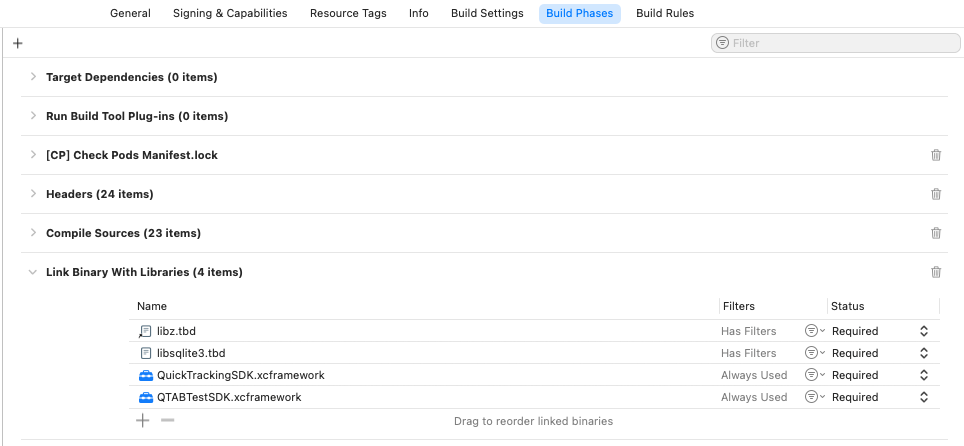
In your Xcode project, go to the "Build Phases" tab and add the following dependencies to the "Link Binary With Libraries" section:
-
QuickTrackingSDK.xcframework
-
QTABTestSDK.xcframework
-
libsqlite3.tbd
-
libz.tbd
-
2. Programmatic experiment
2.1 Initialize the SDK
Full example
#import <QuickTrackingSDK/QuickTrackingSDK.h>

- (void)applicationDidFinishLaunching:(NSNotification *)aNotification {
    QTSDKConfig *sdkConfig;
    // Configure the SDK.
    sdkConfig = [[QTSDKConfig alloc] initWithAppkey:@"YOUR_APP_KEY"
                                        trackDomain:@"https://YOUR_DATA_COLLECTION_DOMAIN"
                                      launchOptions:nil];
    // Set the app channel, for example: appstore
    sdkConfig.channel = @"YOUR_CHANNEL";

    // Initialize the SDK.
    [QuickTrackingSDK initWithConfig:sdkConfig];

    // Configure A/B testing.
    QTABTestConfigOptions *configOptions;
    configOptions = [[QTABTestConfigOptions alloc] initWithURL:@"https://YOUR_DATA_COLLECTION_DOMAIN/abtest_results?appkey=YOUR_APP_KEY"];

    // The polling interval in seconds for fetching the latest experiment results.
    // Default: 600s (10 minutes).
    // Minimum: 10s. Maximum: 1800s (30 minutes). Values outside this range will revert to the default.
    //configOptions.updateInterval = 300;

    // A/B testing log switch. Default: NO (disabled).
    configOptions.enableLog = YES;

    // A/B testing property change callback.
    configOptions.onABTestPropertyChangedBlock = ^(NSArray * _Nonnull result) {
       /** Example output
        [
          {"gid": xxx, "expid": xxx},
          {"gid": xxx, "expid": xxx}
        ]
        **/
        NSLog(@"-----%@", result);
    };

    // Initialize the A/B testing SDK.
    [QTABTest startWithConfigOptions:configOptions];
}
QTABTestConfigOptions
|
Parameter |
Type |
Description |
|
URL |
NSString |
The URL for fetching experiment results. Example: |
|
updateInterval |
NSTimeInterval |
The polling interval in seconds for fetching the latest experiment results. Default: 600 seconds. Minimum: 10 seconds. Maximum: 1800 seconds. Values outside this range revert to the default. |
|
enableLog |
BOOL |
Enables or disables logging. Default: NO. Set to YES to enable logging. |
|
onABTestPropertyChangedBlock |
OnABTestPropertyChangedBlock |
A callback triggered when an A/B testing property changes. It includes a |
Enable logging
API function
/// Sets whether to print SDK logs to the console.
/// @param enable A Boolean value that enables or disables debug logging. YES: enable, NO: disable. The default is NO.
+ (void)setLogEnabled:(BOOL)enable;
Full example
[QTABTest setLogEnabled:YES];2.2 Get experiment variables
After initializing the QuickTracking A/B testing SDK, retrieve experiment variables using one of the following strategies:
-
fetchABTestFromCache: Returns the value from the local cache. If not found, returns the default value.
-
fetchABTestFromServer: Fetches data from the server, ignoring the local cache.
-
fetchABTestFromCacheThenServer: Reads from the local cache first. If a value is not found, it fetches data from the server.
Use cases
|
API name |
Use case |
|
fetchABTestFromCache |
If query performance is critical, use thefetchABTestFromCache API to retrieve variables from the local cache only. However, the latest experiment results may not be available immediately. |
|
fetchABTestFromServer |
If you are running a round-robin experiment and require real-time results, use thefetchABTestFromServer API to retrieve experiment variables. The tradeoff is potential network latency. |
|
fetchABTestFromCacheThenServer |
Recommended for most scenarios as it balances performance and freshness. It first retrieves the variable from the local cache. If the variable is not found, it fetches the latest data from the A/B testing server. |
2.3 API reference
Return object (New in version 1.4.0)
The API returns an object containing experiment data.
result =
{
 "expid" = "114"; // experiment ID
 "gid" = "201"; // experiment group ID
 "value" = ""; // return value
}
Parameters
|
Parameter |
Type |
Default |
Description |
Notes |
|
value |
NSString | BOOL | Int | Object |
undefined |
The value of the experiment parameter. |
The returned value's data type must match that of the experiment variable. A mismatch is treated as an exception by the SDK. Ensure your business logic handles the result correctly. |
|
expid |
NSString |
"" |
experiment ID |
|
|
gid |
NSString |
"" |
experiment group ID |
fetchABTestFromCache
API function
// Retrieves an experiment value from the local cache. Returns the default value if the key is not found.
/// @param paramName The name of the experiment parameter.
/// @param defaultValue The default value.
/// @return The experiment value.
- (nullable id)fetchABTestFromCacheWithParamName:(NSString*)paramName
                                   defaultValue:(id)defaultValue;
Parameters
|
Parameter |
Type |
Description |
Notes |
|
paramName |
NSString |
The name of the experiment parameter. |
A required, non-empty string. |
|
defaultValue |
NSString | BOOL | NSNumber | NSDictionary |
The default value of the experiment parameter. |
Required parameter. The data type must match the experiment variable's type. For example, if the experiment variable is a NUMBER, the |
Return value
|
Parameter |
Type |
Default |
Description |
Notes |
|
<T> T |
NSString | BOOL | NSNumber | NSDictionary |
nil |
The value of the experiment parameter. |
The returned value's data type must match that of the experiment variable. A mismatch is treated as an exception by the SDK. Ensure your business logic handles the result correctly. |
Full example
#import "QTABTest.h"

// Example: Fetching a parameter of type NSDictionary.
NSDictionary *dict = @{
    @"param1" : @"1"
    };
NSDictionary *result = [[QTABTest sharedInstance] fetchABTestFromCacheWithParamName:@"ios_test_json" defaultValue:dict];
Note:
Ensure your business logic correctly handles the default value.
fetchABTestFromServer
API function
// Asynchronously fetches the latest experiment result from the server, ignoring the local cache.
/// @param paramName The name of the experiment parameter.
/// @param defaultValue The default value.
/// @param timeoutInterval The timeout in seconds.
/// @param completionHandler A callback on the main thread that returns the experiment result.
- (void)fetchABTestFromServerWithParamName:(NSString*)paramName
                             defaultValue:(id)defaultValue
                          timeoutInterval:(NSTimeInterval)timeoutInterval
                        completionHandler:(void (^)(id _Nullable result))completionHandler;
Parameters
|
Parameter |
Type |
Default |
Description |
Notes |
|
paramName |
NSString |
nil |
The name of the experiment parameter. |
Required parameter. Must be a non-empty string. |
|
timeoutInterval |
NSTimeInterval |
600 |
The timeout for requests to the A/B testing server. |
Optional parameter. |
|
defaultValue |
NSString | BOOL | NSNumber | NSDictionary |
nil |
The default value of the experiment parameter. |
Required parameter. The data type must match the experiment variable's type. For example, if the experiment variable is a NUMBER, the |
|
<T> T |
NSString | BOOL | NSNumber | NSDictionary |
nil |
The value of the experiment parameter. |
The returned value's data type must match that of the experiment variable. A mismatch is treated as an exception by the SDK. Ensure your business logic handles the result correctly. |
|
callback |
callback |
None |
A callback that returns the experiment result. |
Required parameter. |
Completion Handler
typedef void (^QTABCompletionHandler)(id _Nullable result);Return value
|
Parameter |
Type |
Default |
Description |
Notes |
|
<T> T |
NSString | BOOL | NSNumber | NSDictionary |
nil |
The value of the experiment parameter. |
The returned value's data type must match that of the experiment variable. A mismatch is treated as an exception by the SDK. Ensure your business logic handles the result correctly. |
Full example
NSDictionary *dict = @{
    @"param1" : @"1"
};
NSString *paramName = @"test_json";

[[QTABTest sharedInstance] fetchABTestFromServerWithParamName:paramName defaultValue:dict timeoutInterval:10 completionHandler:^(id  _Nullable result) {
    if (result) {
        NSLog(@"======result:%@", result);
    }
}];
Note:
Ensure your business logic correctly handles the default value.
fetchABTestFromCacheThenServer
API function
// Retrieves the value from the local cache. If not found, it fetches the value from the server.
/// @param paramName The name of the experiment parameter.
/// @param defaultValue The default value.
/// @param timeoutInterval The timeout in seconds.
/// @param completionHandler A callback on the main thread that returns the experiment result.
- (void)fetchABTestFromCacheThenServerWithParamName:(NSString*)paramName
                                      defaultValue:(id)defaultValue
                                   timeoutInterval:(NSTimeInterval)timeoutInterval
                                 completionHandler:(void (^)(id _Nullable result))completionHandler;
Parameters
|
Parameter |
Type |
Default |
Description |
Notes |
|
paramName |
NSString |
nil |
The name of the experiment parameter. |
Required parameter. Must be a non-empty string. |
|
timeoutInterval |
NSTimeInterval |
600 |
The timeout for requests to the A/B testing server. |
Optional parameter. |
|
defaultValue |
NSString | BOOL | NSNumber | NSDictionary |
nil |
The default value of the experiment parameter. |
Required parameter. The data type must match the experiment variable's type. For example, if the experiment variable is a NUMBER, the |
|
<T> T |
NSString | BOOL | NSNumber | NSDictionary |
nil |
The value of the experiment parameter. |
The returned value's data type must match that of the experiment variable. A mismatch is treated as an exception by the SDK. Ensure your business logic handles the result correctly. |
|
callback |
callback |
None |
A callback that returns the experiment result. |
Required parameter. |
Return value
|
Parameter |
Type |
Default |
Description |
Notes |
|
result |
NSString | BOOL | NSNumber | NSDictionary |
The value of the experiment parameter. |
The returned value's data type must match that of the experiment variable. A mismatch is treated as an exception by the SDK. Ensure your business logic handles the result correctly. |
Full example
NSString *defaultValue = @"111";
NSString *paramName = @"test_string";
[[QTABTest sharedInstance] fetchABTestFromCacheThenServerWithParamName:paramName defaultValue:defaultValue timeoutInterval:10 completionHandler:^(id  _Nullable result) {
    if (result) {
        NSLog(@"======result:%@", result);
    }
}];
Note:
Ensure your business logic correctly handles the default value.
3. Debugging an experiment
After you start the experiment: