Configure H5 bridging to control how tracking data from in-app H5 pages is reported to your App application, H5 application, or both.
1. H5 Bridge Usage Scenarios
Scenario 1: How to report H5 data to H5 applications and APP applications at the same time
An H5 activity page (for example, a "Spring Day" campaign) is embedded in multiple apps. With H5 bridging enabled, you can meet the following analysis requirements:
-
App operators can view the complete user journey before and after customers participate in H5 activities within the app.
-
H5 activity operators can view aggregated H5 activity data across all apps.
Operations
-
Create two applications:
-
An app that has its own appKey_app
-
A Web/H5 application that has its own appKey_h5
-
SDK configuration
enableJSBridge=trueis enabled and custom javaScriptProxy is injected into the application WebView page.
Report logs
When a tracking event is triggered on the H5 side, the following data is reported:
|
Reporting client |
Log content |
|
Apps |
|
|
H5 application in webview |
|
Scenario 2: How to report H5 data to a unique APP application
Some pages may be implemented in H5 due to technical architecture choices. With this configuration, you can meet the following analysis requirement:
-
View complete business, operations, and product data within a single app dataset.
Operations
-
Create an app with only one appKey_app
-
SDK configuration
enableJSBridge=trueis enabled and custom javaScriptProxy is injected on the application WebView page. For more information, see 2.1. -
The H5 appKey is left empty. In this case, the H5 SDK prints warning logs but does not affect the number of sends. and set aplus-jsbridge-only to true to disable H5 data reporting
Report logs
When a tracking event is triggered on the H5 side, the following data is reported:
|
Reporting client |
Log content |
|
Apps |
|
|
H5 application in webview |
Report without logs |
Scenario 3: How to report H5 data only to H5 applications
Use this scenario when app business, operations, and product teams do not need to see H5 data in the app dataset.
Operations
-
Create two applications:
-
An app that has its own appKey_app
-
A Web/H5 application that has its own appKey_h5
-
No API calls are made. The app application and the h5 application are tracked separately.
Report logs
When a tracking event is triggered on the H5 side, the following data is reported:
|
Reporting client |
Log content |
|
Apps |
Report without logs |
|
H5 application in webview |
|
2. Description of H5 Bridging Principle
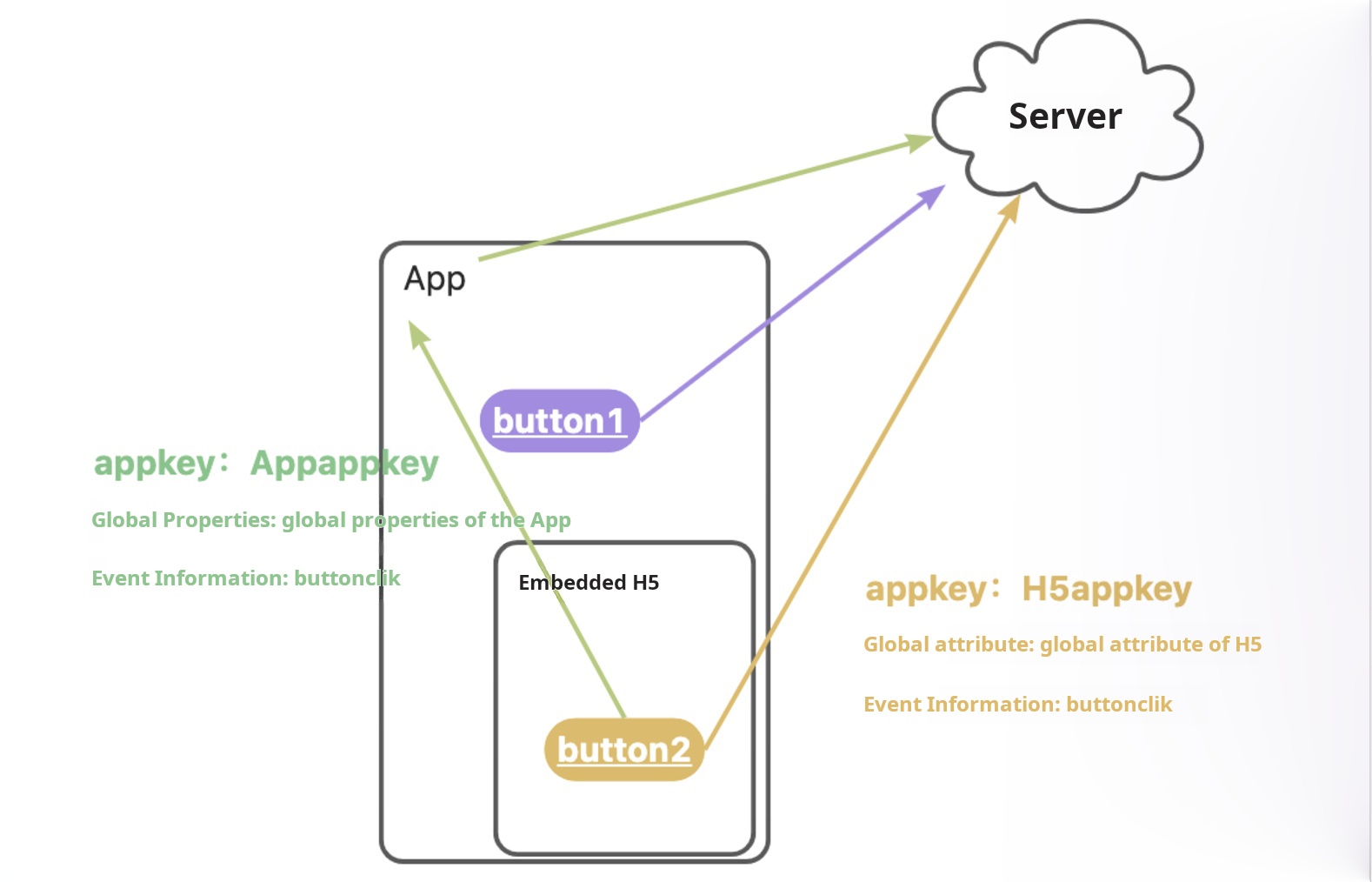
The following prerequisites apply to all three scenarios:
-
HarmonyOS Next App integrates QuickTracking HarmonyOS Next SDK
-
In-app H5 page integrates QuickTracking H5 SDK
2.1. HarmonyOS Next Application Code
Bridging API description
Enable the SDK configuration enableJSBridge=true before calling the bridging API. Otherwise, the API call is invalid.
import { createJSBridgeProxy } from '@quicktracking/analytics';

function createJSBridgeProxy(controller: WebviewController)
Parameters
|
Value |
Description |
|
controller |
HarmonyOS Next system webview controller WebviewController |
Sample code
import { webview } from '@kit.ArkWeb'
import { BusinessError } from '@kit.BasicServicesKit'
import { promptAction } from '@kit.ArkUI'
import { createJSBridgeProxy } from '@quicktracking/analytics';

@Entry
@Component
struct WebPage {
  @State message: string = 'Hello World';
  controller: webview.WebviewController = new webview.WebviewController();
  responseWeb: WebResourceResponse = new WebResourceResponse();

  onPageShow(): void {
    // When you need to introduce other user-defined JSProxy
    // const qtJSProxy:QTJSProxyObject =  createJSBridgeProxy(this.controller);
    // this.controller.registerJavaScriptProxy(qtJSProxy.object, qtJSProxy.name, qtJSProxy.methodList)
    // this.controller.registerJavaScriptProxy(this.testObjtest,"objName",["test"],["asyncTestBool"]);
  }

  build() {
    Column() {
      Web({src: $rawfile('index.html'), controller: this.controller})
        .javaScriptAccess(true)
        .javaScriptProxy(createJSBridgeProxy(this.controller))
    }
    .height('100%')
    .width('100%')
  }
}
2.2. H5 Application Side Code
Report logs only through the APP channel and disable the H5 channel reporting log API
aplus_queue.push({
  action: 'aplus.setMetaInfo',
  arguments: ['aplus-jsbridge-only', true]
});
Important: If H5 sets aplus-jsbridge-only to true, the H5 SDK stops reporting tracking events. Do not enable this setting on non-in-app H5 pages.
H5 global attributes take effect globally
After you enable this API, global properties configured through globalproperty in aplus.appendMetaInfo or aplus.setMetaInfo are synchronized to the native app. This option is disabled by default.
Important: This API is supported only in qt_web_v2.0.12 and later.
aplus_queue.push({
  action: 'aplus.setMetaInfo',
  arguments: ['aplus-globalproperty-sync-enable', true]
});
For example, if you set the global attribute "Current City: Beijing" in the app and "Current City: Shanghai" in the in-app H5, the global attribute for events triggered in both H5 and app native becomes "Current City: Shanghai". If you do not enable this option, global attributes set in H5 do not take effect in the native app.