SDK information
|
SDK name |
Version |
MD5 |
|
QTCommon |
Latest version: 1.8.5 Changelog: iOS SDK changelog |
4ed3e3a3d8265a3c6c31042d82de5c02 |
|
UMAPM_P |
2.2.2 Changelog: iOS SDK changelog |
b9758698d453462865b8e14b46a3e707 |
|
UMEFS_P |
2.3.6 Changelog: iOS SDK changelog |
e2a6dcf6a3deafe5e2f4247cd9064f7d |
Integrate the QuickTracking SDK
CocoaPods
-
Add the following to your Podfile:
pod 'QTCommon' pod 'UMAPM_P' pod 'UMEFS_P' -
Open a terminal and navigate to your project directory.
-
Run
pod installorpod update. -
If you cannot fetch the latest version, run
pod repo updatefirst, and then runpod installorpod update.
IDFA
-
By default, the SDK collects the IDFA for more accurate analytics and data verification. If your app does not use the IDFA, configure your App Store submission as follows to avoid rejection for the reason "The app does not include advertising features, but it accesses the advertising identifier (IDFA)."
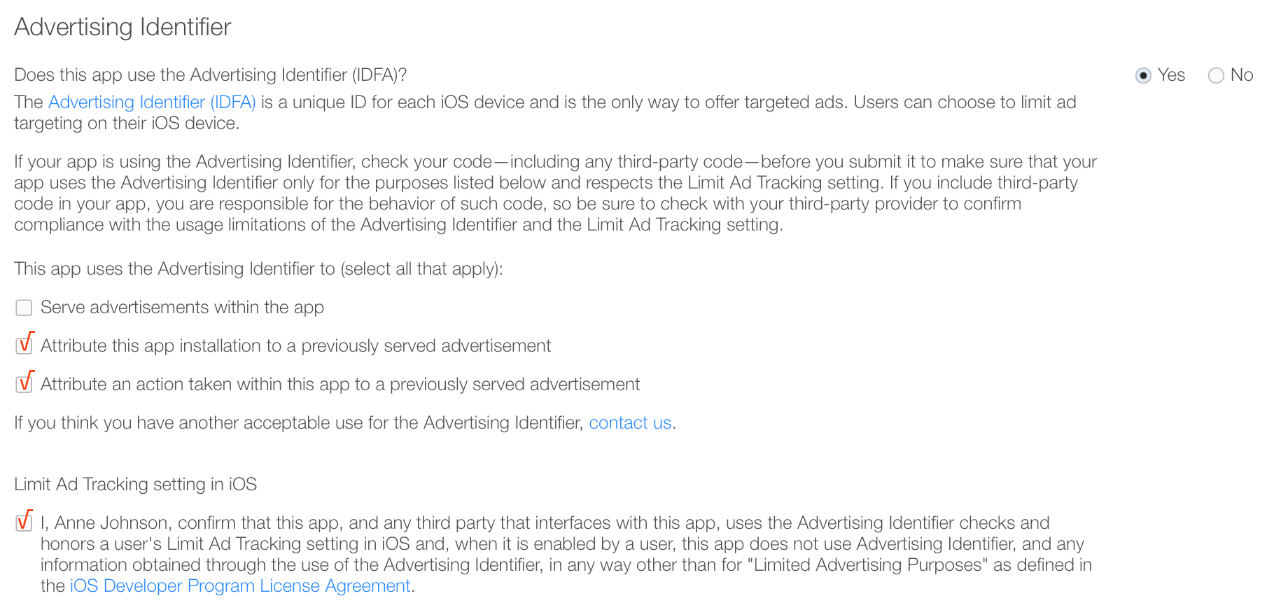
-
The QuickTracking SDK does not request IDFA tracking permission on its own. Your app must request permission to display the tracking authorization prompt.
-
If a user opts out of IDFA collection, configure the SDK to return a custom field or an empty string to prevent IDFA collection. For details, see 2.1 Device ID Settings.