Essential for using QuickTracking Android(A/B Testing).
Refer and initialize the SDK
sdk basic information
SDK | The version number. | md5 | The app package name. |
QuickTracking Next SDK A/B Testing Plug-in | Latest version: 1.0.0 | b5a8c8fd9ac6e3b028a6c8d614884d04 | @quicktracking/abtesting |
Currently, HarmonyOS Next Next SDK A/B Testing only supports offline access. To obtain the offline package, click HarmonyOS Harmony_QT_AB_TEST_SDK 1.0.0.zip.
Integration code details
The A/B Testing SDK depends on the Quick Tracking SDK V1.6.4 or later. Before you use the Quick Tracking SDK, make sure that you have successfully integrated the Quick Tracking SDK and initialized the SDK. For more information, see HarmonyOS HarmonyOS Next SDK.
Programming Experiment
Integrate and initialize the SDK
First, you need to initialize the QuickTracking statistics SDK in synchronous mode. After you initialize the QuickTracking statistics SDK, initialize the QuickTracking A/B Testing SDK. When you initialize the Quick Tracking A/B Testing SDK, you must specify the URL of the request diversion test. Contact the operation personnel to obtain the URL.
Synchronous introduction mode
Add the QT A/B Testing SDK dependency to the oh-package.json5 file of the main module. Currently, HarmonyOS next only supports local package access:
{
  ...
  "dependencies": {
    "@quicktracking/common": "file:./lib/common.har",
    "@quicktracking/analytics": "file:./lib/qt_tongji.har",
    "@quicktracking/abtesting": "file:./lib/abtesting.har"
  }
}
SDK storage address

Initialize the SDK
The SDK initializes the dependency @quicktracking/common and passes in the corresponding AB parameters.
import * as QT from '@quicktracking/analytics';
import { QTABTestPlugin,QTABTestConfigOptions } from '@quicktracking/abtesting';

QT.setLogEnabled(true);
QT.setTrackDomain("Receipt domain name", "Receipt domain name")

export default class MyAbilityStage extends AbilityStage {
  onCreate() {
    // Initialize the parameters of the AB experiment.
    let config: QTABTestConfigOptions =
      new QTABTestConfigOptions("Your service address /abtest_results?appkey=xxxxx", 5 * 60 * 1000);
    QT.preInit({
      appKey: 'Your appkey',
      context: this.context.getApplicationContext(),
      enableJSBridge: true,
      enableAutoTrackApplication: true,
      enableAutoTrackPage: false,
      plugins: [new QT.InternalPlugin()],
      newPlugins: [new QTABTestPlugin(this.context.getApplicationContext(), config)]
    });
    QT.init();
  }
}
Procedure:
// Quick AB test interface
export class QTABTestConfigOptions {
  mUrl: string = '';// AB experiment address --- must be passed
  mInterval?: number; // The time when the cache is updated. This value is optional.
}
The following table describes the parameters in the preceding statement.
Option | Parameter | Default value | Description | Remarks |
url | string | undefined | Experiment Address | Required parameter. You must set a non-empty string. |
timeInterval | int | 10 * 60 *1000 | Cache Update Frequently (ms) Maximum value: 30 * 60 * 1000 Minimum value: 10 * 1000 | No |
Get experiment variables
After the initialization QuickTracking ABTest SDK, the variable value of the specific test is obtained through the API, which can be divided into the following two strategies according to the method of obtaining the value of the test variable:
// Quick AB test interface
export interface IQuickTrackABTestApi {
  // Obtain the AB test data from the cache.
  fetchABTestFromCache(param: QT_AB_API_PARAMS): void;

  // Obtain AB test data from the server.
  fetchABTestFromServer(param: QT_AB_API_PARAMS): void;
}
Scenarios
API name | Scenarios |
fetchABTestFromCache | If you have requirements on query performance, you can use fetchABTestFromCache API to obtain variable values only from the local cache. The disadvantage is that the latest experimental results cannot be hit in time. |
fetchABTestFromServer | If you want to perform a time slice rotation experiment and have requirements on the timeliness of the experiment, you can use fetchABTestFromServer API to obtain the experimental variable values. The disadvantage is that there may be a certain network latency. |
List of operations by function
QT_AB_API_PARAMS
export interface QT_AB_API_PARAMS {
  param_name: string; // request parameters
  value_type: QT_AB_EXPERIMENT_VARIABLE_TYPE; // The data format type.
  default_value: QT_AB_EXPERIMENT_VARIABLE_VALUE; // The default value.
  callback: OnABTestResultCallBack; // The callback.
  timeout_milliseconds?: number; // (Optional) The timeout period.
  update_interval_milliseconds?: number; //(Optional) The time when the cache was updated.
}
Request Param panel
Option | Parameter | Default value | Description | Remarks |
param_name | string | undefined | Experiment Parameter Name | Required parameter. You must set a non-empty string. |
value_type | "STRING" | "NUMBER" | "BOOLEAN" | "JSON" | "INTEGER" | undefined | Data type | Required parameters, which must be consistent with the current experimental value result type. The "JSON" parameter is set to Record in HarmonyOS next. |
default_value | string | number | boolean | object | null | undefined | Record<string, string | number | boolean | object>; | undefined | Default result values for experiment parameters | Required parameters, which must be consistent with the current experimental value result type. If the experiment value corresponding to the parameter is of the NUMBER type, the input default_value must also be of the number type, and the returned result experiment result is also of the number type. |
callback | OnABTestResultCallBack | undefined | Callback | |
timeout_milliseconds | number | 30 * 1000 | (Optional) Timeout Period | Network request timeout period |
update_interval_milliseconds | number | 30 * 60 * 1000 | (Optional) Cache Update Time |
Note: Please make sure that the default values used in the /B shunt API are handled normally in business logic!
The following table describes the response parameters.
Option | Parameter | Default value | Description | Remarks |
<T> T | string | number | boolean | object | null | undefined | Record<string, string | number | boolean | object>; | undefined | Experimental parameter result value | the specified experiment result value must be of the same type as the experiment value. otherwise, the sdk considers the experiment result as abnormal. At the same time, please note that the results returned by result have made normal business logic judgment in the business. |
Examples
import com.quicktracking.sdk.android.abtest.QTABTest;

// The request returns a String parameter.
String result = QTABTest.shareInstance().fetchABTestFromCache("param_string", "test");

// The Boolean parameter returned for the request.
Boolean result = QTABTest.shareInstance().fetchABTestFromCache(getTextValue(), false);

// The number parameter returned by the request.
Integer result = QTABTest.shareInstance().fetchABTestFromCache(getTextValue(), 1);

// The request returns the JSONObject parameter.
try{
  JSONObject result = QTABTest.shareInstance().fetchABTestFromCache(getTextValue(), null);
}catch (Exception e){
}
Use instances:
import { QTABTest, QT_AB_API_PARAMS, QT_AB_EXPERIMENT_VARIABLE_VALUE } from '@quicktracking/abtesting';

...
Button ('Request JSON')
  .controlSize(ControlSize.SMALL)
  .buttonStyle(ButtonStyleMode.EMPHASIZED)
  .onClick(() => {
    const param: QT_AB_API_PARAMS = {
      param_name: this.areaText,
      value_type: "JSON",
      default_value: new Object({
        "name": "test",
      }),
      callback: (result: QT_AB_EXPERIMENT_VARIABLE_VALUE) => {
        this.refreshLogText(JSON.stringify(result))
      }
    }
    QTABTest.sharedInstance.fetchABTestFromServer(param)
    QTABTest.sharedInstance.fetchABTestFromCache(param)
  })
...
Commissioning test
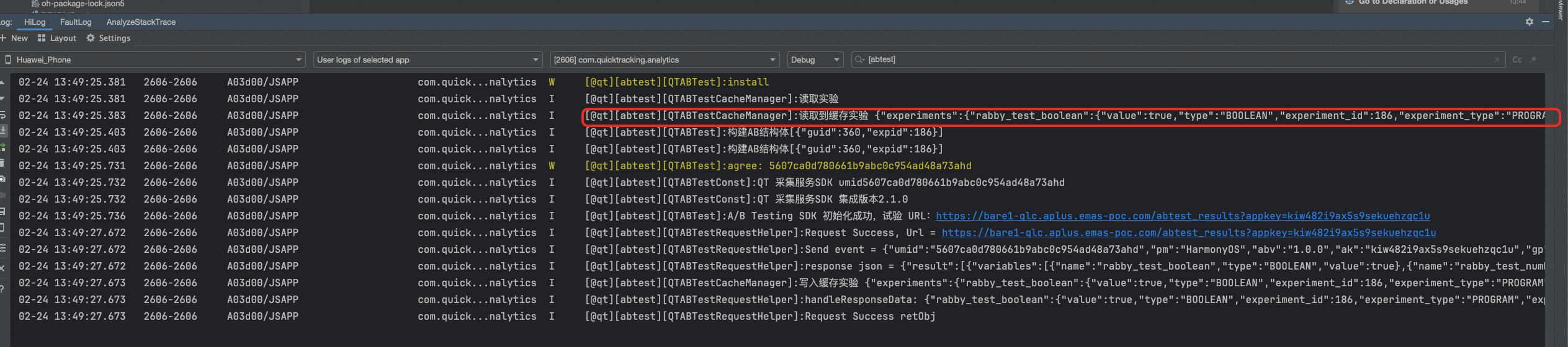
After opening the experiment

When log is enabled, the filter [abtest] will print out your corresponding experiment list.