Document Description: The content of this document is to introduce how H5 data should be reported when H5 pages exist in App?
1 H5 bridging scenario
How do 1.1 report H5 data to H5 applications and App applications at the same time?
Scenario example:
A "Spring Day" activity H5 is embedded in multiple App terminals and operated in the current mode to meet the following analysis requirements:
App operation needs to see the complete link data before and after the customer participates in H5 activities in App.
H5 activity operation needs to see the activity data of H5 in all App terminals.
Operation instructions:
Create two applications:
An App application that has its own Appkey_app
A Web/H5 application that has its own Appkey_h5
Call the attach interface in the app to perform H5 bridging
Reporting logs:
App reports a log:
Appkey is the App's "Appkey_app"
The user account is the user account for the app
Device ID is the device ID of the app
System properties are the app's system properties
Global attributes are global attributes of the tracking point in the app
The event code and the event attribute are the tracking points in H5
H5 reports a log:
Appkey is "Appkey_h5" of H5
A user account whose user account is H5
The ID of the device whose device ID is H5
System properties of H5
The global attribute is the global attribute of the tracking point in H5
The event code and the event attribute are the tracking points in H5
How do 1.2 report H5 data only to the unique App application?
Scenario example:
Due to the technical architecture, some pages are H5 technical structures. Operating in the current mode can meet the following analysis requirements:
App business, operation, and PD can see complete full-link data in App Data.
Operation description:
Create an app with only one Appkey_app
Call the attach interface in the app to perform H5 bridging
H5 Appkey is set to null and the call aplus-jsbridge-only is equal to true to disable H5 data reporting
Report logs.
Only the app reports a log:
Appkey is the App's "Appkey_app"
The user account is the user account for the app
Device ID is the device ID of the app
System properties are the app's system properties
Global attributes are global attributes of the tracking point in the app
The event code and the event attribute are the tracking points in H5
1.3 if H5 data is only reported to H5 applications?
Scenario example:
App business, operation and PD do not want to see H5 data in App
Operation description:
Create two applications:
An App application that has its own Appkey_app
A Web/H5 application that has its own Appkey_h5
No API calls
Report logs.
Only H5 reports one log:
Appkey is "Appkey_h5" of H5
A user account whose user account is H5
The ID of the device whose device ID is H5
System properties of H5
The global attribute is the global attribute of the tracking point in H5
The event code and the event attribute are the tracking points in H5
2 H5 Bridging Principle
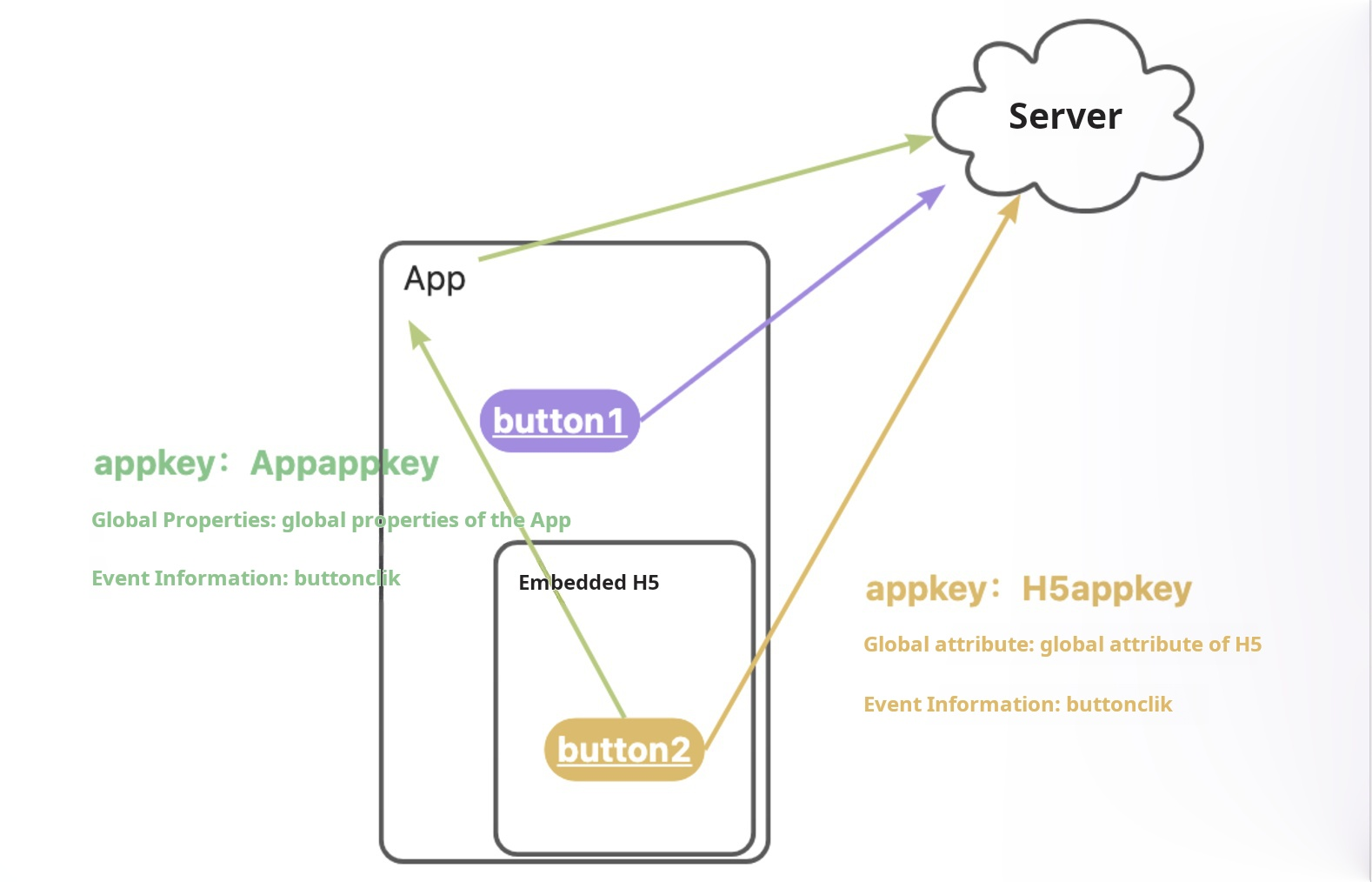
The above method is based on the following prerequisites:
App integration QuickTrackingApp SDK
And in-app H5 integration QuickTracking H5 SDK
The following figure shows that when a user triggers button2 on the h5 page in the app, two logs are reported at the same time:
Reporting through App SDK: In the reported logs, the appkey is the appkey of the app, the global attribute is the global attribute of the app, and the event code and event attribute are the code and attribute of the tracking point in h5. (Green arrow in the figure)
Reporting through H5 SDK: In the reported logs, the appkey is the appkey of h5, the global attribute is the global attribute of h5, and the event code and event attribute are the code and attribute of the buried point in h5. (Yellow arrow in the figure)
3 App Bridge H5 Interface
iOS: disabled by default. It can be enabled only by calling the following API
Note: iOS SPM versions earlier than 1.3.0 are automatically bridged by default. If you upgrade the SPM version, you need to modify the logic.
/**
 * @brief The H5 bridge interface.
 *
 * @param WebView WKWebView object
 * @warning
 *
 */
+ (void)attach:(id)WebView;
Example:
#import <QTCommon/UMSpmHybrid.h>

WKWebView *webView=[[WKWebView alloc]init];
[UMSpmHybrid attach:webView];
[webView loadRequest:request];
Note: To ensure the accuracy of reporting H5 page load events, be sure to call the attach method before loadRequest.
4 H5 SDK reporting log switch
The switch API that controls the yellow arrow link:
H5 SDK API:
SDK parameters | ||
aplus-jsbridge-only | true | Disable H5 log sending (yellow arrow) |
false (Default value: false) | Turn on H5 log sending (yellow arrow) | |
aplus_queue.push({
  action: 'aplus.setMetaInfo',
  arguments: ['aplus-jsbridge-only', true]
});
5 H5 global attribute synchronization API
If you disable the following API operations in H5, the global properties that are configured by using the globalproperty in aplus.appendMetaInfo or aplus.setMetaInfo parameter do not take effect in the native app. (This interface defaults to true.)
Note that this interface is supported in qt_web_v2.0.12 and must be used with android 1.4.3.PX and above and iOS 1.4.0.PX and above.
aplus_queue.push({
  action: 'aplus.setMetaInfo',
  arguments: ['Disable aplus-globalproperty-sync-enable, false] // Disable synchronization
});
For example, by default, if you set the global attribute "Current City: Beijing" in the app and set the global attribute "Current City: Shanghai" in the app H5, the global attribute of events triggered in H5 and app native will be "Current City: Shanghai". If you turn off this switch, the global properties set in H5 are not synchronized to the native app.
6 Historical documents
Note: iOS SPM versions earlier than 1.3.0 are automatically bridged by default. If you upgrade the SPM version, you need to modify the logic.
Introduction to H5 Bridging APIs
Before you perform H5 bridging, you need to integrate the App SDK and JS SDK and initialize them.
Call an API operation
In iOS, the event statistics protocol on the H5 page follows Native reporting by default.
Native page PV events are not reported
When statistics are collected on the h5 layer, you need to call this function if you need to avoid repeated reporting of page PV events on the native layer and the h5 layer. After this function is called, the SDK does not collect statistics on and report PV events on the current page at the native layer. This prevents duplicate reporting of PV events on pages at the H5 layer.
/**
 * @brief Skips the statistics on the current page.
 *
 * @param PageObject The object of the container. This parameter is used to automatically obtain the page. By default, this parameter can be set to nil.
 * @param pageName The name of the page. This parameter is used when you manually configure the page. You can enter nil when you configure automatic page retrieval.
 * @warning We recommend that you call this operation before you set the page. After you call this operation, the native page does not send data.
 *
 */
+ (void)skipMe:(id)PageObject pageName:(NSString *)pageName;