1. How do I view a tracking solution?
Before embedding points, it is necessary to determine where to bury points and which points to bury, that is, it is necessary to sort out the clear requirements for embedding points. In the Quick Tracking platform, explicit tracking requirements are called tracking solutions, and a specification template is designed for the tracking solution. Examples:
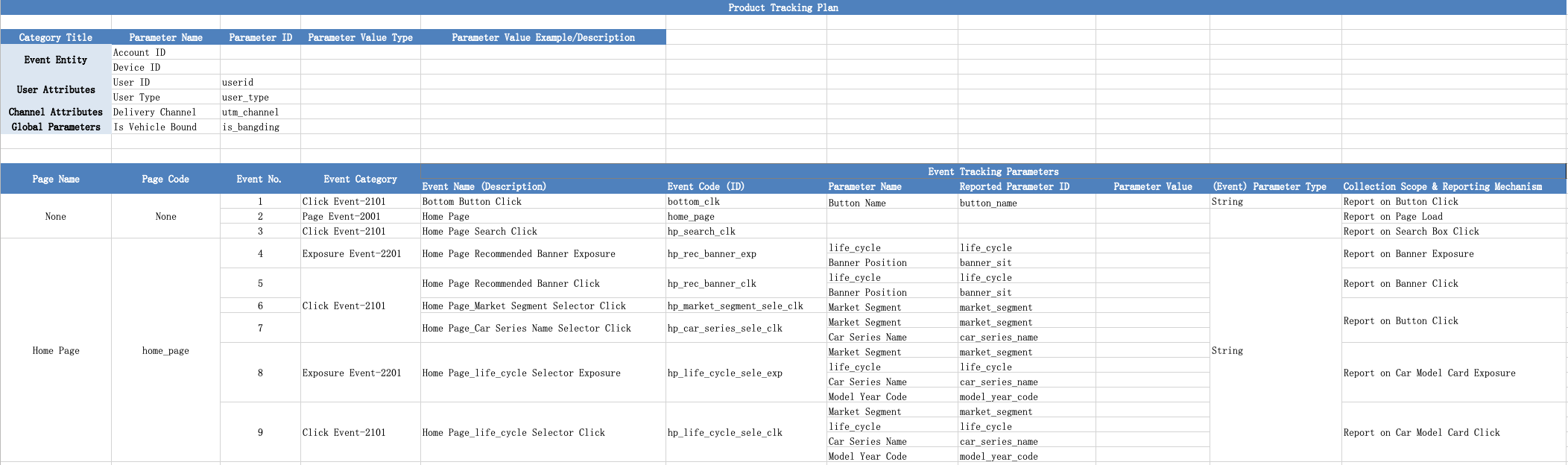
In the burial point scheme, the required burial points are as follows:
1. Event subject: refers to "who" triggered this event, which is divided into device ID and account ID. The reported event must have one of them.
Device ID: The default device ID of a macOS device is a unique device ID at the application level. The device ID is automatically generated by the Quick Tracking SDK or configured by calling the setCustomDeviceId operation.
Account ID: the account ID of the client user to log on to the system. When a user logs on from different devices, the device ID changes, but the account ID does not change. For example, a user logs in using two computers respectively.
2. User attribute: for the attribute of account ID, for example, the user with account ID of "testdemo@111", "birthday" of "1999-02-13", "member level" of "platinum", etc. The "birthday" and "membership" ratings are user attributes.
3. Global attribute: the attribute carried by each event after global setting once
4. Page browsing events: events reported during page loading (events with equal page code and event code in the tracking scheme are also events marked in blue)
5. Click, exposure, and custom events: events reported when the client user interacts with the client.
Instruction notes
Limits on the input parameter size:
Parameter | Maximum Length /Size |
The upper limit of the event encoding string. | 500 |
Maximum string for user accounts | 64 |
Maximum number of strings for custom attribute and global attribute keys | 1024 |
Maximum number of strings for custom attributes and global attribute values | 4096 |
The maximum length of an array when the value of a custom attribute or a global attribute is an array. | 100 |
Maximum Length of Custom Attribute and Global Attribute Map Collections | 50 |
2. Apply a prefab event
2.1 to manually trigger an application startup event
Interface functions:
// Manually trigger the application startup event.
-(void)trackAppStart:(NSDictionary *_Nullable)properties;Parameter:
Parameter | Type | Description | Required |
properties | NSDictionary *_Nullable | The custom attribute collection of the start event, which is limited by attribute constraints. If the attribute is empty, pass nil | No |
Examples:
NSDictionary *appStartProperties = @{
    @"appStartTest": @"appStartTest",
    @"times": @1024,
    @"subContents": @[@"test1", @"test2", @"test3"]
};
[[QuickTrackingSDK sharedInstance] trackAppStart:appStartProperties];
2.2 manually triggered application exit event
Interface functions:
// Manually trigger the application exit event.
-(void)trackAppEnd:(NSDictionary *_Nullable)properties;Parameter:
Parameter | Type | Description | Required |
properties | NSDictionary *_Nullable | The collection of custom attributes for the exit event, which is limited by attribute constraints. If the attribute is empty, pass nil | No |
Examples:
NSDictionary *appEndProperties = @{
    @"appEndTest": @"appEndTest"
};
[[QuickTrackingSDK sharedInstance] trackAppEnd:appEndProperties];
3 Device ID
The SDK supports custom device IDs. If you want to use a custom device ID, you must set the setCustomDeviceId API parameter to a valid value. The default value is the unique identifier of the encrypted device.
3.1 Custom Device ID
Interface functions:
// Specify the custom device ID.
-(void)setCustomDeviceId:(NSString *_Nonnull)customDeviceID;Parameter:
Parameter | Type | Description | Required |
customDeviceID | NSString * _Nonnull | Custom Device ID String | Yes |
Examples:
[[QuickTrackingSDK sharedInstance] setCustomDeviceId:@"your_deviceId"];3.2 Read Device ID
Interface functions:
// Read the device ID.
-(NSString *_Nullable)getDeviceID;
Examples:
NSString *deviceID = [[QuickTrackingSDK sharedInstance] getDeviceID];Note:
This method depends on SDK initialization completion and may return a null value
4 Account ID
4.1 User Login
Quick Tracking SDK uses devices as the standard when counting users. If you need to count your own accounts, use the following method.
Interface functions:
// Log on to the application.
- (void)onProfileSignIn:(NSString *_Nonnull)userId;Parameter:
Parameter | Type | Description | Required |
userId | NSString *_Nonnull | User account ID, non-empty string | Yes |
Examples:
[[QuickTrackingSDK sharedInstance] onProfileSignIn:@"your_userId"];4.2 User Logout
If you no longer need to bind a user account, you can call the user logout method provided by the SDK. After the user logout method is called, the SDK no longer sends user account-related content.
Interface functions:
// Log out.
- (void)onProfieSignOff;
Examples:
[[QuickTrackingSDK sharedInstance] onProfieSignOff];5. Upload user attributes
The event encoding is fixed as $$_user_profile custom event upload, and the event attributes carried by the event are placed in the user table as user attributes.
Interface functions:
// Upload user properties.
- (void)uploadUserProfile:(NSDictionary *_Nullable)properties;Parameter:
Parameter | Type | Description | Required |
properties | NSDictionary *_Nullable | A collection of user attributes, subject to attribute constraints. If the attribute is empty, pass nil | Yes |
Examples:
NSDictionary *userProfile = @{
  @"name": @"your_name",
  @"email": @"example@example.com"
};
[[QuickTrackingSDK sharedInstance] uploadUserProfile:userProfile];
Note:
The SDK does not cache user properties. To report user properties, you must call the user account to set the API onProfileSignIn to ensure data accuracy.
6. Global attributes
6.1 Register Global Attributes
Interface functions:
// Set global properties.
-(void)registerGlobalProperties:(NSDictionary * _Nonnull)properties;Parameter:
Parameter | Type | Description | Required |
properties | NSDictionary * _Nonnull | A collection of global attributes, subject to attribute constraints. If the attribute is empty, pass nil | Yes |
Examples:
[[QuickTrackingSDK sharedInstance] registerGlobalProperties:@{
    @"content": @"Test",
    @"times": @1024,
    @"subContents": @[@"abc", @"def", @"ghi"]
}];
Note:
If the key of an existing global attribute is the same as the key of an existing global attribute, the existing value is updated. If the key of an existing global attribute is different from the key of an existing global attribute, a new global attribute is inserted.
6.2 delete a global attribute
Interface functions:
// Delete global attributes based on the key.
-(void)unregisterGlobalProperty:(NSString *_Nonnull)propertyName;Parameter:
Parameter | Type | Description | Required |
propertyName | NSString *_Nonnull | Global attribute key to delete | Yes |
Examples:
[[QuickTrackingSDK sharedInstance] unregisterGlobalProperty:@"your_key"];6.3 to obtain a single global attribute based on a key
Interface functions:
// Obtain global properties based on the key.
-(id _Nullable)getGlobalProperty:(NSString *_Nonnull)propertyName;Parameter:
Parameter | Type | Description | Required |
propertyName | NSString *_Nonnull | The key of the global property to get | Yes |
Return value:
Description | Type |
Gets the global property value of | id _Nullable |
Examples:
id value = [[QuickTrackingSDK sharedInstance] getGlobalProperty:@"your_key"];6.4 Get All Global Attributes
Interface functions:
// Obtain all global attributes.
-(NSDictionary *_Nullable)getGlobalProperties;
Return value:
Description | Type |
Obtain all global properties | NSDictionary *_Nullable |
Examples:
NSDictionary *globalProperties = [[QuickTrackingSDK sharedInstance] getGlobalProperties];6.5 Clear All Global Attributes
Interface functions:
// Clear all global attributes.
-(void)clearGlobalProperties;
Examples:
[[QuickTrackingSDK sharedInstance] clearGlobalProperties];7. Page browsing events
Before use, please go to the data collection-> tracking management-> event management module in the QuickTracking management background to create the corresponding page event, and then pass in the corresponding page code (page_ name).
7.1 page startup
Interface functions:
// Statistics page entry behavior
+(void)onPageStart:(id _Nonnull)pageContext page_name:(NSString * _Nonnull)page_name options:(NSDictionary *_Nullable)options;Parameter:
Parameter | Type | Description | Required |
pageContext | id _Nonnull | The instance self of a viewController. We recommend that you specify a non-null value. | Yes |
page_name | NSString * _Nonnull | The page code of the page event created by the QuickTracking platform. We recommend that you specify a non-null value. | Yes |
options | NSDictionary *_Nullable | A collection of page properties. Only two properties can be read. The default value is empty:
| No |
Examples:
NSDictionary *pageOptions = @{
    @"url": @"your_url",
    @"page_title": @"your_page_title"
};
[QuickTrackingSDK onPageStart:self page_name:@"your_page_name" options:pageOptions];
7.2 Page Leave
Interface functions:
// Count the page leaving behavior.
+(void)onPageEnd:(id _Nonnull)pageContext page_name:(NSString * _Nonnull)page_name;Parameter:
Parameter | Type | Description | Required |
pageContext | id _Nonnull | The instance self of a viewController. We recommend that you specify a non-null value. | Yes |
page_name | NSString * _Nonnull | The page code of the page event created by the QuickTracking platform. We recommend that you specify a non-null value. | Yes |
Examples:
[QuickTrackingSDK onPageEnd:self page_name:@"your_page_name"];7.3 setting page event properties
Interface functions:
// Set the properties of the page event.
+(void)updatePageProperties:(id _Nonnull)pageContext page_name:(NSString *_Nonnull)page_name properties:(NSDictionary *_Nonnull)properties;Parameter:
Parameter | Type | Description | Required |
pageContext | id _Nonnull | The instance self of a viewController. We recommend that you specify a non-null value. | Yes |
page_name | NSString *_Nonnull | The page code of the page event created by the QuickTracking platform. We recommend that you specify a non-null value. | Yes |
properties | NSDictionary *_Nonnull | Event Property Collection | Yes |
Examples:
NSDictionary *pageProperties = @{
    @"page_type": @"main",
    @"user_role": @"admin"
};
[QuickTrackingSDK updatePageProperties:self page_name:@"your_name" properties:pageProperties];
8. Event tracking
Custom events can be used to track user behavior and record the specific details of behavior occurrence.
Before using, go to the Data Collection> Tracking Management> Event Management module in the Quick Tracking management background, create a custom event, and then pass in the corresponding event code in the project.
Interface functions:
// The tracking event.
- (void)event:(NSString *_Nonnull)eventCode;
// The tracking event has event attributes.
- (void)event:(NSString *_Nonnull)eventCode properties:(NSDictionary *_Nullable)properties;
// The tracking event is encoded with the page code.
- (void)event:(NSString *_Nonnull)eventCode page_name:(NSString *_Nonnull)page_name;
// Track events with page code and event attributes
- (void)event:(NSString *_Nonnull)eventCode page_name:(NSString *_Nonnull)page_name properties:(NSDictionary *_Nullable)properties;Parameter:
Parameter | Type | Description | Required |
eventCode | NSString *_Nonnull | Event encoding. You cannot pass a parameter that starts with "$$_" as a non-empty string of id | Yes |
properties | NSDictionary *_Nullable | Event property collection, key is the name of the property, must be NSString,value is the value of the property, only support NSString, NSNumber, NSArray these types, where NSArray type value currently only supports the element is NSString, up to 100 elements | No |
page_name | NSString *_Nonnull | Page code of the event attribution page | No |
Examples:
// The tracking event.
NSString *eventCodeSimple = @"your_event_code";
[[QuickTrackingSDK sharedInstance] event:eventCodeSimple];

// The tracking event with page attributes
NSString *eventCodeWithProperties = @"your_event_code";
NSDictionary *yourProperties = @{
    @"item_name": @"your_item_name",
    @"item_price": @20
};
[[QuickTrackingSDK sharedInstance] event:eventCodeWithProperties properties:yourProperties];

// The tracking event is encoded with the page code.
NSString *eventCodeWithPage = @"your_event_code";
NSString *page_name = @"homepage";
[[QuickTrackingSDK sharedInstance] event:eventCodeWithPage page_name:page_name];

// Track events with page code and event attributes
NSString *eventCodeWithPageWithProperties = @"your_event_code";
NSString *page_name = @"settings_page";
NSDictionary *properties = @{
    @"button_name": @"save_settings",
    @"user_id": @"test"
};
[[QuickTrackingSDK sharedInstance] event:eventCodeWithPageWithProperties page_name:page_name properties:properties];
9. Other
9.1 to disable the SDK
After you call this operation, the SDK does not collect events and does not send network requests.
Interface functions:
// Disable the SDK.
+(void)disableSDK;
Examples:
[QuickTrackingSDK disableSDK];9.2 open the SDK
If the SDK is disabled, the data collection feature is restored after the SDK is called.
Interface functions:
// Enable the SDK.
+(void)enableSDK;
Examples:
[QuickTrackingSDK enableSDK];