Select the correct tracking API based on the tracking scheme.
1. How do I view a tracking solution?
Before embedding points, it is necessary to determine where to bury points and which points to bury, that is, it is necessary to sort out the clear requirements for embedding points. In the QuickTracking platform, the explicit requirements of the tracking point are called the tracking point scheme, and a specification template is designed for the tracking point scheme. as follows: 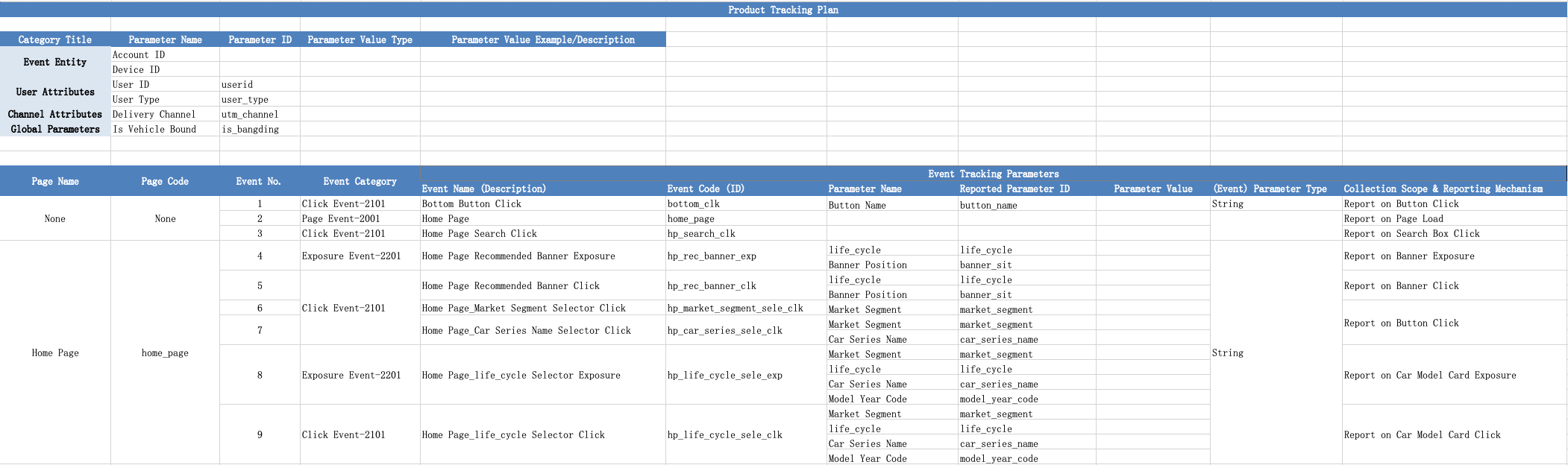
In the burial point scheme, the required burial points are as follows:
1. Event subject: the "who" triggered the event. The event can be divided into device ID and account ID. The event must have one of them.
Device ID: Generally, it is openid in the applet. The device ID of the h5 page embedded in the applet also needs to be set to the openid of the applet.
Account ID: the account ID of the client user after logging in. When a user logs in from different devices, the device ID changes, but the account ID does not change. For example, a user uses a mobile phone and a pad to log in separately.
2. User attribute: for the attribute of account ID, for example, the user with account ID of "testdemo@111", "birthday" of "1999-02-13", "member level" of "platinum", etc. The "birthday" and "membership" ratings are user attributes.
3. Channel attributes: attributes of advertisement delivery, such as delivery channel, delivery method, and delivery content.
4. Global attribute: the attribute carried by each event after global setting once
5. Page browsing events: events reported during page loading (events with equal page code and event code in the tracking scheme are also events marked in blue)
6. Click, exposure, and custom events: events reported when the client user interacts with the client.
2. Set the device ID and account ID
2.1 Device ID Settings
Each mini program platform has its own device ID generation logic. Therefore, the QuickTracking SDK does not automatically generate any device IDs. However, the logs of the QuickTracking SDK depend on the device ID. Therefore, you need to set the device ID before tracking. For WeChat mini programs, the SDK allows you to authorize QuickTracking to automatically obtain OpenID. Alternatively, the developer obtains the official mini program ID such as openid/unionid and manually uploads it as the device ID. Otherwise, the QuickTracking SDK cannot report any logs.
The manual upload method is as follows:
// Method 1:
wx.aplus.setMetaInfo("_anony_id", the ID implemented by the business side);

// Method 2:
wx.aplus_queue.push({
  action: "aplus.setMetaInfo",
  arguments: ["_anony_id", the ID implemented by the business side],
});
Note: The sample code is used to call WeChat mini programs. Other mini programs have similar platform logic.
// inside app.js
const aplusConfig = {
  metaInfo: {
    ... // Configure the SDK.
    '_hold: 'BLOCK', // The blocking log is reported. The blocking log is reported after the openid and unionid are successfully obtained.
    ... // Configure the SDK.
  },
};

// Initialize the qt_mini_sdk.
import { initQTSDK } from "./utils/qt_mini.umd.js";
initQTSDK(aplusConfig);

wx.login({
  success: (res) => {
    // Use the code to exchange the OpenID.
    if (res.code) {
      wx.request({
        url: the interface that the backend of the customer service side obtains openid,
        method: "post",
        data: {
          code: res.code,
        },
        success: (res) => {
          if (res.data && res.data.openid) {
            // Method 1:
            wx.aplus.setMetaInfo("_anony_id", res.data.openid);

            // Method 2:
            /**
              wx.aplus_queue.push({
                action: 'aplus.setMetaInfo',
                arguments: ['_anony_id', res.data.openid]
              });
              */
          } else {
            // Method 1:
            wx.aplus.setMetaInfo("_anony_id", the ID implemented by the business side);

            // Method 2:
            /**
              wx.aplus_queue.push({
                action: 'aplus.setMetaInfo',
                arguments: ['_anony_id', id implemented by the business side]
              });
              */
          }
        },
      });
    }
  },
  fail: () => {
    // The failure message.
  },
  complete: () => {
    // Method 1:
    wx.aplus.setMetaInfo("_hold", "START");

    // Method 2:
    /**
        wx.aplus_queue.push({
          action: 'aplus.setMetaInfo',
          arguments: ['_hold', 'START']
        });
        */
  },
});
PS: Currently, QuickTracking supports automatic collection of WeChat mini program openid, which needs to be authorized in the product. The authorization method is as follows. Click and fill in the content as required.
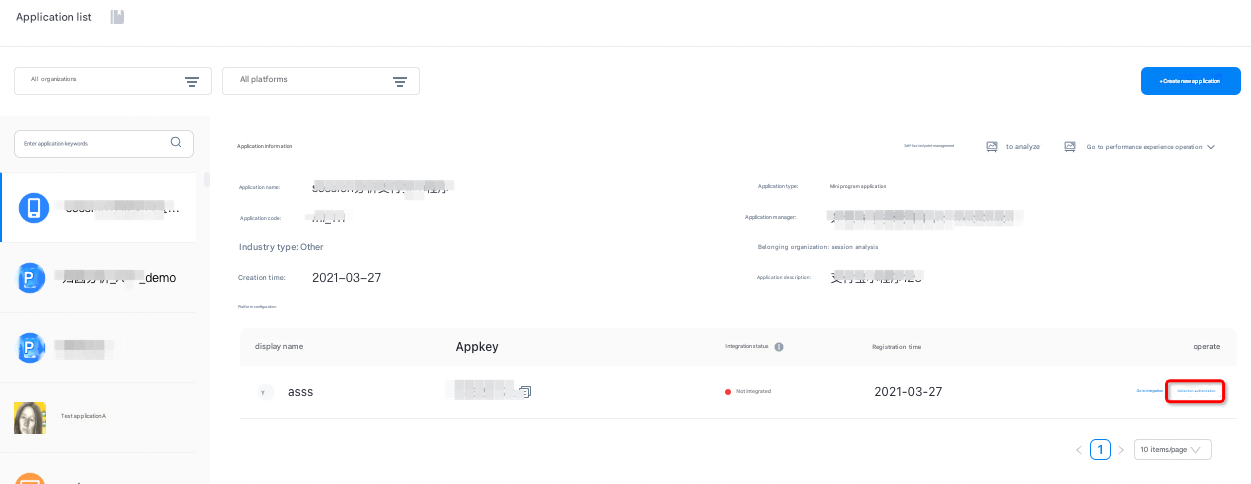
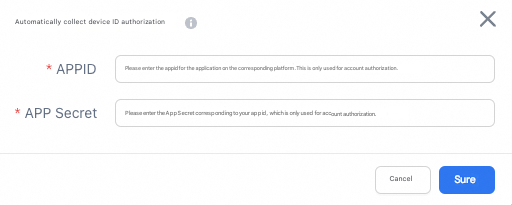
After authorization, set the device ID code mode to:
const aplusConfig = {
  metaInfo: {
  ... // Configure the SDK.
  'autoGetOpenid': true // Enable automatic collection of OpenID
  ... // Configure the SDK.
  }
};
// Initialize the qt_mini_sdk.
import { initQTSDK } from './utils/qt_mini.umd.js';
initQTSDK(aplusConfig);
If manual openid has been used before, and now you want to change to the above QuickTracking to automatically collect WeChat applet openid, you also need to pay attention to the following:
Remove the SDK blocking reporting logic with_hold=BLOCK in metainfo
Comment out the logic code for manually setting "_anony_id=openid" before, that is, remove the code for getting openid from wx.login.
Note that it is important to ensure that the content about setting appKey and receiving domain name is not affected.
_hold=BLOCK will only block the API command report sent by the command queue aplus_queue, and will not block the report of the API directly called through the aplus environment variable.
2.2 Account ID Settings
You must specify an account ID when you log on to the Apsara Uni-Manager console or when you log on to the Apsara Uni-Manager console. This is because each log after setting will carry the account ID, but the event triggered after exiting the mini program and then entering will not carry the account ID. Therefore, you need to set the account ID when you log on to the user and when you log on to the mini program:
const { aplus } =Mini Program Platform Environment Variables // Such as WeChat wx, Alipay my, Byte tt, Baidu Swan, etc.

// When the user logs on, the user logon account information is obtained or the user has logged on, and the user logon account is obtained by using the cookie or localstorage.
function demoLogin() {
  /*************************** IF SYNCHRONIZING SCENE *************************************** /
  aplus.setMetaInfo("_user_id", 'Account id');

  /************************* If it is an asynchronous scenario *********************************** /
  // Set_hold=BLOCK to block collection and reporting.
  aplus.setMetaInfo("_hold", 'BLOCK');

  ...
  function callback() {
    // Obtain the user account ID in the asynchronous callback result.
    aplus.setMetaInfo("_user_id", 'Account id');

    // Set_hold=START to allow collection and reporting.
    aplus.setMetaInfo("_hold", 'START');
  };
  ...
};
// Reset the user account ID when the user logs off.
function demoLogOff() {
    aplus.setMetaInfo("_user_id", '');
};
2.3 device ID and account ID
If you need to obtain the device ID of QuickTracking on the mini program, you can obtain the_anony_id in metainfo. Take the WeChat mini program as an example:
const { aplus } =Mini Program Platform Environment Variables // Such as WeChat wx, Alipay my, Byte tt, Baidu Swan, etc.
aplus.getMetaInfo('_anony_id');
If you need to obtain the account ID of QuickTracking on the mini program side, you can obtain_user_id in metainfo. Take the WeChat mini program as an example:
const { aplus } =Mini Program Platform Environment Variables // Such as WeChat wx, Alipay my, Byte tt, Baidu Swan, etc.
aplus.getMetaInfo('_user_id');
3. Set user properties
Reports user attributes by using the preset event coding $$_user_profile. The event type is other events.
Before you report user attributes, you must set _user_id to report user accounts. Otherwise, Quick Tracking does not perform correlation calculation on user attributes. After you confirm the account ID of the reporting user, an example of reporting user attributes is as follows:
const { aplus } =Mini Program Platform Environment Variables; // For example, WeChat wx, Alipay my, Byte tt, Baidu Swan, etc.
// Example
aplus.record("$$_user_profile", "OTHER", {
  name: "sss", // User attribute 1
  gender: "male", // User attribute 2
  class: "3", // User attribute 3
});
In the preceding content, no changes can be made to the three rows. Only rows 4, 5, and 6 can be customized.
4 Channel attributes
Channel attributes do not need to be embedded, but the URL of the mini program must contain these channel attributes, and the attribute key must start with "utm_" because the keyword recognized by the SDK is "utm_". For example:
qaplus/product?utm_channel=gzh
PS: If you have cooperated with a channel delivery company on the market and cannot start with utm_, you can use the Global Attributes API to report the channel attributes. The attribute key must start with utm_.
5 Global attributes
The lifecycle of global properties is from application startup to application hiding
5.1 Append Global Attribute (aplus.appendMetaInfo)
When you use aplus.appendMetaInfo to report global attributes, if the key of the global attribute is the same as that of an existing global attribute, the existing value is updated. If the key of the global attribute is different from that of an existing global attribute, a new global attribute is inserted.
Interface:
const { aplus } =Mini Program Platform Environment Variables; // For example, WeChat wx, Alipay my, Byte tt, Baidu Swan, etc.

aplus.appendMetaInfo("globalproperty", {
  // Append global attributes.
  xxx: xxx,
});Example:
const { aplus } =Mini Program Platform Environment Variables; // For example, WeChat wx, Alipay my, Byte tt, Baidu Swan, etc.

aplus.appendMetaInfo("globalproperty", {
  // Append global attributes.
  a: 3,
  b: 4,
});
// The current globalproperty is a:3 and b:4

aplus.appendMetaInfo("globalproperty", {
  // Append global attributes.
  b: 2,
  d: 4,
});
// The current globalproperty is a:3, b:2, d:4
5.2 Override Global Properties
When you use aplus.setMetaInfo to report global properties, only the last report will prevail. That is, all the existing global attributes are cleared first, and then the global attributes set by this setMetaInfo are added.
Make sure that this method meets the business logic before you use it. In common scenarios, clear global attributes.
note that using this method will also overwrite the channel property! ! !
Interface:
const { aplus } =Mini Program Platform Environment Variables; // For example, WeChat wx, Alipay my, Byte tt, Baidu Swan, etc.

aplus.setMetaInfo("globalproperty", {
  xxx: xxx,
});
Example:
const { aplus } =Mini Program Platform Environment Variables; // For example, WeChat wx, Alipay my, Byte tt, Baidu Swan, etc.

aplus.setMetaInfo("globalproperty", {
  a: 1,
  b: 2,
});
// The current globalproperty is a:1 and b:2

aplus.setMetaInfo("globalproperty", {
  c: 1,
  d: 2,
});
// The current globalproperty is c:1 and d:2, "a:1 and b:2 no longer exist"
6 Page Browsing Event API
1. You can use the SDK to tag events and the code to tag events. By default, the tag is enabled.
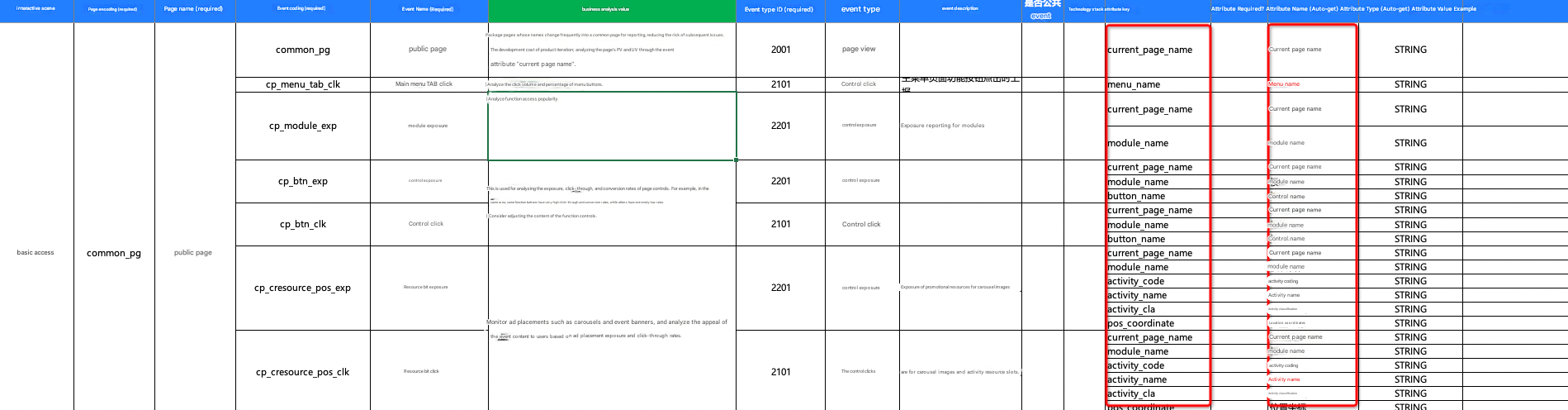
2. The following content needs to be embedded for page browsing events:
Event code: the page code. In a page browsing event, the event code is the page code.
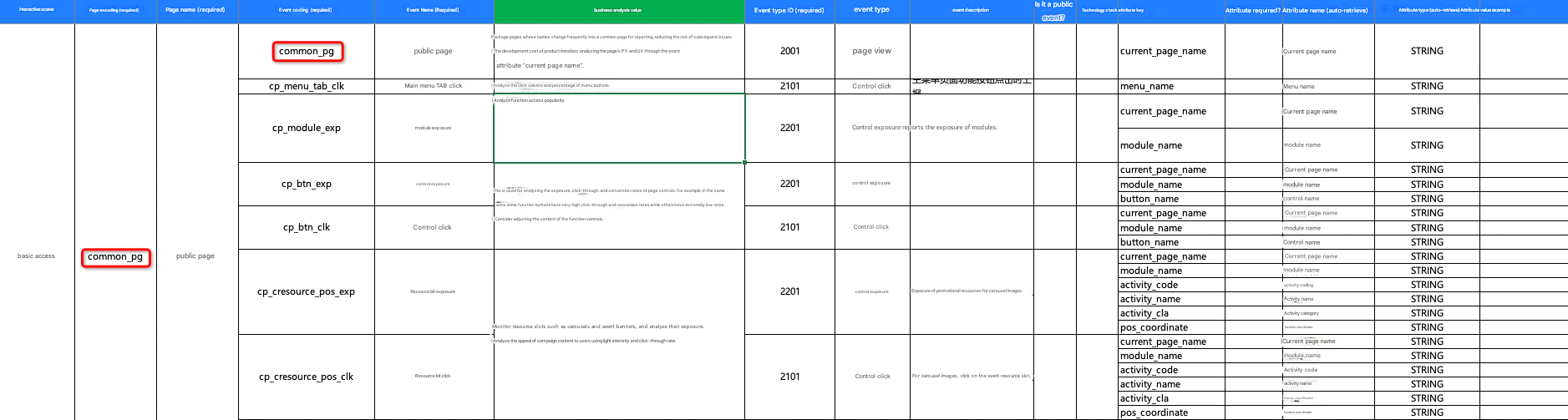
Event attributes of page browsing events: see the tracking scheme for specific attributes.
6.1 pageConfig
pageConfig is used to globally set the page encoding mode of the page, as shown in the following example:
const aplusConfig = {
  metaInfo: {
    appKey: "", // The AppKey that you specify when you create an application by using QuickTracking. This parameter is required.
    trackDomain: "", // Required. The domain name for log collection and reporting.
    _user_id: "testUserId", // The logon account ID of the mini program. If you need to calculate and analyze the user account latitude data, you must report
    _anony_id: "testOpenid", // The unique identifier of the user on the mini program platform, which is used to calculate the UV. Required.
    DEBUG: true, // Turn on the debug log.
    appVersion: "The version of your current mini program",

    // Configure the page encoding globally.
    // If the page encoding is not set, the path is used by default.
    // If the page title is not set, the WeChat mini program defaults to the page title, and other mini programs default to ""
    pageConfig: {
      "pages/index/index": {
        pageName: "page_name_test_index",
        pageTitle: "Home",
        skipMe: true, // Ignore the page browsing events that are automatically reported for the page. The default value is undefined.
      },
      "pages/detail/detail": {
        pageName: "page_name_test_detail",
        pageTitle: "Details page",
      },
    },
  },
};
Among them
pageName indicates the page encoding
pageTitle indicates the page title
skipMe specifies whether to disable automatic browsing event collection for the page (true indicates that it is disabled and false indicates that it is enabled)
Note: The priority set by skipMe is lower than the master switch aplus-disable-apv that disables the automatic collection of page browsing events.
6.2 page auto-tracking
When the SDK identifies a page onHide, it reports a page browsing event. The reported content is:
Current Client Time
Page path
Page encoding (default is page path, if pageConfig is set, the value is page_name of the mapping pageConfig)
The title of the page. The default value is the title of the page. If pageconfig is set, the value is the page_title of the mapping.
Length of time on page: time from onShow to onHide
6.2.1 Disable automatic page tracking
By default, automatic page reporting is enabled. To disable automatic page reporting, call the following API operations:
const { aplus } =Mini Program Platform Environment Variables // Such as WeChat wx, Alipay my, Byte tt, Baidu Swan, etc.

aplus.setMetaInfo('aplus-disable-apv', true);
To disable automatic page reporting for only one page, set skipMe to true in pageconfig.
6.2.2 Set event properties for automatic page browsing events
The updatePageProperties can be called to dynamically set the event properties of the page encoding and page browsing events before the onhide hook fires on the page.
API description:
const { aplus } =Mini Program Platform Environment Variables // Such as WeChat wx, Alipay my, Byte tt, Baidu Swan, etc.

aplus.updatePageProperties($params, $page_path);
Among them
$params: the collection of page event attributes, object type, which does not support multi-layer nesting. The prefabricated field page_name is used to dynamically set the page code of automatic page events.
$page_path: optional field, string type, if not, default is the current page path
Examples
onShow() {
  const { aplus } =Mini Program Platform Environment Variables // Such as WeChat wx, Alipay my, Byte tt, Baidu Swan, etc.

  aplus.updatePageProperties({
    page_name: '', //(Optional) Prefabricated field for dynamically setting the page encoding for automatic page events
    param1: '',
    param2: ''
  }, 'pages/home/home');
}
Manual collection of 6.3 pages
API
The sendPV method sends a page PV log. Its API definition is as follows:
const { aplus } =Mini Program Platform Environment Variables // Such as WeChat wx, Alipay my, Byte tt, Baidu Swan, etc.

aplus.sendPV($pageEventConfig, $properties
)
Among them
$pageEventConfig is the configuration of the page event, just write { is_auto: false }
$properties is the extended parameter of this page event. Its value is of the object type and cannot be nested in multiple layers. If no empty object '{}' can be passed
duration: The duration field is used to record the duration of the page browsed in manual PV mode. The logic for calculating duration needs to be designed and implemented by developers based on business scenarios. under the automatic PV function, the duration computational logic is implemented by the sdk
Examples
// A simple demo
const { aplus } =Mini Program Platform Environment Variables; // For example, WeChat wx, Alipay my, Byte tt, Baidu Swan, etc.

aplus.sendPV(
  {
    is_auto: false,
  },
  {
    page_title: "home page", // The default value is the value in the pageConfig parameter. If this parameter is set, the value is set here. This parameter is required.
    page_name: "yourCurrentPageName", // The default value is the value in pageConfig. If it is set here, it is the value set here (not required).

    // If you set the duration parameter (in milliseconds),QuickTracking is used as the "event attribute-duration (s)" for analysis.
    duration: 1111111,

    // Customize event properties.
    x: 111,
    y: 222,
  }
);
Note:
By default, the page_title parameter is set to the value in the pageConfig parameter. If the page_title parameter is set, the value is set.
By default, the page_name parameter is set to the value specified in the pageConfig parameter. If the page_name parameter is set, the page_name parameter is set to the value specified in the pageConfig parameter.
7 Event Burial Point
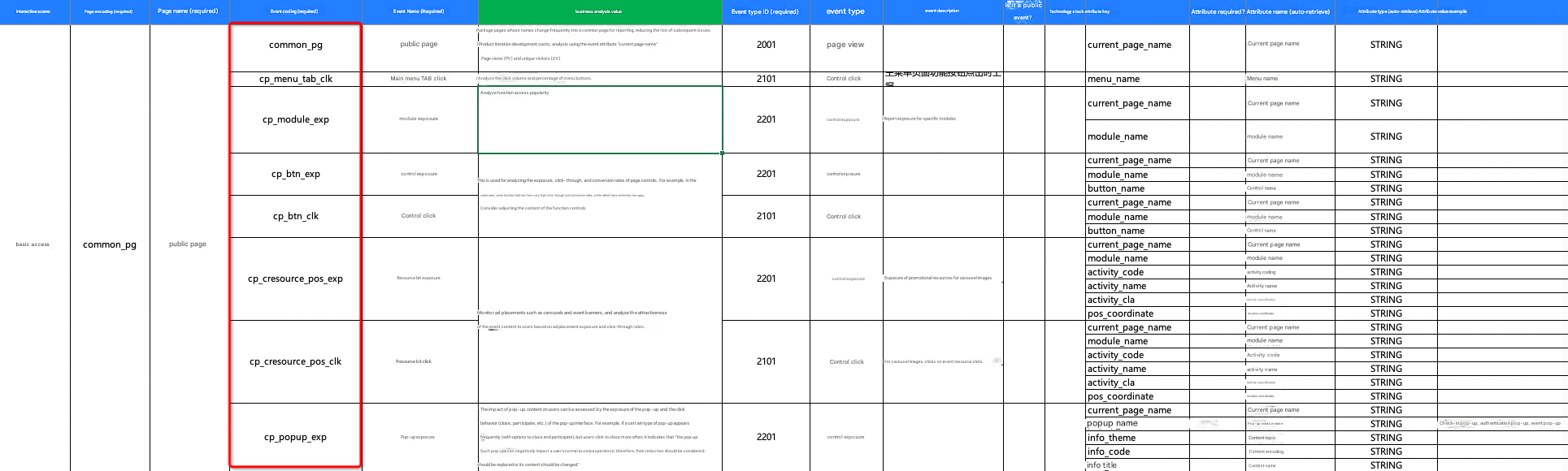
All events except page browsing events are buried by using 'action':'aplus.record'. The following content needs to be buried:
Event code:
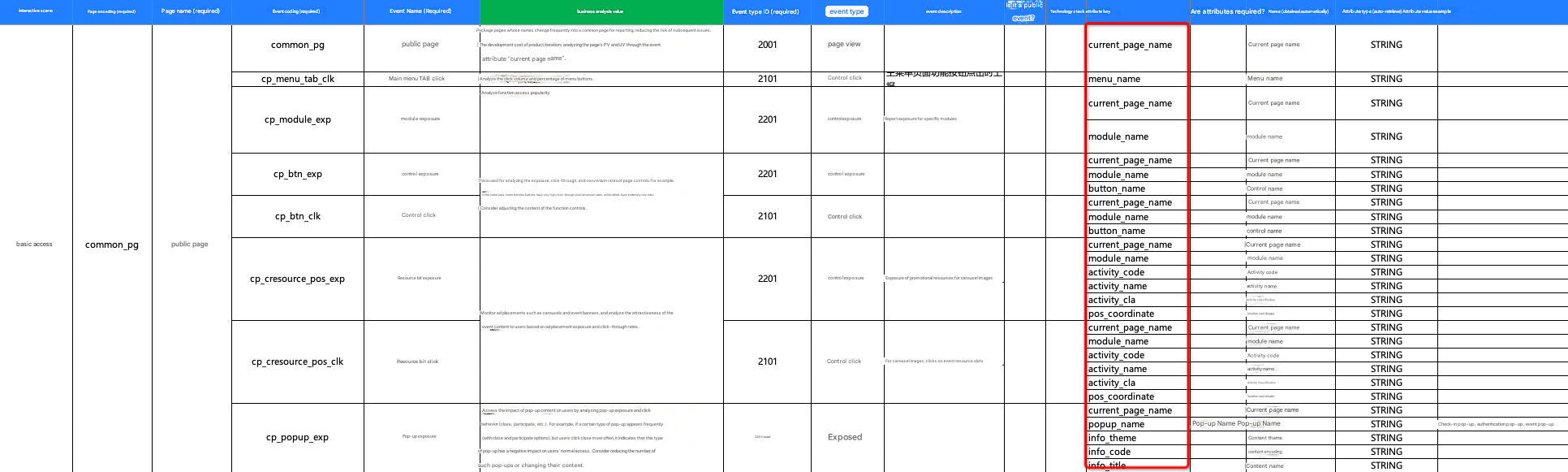
Event Properties:
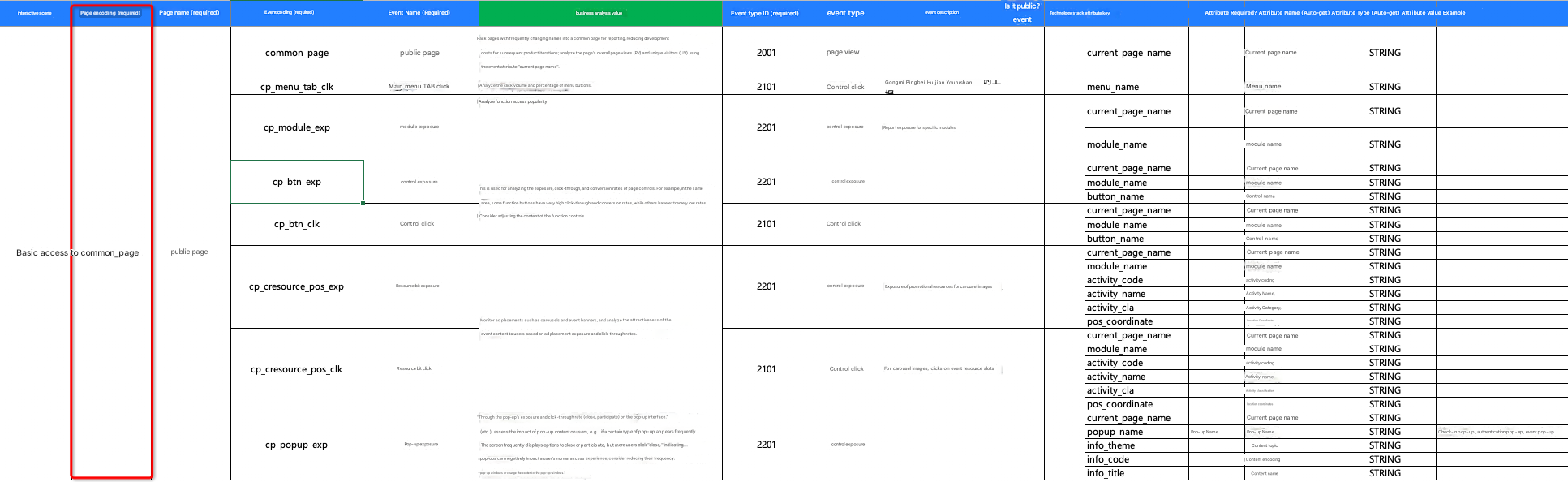
Page Encoding (optional): By default, the SDK collects the page path. If the page path is mapped in pageConfig and page_name is set, the value is page_name in pageConfig. If page_name is set in the event property when the event is buried, the value is set to page_name in the event property. That is, the value priority is:
page_name in event properties> page_name in pageConfig> page path
Page Title: The SDK collects the title of the page by default. If the page path is mapped in pageConfig and page_title is set, the value is page_title in pageConfig. If you set page_title in the event property when you tag an event, the value of the page_title parameter is the same as that of the event property. That is, the value priority is
page_title in event properties> page_title in pageConfig> page title
Event tracking is divided into SDK automatic tracking (full tracking) and code tracking. By default, the full tracking of clicks and exposure is disabled.
7.1 Exposure Event
EXP refers specifically to an exposure event
const { aplus } =Mini Program Platform Environment Variables; // For example, WeChat wx, Alipay my, Byte tt, Baidu Swan, etc.

aplus.record("Event code in the tracking scheme", "EXP", {
  x: "111",
  y: "222",
  z: "333",
  page_name: "demoPageName", // The custom page code of the current page. This parameter is optional.
});
7.2 Click Events
CLK refers specifically to the click event
const { aplus } =Mini Program Platform Environment Variables; // For example, WeChat wx, Alipay my, Byte tt, Baidu Swan, etc.

aplus.record("Event code in the tracking scheme", "CLK", {
  x: "111",
  y: "222",
  z: "333",
  page_name: "demoPageName", // The custom page code of the current page. This parameter is optional.
});
7.3 Other event tracking points
Other custom events except click and exposure events
const { aplus } =Mini Program Platform Environment Variables // Such as WeChat wx, Alipay my, Byte tt, Baidu Swan, etc.

aplus.record ('Event code in the tracking scheme ', 'OTHER', {
  x: '111',
  y: '222',
  z: "333",
  page_name: "demoPageName", // The custom page code of the current page. This parameter is optional.
});
7.4 auto exposure (full spot)
The SDK internally helps developers handle exposure times and automatically collects element exposure behaviors. The trigger timing is that the control is displayed in the visible area over 50% ms and the time exceeds 300ms.
Take WeChat as an example. The UI part:
// The root node of the WXML file on the page. capture-bind:touchstart:
<view class="root" capture-bind:touchstart="onAplusTouch">

 // Add class and data-tracker to the node to be exposed (corresponding to the configuration of automatic click in app.js), such as:
 <view class="button-section">
    <button
       class="auto-exposure"
       data-pagename="Customize the page encoding of the current event"
       data-page_title="Customize the page title for the current event"
       data-name="btn-navigator"
       data-index="num1"
       bindtap="onNavigatorTap"> Navigation </button>
   	<button
       class="autotrack_exp"
       data-itemName='Reading Stude'
       data-itemzoon='abc'
       data-itemid='a_product_id'
       data-promotioninformation='abc'
       data-pagename='Homepage'> autoExp</button>
  	<custom_component
       class="custom_component"
       name="books"
       title="data-title"
       description="this is a custom_component"></custom_component>
  </view>
</view>
sdk configuration section:
const aplusConfig = {
  metaInfo: {
    "aplus-auto-exp": [
      {
        cssSelector: ".auto-exposure", // The class of the element that you want to expose.
        logkey: "auto-exp-id", // The corresponding event code in the tracking scheme.
        /**Note:
         * 1. If CSSselector can match multiple elements, data-tracker must be buried on the page node, otherwise aplusJS cannot recognize the uniqueness of elements, thus causing multiple elements in a list to trigger only one exposure;
         * 2. Currently, Alipay mini programs do not support the collection of this attribute.
         */
        props: ["data-name", "data-index", "data-pagename", "data-page_title"],
      },
      {
        cssSelector: ".autotrack_exp", // The class of the element that you want to expose.
        logkey: "autotrack_exp", // The corresponding event code in the tracking scheme.
      },
    ],
    // The preceding callback function of automatic exposure, which is used to support customized parameter reporting, such as hump writing (HTML data attribute only supports lowercase by default).
    // Valid values: 1.9.25 and later.
    "aplus-auto-exp-userfn": function (e, selector) {
      if (selector.indexOf("autotrack_exp") != -1) {
        var dataset = e.dataset;
        var obj = {};
        obj.itemID = dataset.itemid;
        obj.itemName = dataset.itemname;
        obj.itemZoon = dataset.itemzoon;
        obj.promotionInformation = dataset.promotioninformation;
        obj.pageName = dataset.pagename;
        return obj;
      }
    },
  },
};
The automatic exposure pre-callback function. The default value is undefined. To enable this function, you must set the following parameters:
const { aplus } =Mini Program Platform Environment Variables // Such as WeChat wx, Alipay my, Byte tt, Baidu Swan, etc.
aplus.setMetaInfo('aplus-auto-exp-userfn', function(e, selector) {
  /**
    * e: DOM element
    * selector: the selector of the element. The value is the cssSelector passed in the automatic click.
    * @return The custom attribute object.
    */
});
Note that you must use the >>> syntax to help the SDK obtain the DOM data of a custom component. For more information, see.
// The root node of the WXML file on the page. capture-bind:touchstart:
<view class="root" capture-bind:touchstart="onAplusTouch">
	// Add class and data-tracker to the node to be exposed (corresponding to the configuration of automatic click in app.js), such as:
	<view class="button-section">
		<custom_component
        class="custom_component"
        name="books"
        title="data-title"
        description="this is a custom_component">
		</custom_component>
	</view>
</view>
const aplusConfig = {
metaInfo: {
...
"aplus-auto-exp": [
{
cssSelector: ".root >>> .custom_component",
logkey: "exp_custom_component",
props: [],
},
{
// Components not controlled by shadow root
cssSelector: ".custom_component",
logkey: "exp_custom_component",
props: [],
},
],
...
},
};
7.5 automatic click (full tracking point)
Starting from version 1.1.0, to reduce the workload of developer tracking, the sdk also supports configuring some information to allow the SDK to automatically collect click events within the page. (Alipay and Baidu mini programs are supported only when the basic library version is 2.x or later)
Take WeChat as an example. The UI part:
// The catchtap of the root node of the WXML file on the page:
<view catchtap="onAplusClk">

// Add class and data-tracker to the node to be exposed (corresponding to the configuration of automatic click in app.js), such as:
<view class="button-section">
  <button
     class="auto-click"
     data-pagename="Customize the page encoding of the current event"
     data-page_title="Customize the page title for the current event"
     bindtap="onNavigatorTap"> Navigation </button>
  <button
     class="autotrack_clk"
     data-itemName='Reading Stude'
     data-itemzoon='abc'
     data-itemid='a_product_id'
     data-promotioninformation='abc'
     data-pagename='Homepage'> autoClk</button>
</view>
sdk configuration section:
const aplusConfig = {
  metaInfo: {
    ...
    "aplus-auto-clk": [
      {
        cssSelector: ".auto-click",
        logkey: "demoEventCode", // The event code in the tracking scheme.
        props: ["data-name", "data-pagename", "data-page_title"], // The custom attributes in the tracking scheme.
      },
      {
        cssSelector: ".autotrack_clk",
        logkey: "autotrack_clk", // The corresponding event code in the tracking scheme.
      },
    ],
    // The preceding callback function for automatic click events. This function is used to support customized parameter reporting, such as the camel case. By default, HTML data attributes support only lowercase.
    "aplus-auto-clk-userfn": function (e, selector) {
      if (selector.indexOf("autotrack_clk") != -1) {
        var dataset = e.dataset;
        var obj = {};
        obj.itemID = dataset.itemid;
        obj.itemName = dataset.itemname;
        obj.itemZoon = dataset.itemzoon;
        // obj.promotionInformation = dataset.promotioninformation;
        obj.pageName = dataset.pagename;
        return obj;
      }
    },
    ...
  },
};
The pre-callback function for automatic clicks. The default value is undefined. To enable this function, you must set the following parameters:
const { aplus } =Mini Program Platform Environment Variables; // For example, WeChat wx, Alipay my, Byte tt, Baidu Swan, etc.

/**
 * e: DOM element
 * selector: the selector of the element. The value is the cssSelector passed in the automatic click.
 * @return The custom attribute object.
 */
aplus.setMetaInfo("aplus-auto-clk-userfn", function (e, selector) {

});
7.6 Mini Program Element Click
starting from version 2.4.2, developers need to collect the click behavior of elements bound to event functions in pages in some scenarios. to reduce the developer's configuration workload in section 7.5, the sdk supports automatic collection in such scenarios.
By default, the click behavior of the element bound to the event function is not collected. To enable this feature, you must declare it in the SDK initialization configuration:
Note: through the dynamic active setting autotrackMethodEnable or autotrackMethodFilterMap will not take effect, only in the initialization before the advance declaration can be
const aplusConfig = {
  metaInfo: {
    appKey: "", // The AppKey that you specify when you create an application by using QuickTracking. This parameter is required.
    _user_id: "testUserId", // The logon account ID of the mini program. If you need to calculate and analyze the user account latitude data, you must report
    _anony_id: "testOpenid", // The unique identifier of the user on the mini program platform, which is used to calculate the UV. Required.
    DEBUG: true, // Turn on the debug log.
    appVersion: "The version of your current mini program",
    autotrackMethodEnable: true, // It takes effect together with the following sample rate features.
    autotrackMethodFilterMap, { // 2.4.4 new method sample rate configuration
      onClick: "0.5",
    }
  },
};
Scenarios
Take WeChat mini program scenario as an example
//wxml
<view class="bottomTab"
      bindtap="onClick"
      id="my_bottom_tab"
      data-custom_property="1111"
      data-element_type="Element type, developers add as needed"
      data-element_name="Element name, developers add as needed"
      data-element_class_name="element class, developers add as needed"
      data-element_content="Element content, developers add as needed"
      data-element_selector="css filters, developers add on demand"
      data-element_path="element path, developers add as needed">
  <view class="iconfont icon-dibu"> Bottom navigation </view>
</view>

//homePage.js
Page({
  // Click the tab at the bottom.
  onClick: function () {
    // The business processing logic.
  }
})
When the user triggers the onClick event, the sdk reports an event encoded as $$_mp_item_click. The collection fields include:
Event Properties
(Default collection) methodName:"onClick"
(User Defined Attribute) custom_property:"1111"
Full burial attribute
element_id: "my_bottom_tab"
element_type: "element type, which developers add as needed"
element_name: "element name, which developers add as needed"
element_class_name: "element class, developers add as needed"
element_content: "Element content, developers add as needed"
element_selector: "css filters, developers add on demand"
element_path: "element path, which developers add as needed"
Note: The full tracking attribute takes effect only after the developer configures the data attribute data-element_xxx on the element.
8 Sharing fission
Sharing fission is a key concept of the growth hacking strategy. It relies on the social connection between users to realize the mutual transmission of information, so as to promote the acquisition of new users.
After completing the integration of the SDK function of sharing fission, you will be able to use the QuickTracking platform to share trend models and measure the pull-up benefits of marketing activities by sharing return-related indicators.
Supports viewing the reflow effect metrics of the top sharing users and different sharing reflow levels.
Supports flexible combination and configuration of backflow indicators, views top users with the most fission pull-up capability and sharing backflow conversion capability, tracks the relationship between users sharing fission links and sharing backflow, and quickly locates key opinion consumers.
Obtain source sharing parameters
aplus.getRefShareParams();Version requirements
mini program sdk v2.2.0 or later
Features
API used to obtain the source sharing id and source sharing url when the shared person opens the applet
request parameters
None
Return parameters
Object type
Parameters | Type | Default Value | Meaning | Remarks |
$$_ref_share_url | String | "" | Source share url that does not contain the share id | None |
$$_ref_share_id | String | "" | source sharing id | None |
Call example
Note: Considering the difference in the capabilities of applet platforms in onShareAppMessage and onShareTimeline APIs, SDK provides two API usage methods to request sharing parameters, namely, Promise return and function callback return. You can select based on the platform that your product needs to adapt to.
Promise-based
/**
 * Take the WeChat mini program as an example, the Promise return value scenario.
 */

Page({
  data: {
    // The shared ID field of the SDK.
    $$_share_id: "",
  },
  getShareId() {
    const { $$_ref_share_url, $$_ref_share_id } = wx.aplus.getRefShareParams();

    // Method 1: Obtain the share ID from the user-defined function.
    wx.aplus
      .requestShareParams({
        title: "Share the activity page",
        path: "/pages/share/shareCampaign?utm_test=test",
        campaign: "This is a sharing activity",
        shareId: $$_ref_share_id,
      })
      .then((res) => {
        const { $sid } = res;
        if ($sid) {
          this.setData({
            $$_share_id: $sid,
          });
        } else {
          // Specify the cause of the error. In the SDK DEBUG mode, the mini program console prints the error.
          console.log("Failed to obtain the shared parameters.");
        }
        return res;
      });
  },

  // Listen to the behavior of the user clicking the forward button (button open-type="share") or the "forward" button in the upper-right menu on the page and customize the forward content.
  onShareAppMessage() {
    return {
      title: "User default sharing activity page title",
      path: `/pages/share/shareCampaign?utm_test=test&$sid=${this.data.$$_share_id}`,
      // You must specify the sdk prefabricated field to share the ID.
      $$_share_id: this.data.$$_share_id,
      // Specify the ID of the shared activity as needed. The field is a preset field in the SDK.
      $$_share_campaign_id: "This is a custom sharing activity",
      // You must specify the original share link. Remember that you do not need to splice the share ID.
      $$_ share_url: 'Share ${this.route}?utm_source=Share the circle of friends',
    };
  },

  // Monitor the behavior of the "Share to Friends" button in the upper-right corner and customize the shared content.
  onShareTimeline() {
    return {
      title: "Sharing Friends",
      // The parameters in the query when the next shared subject opens the applet. Remember to splice $sid, otherwise the sharing chain will be broken.
      query: `$sid=${this.data.$$_share_id}`,
      // You must specify the sdk prefabricated field to share the ID.
      $$_share_id: this.data.$$_share_id,
      // You must specify the sdk prefabricated field to share the activity id.
      $$_share_campaign_id: "This is a custom sharing activity",
      // You must specify the original share link. Remember that you do not need to splice the share ID.
      $$_ share_url: 'Share ${this.route}?utm_source=Share the circle of friends',
    };
  },
  // Customize simulated sharing, such as generating shared images and shared clipboard content.
  userCustomShare() {
    wx.aplus.record("$$_share", "CLK", {
      // Specify the fields as needed. The fields are pre-made in the SDK and shared titles.
      $$_ share_title: "This is a shared title",
      // You must specify the sdk prefabricated field to share the ID.
      $$_share_id: this.data.$$_share_id,
      // Specify the ID of the shared activity as needed. The field is a preset field in the SDK.
      $$_share_campaign_id: "This is a custom sharing activity",
      // Specify the fields that you want to share with the target platform.
      $$_ share_type: "User-defined sharing target platform",
      // You must specify the original share link. Remember that you do not need to splice the share ID.
      $$_ share_url: 'The ${this.route}?utm_source=Custom sharing',
    });
  },
});
Callback-based usage
/**
* Take the WeChat mini program as an example, the Promise return value scenario.
*/

Page({
  data: {
    // The shared ID field of the SDK.
    $$_share_id: "",
  },
  getShareId() {
    const {
      $$_ref_share_url,
      $$_ref_share_id,
    } = wx.aplus.getRefShareParams();

    // Method 1: Obtain the share ID from the user-defined function.
    wx.aplus.requestShareParams({
      title: 'Share activity page',
      path: '/pages/share/shareCampaign?utm_test=test',
      campaign: 'This is a sharing campaign',
      shareId: $$_ref_share_id,
    }).then((res) => {
      const { $sid } = res;
      if ($sid) {
        this.setData({
          $$_share_id: $sid,
        });
      } else {
        // Specify the cause of the error. In the SDK DEBUG mode, the mini program console prints the error.
        console.log("Failed to obtain the shared parameters.");
      }
      return res;
    });
  },

  // Listen to the behavior of the user clicking the forward button (button open-type="share") or the "forward" button in the upper-right menu on the page and customize the forward content.
  onShareAppMessage() {
    return {
      title: 'User default sharing activity page title',
      path: `/pages/share/shareCampaign?utm_test=test&$sid=${this.data.$$_share_id}`,
      // You must specify the sdk prefabricated field to share the ID.
      $$_share_id: this.data.$$_share_id,
      // Specify the ID of the shared activity as needed. The field is a preset field in the SDK.
      $$_share_campaign_id: "This is a custom sharing activity",
      // You must specify the original share link. Remember that you do not need to splice the share ID.
      $$_ share_url: 'Share ${this.route}?utm_source=Share the circle of friends',
    };
  },

  // Monitor the behavior of the "Share to Friends" button in the upper-right corner and customize the shared content.
  onShareTimeline() {
    return {
      title: "Sharing Friends",
      // The parameters in the query when the next shared subject opens the applet. Remember to splice $sid, otherwise the sharing chain will be broken.
      query: `$sid=${this.data.$$_share_id}`,
      // You must specify the sdk prefabricated field to share the ID.
      $$_share_id: this.data.$$_share_id,
      // You must specify the sdk prefabricated field to share the activity id.
      $$_share_campaign_id: "This is a custom sharing activity",
      // You must specify the original share link. Remember that you do not need to splice the share ID.
      $$_ share_url: 'Share ${this.route}?utm_source=Share the circle of friends',
    };
  },
  // Customize simulated sharing, such as generating shared images and shared clipboard content.
  userCustomShare() {
    wx.aplus.record("$$_share", "CLK", {
      // Specify the fields as needed. The fields are pre-made in the SDK and shared titles.
      $$_ share_title: "This is a shared title",
      // You must specify the sdk prefabricated field to share the ID.
      $$_share_id: this.data.$$_share_id,
      // Specify the ID of the shared activity as needed. The field is a preset field in the SDK.
      $$_share_campaign_id: "This is a custom sharing activity",
      // Specify the fields that you want to share with the target platform.
      $$_ share_type: "User-defined sharing target platform",
      // You must specify the original share link. Remember that you do not need to splice the share ID.
      $$_ share_url: 'The ${this.route}?utm_source=Custom sharing',
    });
  }
})
Request sharing parameters
aplus.requestShareParams(Object params, Function callback);Version
mini program sdk v2.2.0 or later
Features
request is used to build the share ID required for the sharing chain
request parameters
Parameters | Type | Default Value | Meaning | Remarks |
params | Object | None | Share the API for obtaining parameters |
path: the path of the shared page. String type. The default value is the path of the page shared by the current mini program.
campaign: the identity of the shared campaign. String type, the default value is undefined, the maximum length is 4*1024 characters title: Share the title. String type, the default value is undefined, the maximum length is 4*1024 length shareId: the ID of the source share. String type. Default value: undefined. |
callback | Function | undefined | The callback function provided for the applet platform that does not support the promise return | If the callback parameter is not specified, the shared parameter acquisition API returns result as a promise by default. If the callback parameter has a value and is a callback parameter, the callback function returns the shared parameter to obtain the request result of the API. |
Return parameters
If the request parameters does not contain a callback, return Promise.resolve(Object result)
Parameters | Type | Default Value | Meaning | Remarks |
$sid | String | undefined | Share ID, which represents the unique identifier of the sharing behavior of the current mini program subject. | None |
$scampaign | String | undefined | Share activity identification | The fields in the SDK do not need to be modified. Otherwise, data accuracy is affected. ! ! |
$soriPath | String | The path that is passed when the API is called. If no value is specified, the default value is the path of the page on which the API is called. | The original share URL, which represents the original share URL. | The fields in the SDK do not need to be modified. Otherwise, data accuracy is affected. ! ! |
path | String | Share URL of the $sid parameter | Share URL, which represents the shared address. | The fields in the SDK do not need to be modified. Otherwise, data accuracy is affected. ! ! |
title | String | undefined | Share Title | None |
Call example
Note: Considering the difference in the capabilities of applet platforms in onShareAppMessage and onShareTimeline APIs, SDK provides two API usage methods to request sharing parameters, namely, Promise return and function callback return. You can select based on the platform that your product needs to adapt to.
Promise-based
Method 1: Obtain the share ID in the custom method, and then report the share information through the returned result in the onShareAppMessage \ onShareTimeline
Page({
  data: {
    $$_ share_id: "", // The shared ID field of the SDK.
  },
  getShareId() {
    // Method 1: Obtain the share ID from the user-defined function.
    wx.aplus.requestShareParams({
      title: 'Share activity page',
      path: '/pages/share/shareCampaign?utm_test=test',
      campaign: 'This is a sharing campaign',
      shareId: "This is a source share id"
    }).then(res => {
      const { $sid } = res;
      this.setData({
        $$_share_id: $sid
      });
      return res;
    });
  },
  // Listen to the behavior of the user clicking the forward button (button open-type="share") or the "forward" button in the upper-right menu on the page and customize the forward content.
  onShareAppMessage(options) {
    return {
      title: 'User default sharing activity page title',
      path: `/pages/share/shareCampaign?utm_test=test&$sid=${this.data.$$_share_id}`,
      // You must specify the sdk prefabricated field to share the ID.
      $$_share_id: this.data.$$_share_id,
      // Specify the ID of the shared activity as needed. The field is a preset field in the SDK.
      $$_share_campaign_id: "This is a custom sharing activity",
      // You must specify the original share link. Remember that you do not need to splice the share ID.
      $$_ share_url: 'Share ${this.route}?utm_source=Share the circle of friends',
    }
  },
  ...
  // Monitor the behavior of the "Share to Friends" button in the upper-right corner and customize the shared content.
  onShareTimeline(options) {
    return {
      title: "Sharing Friends",
      // The parameters in the query when the next shared subject opens the applet. Remember to splice $sid, otherwise the sharing chain will be broken.
      query: `$sid=${this.data.$$_share_id}`,
      // You must specify the sdk prefabricated field to share the ID.
      $$_share_id: this.data.$$_share_id,
      // You must specify the sdk prefabricated field to share the activity id.
      $$_share_campaign_id: "This is a custom sharing activity",
      // You must specify the original share link. Remember that you do not need to splice the share ID.
      $$_ share_url: 'Share ${this.route}?utm_source=Share the circle of friends',
    }
  },
  // Customize simulated sharing, such as generating shared images and shared clipboard content.
  userCustomShare() {
    wx.aplus.record("$$_share", "CLK", {
      // Specify the fields as needed. The fields are pre-made in the SDK and shared titles.
      $$_ share_title: "This is a shared title",
      // You must specify the sdk prefabricated field to share the ID.
      $$_share_id: this.data.$$_share_id,
      // Specify the ID of the shared activity as needed. The field is a preset field in the SDK.
      $$_share_campaign_id: "This is a custom sharing activity",
      // Specify the fields that you want to share with the target platform.
      $$_ share_type: "User-defined sharing target platform",
      // You must specify the original share link. Remember that you do not need to splice the share ID.
      $$_ share_url: 'The ${this.route}?utm_source=Custom sharing',
    });
  }
})
Method 2: Call the sharing parameter acquisition API in the onShareAppMessage, and then return the result by promise in the onShareAppMessage to report the sharing information
Note: The onShareTimeline method does not support promise returns. Therefore, you onShareTimeline still need to use the setState method to obtain the share ID.
Page({
  ...
  onShareAppMessage(options) {
    const promise = wx.aplus.requestShareParams({
      title: 'Share activity page',
      path: '/pages/share/shareCampaign?utm_test=test',
      campaign: 'This is a sharing campaign',
      shareId: "This is a source share id"
    });

    return {
      title: 'User default sharing activity page title',
      promise
    }
  },
  ...

})
Callback-based usage
Page({
  data: {
    $$_ share_id: "", // The shared ID field of the SDK.
  },
  getShareId() {
    wx.aplus.requestShareParams({
      title: 'Share activity page',
      path: '/pages/share/shareCampaign?utm_test=test',
      campaign: 'This is a sharing campaign',
      shareId: "This is a source share id"
     }, (res) => {
      const { $sid } = res;
      this.setData({
        $$_share_id: $sid
      });
    });
  },
  ...
  // Listen to the behavior of the user clicking the forward button (button open-type="share") or the "forward" button in the upper-right menu on the page and customize the forward content.
  onShareAppMessage(options) {
    return {
      title: 'User default sharing activity page title',
      path: `/pages/share/shareCampaign?utm_test=test&$sid=${this.data.$$_share_id}`,
    	// You must specify the sdk prefabricated field to share the ID.
      $$_share_id: this.data.$$_share_id,
      // You must specify the sdk prefabricated field to share the activity id.
      $$_share_campaign_id: "This is a custom sharing activity",
      // You must specify the original share link. Remember that you do not need to splice the share ID.
      $$_ share_url: 'Share ${this.route}?utm_source=Share the circle of friends',
    }
  },
  // Monitor the behavior of the "Share to Friends" button in the upper-right corner and customize the shared content.
  onShareTimeline(options) {
    return {
      title: "Sharing Friends",
      // The parameters in the query when the next shared subject opens the applet. Remember to splice $sid, otherwise the sharing chain will be broken.
      query: `$sid=${this.data.$$_share_id}`,
      // You must specify the sdk prefabricated field to share the ID.
      $$_share_id: this.data.$$_share_id,
      // You must specify the sdk prefabricated field to share the activity id.
      $$_share_campaign_id: "This is a custom sharing activity",
      // You must specify the original share link. Remember that you do not need to splice the share ID.
      $$_ share_url: 'Share ${this.route}?utm_source=Share the circle of friends',
     }
  },

  // Customize simulated sharing, such as generating shared images and shared clipboard content.
  userCustomShare() {
     wx.aplus.record("$$_share", "CLK", {
        // Specify the fields as needed. The fields are pre-made in the SDK and shared titles.
        $$_ share_title: "This is a shared title",
        // You must specify the sdk prefabricated field to share the ID.
        $$_share_id: this.data.$$_share_id,
       	// Specify the ID of the shared activity as needed. The field is a preset field in the SDK.
      	$$_share_campaign_id: "This is a custom sharing activity",
        // Specify the fields that you want to share with the target platform.
        $$_ share_type: "User-defined sharing target platform",
        // You must specify the original share link. Remember that you do not need to splice the share ID.
      	$$_ share_url: 'The ${this.route}?utm_source=Custom sharing',
      });
  }
})