Basic integration
1. Domain settings
Before pre-initialization, call the setTrackDomain API to set the data collection domain for your private environment. Call this API before any other SDK API.
import { setTrackDomain } from '@quicktracking/analytics';

/**
* Sets the primary and standby domains for uploading analytics logs.
* The SDK first tries to report data to the primary domain. If the attempt fails, it retries with the standby domain.
* The primaryDomain cannot be null or an empty string. If it is, the SDK logs an error: "Data collection domain cannot be empty. Check your domain settings!"
* The standby domain can be null or an empty string. In this case, the SDK treats it as identical to the primary domain. If the data upload fails, the SDK retries sending the data to the primary domain.
* The domain parameters must include the "https://" prefix.
*/

function setTrackDomain(primaryDomain: string, standaryDomain?: string)|
Parameter |
Description |
|
primaryDomain |
The primary domain for log uploads. |
|
standaryDomain |
The standby domain for log uploads. |
Note: Only HTTP and HTTPS protocol prefixes are supported. If you do not specify a protocol prefix, the SDK uses HTTPS by default.
2. Compliant initialization
To comply with data privacy regulations, your app must not collect personal information until the user consents to your privacy policy. The QuickTracking SDK for HarmonyOS NEXT splits initialization into two steps: pre-initialization and initialization. Follow these steps to ensure compliant initialization:
-
Display a privacy policy and obtain user consent when your app first launches.
-
You must state in your privacy policy that you use the QuickTracking SDK for data collection. We recommend adding the following clause: "Our product integrates the QuickTracking SDK, which collects your OAID, Huawei AAID, SIM card IMSI, hardware serial number, MCC, and MNC to provide statistical analysis services."
-
Initialize the QuickTracking SDK only after the user agrees to your privacy policy.
2.1. Pre-initialization API
Call the pre-initialization API. This call does not collect device information or send data to the QuickTracking service.
2.1.1. API
import { preInit } from '@quicktracking/analytics';

function preInit(cfg: UMConfig):void
2.1.2. Parameters
|
Parameter |
Type |
Description |
Required |
|
context |
common.ApplicationContext |
The application context. |
Yes |
|
appKey |
string |
Your unique application identifier. It must match the appKey configured in the QuickTracking backend. The SDK sends this key with every event log to identify your application. |
Yes |
|
plugins |
BasePlugin | BasePlugin[] |
The plugin or array of plugins to enable. |
Yes |
|
channel |
string |
The distribution channel of your application. This value corresponds to the "Upgrade Channel" field in the "System Properties" section of the QuickTracking analytics platform. |
No |
|
enableLog |
boolean |
Specifies whether to enable the debug log. The default value is |
No |
|
enableJSBridge |
boolean |
Specifies whether to enable the H5 bridge function. The default value is |
No |
|
enableAutoTrackApplication |
boolean |
Specifies whether to enable automatic application lifecycle tracking. The default value is |
No |
|
enableAutoTrackPage |
boolean |
Specifies whether to enable automatic page tracking. The default value is |
No |
|
deviceManufacturer |
string |
A custom device manufacturer. |
No |
|
deviceBrand |
string |
A custom device brand. |
No |
|
marketName |
string |
A custom market name. |
No |
|
deviceName |
string |
A custom device name. |
No |
|
hardwareModel |
string |
A custom hardware model. |
No |
|
CPU |
string |
A custom CPU type. |
No |
|
deviceType |
string |
A custom device type. |
No |
|
screenResolution |
string |
A custom screen resolution. |
No |
|
OSVersion |
string |
A custom OS version. |
No |
|
AAID |
string |
A custom AAID. |
No |
|
ODID |
string |
A custom ODID. |
No |
|
OAID |
string |
A custom OAID. |
No |
To control the collection of specific device identifiers, such as disabling collection or providing your own implementation, pass custom values during pre-initialization:
 preInit({
      appKey: 'YOUR_APP_KEY'
      context: this.context.getApplicationContext(),
      enableJSBridge: true,
      enableAutoTrackApplication: true,
      enableAutoTrackPage: true,
      plugins: [new InternalPlugin()],
      customAAID: "", // Disables AAID collection
      customODID: "YOUR_CUSTOM_ODID",
      customOAID: "YOUR_CUSTOM_OAID",
    });
Important: Implement custom collection methods with caution. If you provide a custom implementation for an identifier, you take full responsibility for its collection, and the SDK will no longer attempt to collect it. Limiting the identifiers the SDK can access negatively impacts the accuracy and stability of your analytics data.
2.2. Initialization API
After the user agrees to your privacy policy, call the init API to start log collection and transmission.
2.2.1. API
import { init } from '@quicktracking/analytics';

function init():Promise<void>
2.3. Calling the initialization API
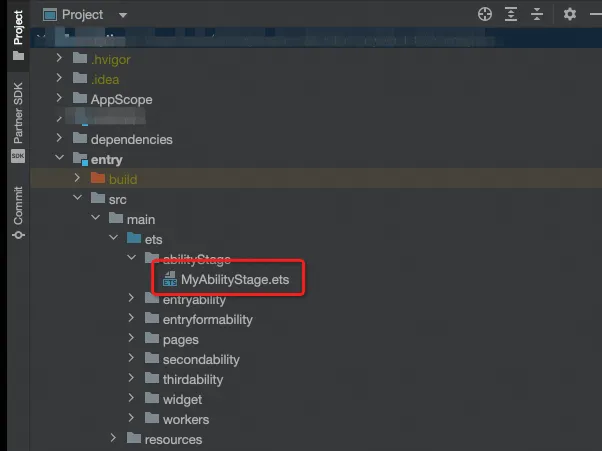
In your application module directory, add an AbilityStage file, such as entry/src/main/ets/abilityStage/MyAbilityStage.ets. The following image shows the file location:
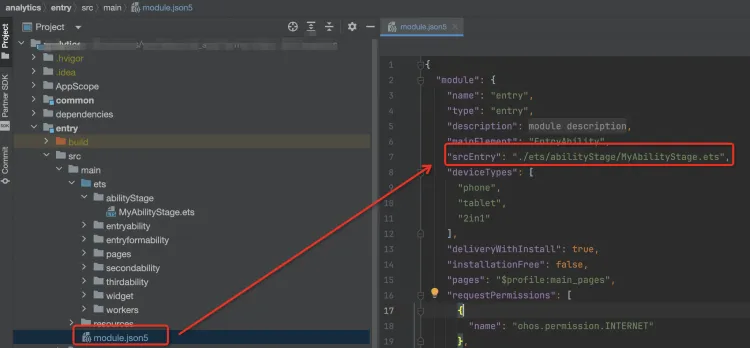
In the module's module.json5 file, add srcEntry and point it to the AbilityStage file path:
2.3.1. Complete example
import AbilityStage from '@ohos.app.ability.AbilityStage';
import { preInit, InternalPlugin, setLogEnabled, init, setTrackDomain } from '@quicktracking/analytics';

// Enable the debug log.
setLogEnabled(true);
// Set the data collection domains.
setTrackDomain("YOUR_PRIMARY_DOMAIN", "YOUR_STANDBY_DOMAIN");

export default class MyAbilityStage extends AbilityStage {
  onCreate() {
    preInit({
      appKey: 'YOUR_APP_KEY'
      context: this.context.getApplicationContext(),
      enableJSBridge: true,
      enableAutoTrackApplication: true,
      enableAutoTrackPage: true,
      plugins: [new InternalPlugin()]
    });
    init();
  }
}
Important: Call the init() method only after the user has consented to your privacy policy. Ensure this call is placed after the preInit() method. Data collection and transmission do not begin until init() is called.
3. Log printing
Call the setLogEnabled API to enable or disable SDK log messages.
import { setLogEnabled } from '@quicktracking/analytics';

function setLogEnabled(enable: boolean):void|
Parameter |
Description |
|
enable |
Enables or disables SDK log messages. The default is |
Note:
-
To view initialization logs, enable logging before calling the initialization method.
-
Logs are categorized into three levels:
-
error: Error messages related to SDK integration or runtime issues. -
warn: SDK warning messages. -
info: SDK informational messages.