This document is for standalone deployment customers only
1. Brief description
QuickAudience (hereinafter referred to as QA) has upgraded the WeCom access mode of the original service provider mode to the enterprise self-built application mode. After the upgrade, the WeCom access mode can obtain more WeCom data through the enterprise self-built application without being limited by the number of API calls, thus reducing the WeCom data acquisition cost.
2. Preparations before access
2.1 Resource List
No. | Resource Group Name | Specification | Requirement | Remarks |
1 | Second-hierarchy domain | qawecom.xxx.com | domain filing enterprises and WeChat-registered enterprises must be consistent | If there is a public network domain, it can be shared and forwarded according to the specified path. |
2 | EIP (public IP address) | Bandwidth 5Mbps | The second-hierarchy domain points to the public IP address | Refer to the recommended specifications based on the number of WeCom users:
|
3 | SSL Certificate | SSL Certificates Service with second-hierarchy domains |
|
2.2 Information List
No. | Purpose | Reference | How to obtain an enterprise-to-WeChat link |
1 | WeCom account association | corpid, secret | https://developer.work.weixin.qq.com/document/path/90665#secret |
2 | WeCom API Callback | corpid |
3. Network deployment
3.1 WeCom Callback Request Forwarding
/restapi/thirdservice/we/com the public network domain according to the path and forward the request under the path to the IP or SLB address of the QA service.
3.2 Add a Waf allow list
To ensure that QA products can only be accessed over the internal network, you need to configure a allow list on Waf to allow calls for WeComservice.
Add /restapi/thirdservice/we/com request to the allow list under the public network domain, and only allow the path to be accessed through the Internet.
4. WeCom background configuration description
Before you perform this operation, see WeCom Authorization Configuration Guide to complete WeCom authorization. In the following example, the application name is [test space].
as an example
4.1 Application Visible Range Configuration
Note: If you do not set the visibility range, you cannot obtain data such as the address book and fan data from the enterprise.
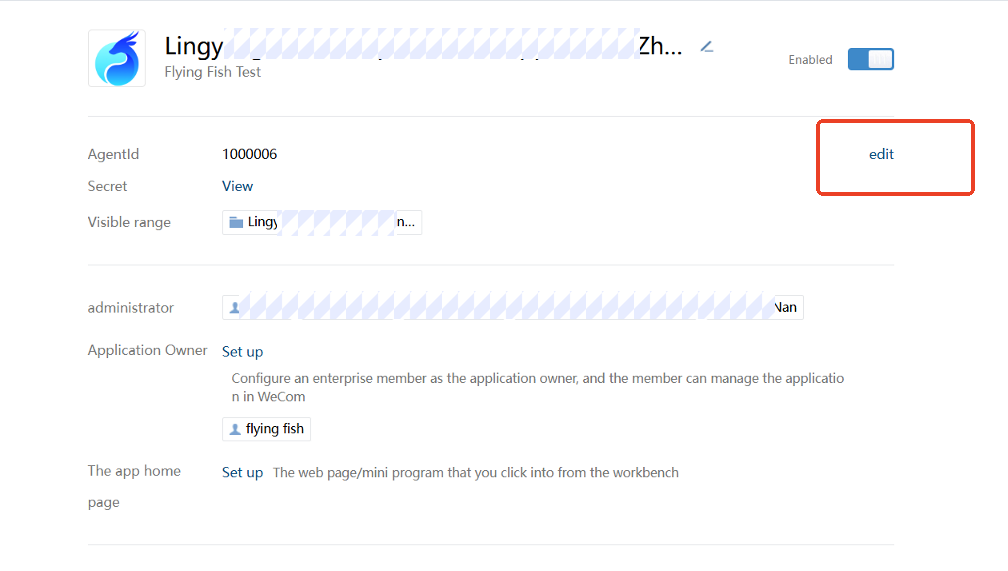
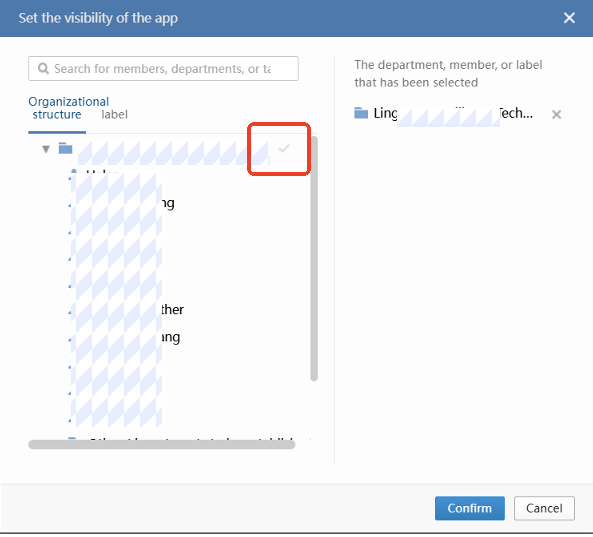
Permissions related to 4.2 configuration
If you want to obtain customer information through the API, you need to configure the application with the permission to obtain customer information, otherwise the acquisition will fail.
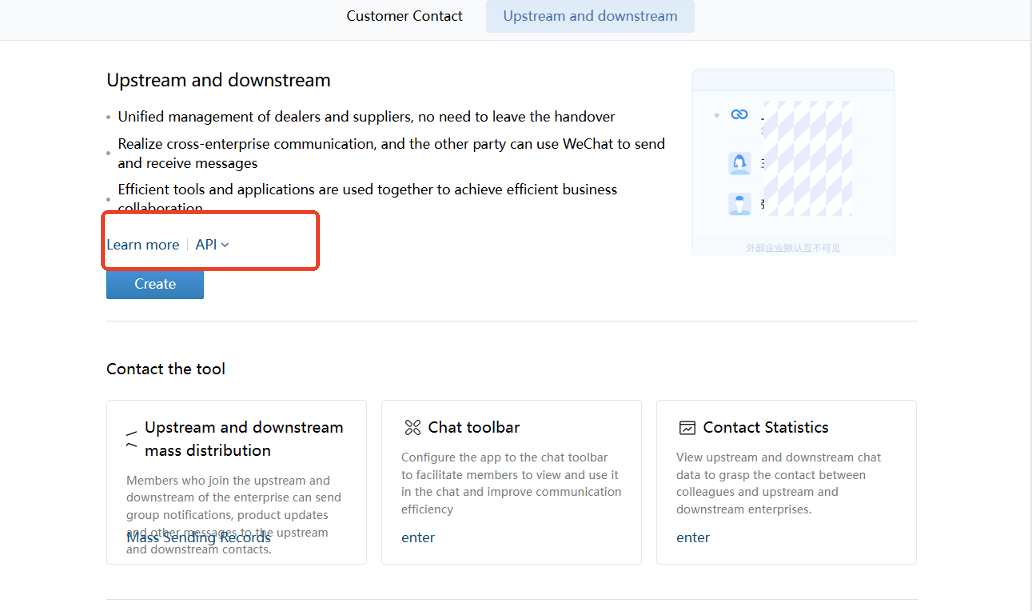
Enter the customer and upstream and downstream
As shown in the following figure, bind WeChat developer ID between customers and upstream and downstream-> customer contact-> customer
NoteIf it is not bound, it will affect the acquisition of customer data.
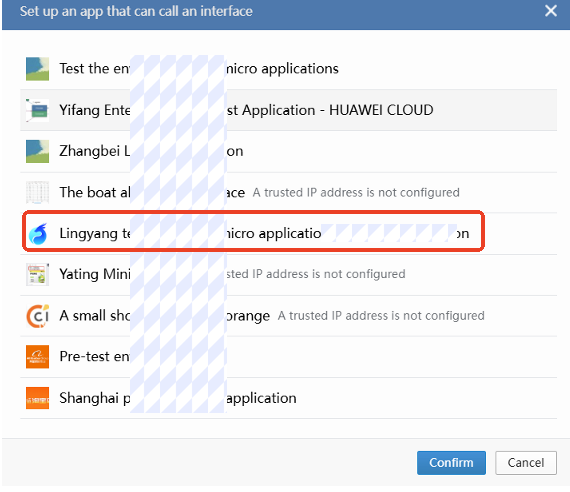
Add callable API applications
Check the [Hillingyang QA WeCom Application] application
Reference: Overview-Documentation-WeCom Developer Center
4.3 Configure Callback API
Go to the WeCom self-built application and click Set API Receive
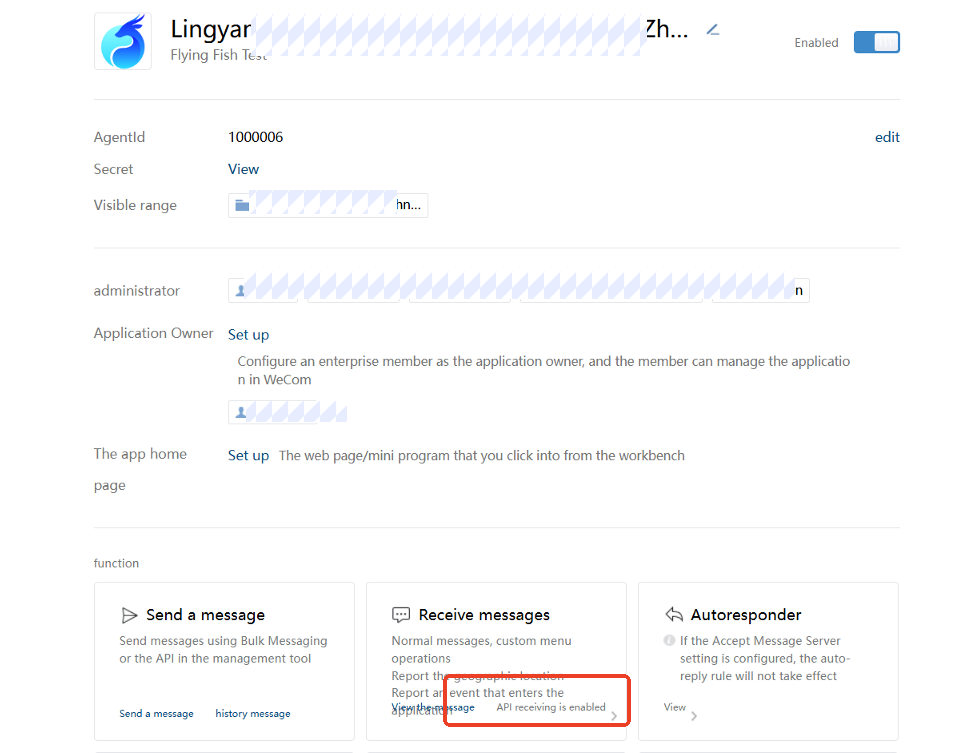
Set API acceptance
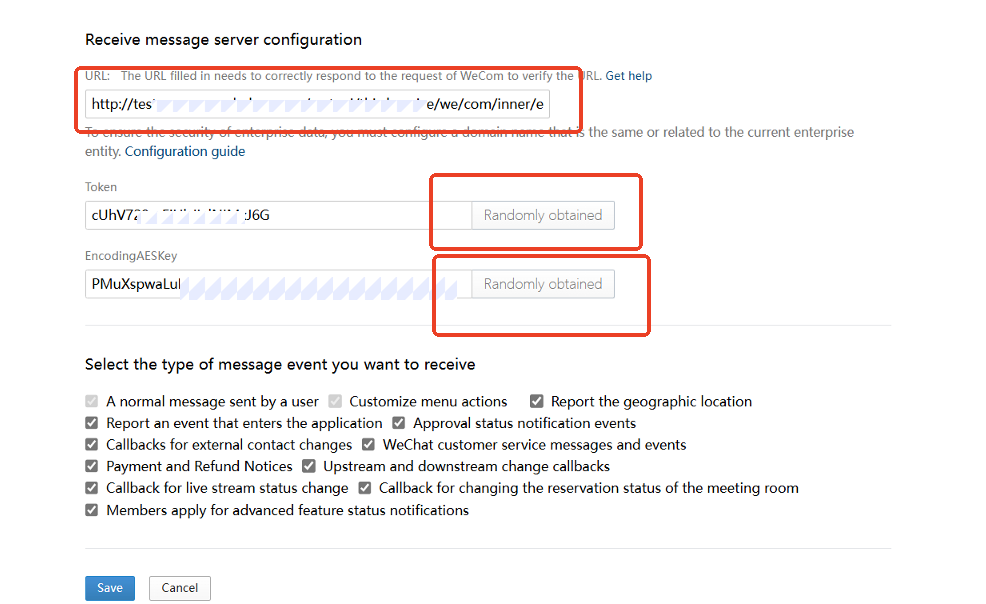
Configuration information
Parameter | Value | Description |
URL | https://{domain}.com/restapi/thirdservice/we/com/inner/event/oneparty/callback/{corpid} |
Examples: https://test.lydaas.com/restapi/thirdservice/we/com/inner/event/oneparty/callback/wwb697d33134e48cfc |
Token | Random Acquisition | Need to record, follow-up in QA related WeCom account use |
EncodingAESKey | Random Acquisition | Need to record, follow-up in QA related WeCom account use |
When you configure a callback URL, WeCom sends a test request to the URL. If you do not configure the callback request forwarding feature in Step 3, the callback request fails to be saved. Configure the callback request forwarding feature first.
5. Other precautions
5.1 If the analysis source uses HUAWEI CLOUD GaussDB, pay attention to the character encoding issues [Important]
When you create a database on HUAWEI CLOUD GaussDB as the QA analysis source, you must specify the character encoding as UTF8. By default, the character encoding SQL_ASCII will report an exception when parsing the Unicode encoding of the WeCom data, causing the QA scheduling task to fail.
[Note] The character encoding cannot be modified after the database is created, so it must be specified during creation.
5.2 historical data compatibility and migration (not required)
If you have bound an WeCom account in service provider mode, historical WeCom data will be generated in QA. Please be sure to contact QuickAudience after-sales technical support personnel for relevant migration methods.
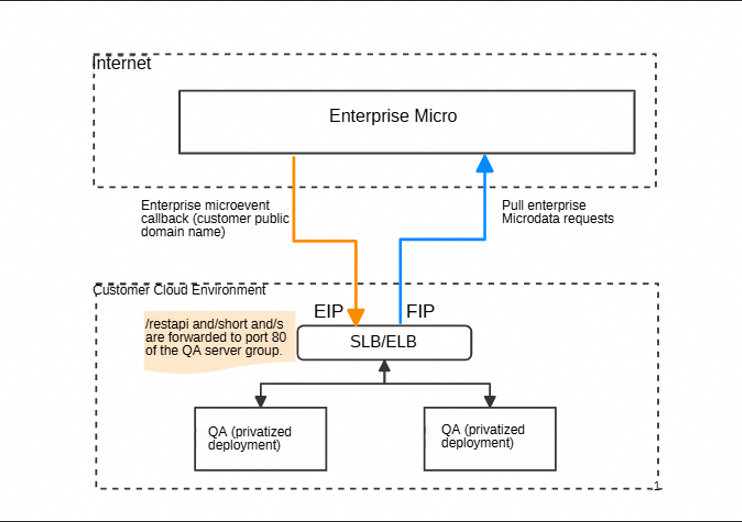
5.3 Independent Deployment Environment Network Diagram
For private deployment customers, QA has been deployed in the customer cloud environment. When pulling WeCom data, it can directly request WeCom, which conforms to the WeCom security standard. For WeCom event callback, the public network domain must be provided (the public network domain must be the same as the enterprise entity in the WeCom ), which can realize the WeCom callback event request to QA service.
6. FAQ
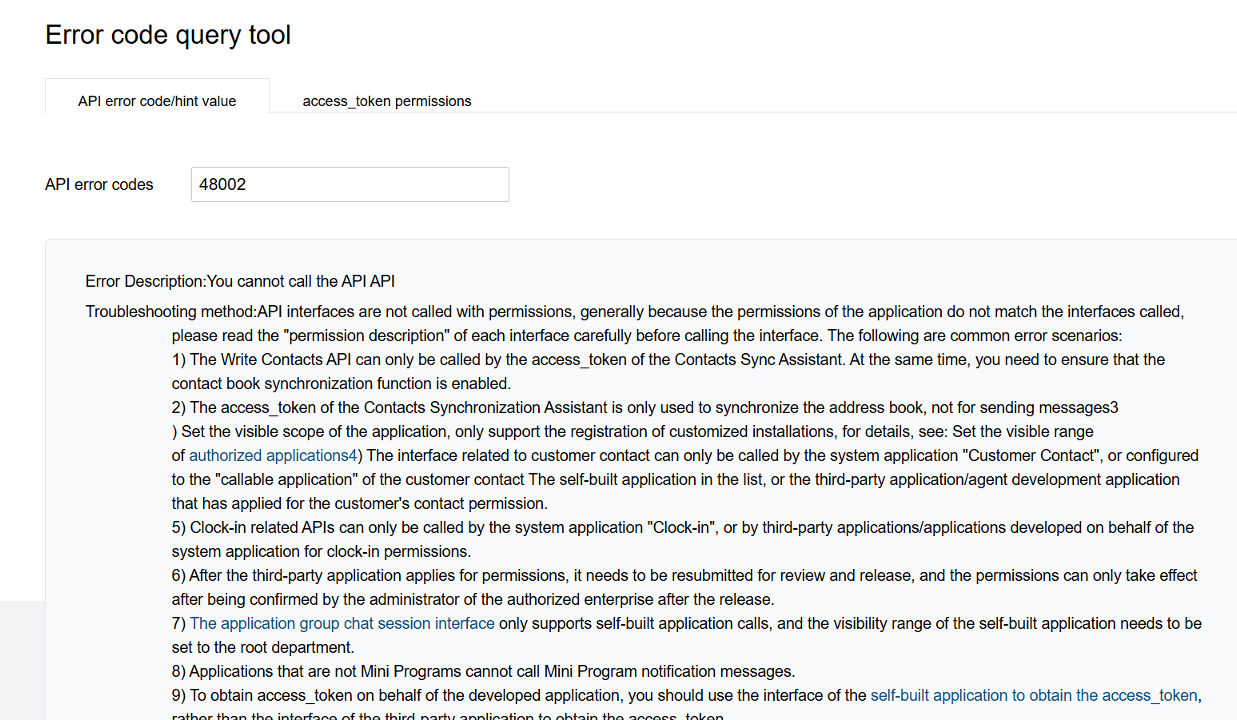
6.1 Call WeComAPI Return 48002
Phenomenon

WeCom Error Description
Solutions
Follow 4.2 WeCom Background Configuration Permission Steps to configure
6.2 manually triggered scheduling task
Manually run commands in the core container
curl --location 'http://127.0.0.1:9001/swagger/test/invoke/day/dataimport/{organizationid}/{workspaceid}/WECHAT_WECOM'where {organizationid}/{workspaceid} are replaced with organization ID and space ID, respectively
Example
Organization Name: Test Organization
Organization ID:0a27b751-db52-4ec2-b2bc-e7b747c0bfb6
Space name: Default space
Space ID:5a3e3999-fccb-43ef-b232-9cbbae053e8b
curl --location 'http://127.0.0.1:9001/swagger/test/invoke/day/dataimport/0a27b751-db52-4ec2-b2bc-e7b747c0bfb6/5a3e3999-fccb-43ef-b232-9cbbae053e8b/WECHAT_WECOM'curl --location 'http://127.0.0.1:9001/swagger/test/invoke/day/dataimport/27edd606-d875-42a1-812b-e823a2727e75/27c4853e-f2c5-44c8-866d-42488e9ef999/WECHAT_WECOM'