Configure and integrate custom UDF components with Quick Audience for automated marketing journeys.
UDF overview
UDF (User-Defined Functions) refers to custom components in Quick Audience. This document uses "UDF" to refer to custom components throughout.
UDF access has two parts: configuration and execution. Configuration handles interface management and canvas component setup. Execution handles callbacks during journey runs, similar to webhooks.
UDF configuration
To integrate with Quick Audience, develop an HTTP server that accepts POST requests with a 10-second timeout. The following table lists common parameters for Quick Audience requests.
System interaction flow
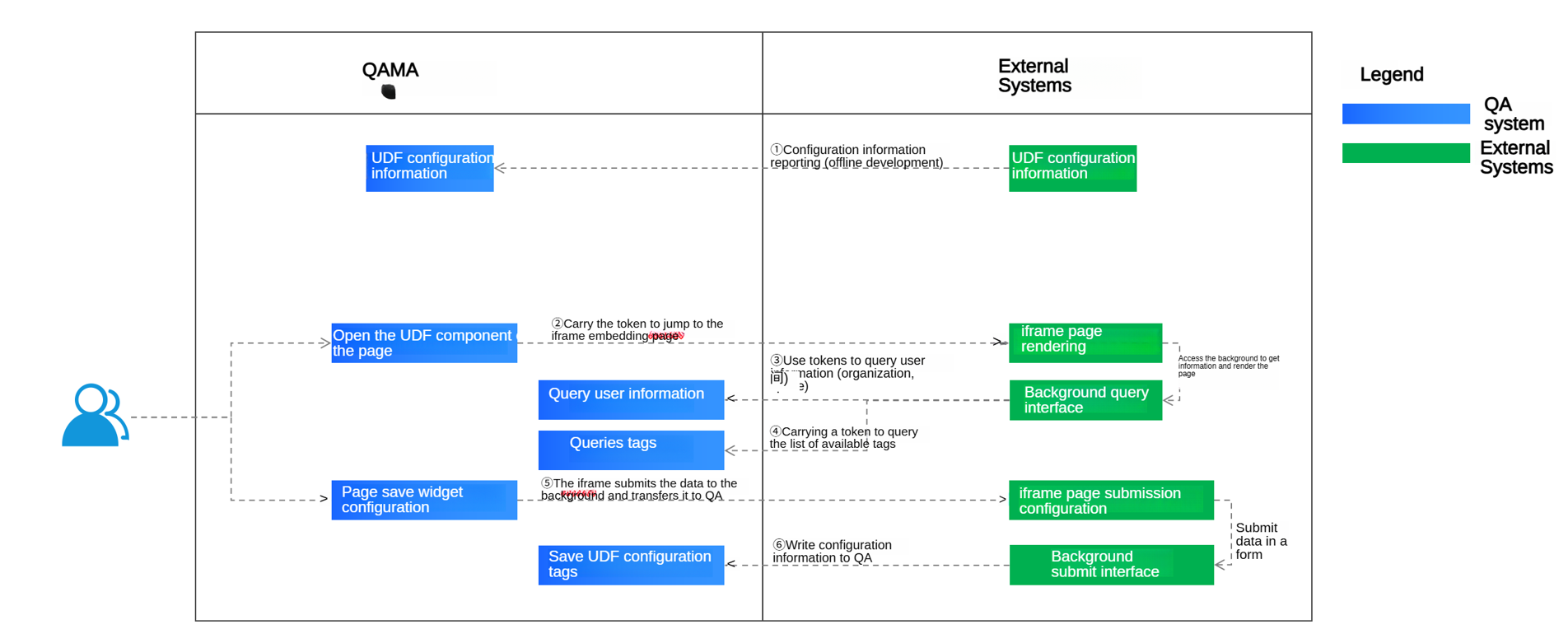
① Provide configuration information for offline development
② Navigate to the iframe page in the external system
③ API: Retrieve user information by token and return results to the iframe page
④ API: Retrieve tag information by token and return results to the iframe page
⑤ Frontend submits data via the iframe-embedded API; the external system backend submits data to Quick Audience via ⑥
⑥ API: Submit configuration to Quick Audience, which executes the process based on selected tags
Configure UDF component fields
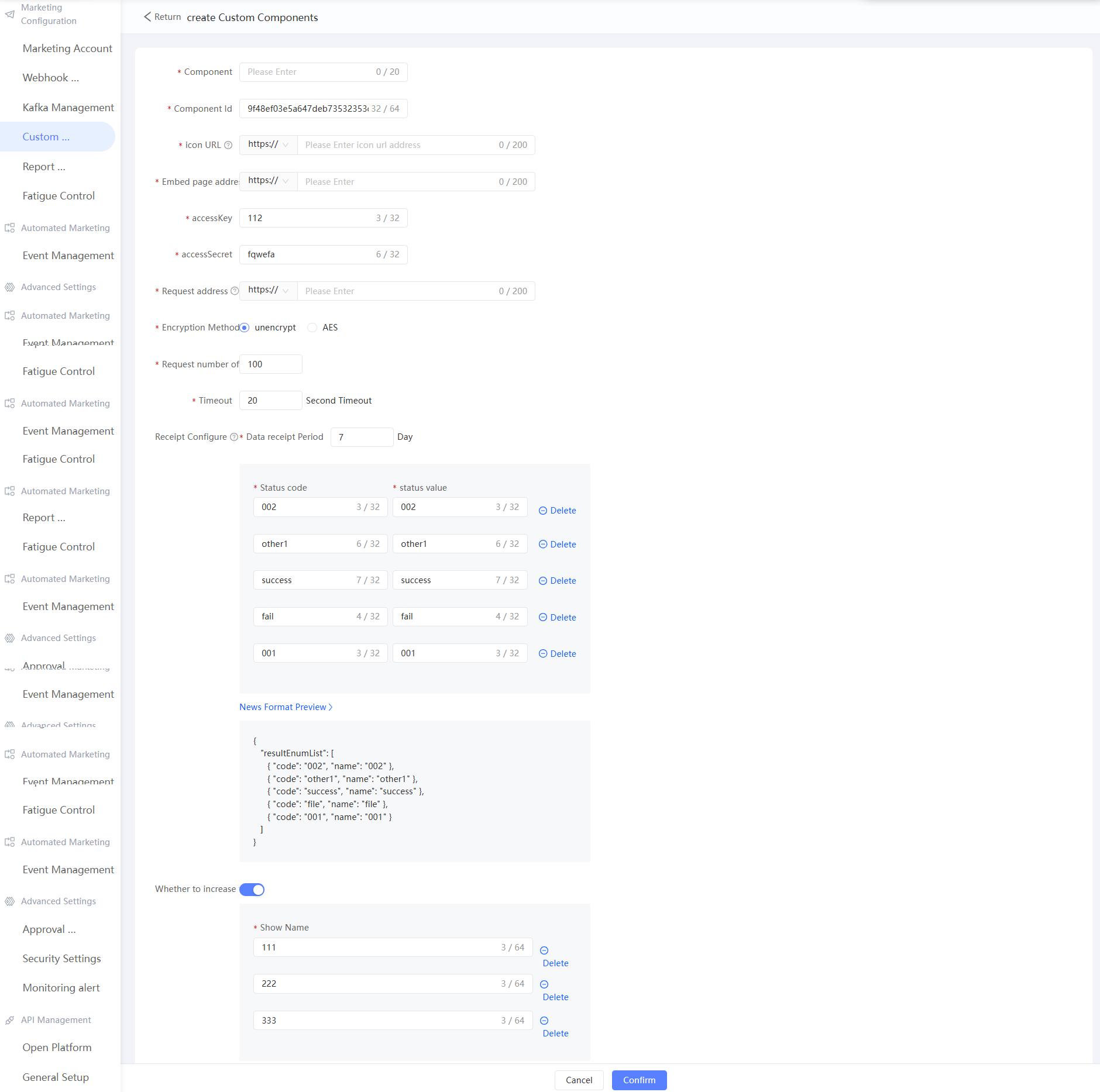
Limits on fields:
|
Field |
Limits |
|
Embed Page Address |
The iframe embed URL. Must be a complete URL with protocol (HTTP or HTTPS). HTTPS recommended. |
|
icon URL |
Component icon URL. Recommended size: 21 × 21 px. |
|
Request Address |
The message push endpoint URL. Must include protocol (HTTP or HTTPS). HTTPS recommended. |
|
Receipt Settings |
Returns marketing results to Quick Audience via API. Configure the Receipt Result field for automated marketing branch decisions. |
|
AES key |
AES key length: 128, 192, or 256 bits (16, 24, or 32 characters). |
|
Public |
When enabled, the UDF component is available to all spaces in the organization. When disabled, the component is limited to the current space. |
JSON configuration example
{
    "name":"Custom component name",
    "type":"marketing", // Custom component category: Currently, only marketing -> marketing components are supported.
    "version":"version number", // The default 1.0
    "endpoint":"The target domain name of the custom component starts with http or https, such as: http://demo.com /second-level path to point/index.html",
    "iconUrl":"icon address",
    "enable": true // true or false whether to enable
    "accessKey":"AccessKey for component authentication",
    "accessSecret":"AccessKey secret",
    "metaData":{ // The metadata information. The format of the metadata is different from that of the type component.
        "allowIDType":"This component supports user ID types, such as mobile, email, idfa, and imei",
        "encryptionMethod":"Push marketing message encryption algorithm null | encryptionMethod",
        "sendParam":{
            "batchSendUrl":"The URL for pushing marketing tasks starts with http or httpss, such as http://demo.com/send",
            "batchLimit":100, // The number of records to be pushed at a time. The value is 1 to 1000. The default value is 100.
            "timeout": 10, // The request timeout period (unit: seconds) 0 to 60. Default value: 10.
            "retryTimes":0, // The number of retries that are failed is 0 to 3. Default value: 0.
            "retryPeriod":0, // The retry interval (in seconds) of 0 to 3600. Default value: 0.
        },
        "callbackParam":{// Marketing component receipt parameters
            "usableInHours": 3 * 24, //1 to 30 * 24. Default value: 3. The number of days in which the push result receipt data is valid. If the number of days is exceeded, the data is discarded.
            "clearInHours": 7 * 24, //1 to 365 * 24. By default, the number of days after which the result receipt data is recycled.
            "resultEnumList":[ // The list of push result receipts. Default value: success and fail.
                {
                    "code":"success",
                    "name":"Success"
                },
                {
                    "code":"fail",
                    "name":"Failed"
                }
            ],
            "extParams": {
              "extParam1": "Extension parameter column header 001", // The name of the column displayed in the effect analysis. The extension field 01
              "extParam2": "Extension parameter column header 002", // The column name displayed in the effect analysis. The extension field 02
              "extParam3": "Extension parameter column header 003" // The column name displayed in the effect analysis. The extension field 03
            }
        }
    }
}
Iframe integration
The external system provides an iframe page. Enter the page URL as the endpoint configured in the previous step.
Note: Add cross-origin support with X-Frame-Options: allow-from https://example.com/
Jump URL
/endPoint?comeFrom=xxx&qaEndpoint=xxx&token=xxx
Return Result
{
  "success":true,
  "errorDesc":"The error message. This parameter can be empty."
}
API: Query user information by token
API :/openapi/v3/account/query?token=xxx
Returned value:
{
  "success": false,
  "errorDesc": "",
  "data": {
    "organizationId":"Organization ID",
    "organizationName":"Organization name",
    "userId":"User ID",
    "nickName":"User nickname",
  },
  "@comment": {
    "success": "/**\n * Enumerated values: true | false\n */",
    "errorDesc": "/**\n * The description of the error message \n */",
    "data": "/**\n * User information \n */"
  }
}
If user information is returned, the system is operational. Otherwise, a token-invalid error displays on the page.
API: Save selected audience and event IDs
API :/restapi/marketing/udf_component/genUdfComponentNode
input parameter:
{
    "componentId": "1001",
    "sourceId": "c1f5691dd5864479820c10c0089bece9 (The ID of the event or the crowd)",
    "sourceNodeId": "",
    "nodeId": "83a2d328-030d-436a-b607-21da8ee2e34b",
    "sourceType": 1 // The type of the event. 1 indicates the crowd and 2 indicates the event.
}
Returned value:
{
    "data": {
        "nodeId": "83a2d328-030d-436a-b607-21da8ee2e34b",
        "token": "zKBfv7flRQmhd+XP1l1uuKCjE6seEOq8l02cBFWWRr5xQoOUPxb3+tj+ZPctWDG4rM5vC2PMQLxG0Xw7Qw6TpsDfXSYFwD8kmTjpUOV4AjxQfZPfC5q0wPrEFhvgfjz9X1OKDu4V4p1oJnJcbt5nELidsVk6jxkbVwHEL8ezXcyXFRKbC+jVYxOwG5ElUhS0+hraAK5IiwR1XgZCarFgOGf5ZZo/Nacjrp5AP8HbF3tl4+thAjp8ZuMWTYXsBJbe"
    },
    "errorCode": null,
    "errorDesc": null,
    "exStack": null,
    "opers": [],
    "solution": null,
    "success": true,
    "traceId": "48d6e570-1918-47a4-83ee-27c3f32d3a99"
}
API: Get audience tags and event attributes (requires 2.1.4)
API :/openapi/v3/udf_component/marketing/getNodeUsableLabels?token=xxx&nodeId=xxx&version=VERSION_2
Returned value:
[
    {
        "id": "Tag ID /Property ID",
        "name": "Label name /Attribute name"
    }
]
Selected tags and attributes are passed as parameters to the third-party system.
API: Frontend data submission via iframe
Page parameters are defined by the third party. During execution, Quick Audience calls the third party, which executes the task. Selected tags must be returned to Quick Audience via interface ⑥.
API: Submit UDF configuration (requires 2.1.5)
API: /openapi/v3/udf_component/marketing/saveOrUpdateNodeConfig?token=xxx
Request body:
{
  "nodeId": "Node ID",
  "nodeName": "Node name",
  "labelIdList": [
    "Tag ID.[name]",
    "Label ID.[name]"
  ]
}
Return value: No return value. The HTTP status is 200.
UDF execution
System flow diagram:
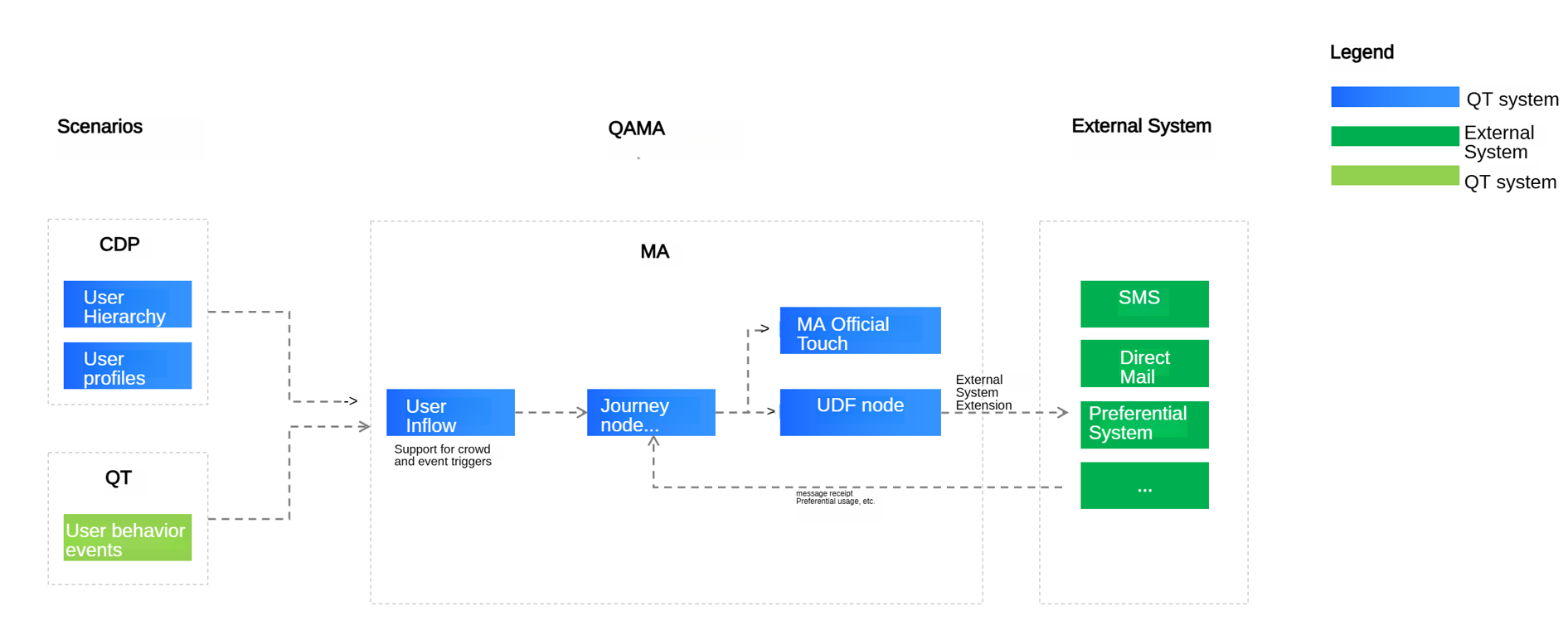
Node execution request
Develop an HTTP server that accepts POST requests with a 10-second timeout. The following table lists common parameters for Quick Audience execution and receipt requests.
Request URL :{sendParam.batchSendUrl }
Request Header Information
Decode the header values using java.net.URLDecoder#decode(java.lang.String, java.lang.String) with UTF-8 encoding.
v=4 // The fixed parameter, which is used to distinguish between the new version and the old version. The new version is 4, and the old version does not have this field.
Request Body:
|
Request input parameters |
Remarks |
|||
|
Parameters |
Parameter |
Parameter |
Required |
|
|
Request Timestamp |
time |
Long |
Yes |
|
|
The request ID. |
requstId |
String |
Yes |
|
|
Component ID |
componentId |
String |
Yes |
|
|
AccessKey |
accessKey |
String |
Yes |
AES key length: 128, 192, or 256 bits (16, 24, or 32 characters). |
|
message body encryption algorithm |
encryptionMethod |
String |
No |
By default, null is not encrypted. Currently, only AES encryption is supported. The encryption and padding methods are AES, ECB, and PKCS5Padding. |
|
Signature |
signature |
String |
Yes |
time + componentId + HMAC-SHA256 of time + componentId + accessKey using accessSecret Note: The signature algorithm is the same as that of WebHook. |
|
Message body |
data |
String |
Yes |
message body after encryptionMethod encryption:
|
Sample request body:
{
  "time": 0,
  "requestId": "111",
  "componentId": "111",
  "accessKey": "111",
  "signature": "111",
  "encryptionMethod": [
    "AES"
  ],
  "data": "string format. The detailed format is as follows"
}

// The data format.
{
    "jobId": "",
    "jobName": "",
    "nodeId": "",
    "nodeName": "",
    "componentName": "",
    "taskId": "",
    "taskStartTimestamp": 0,
    "nodeStartTimestamp": 0,
    "data": {
      "messageId": "",
      "customerList": [
        {
          "customerId": "",
          "featureMap": {
            "Receipt field":"Bring back as is"
          },
          "idMappings": {
                    "mobile": "mobile phone number",// The ID type of the instance.
                    "qaid": "QAID generated by QA"
                },
                "labels": {},
          "processInfo": {
            "processInstanceId": "New version: Journey instance ID of each user in a journey cycle",
            "processInstanceStartTime": "New version: the start time of the journey instance for each user in the journey period, in timestamp format",
            "processNodeInstanceId": "New version: journey node instance ID (different each time)",
            "processNodeInstanceStartTime": "New version: The node instance start time of each user's journey in the journey period, in timestamp format",
            "groupName":"nodeId:nodeName:groupResult(node.result),groupName(node.resultExt);nodeId:nodeName:groupResult(node.result),groupName(node.resultExt)",
            "@comment":{
              "groupName" : "node id: node name (configured on the interface): grouping result (percentage number of random grouping, two decimal places): group name (configured on the interface); separate multiple with semicolon"
            }
        	}
          "@comment": {
            "featureMap": "/**\n * The extension field, which must be returned downstream during asynchronous receipt \n */"
          }
        }
      ]
    },
    "activityId": "",
    "activityName": "",
    "subActivityId": "",
    "subActivityName": "",
    "processId": "",
    "processName": "",
    "processInstanceId": "",
    "processInstanceName": "",
    "processInstanceStartTime": "",
    "processNodeId": "",
    "processNodeName": "",
    "processNodeInstanceId": "",
    "processNodeInstanceStartTime": "",
    "groupId": "",
    "groupName": "",
    "@comment": {
      "activityId": "/**\n * Activity ID\n */",
      "activityName": "/**\n * Activity name \n */",
      "subActivityId": "/**\n * The ID of the child activity \n */",
      "subActivityName": "/**\n * child activity name \n */",
      "processId": "/**\n * Journey ID (Automation ID); Activity ID\n */",
      "processName": "/**\n * Journey name (Automation name); Activity name \n */",
      "processInstanceId": "/**\n * Journey instance ID; Activity instance ID\n */",
      "processInstanceName": "/**\n * The name of the activity instance (the time of the activity)\n */",
      "processInstanceStartTime": "/**\n * Activity instance start time \n */",
      "processNodeId": "/**\n * The ID of the active node \n */",
      "processNodeName": "/**\n * Activity node name \n */",
      "processNodeInstanceId": "/**\n * The ID of the active node instance \n */",
      "processNodeInstanceStartTime": "/**\n * Active node instance start time \n */",
      "groupId": "/**\n * The ID of the ABTest group. This parameter is empty. \n */",
      "groupName": "/**\n * ABTest group name (null)\n */"
    }
  }
Returned value:
{
  "success": true,
  "errorDesc": "Error message",
  "customerList": [
    {
      "messageId": "Message ID",
      "customerId": "Customer ID",
      "returnType": "The receipt result. This result is the same as the receipt result. If there is one, it is directly regarded as the receipt result. If you do not want to enter the receipt result directly, do not pass it",
      "returnMessage": "The length of the receipt message is 255. If the length of the receipt message exceeds the limit, it will be automatically intercepted."
    }
  ]
}
Authentication
signature algorithm
long sendTime = System.currentTimeMillis();
// The ID of the component.
// Component AK
// Component sk

String sign = getSignatureByHmacSHA1(sendTime, componentModel.getComponentId(), componentModel.getAccessKey(), componentModel.getAccessSecret());

public static String getSignatureByHmacSHA1(long time, String prametersString, String accessKey, String accessSecret) {
    String str = time + prametersString + accessKey;
    return HmacUtils.hmacSha256Hex(accessSecret, str.replaceAll("\\s+", ""));
}
Receipt reporting
After executing a marketing task, the access point reports the receipt to Quick Audience to confirm message delivery results.
HTTP Request URL:
API :/restapi/marketing2/udfComponent/receiveCallback?
Request Body:
{
  "time": 0,
  "componentId": "UDF component ID",
  "signature": "Signature",
  "data": "The encrypted receipt information, which is a string",
  "@comment":{
    "time":"The timestamp of the receipt, in milliseconds"
  }
}

// The original format of data.
{
  "nodeId": "Node ID",
  "taskId": "Task ID",
  "customerList": [
    {
      "messageId": "Message ID",
      "customerId": "Customer ID",
      "returnType": "Receipt result",
      "sendTimestamp": 0,
      "featureMap": {
        "request parameters": "Return"
      }
      "@comment": {
        "messageId": "/**\n * The ID of the message. This ID is included when QA pushes the message \n */",
        "customerId": "/**\n * User ID\n */",
        "returnType": "/**\n * Receipt result \n */",
        "sendTimestamp": "/**\n * Message push time \n */",
        "featureMap": "The parameters used to send the request. You must bring them back in the receipt."
      },
      "extParam1": "Extension parameter 001-custom return value",
      "extParam2": "Extension parameter 002-Custom return value",
      "extParam3": "Extension parameter 003-Custom return value"
    }
  ],
  "@comment": {
    "nodeId": "/**\n * Node ID\n */",
    "taskId": "/**\n * Task ID\n */",
    "customerList": "/**\n * list of receipt users /followers \n */"
  }
}
Returned value:
{
  "success": true,
  "errorDesc": "",
  "@comment": {
    "success": "/**\n * Enumerated values: true | false\n */",
    "errorDesc": "/**\n * The description of the error message \n */",
    "data": "/**\n * User information \n */"
  }
}