System functions in Performance Testing (PTS) generate dynamic values that each virtual user can embed directly in request bodies, producing realistic and unique traffic during load tests. This topic describes how to use a system function to parameterize the body of an API request.
Prerequisites
Before you begin, make sure that you have:
A PTS stress testing scenario with at least one HTTP node configured. For details, see HTTP nodes
An API request that uses a method accepting a request body (POST or PUT)
Select and copy a system function
Log on to the PTS console. Choose Performance Test > Create Scenario, and then click PTS.
On the Scenario Settings tab, configure the basic request information.
NoteIn this example, the body of an API request is parameterized and the request method is POST or PUT. In actual stress testing, select the objects to be parameterized and the request method based on your business requirements.
In the lower part of the PTS Scenario page, click System Functions to open the list of available functions.
In the System Function panel, click a function name to view its expression, or click the
 icon next to a function to copy it directly.
Build a custom function with the function generator
If none of the built-in system functions fit your use case, build a custom function expression with the function generator.
In the lower part of the System Function panel, click Function Generator. Alternatively, click the
 icon next to any function to open the generator with that function preloaded.
Select a function type, edit the function expression, and replace the sample values with the actual values for your stress test.
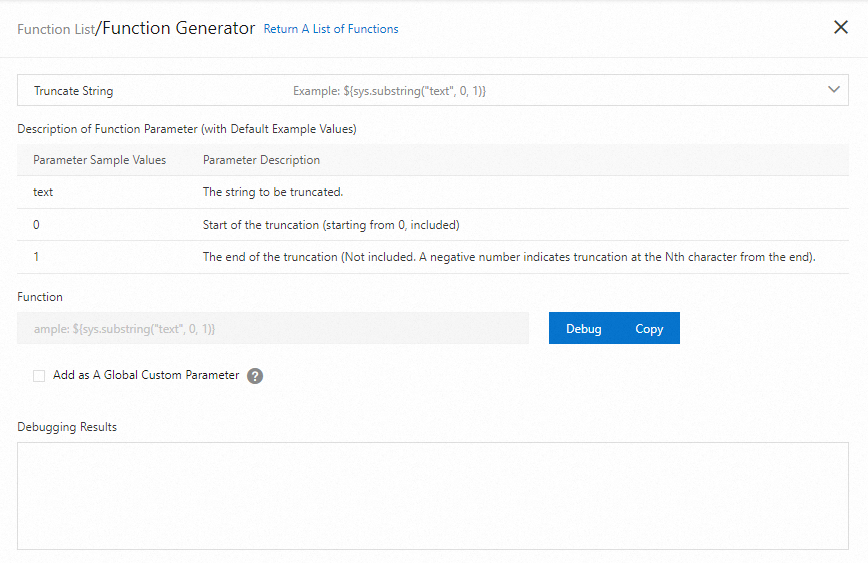
Click Debug to verify that the output matches your expectations.
(Optional) To reuse this function across the entire scenario, select Add as A Global Custom Parameter and enter a parameter name. When defined as a global custom parameter, the function is added to the global parameter list, which can be called by the entire stress testing scenario.
Click Copy to copy the function expression.
Insert a system function into a request body
After copying a function expression, embed it in an API request body to parameterize the payload.
In the body field of the API request, paste the function expression.
Edit the body content to combine the function with static strings, other parameters, or additional functions as needed. For information about how to define a body, see Body definition.
Combine functions with arithmetic operations
PTS supports four arithmetic operations for composing function expressions. For syntax and examples, see Use four operations.
Nest parameters in system functions
When you nest a parameter inside a system function, enclose the nested parameter in double quotation marks (""). Without the quotation marks, PTS treats the nested parameter as a literal string and does not resolve it at runtime.
For detailed examples, see How do I combine parameterized system functions and strings?