When a JMeter test plan contains multiple thread groups, you can run them in parallel or in series. Configure this behavior by combining a JMeter setting with your Performance Testing (PTS) load configuration.
Thread group types in JMeter
Apache JMeter supports three types of thread groups, each serving a distinct role in a test plan:
| Thread group type | Role | Example |
|---|---|---|
| Thread Group | The core building block. Each thread group defines a pool of virtual users and controls their count, behavior, and lifecycle. Use separate thread groups to model distinct user roles -- for example, buyers, sellers, and administrators on a marketplace. | Simulate 200 buyers browsing products and 50 sellers uploading listings at the same time. |
| setUp Thread Group | Runs before all other thread groups to prepare the test environment. JMeter runs it first automatically -- no special configuration is required. | Establish database connections or seed test data. |
| tearDown Thread Group | Runs after all other thread groups to clean up resources. JMeter runs it automatically after the main groups finish. | Close database connections or delete test records. |
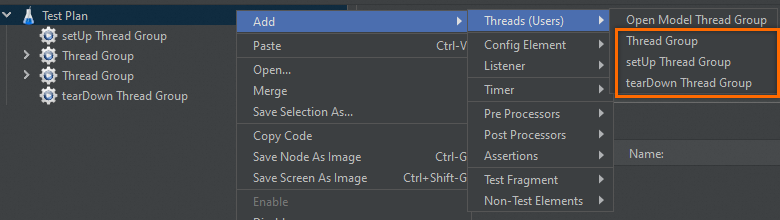
How PTS overrides JMeter settings
PTS applies its own Concurrency, Loops, and Test Duration values to the main thread groups in your JMeter script. setUp and tearDown thread groups retain their original JMeter configuration and are not affected.
| PTS setting | Applies to | Behavior |
|---|---|---|
| Concurrency | Main thread groups only | Overwrites the thread count configured in each main thread group in the JMeter script. |
| Loops | All main thread groups | Overwrites the loop count for every main thread group. |
| Test Duration | Entire test | Sets a hard time limit. When the duration expires, PTS stops all thread groups. |
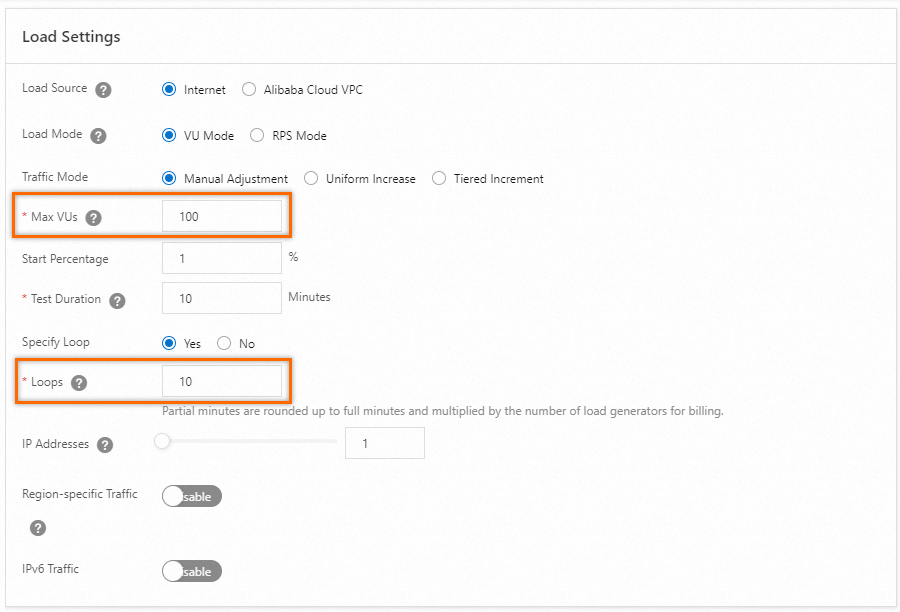
Run thread groups in parallel
In parallel mode, all main thread groups start simultaneously and run independently. This is the default behavior and is suited for the following scenarios:
Mixed-role load testing. Model different user types hitting a system at the same time -- for example, 200 buyers browsing while 50 sellers upload products and 10 admins review reports.
Multi-scenario testing. Test several API endpoints or functional modules in a single test run.
Shorter test cycles. All thread groups run concurrently, which reduces total test time compared to serial execution.
Configure parallel execution
In the Test Plan properties of your local JMeter script, make sure Run Thread Groups consecutively (i.e one at a time) is not selected.
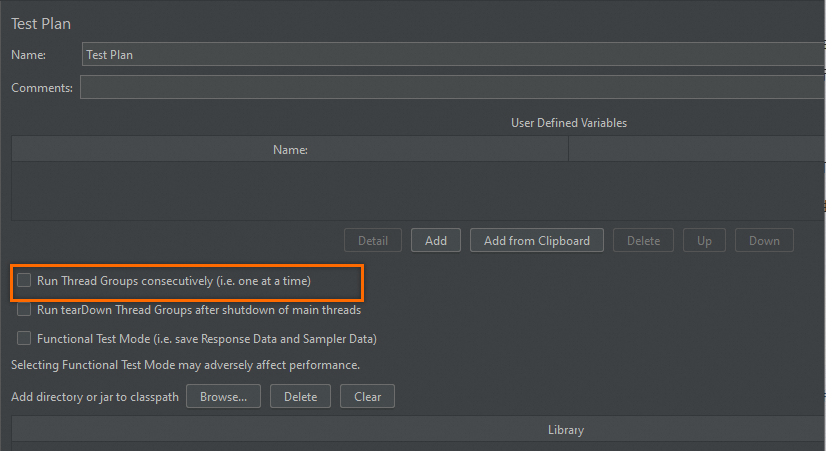
Parallel execution behavior
The test stops when either the configured Loops complete or the Test Duration expires, whichever comes first. Each thread group runs independently -- one group finishing early does not affect the others.
Example: A test plan contains two thread groups (A and B), Loops is set to 5, and Test Duration is set to 10 minutes.
| What happens | Why |
|---|---|
| A and B start at the same time. | Run Thread Groups consecutively is not selected. |
| Both groups iterate up to 5 times each. | PTS applies Loops = 5 to all main thread groups. |
| If all 5 loops finish in 5 minutes, the test stops at the 5-minute mark. | Loops completed before Test Duration expired. |
| If loops have not finished after 10 minutes, the test stops at the 10-minute mark. | Test Duration expired before Loops completed. |
Run thread groups in series
In serial mode, thread groups run one after another. The next group starts only after the previous group finishes all its loops. This mode is suited for the following scenarios:
Staged testing. Run initialization tasks in one thread group before the main load test begins -- for example, populate a cache in group A, then run the actual load test in group B.
Dependent workflows. Test scenarios where one operation must complete before the next begins, such as creating resources in group A and then querying them in group B.
Configure serial execution
In the Test Plan properties of your local JMeter script, select Run Thread Groups consecutively (i.e. one at a time).
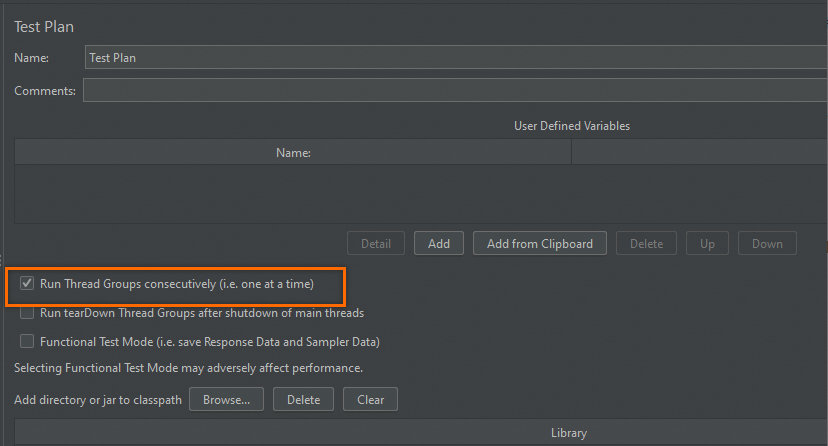
Set the Loops value in PTS. PTS applies this value to each thread group individually.
Set a Test Duration in PTS that is long enough to cover the full serial execution. If the duration is too short, PTS stops the test before later thread groups finish.
Serial execution behavior
Thread groups run in the order they appear in the test plan. Each group completes all its loops before the next group starts.
Example: A test plan contains three thread groups (A, B, and C) and Loops is set to 5 in PTS.
| Execution order | What happens |
|---|---|
| 1. Thread group A | Runs 5 loops at the configured concurrency, then stops. |
| 2. Thread group B | Starts after A finishes. Runs 5 loops, then stops. |
| 3. Thread group C | Starts after B finishes. Runs 5 loops, then stops. |
Estimate the required test duration. Multiply the average response time (RT) of each service request by the total number of requests across all thread groups. Add a buffer to this estimate when setting Test Duration in PTS to avoid premature termination.
PTS and JMeter interaction details
PTS overrides the concurrency and loop settings of main thread groups only. setUp and tearDown thread groups always use their JMeter-configured values.
In serial mode, set a generous Test Duration. If the duration expires mid-test, remaining thread groups do not run.