If all requests in a stress testing scenario require the same header, configuring it on each request is repetitive. A global header lets you define the header once. Performance Testing Service (PTS) then includes it in every request within that scenario automatically.
Common use cases:
Browser comparison: Create two scenarios with different
User-Agentglobal headers -- one for Chrome, one for Firefox -- to compare page performance.Scenario tagging: Add a custom header such as
explorer_identificationto identify which scenario a request belongs to.
Prerequisites
Before you begin, make sure that you have:
An Alibaba Cloud account with PTS activated
A stress testing scenario created in the PTS console
Configure a global header
Log on to the PTS console, choose Performance Test > Create Scenario, and then click PTS.
On the PTS Scenario page, click Parameters in the lower part of the page.
In the Parameters panel, click the Global Header tab.
On the Global Header tab, specify a header name and Value. As you type in the name field, PTS suggests common HTTP request headers through fuzzy matching. Select a header from the drop-down list.
ImportantThe Value field requires a static value. Parameterized expressions are not supported in global headers.
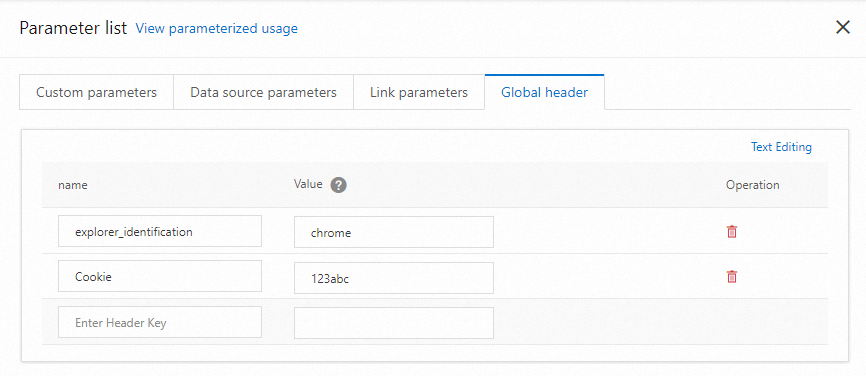
Add multiple headers in bulk
To add several headers at once, click Text Format in the upper-right corner of the Global Header tab. Enter each header on a separate line in name : value format:
explorer_identification : chrome
Cookie : 123abc
This view also displays any headers you have already configured, so you can review and edit them in one place.
What to do next
With global headers configured, add requests to your scenario and run a stress test.