When the same test scenario runs against multiple environments, duplicating the scenario for each environment creates maintenance overhead and increases the risk of configuration drift. Custom parameters let you define reusable variables and update a single value to switch environments, endpoints, or other scenario-wide settings.
Performance Testing (PTS) supports two parameter scopes:
Global parameters -- apply to the entire test scenario. Every API in every business session uses the same value.
Business session parameters -- apply within a single business session (transaction). Each business session resolves its own parameter values independently.
Parameter reference syntax
Reference custom parameters in the API configuration with the ${<parameter-name>} syntax. A parameter named domain is referenced as ${domain}:
http://${domain}Supported and unsupported content types
| Content type | Supported |
|---|---|
| Strings | Yes |
| System functions | Yes |
| File parameters | No |
| Output parameters | No |
If a custom parameter uses a system function and two APIs in the same business session reference that parameter, both APIs resolve to the same value for each virtual user.
Create a global parameter
Global parameters take effect across the entire test scenario.
Prerequisites
Before you begin, make sure that you have:
A PTS performance testing scenario. For details, see Create a PTS-based performance testing scenario
Procedure
Log on to the PTS console.
Choose Performance Test > Create Scenario, and then click PTS.
On the PTS Scenario page, click Parameters at the bottom of the page.

On the Custom Parameters tab, enter a Parameter Name and Parameter Logic, and then click Confirm.
Example: Switch domain names across environments
When testing APIs across different environments, only the domain name changes between environments. Define a domain parameter to avoid editing every API URL individually.
On the Custom Parameters tab, create a parameter named
domainand set its value to the target domain.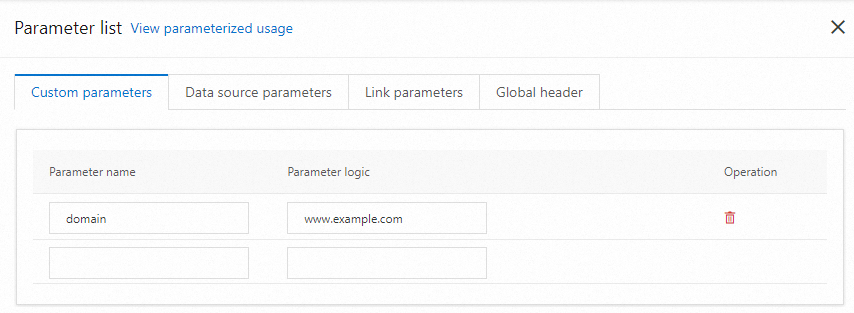
In the API configuration, set the URL to
http://${domain}.
To switch environments, update the domain parameter value. All APIs that reference ${domain} reflect the change automatically.
Create a business session parameter
Business session parameters take effect throughout a single business session. Use business session parameters when a value must remain consistent across multiple API calls within one transaction but can differ between separate business sessions.
For configuration details, see Custom parameters in data configuration.