The API center serves as the unified portal for Performance Testing Service (PTS) to manage HTTP APIs. This allows you to perform quick debugging and stress testing on HTTP APIs. The API center allows you to create API sets to classify APIs. This way, you can manage APIs based on your business requirements. This topic describes how to create an API set.
The system provides a default API set. If the default API set does not meet your business requirements, you can to create an API set. The API center allows you to create child sets for a parent API set. This allows you to manage APIs in a fine-grained manner. You can add APIs to the parent and child API sets. For more information, see Create an API.
Procedure
Log on to the PTS console. On the Test API page, click the
 icon in the left-side navigation tree to create a set.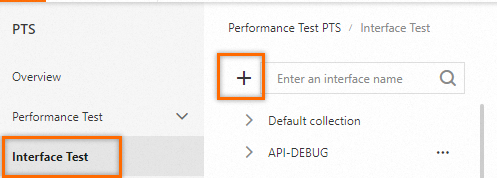
In the Create API Set dialog box, configure the Name parameter and click OK.
In the left-side navigation tree, the created API sets are displayed below Default Set.
The following list describes the operations that you can perform on an API set:
Click the
 icon on the left of a set to expand the set.
 Click the
 icon on the left of a set to collapse the set.
 Click the
 icon on the right of a set to create a child set for the current set.
 Click the
 icon on the right of a set to delete the set. Important
If you delete a parent set, all child sets of the parent set are deleted. At the same time, all APIs in the deleted parent and child sets are deleted. Proceed with caution.
Click the
 icon on the right of a set to rename the set.