When a stress test scenario requires branching logic -- for example, calling different APIs based on a response value from a previous request -- you can use conditional judgment instructions to control which APIs execute based on whether specified conditions are met.
How conditional logic works
PTS supports two logical relationships between conditions, determined by how you arrange them in the scenario editor:
| Arrangement | Logical relationship | Behavior |
|---|---|---|
| Nested (one condition inside another) | AND | All conditions must be true for the API to execute |
| Parallel (conditions at the same level) | OR | The API executes if any one condition is true |
PTS evaluates conditions in sequence during stress testing. An API executes only after the conditions in its branch are satisfied.
Supported value types for conditions
The judgment object and comparison value in a condition accept the following types:
| Value type | Supported | Description |
|---|---|---|
| String literal | Yes | Fixed strings such as "success" or "200" |
| Response parameters | Yes | Output values extracted from a previous API in the scenario |
| Global parameters | Yes | Parameters defined at the scenario level |
| Custom parameters | Yes | User-defined variables |
| File parameters | Yes | Values loaded from external data files |
| System functions | No | Cannot be used as judgment objects or comparison values |
| Mixed parameter-string expressions | No | Concatenations of parameters and strings are not supported |
To match against multiple values or patterns, use regular expressions in the comparison value.
Add a conditional judgment instruction
Log on to the PTS console and choose Performance Test > Create Scenario. Click PTS.
Configure the request parameters of an HTTP node. For more information, see Basic request parameters.
Configure response parameters for the initial API so that subsequent conditions can reference the output values. For more information, see API response parameters.

In the Business Session section, click the Add Instruction drop-down list and select Conditional Judgment.
Expand Start Conditional Judgment and configure the Condition parameter.

Conditional judgment instructions must be used in pairs (a start and an end block). The judgment object must reference a parameter, such as a file parameter, a response parameter from a previous API, or a custom parameter.
Examples
AND condition: both conditions must be true
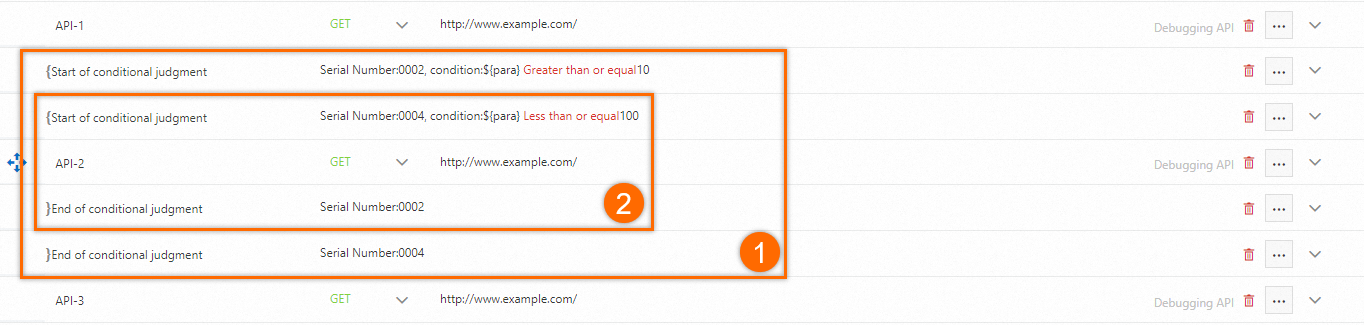
Goal: Execute an API only when para is between 10 and 100 (inclusive).
Logic: para >= 10 AND para <= 100
Setup: Nest the second condition (para <= 100) inside the first condition (para >= 10). Nesting creates an AND relationship -- both conditions must be true for the API to execute.
OR condition: either condition is sufficient
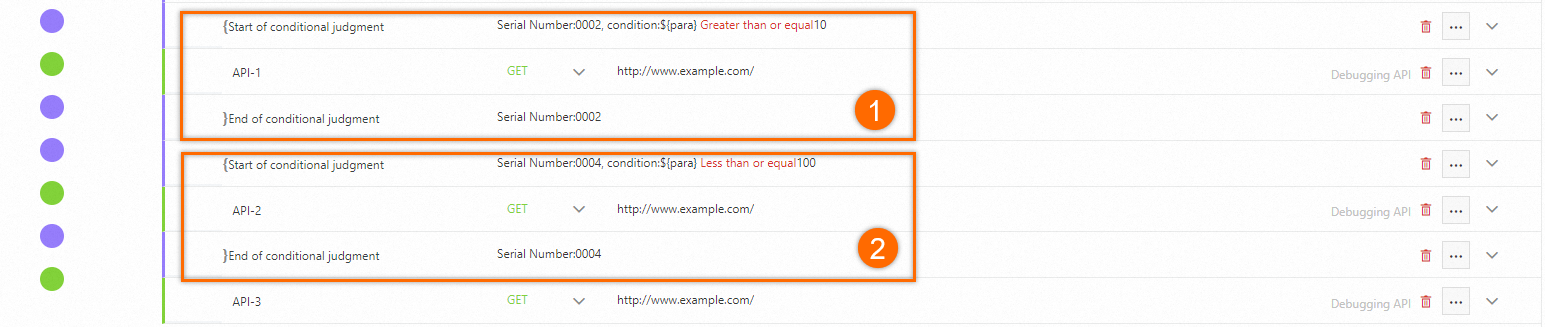
Goal: Execute an API when para is outside the range of 10 to 100.
Logic: para < 10 OR para > 100
Setup: Place both conditions at the same level (parallel) and add the same API call under each branch. Parallel arrangement creates an OR relationship -- the API executes if either condition is true.
Combined AND/OR condition
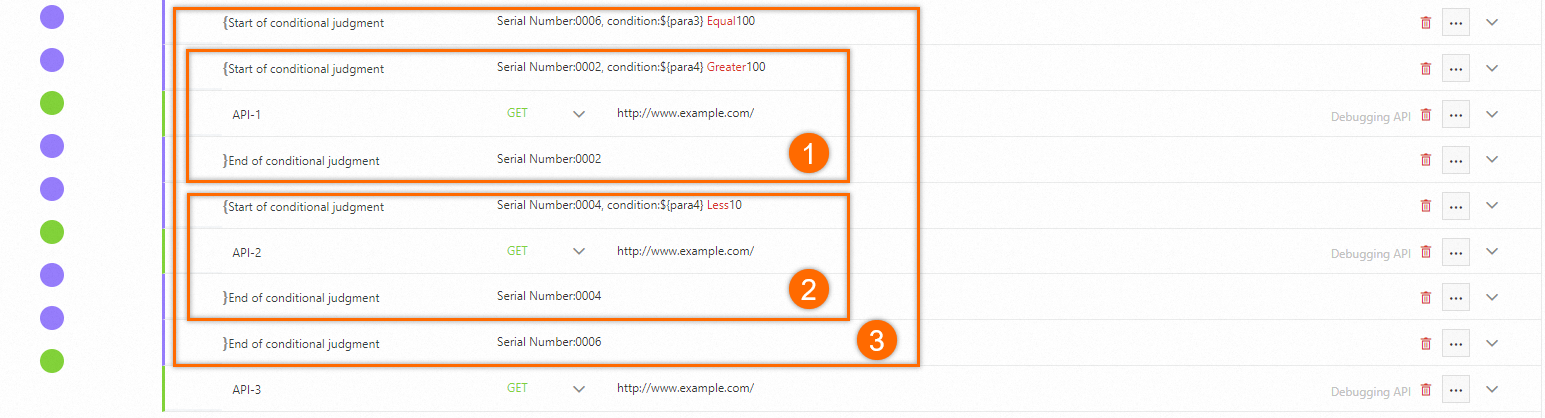
Goal: Execute an API when para3 equals 100 AND either para4 > 100 or para4 < 10.
Logic: para3 = 100 AND (para4 > 100 OR para4 < 10)
Setup: Place the two OR conditions (para4 > 100 and para4 < 10) at the same level, then nest both inside the AND condition (para3 = 100). The outer condition must be true, and at least one inner condition must also be true.