A successful HTTP status code does not guarantee correct business logic. A login API might return 200 OK with an "invalid credentials" message, or an order API might succeed at the HTTP level while returning an empty result set. Checkpoints let you define pass/fail criteria based on actual response content -- status codes, headers, body text, and output parameters -- so the stress testing report reflects real business outcomes, not just HTTP-level success.
Checkpoint types
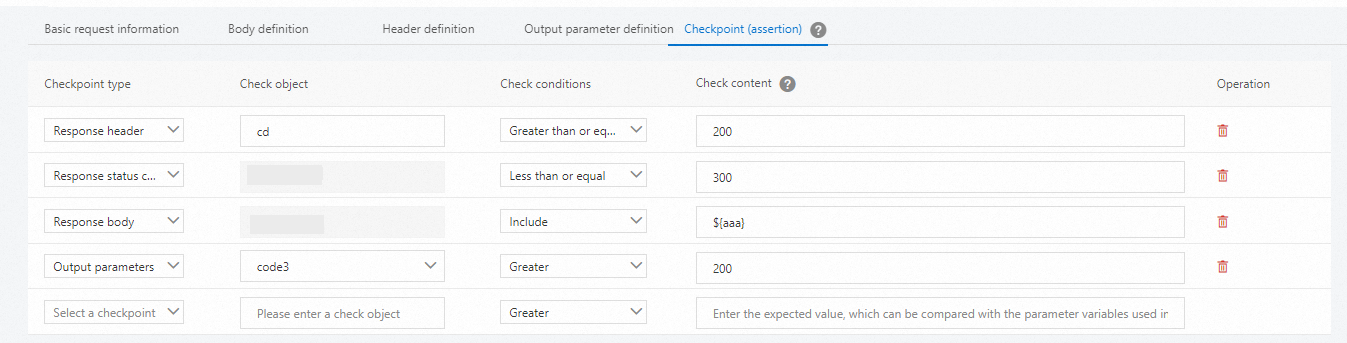
PTS supports four checkpoint types, each validating a different part of the API response:
| Type | What it checks | Typical use |
|---|---|---|
| Status Code | HTTP response status code | Verify the response returns 2xx or a specific code |
| Response Header | HTTP response header values | Confirm headers like Content-Type or Cache-Control |
| Response Body | Content in the response body | Match expected text, JSON fields, or patterns |
| Output Parameters | Extracted output parameter values | Validate dynamic values captured from previous API calls |
How checkpoints are evaluated
Define one or more checkpoints on the Check Point (Assertion) tab of an API node in your stress testing scenario.
For each request during the test, PTS evaluates all checkpoints against the response.
All checkpoints for a single request use AND logic -- every checkpoint must pass for the request to count as a business success.
Real-time monitoring and the final stress testing report show whether the tested business runs as expected or failed. You can determine whether to continue the stress test based on the reports.
Checkpoint results in reports
After you configure checkpoints, real-time stress testing and the stress testing reports indicate whether the tested business runs as expected or failed. Use these results to determine whether to continue the stress test.
Check conditions
The conditions available for a checkpoint depend on whether the Content value is numeric or non-numeric.
Non-numeric values
If the Content value contains non-numeric characters:
| Condition | Behavior |
|---|---|
| Equal To | Exact match |
| Not Equal To | Does not match exactly |
| Contain | Content includes the specified substring |
| Not Contain | Content does not include the specified substring |
| Belong To | Content is a member of the specified set |
| Not Belong To | Content is not a member of the specified set |
| Exist | The check object exists in the response |
| Not Exist | The check object does not exist in the response |
| Regular Expression | Content matches the specified regex pattern |
Numeric values
If the Content value contains only digits, additional numeric comparisons become available:
| Condition | Behavior |
|---|---|
| Greater Than | Value is strictly greater than the threshold |
| Greater Than or Equal To | Value is greater than or equal to the threshold |
| Equal To | Value equals the threshold exactly |
| Less Than or Equal To | Value is less than or equal to the threshold |
| Less Than | Value is strictly less than the threshold |
| Belong To | Value is within the specified set or range |
| Not Belong To | Value is outside the specified set or range |
| Exist | The check object exists |
| Not Exist | The check object does not exist |
| Regular Expression | Value matches the specified regex pattern |
Exist and Not Exist
The Exist and Not Exist conditions apply to all data types. They only check whether the target object exists in the response -- they do not evaluate the actual value.
Set and range expressions for Belong To and Not Belong To
The Belong To and Not Belong To conditions accept positive integers, negative integers, 0, and strings. Use standard mathematical notation to define ranges and sets.
| Expression type | Syntax | Example | What it matches |
|---|---|---|---|
| Closed interval | [min,max] | [-20,20] | Any integer from -20 to 20, inclusive |
| Set with ranges | {elements} | {[-200,200],-1,2} | -1, 2, and any integer in the range [-200, 200] |
| String set | {"str1","str2"} | {"abc","bcd","200","-200","Registered","Signed Up"} | Any string that exactly matches a member of the set |
If a set does not include a negative integer, you can write it as a closed-interval expression. However, use a set expression for clarity. For example, [200-300,1] matches the integer 1 and all integers in the closed interval from 200 to 300.
Expression syntax guidelines
When using Belong To or Not Belong To with mixed negative numbers and ranges, always use set notation ({...}) to avoid ambiguity with the minus sign.
Example: validate a cookie and status code
Suppose the test passes only when both of these conditions are met:
The
export_cookieoutput parameter contains sandbox information.The response status code falls in the range 200 to 399.
Step 1: Define the output parameter
On the Output Parameter Definition tab of the target API node, configure the export_cookie output parameter.

Step 2: Configure checkpoints
On the Check Point (Assertion) tab of the same API node, add two checkpoints:
An Output Parameters checkpoint that verifies
export_cookiecontains the expected sandbox value.A Status Code checkpoint that verifies the response code belongs to the range
[200,399].

Because checkpoints use AND logic, both conditions must be satisfied for the request to count as a business success.