Performance Testing (PTS) can run stress tests entirely within an Alibaba Cloud Virtual Private Cloud (VPC), keeping all traffic inside your private network. Compared with internet-based testing, VPC testing is more secure and flexible because services under test are never exposed to the public internet.
VPC-based stress testing applies to the following use cases:
Security-sensitive workloads. Finance, insurance, and other regulated workloads stay fully isolated inside the VPC, with no internet exposure. While you can add load generator IP addresses to a whitelist to restrict internet access, VPC-based testing provides stronger isolation because the business is completely separated from the internet.
Services in active development. Stress test microservices individually without deploying them to the internet. This isolates application performance from public network variables and reduces security risk and testing costs.
Internal-only services. Services such as ApsaraMQ for MQTT and ApsaraDB for Redis typically have no public endpoints and can only be tested from within the VPC.
Cost reduction. VPC tests generate no internet bandwidth traffic, which eliminates bandwidth fees.
Limits
| Category | Constraint |
|---|---|
| Throughput | 20,000 -- 100,000 TPS, varies by region |
| Region | Each scenario supports only one region. All target APIs must use internal network services in the same region. |
| IP addressing | All API calls must use VPC internal addresses or domain names that resolve to VPC internal addresses. For details, see Domain name-IP address binding. |
| Network access | Internal network access must be granted manually. Before testing, configure ECS security group rules and Server Load Balancer (SLB) settings to allow traffic from the load generators. |
Prerequisites
Before you begin, make sure that you have:
An activated Alibaba Cloud VPC service with a VPC, vSwitch, and security group created. See Create a VPC with an IPv4 CIDR block and Create a VPC with an IPv6 CIDR block
A server running inside the VPC with security group rules that allow inbound access from within the VPC. See Configure security groups in different scenarios
PTS activated. See Activate PTS
Procedure
Log in to the PTS console. Choose Performance Test > Create Scenario, then click PTS.
On the Scenario Settings tab of the PTS Scenario page, configure the test parameters. In the Test URL field, enter a domain name or an internal IP address. If the target service is accessed through a vSwitch, the IP address must fall within the CIDR block of that vSwitch.
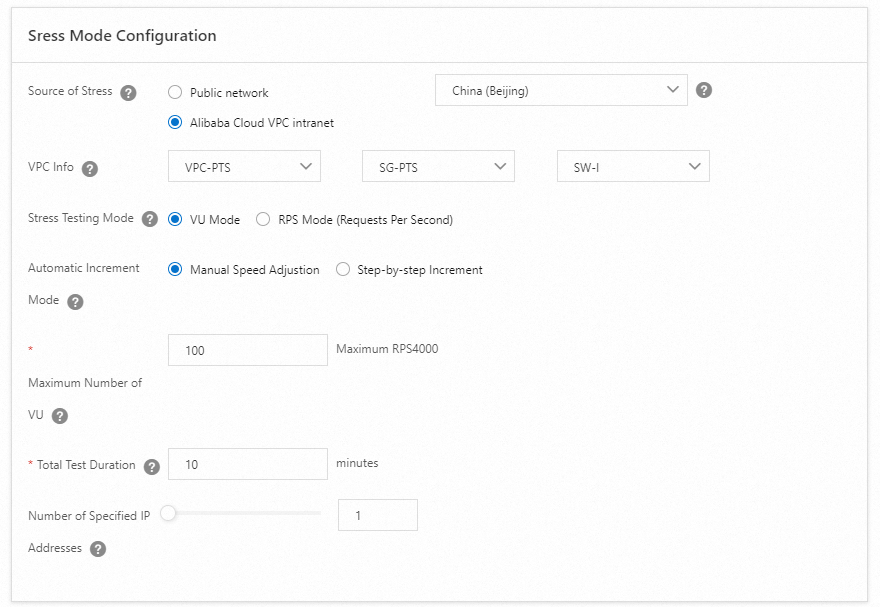
In the Stress Mode Configuration section, set Source of Stress to Alibaba Cloud VPC. Configure the remaining stress parameters based on your workload requirements. For details, see Configure the stress testing mode and level.
ImportantThe region, VPC, security group, and vSwitch in this section must match the service under test.
To verify the scenario before a full run, click Debug at the bottom of the page. For details, see Debug a stress testing scenario.
Click Save and Start at the bottom of the page. In the Note dialog box, set Execution Cycle to Execute Now, select the The test is permitted and complies with the applicable laws and regulations checkbox, and click Start Test.
Best practices: single-link vs. full-link testing
Performance tests fall into two categories based on scope:
Single-link testing targets one specific service path. It involves fewer participants, costs less, and runs quickly, making it practical for repeated iterations during development.
Full-link testing covers all upstream and downstream service paths end to end. It reveals system-wide bottlenecks but requires more coordination, more participants, and higher cost. Limit full-link tests to later stages after individual services are validated.
Recommended approach:
Start with single-link testing in the VPC. The low cost and absence of internet bandwidth fees make it practical to run frequently during development.
After all single-link tests pass, expose the service to the internet and run full-link tests over the public network to validate end-to-end performance under realistic conditions.