When a stress test in Performance Testing Service (PTS) fails or returns unexpected results, the error is either a Java exception in the error message or an HTTP status code in the response. The following sections group both types by root cause, with solutions for each.
To find your error, search for the exact error message or scroll to the relevant HTTP status code section.
Connection errors
These errors indicate that PTS cannot establish or maintain a connection to the backend server. Start by checking server health and the network path between PTS and the target endpoint.
class java.net.ConnectException:null
Cause: The TCP connection to the target server failed or was rejected.
Solution: Check the backend server health and verify that no network bottleneck exists between PTS and the target.
org.apache.http.ConnectionClosedException:Connection closed
Cause: The server terminated the connection abnormally.
Solution: Check the backend server logs for errors or resource exhaustion that could cause abrupt disconnections.
org.apache.hc.core5.http.ConnectionClosedException:Connection is closed
Cause: PTS sent a request on a connection that the server had already closed.
Solution: Check whether the gateway-layer bandwidth or network path has a bottleneck. If the server is behind a load balancer, verify that idle-connection timeout settings are aligned between PTS and the load balancer.
java.io.IOException:Connection reset by peer
Cause: The backend server forcibly reset the connection.
Solution: If Server Load Balancer (SLB) is in the request path, check the SLB listener configuration, particularly the connection timeout and health check settings.
org.apache.http.ConnectionClosedException:Connection closed unexpectedly
Cause: The connection was terminated before PTS received the response. Typical triggers include:
The server failed to respond within the expected timeframe.
The debug session or stress test was stopped before the response arrived.
Solution: Verify that the server can handle the request within the configured timeout. If the test was intentionally stopped, this error is expected and can be ignored.
Timeout errors
These errors indicate that a request or connection exceeded the allowed time limit. Common root causes include slow backend processing, resource contention, or a timeout setting that is too short for the workload.
java.util.concurrent.TimeoutException:null
Cause: The TCP connection attempt timed out. PTS could not reach the target server within the allotted time.
Solution:
Use the timing waterfall flow in the sampling log details to check whether the connection phase takes unusually long. For details, see Analyze stress testing results.
Check the backend server health and network path for bottlenecks.
org.apache.hc.core5.http2.H2StreamResetException:Timeout due to inactivity (5000 MILLISECONDS) * class
Cause: The backend server did not respond within the default request timeout of 5 seconds.
Solution: Extend the request timeout in the Advanced Settings section of the Create Scenario page.
java.net.SocketTimeoutException:null
Cause: The request timed out while waiting for a response or while reading data (idle timeout).
Solution:
Verify that the server is healthy and can process requests within the expected time.
Check whether the stress testing API has an appropriate timeout setting.
Investigate the server for performance bottlenecks (CPU, memory, I/O).
Redirect and DNS errors
java.lang.RuntimeException:java.net.UnknownHostException
Cause: The domain name cannot be resolved.
Solution:
Verify that the domain name is registered and resolves correctly.
If the domain is not registered with a public DNS, bind it in PTS before running the test.
org.apache.http.client.CircularRedirectException
Cause: The request entered a redirect loop (for example, A -> B -> C -> A) or exceeded 10 redirects.
Solution:
Disable 302 redirect: On the Scenario Settings page, turn off the Allow 302 Redirect switch.

Run the stress test again and inspect the original request to confirm the redirect chain.
To see the exact redirect path, open the sampling log details in the stress testing report and check the timing waterfall flow. For details, see Analyze stress testing results.
HTTP/2 protocol errors
org.apache.hc.core5.http.ProtocolException:Header 'key: value' is illegal for HTTP/2 messages
Cause: The scenario includes headers that HTTP/2 does not allow. The following headers are prohibited in HTTP/2: Connection, Keep-Alive, Proxy-Connection, Transfer-Encoding, Host, and Upgrade.
Solution: Remove the unsupported headers from the scenario configuration and rerun the test.
java.nio.channels.CancelledKeyException:null
Cause: The backend server terminated the connection under the HTTP/2 protocol.
Solution: Investigate the backend server logs for HTTP/2-specific issues such as stream resets or GOAWAY frames.
JMeter script errors
These errors occur when a JMeter script is incompatible with JMeter V5.0, the version that PTS supports.
java.lang.RuntimeException: Could not find the TestPlan class!
Cause: The JMeter script was created with a version that is not compatible with JMeter V5.0.
Solution: Open and re-save the script in JMeter V5.0, then upload it to PTS again.
java.lang.SecurityException: class "xxx"'s signer information does not match signer information of other classes in the same package
Cause: The Java sampler dependency (ApacheJMeter_core or ApacheJMeter_java) in the script was built against a JMeter version other than V5.0.
Solution: Repackage the dependency JAR using JMeter V5.0 libraries and upload the updated package.
Attempt to resolve method: xxx() on undefined variable or class name:
Cause: The BeanShell sampler references a class that was not uploaded with the script.
Solution: Upload the missing JAR package that contains the required class and rerun the test.
VPC network errors
class java.lang.IllegalArgumentException:forbidden uri, uri host must match vpc cidr pattern 10.0.0.0/8, 172.16.0.0/12 or 192.168.0.0/16
Cause: The stress test is configured to use a VPC, but the domain name in the test URL resolves to a public IP address instead of an internal IP address. VPC stress tests require that the target IP falls within a private CIDR range (10.0.0.0/8, 172.16.0.0/12, or 192.168.0.0/16).
Solution: Either of the following approaches works:
Use an internal IP address directly in the test URL.
Log on to the PTS console and bind the domain name to an internal IP address.
HTTP error codes
403 (Forbidden)
A 403 response means the server received the request but refused to authorize it. Common causes in PTS stress tests:
Backend authentication rejection
Cause: The server's authentication mechanism rejected the request, for example, due to a missing or invalid token.
Solution: Check the authentication settings of the backend service and make sure the stress test request includes valid credentials.
User-Agent validation failure
Cause: The server gateway validates the User-Agent (UA) header. The default UA that PTS sends contains a special character so that some services can distinguish between statistical traffic and throttling rules. Some gateways reject this non-standard UA.
Solution:
In the PTS console, go to Performance Test > Scenarios.
Select the scenario and click Edit in the Actions column.
On the Header Definition tab of the Scenario Settings page, set a standard browser UA:
Key:User-AgentValue:Mozilla/5.0 (Macintosh; Intel Mac OS X 10_14_0) AppleWebKit/537.36 (KHTML, like Gecko) Chrome/72.0.3626.109 Safari/537.36
Click Debug. On the Request Details page, verify that the request succeeds. If the request works after changing the UA, continue stress testing with the modified header.
WAF blocking (rare)
Cause: Web Application Firewall (WAF) is blocking the stress test traffic.
Solution: Configure a WAF whitelist rule that allows PTS traffic. For details, see What do I do if the stress testing traffic cannot access my web application due to security policies?
Domain not filed (ICP filing)
Cause: The domain name used for stress testing is not filed, or it resolves to another domain that is not filed.
Solution: Check the response body. If the response contains HTML similar to the following, the domain lacks an ICP filing:
<html>
<head>
<meta http-equiv="Content-Type" content="textml;charset=UTF-8" />
   <style>body{background-color:#FFFFFF}</style>
<title>TestPage184</title>
  <script language="javascript" type="text/javascript">
         window.onload = function () {
           document.getElementById("mainFrame").src= "http://****.aliyun.com/alww.html";
            }
</script>
</head>
  <body>
    <iframe style="width:860px; height:500px;position:absolute;margin-left:-430px;margin-top:-250px;top:50%;left:50%;" id="mainFrame" src="" frameborder="0" scrolling="no"></iframe>
    </body>
</html>
Apply for an ICP filing for the domain before retrying the stress test.
405 (Method Not Allowed)
A 405 response means the server does not support the HTTP method used in the request. Common causes in PTS:
302 redirect changes the request method. When a POST request triggers a 302 redirect, the HTTP client may convert it to a GET request. If the target endpoint does not accept GET, a 405 error is returned.
The server explicitly restricts methods. Check the response
Allowheader (for example,Allow=GET) to see which methods the server accepts.SLB or web server forwarding modifies the method. When a load balancer or reverse proxy forwards the request, the method may be changed. Verify the forwarding rules.
406 (Not Acceptable)
A 406 response means the server cannot produce a response that matches the Accept header in the request.
Cause: The Accept value on the Header Definition tab does not match the content type that the server can return. This typically happens when the Content-Type on the Body Definition tab is automatically synced to the Header Definition tab, and the Accept value conflicts with it.
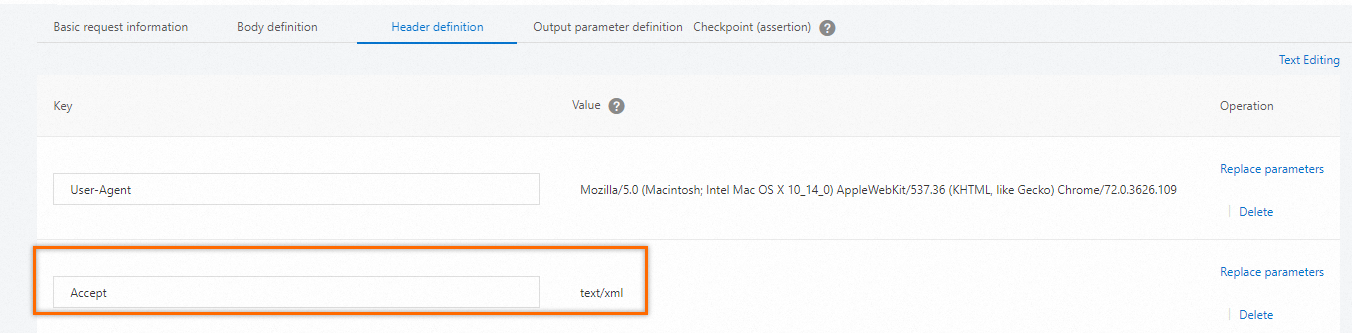
Solution: Adjust the Accept header to match a type the server supports. Test different values to determine which types the server accepts. The following table lists common Accept formats and their matching order.
| Format | Description |
|---|---|
text/html | HTML |
text/plain | Plain text |
text/xml | XML |
image/gif | GIF image |
image/jpeg | JPEG image |
image/png | PNG image |
application/xhtml+xml | XHTML |
application/xml | XML data |
application/atom+xml | Atom XML aggregation |
application/json | JSON data |
application/pdf | |
application/msword | Word document |
application/octet-stream | Binary stream (file downloads) |
application/x-www-form-urlencoded | Default form encoding (key-value pairs) |
Matching priority: When multiple Accept types are specified, the server matches them in this order:
No quality factor: Matched left to right.
application/xml,text/html,application/jsonmatches asapplication/xml>text/html>application/json.With quality factor: Higher
qvalues take priority.application/xml;q=0.3,application/json;q=0.8,text/html(defaults toq=1.0) matches astext/html>application/json>application/xml.Wildcard specificity: More specific types match first.
*/*,text/*,text/htmlmatches astext/html>text/*>*/*.
503 (Service Unavailable)
Backend server overloaded
Cause: The backend server is overloaded and refuses to accept additional requests.
Solution: Check the backend server error logs for resource exhaustion or capacity limits.
SLB throttling due to limited source IPs
Cause: A large number of 503 errors appear in the PTS sampling log, but the backend server shows no corresponding errors. This typically happens when all of the following conditions are true:
The stress test uses an HTTP or HTTPS API.
The entry point is an SLB instance (Internet-facing or internal-facing).
The backend service does not return 503 errors.
The 503 response body matches this pattern:
  <!DOCTYPE HTML PUBLIC "-//IETF//DTD HTML 2.0//EN">
  <html>
  <head><title>503 Service Temporarily Unavailable</title></head>
  <body bgcolor="white">
  <h1>503 Service Temporarily Unavailable</h1>
  <p>The server is temporarily unable to service your request due to maintenance downtime or capacity problems. Please try again later.</body>
  </html>
Root cause: PTS uses long connections by default. When the number of source IP addresses is small, a single IP address can trigger SLB single-proxy throttling, and SLB cannot effectively balance the load.
Solution:
Enable the PTS IP extension feature to increase the number of source IPs. For details, see Start a scenario.
Increase the maximum number of virtual users or the RPS (requests per second) value. For details, see Configure load models and levels.
Switch from long connections to short connections. On the Scenario Settings page, add the following header on the Header Definition tab:
Key:ConnectionValue:closeNoteNewly added APIs inherit this setting by default. Adjust per API if your scenario requires mixed connection modes.

504 (BadGateway Timeout)
Cause: The gateway did not receive a timely response from the backend server.
Solution:
Verify that the backend server is running and processing requests normally.
Extend the timeout period at the gateway layer.
Extend the request timeout in the Advanced Settings section of the Create Scenario page to give the load generator more time.