This page documents the TPC-H test design, procedure, and results for PolarDB-X. Use the results as a baseline when evaluating PolarDB-X analytic query performance or planning capacity.
Background
TPC-H is a decision-support benchmark developed by the Transaction Processing Performance Council (TPC). It runs 22 complex SQL queries against eight tables. Most queries include multi-table joins, subqueries, and GROUP BY clauses, making it a standard tool for evaluating analytic query capabilities.
Test design
Data set
The test uses 100 GB of data (scale factor = 100). The following table shows the row counts for the three largest tables.
| Table | Rows |
|---|---|
| LINEITEM | 600 million |
| ORDERS | 150 million |
| PART_SUPP | 80 million |
Test environment
| Component | Specification |
|---|---|
| Node type | 8C64G |
| Number of nodes | 6 |
| Data set size | 100 GB |
| Stress test ECS instance | ecs.g7.4xlarge (16 vCPUs, 64 GB memory, disk > 200 GB) |
| Network | All instances in the same VPC |
Prerequisites
Before you begin, ensure that you have:
An Alibaba Cloud account with permissions to create ECS and PolarDB-X instances
A virtual private cloud (VPC) in the target region
An ECS instance with a disk larger than 200 GB, deployed in the same VPC as the PolarDB-X instance
Procedure
The following steps reproduce this test on your own PolarDB-X instance. All scripts are included in the downloadable packages.
Step 1: Create an ECS instance for stress testing
Create an Elastic Compute Service (ECS) instance to generate data and run the stress test. The disk size must be larger than 200 GB, because the generated CSV data sets are stored locally.
Step 2: Create a PolarDB-X instance
- Note The PolarDB-X instance and the ECS instance must be in the same VPC.
Create a database named
tpch_100g. For details, see Create a database.CREATE DATABASE tpch_100g;Create the eight TPC-H tables in
tpch_100g. All large tables usedbpartitionandtbpartition(four table partitions each). Small reference tables (nationandregion) usebroadcast.CREATE TABLE `customer` ( `c_custkey` int(11) NOT NULL, `c_name` varchar(25) NOT NULL, `c_address` varchar(40) NOT NULL, `c_nationkey` int(11) NOT NULL, `c_phone` varchar(15) NOT NULL, `c_acctbal` decimal(15,2) NOT NULL, `c_mktsegment` varchar(10) NOT NULL, `c_comment` varchar(117) NOT NULL, PRIMARY KEY (`c_custkey`) ) ENGINE=InnoDB DEFAULT CHARSET=latin1 dbpartition by hash(`c_custkey`) tbpartition by hash(`c_custkey`) tbpartitions 4; CREATE TABLE `lineitem` ( `l_orderkey` bigint(20) NOT NULL, `l_partkey` int(11) NOT NULL, `l_suppkey` int(11) NOT NULL, `l_linenumber` bigint(20) NOT NULL, `l_quantity` decimal(15,2) NOT NULL, `l_extendedprice` decimal(15,2) NOT NULL, `l_discount` decimal(15,2) NOT NULL, `l_tax` decimal(15,2) NOT NULL, `l_returnflag` varchar(1) NOT NULL, `l_linestatus` varchar(1) NOT NULL, `l_shipdate` date NOT NULL, `l_commitdate` date NOT NULL, `l_receiptdate` date NOT NULL, `l_shipinstruct` varchar(25) NOT NULL, `l_shipmode` varchar(10) NOT NULL, `l_comment` varchar(44) NOT NULL, KEY `IDX_LINEITEM_SUPPKEY` (`l_suppkey`), KEY `IDX_LINEITEM_PARTKEY` (`l_partkey`), KEY `IDX_LINEITEM_SHIPDATE` (`l_shipdate`), PRIMARY KEY (`l_orderkey`,`l_linenumber`) ) ENGINE=InnoDB DEFAULT CHARSET=latin1 dbpartition by RIGHT_SHIFT(`l_orderkey`,6) tbpartition by RIGHT_SHIFT(`l_orderkey`,6) tbpartitions 4; CREATE TABLE `orders` ( `o_orderkey` bigint(20) NOT NULL, `o_custkey` int(11) NOT NULL, `o_orderstatus` varchar(1) NOT NULL, `o_totalprice` decimal(15,2) NOT NULL, `o_orderdate` date NOT NULL, `o_orderpriority` varchar(15) NOT NULL, `o_clerk` varchar(15) NOT NULL, `o_shippriority` bigint(20) NOT NULL, `o_comment` varchar(79) NOT NULL, PRIMARY KEY (`O_ORDERKEY`) ) ENGINE=InnoDB DEFAULT CHARSET=latin1 dbpartition by RIGHT_SHIFT(`O_ORDERKEY`,6) tbpartition by RIGHT_SHIFT(`O_ORDERKEY`,6) tbpartitions 4; CREATE TABLE `part` ( `p_partkey` int(11) NOT NULL, `p_name` varchar(55) NOT NULL, `p_mfgr` varchar(25) NOT NULL, `p_brand` varchar(10) NOT NULL, `p_type` varchar(25) NOT NULL, `p_size` int(11) NOT NULL, `p_container` varchar(10) NOT NULL, `p_retailprice` decimal(15,2) NOT NULL, `p_comment` varchar(23) NOT NULL, PRIMARY KEY (`p_partkey`) ) ENGINE=InnoDB DEFAULT CHARSET=latin1 dbpartition by hash(`p_partkey`) tbpartition by hash(`p_partkey`) tbpartitions 4; CREATE TABLE `partsupp` ( `ps_partkey` int(11) NOT NULL, `ps_suppkey` int(11) NOT NULL, `ps_availqty` int(11) NOT NULL, `ps_supplycost` decimal(15,2) NOT NULL, `ps_comment` varchar(199) NOT NULL, KEY `IDX_PARTSUPP_SUPPKEY` (`PS_SUPPKEY`), PRIMARY KEY (`ps_partkey`,`ps_suppkey`) ) ENGINE=InnoDB DEFAULT CHARSET=latin1 dbpartition by hash(`ps_partkey`) tbpartition by hash(`ps_partkey`) tbpartitions 4; CREATE TABLE `supplier` ( `s_suppkey` int(11) NOT NULL, `s_name` varchar(25) NOT NULL, `s_address` varchar(40) NOT NULL, `s_nationkey` int(11) NOT NULL, `s_phone` varchar(15) NOT NULL, `s_acctbal` decimal(15,2) NOT NULL, `s_comment` varchar(101) NOT NULL, PRIMARY KEY (`s_suppkey`) ) ENGINE=InnoDB DEFAULT CHARSET=latin1 dbpartition by hash(`s_suppkey`) tbpartition by hash(`s_suppkey`) tbpartitions 4; CREATE TABLE `nation` ( `n_nationkey` int(11) NOT NULL, `n_name` varchar(25) NOT NULL, `n_regionkey` int(11) NOT NULL, `n_comment` varchar(152) DEFAULT NULL, PRIMARY KEY (`n_nationkey`) ) ENGINE=InnoDB DEFAULT CHARSET=latin1 broadcast; CREATE TABLE `region` ( `r_regionkey` int(11) NOT NULL, `r_name` varchar(25) NOT NULL, `r_comment` varchar(152) DEFAULT NULL, PRIMARY KEY (`r_regionkey`) ) ENGINE=InnoDB DEFAULT CHARSET=latin1 broadcast;
Step 3: Tune instance parameters
Adjust the following parameters on the compute node to optimize stress testing performance. For details, see Parameter settings.
Set
XPROTO_MAX_DN_CONCURRENTandXPROTO_MAX_DN_WAIT_CONNECTIONto4000.Connect to the PolarDB-X instance using a command-line client and run the following statements in the same session to enable massively parallel processing (MPP) and disable logging and CPU statistical sampling:
set GLOBAL RECORD_SQL = false;
set GLOBAL ENABLE_HTAP=true;
set GLOBAL ENABLE_MASTER_MPP=true;
set GLOBAL MPP_METRIC_LEVEL = 0;
set GLOBAL ENABLE_CPU_PROFILE = false;
set GLOBAL ENABLE_SORT_AGG=false;
set GLOBAL MPP_PARALLELISM=192;
set GLOBAL GROUP_PARALLELISM=8;
Step 4: Prepare test data
Download and decompress the tpchData.tar.gz package, then open
params.conf:tar xzvf tpchData.tar.gz cd tpchData/ vi params.confIn
params.conf, set the PolarDB-X connection details:Placeholder Description {HOST}PolarDB-X instance hostname {PORT}PolarDB-X connection port {USER}Database username {PASSWORD}Database password #!/bin/bash ### remote generating directory export remoteGenDir=./ ### target path export targetPath=../tpch/tpchRaw ### cores per worker, default value is 1 export coresPerWorker=`cat /proc/cpuinfo| grep "processor"| wc -l` ### threads per worker, default value is 1 export threadsPerWorker=`cat /proc/cpuinfo| grep "processor"| wc -l` #export threadsPerWorker=1 export hint="" export insertMysql="mysql -h{HOST} -P{PORT} -u{USER} -p{PASSWORD} -Ac --local-infile tpch_100g -e"Replace the following placeholders: To speed up data generation, set
threadsPerWorkerto the number of vCPUs on the ECS instance.In the
tpchData/workloadsdirectory, confirm thattpch.workload.100.lstis present. This file controls data generation for a 100 GB data set (scale factor = 100). The third column sets how many segments the generation process splits into—increase it if resources are limited.Generate 100 GB of data:
cd datagen
sh generateTPCH.sh 100
The generated files appear in
tpch/tpchRaw/SF100/:ls ../tpch/tpchRaw/SF100/ customer lineitem nation orders part partsupp region supplierImport the data into PolarDB-X:
cd ../loadTpch
sh loadTpch.sh 100
Verify data integrity by checking row counts for all eight tables:
MySQL [tpch_100g]> select (select count(*) from customer) as customer_cnt,
 (select count(*)  from lineitem) as lineitem_cnt,
 (select count(*)  from nation) as nation_cnt,
 (select count(*)  from orders) as order_cnt,
 (select count(*) from part) as part_cnt,
 (select count(*) from partsupp) as partsupp_cnt,
 (select count(*) from region) as region_cnt,
 (select count(*) from supplier) as supplier_cnt;
+--------------+--------------+------------+-----------+----------+--------------+------------+--------------+
| customer_cnt | lineitem_cnt | nation_cnt | order_cnt | part_cnt | partsupp_cnt | region_cnt | supplier_cnt |
+--------------+--------------+------------+-----------+----------+--------------+------------+--------------+
|     15000000 |    600037902 |         25 | 150000000 | 20000000 |     80000000 |          5 |      1000000 |
+--------------+--------------+------------+-----------+----------+--------------+------------+--------------+
Collect table statistics for the query optimizer:
analyze table customer;
analyze table lineitem;
analyze table nation;
analyze table orders;
analyze table part;
analyze table partsupp;
analyze table region;
analyze table supplier;
Step 5: Run the stress test
Download and decompress the tpch-queries.tar.gz test script package:
tar xzvf tpch-queries.tar.gzRun all 22 queries and record the elapsed time for each:
cd tpch-queries
'time' -f "%e" sh all_query.sh {HOST} {USER} {PASSWORD} {DB} {PORT}
Each query runs once. The recorded time is the actual wall-clock elapsed time in seconds.
Test results
MySQL 5.7
polardb-2.4.0_5.4.19-20240718_xcluster5.4.19-20240630. For details, see Release notes. The SQL column refers to files in the tpch-queries.tar.gz package.| SQL | Execution duration (s) |
|---|---|
| 01.sql | 38.93 |
| 02.sql | 1.57 |
| 03.sql | 11.83 |
| 04.sql | 2.63 |
| 05.sql | 7.07 |
| 06.sql | 7.49 |
| 07.sql | 24.43 |
| 08.sql | 9.22 |
| 09.sql | 38.88 |
| 10.sql | 6.78 |
| 11.sql | 2.93 |
| 12.sql | 10.2 |
| 13.sql | 3.02 |
| 14.sql | 1.67 |
| 15.sql | 5.1 |
| 16.sql | 1.59 |
| 17.sql | 1.71 |
| 18.sql | 13.78 |
| 19.sql | 2.82 |
| 20.sql | 9.29 |
| 21.sql | 14.54 |
| 22.sql | 2.41 |
| Total | 217.89 |
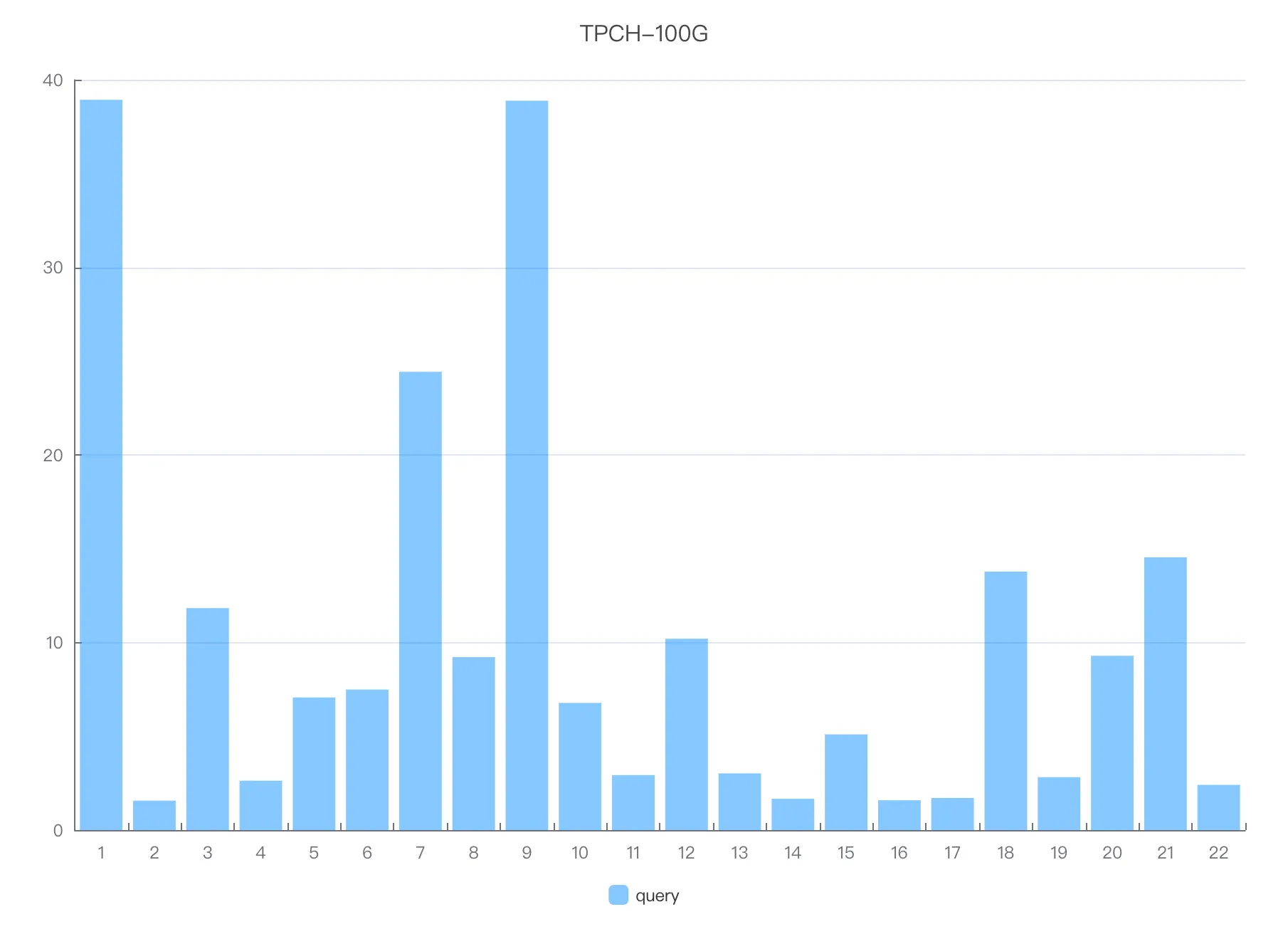
The y-axis shows execution time in seconds. Shorter bars indicate faster queries.
MySQL 8.0
polardb-2.4.0_5.4.19-20240718_xcluster8.4.19-20240630. For details, see Release notes. The SQL column refers to files in the tpch-queries.tar.gz package.| SQL | Execution duration (s) |
|---|---|
| 01.sql | 35.34 |
| 02.sql | 1.92 |
| 03.sql | 12.82 |
| 04.sql | 17.11 |
| 05.sql | 15.6 |
| 06.sql | 9.07 |
| 07.sql | 22.04 |
| 08.sql | 10.92 |
| 09.sql | 28.65 |
| 10.sql | 12.14 |
| 11.sql | 3.14 |
| 12.sql | 9.62 |
| 13.sql | 2.87 |
| 14.sql | 1.57 |
| 15.sql | 4.77 |
| 16.sql | 3.7 |
| 17.sql | 1.54 |
| 18.sql | 22.1 |
| 19.sql | 3.11 |
| 20.sql | 11.07 |
| 21.sql | 13.76 |
| 22.sql | 2.09 |
| Total | 244.95 |
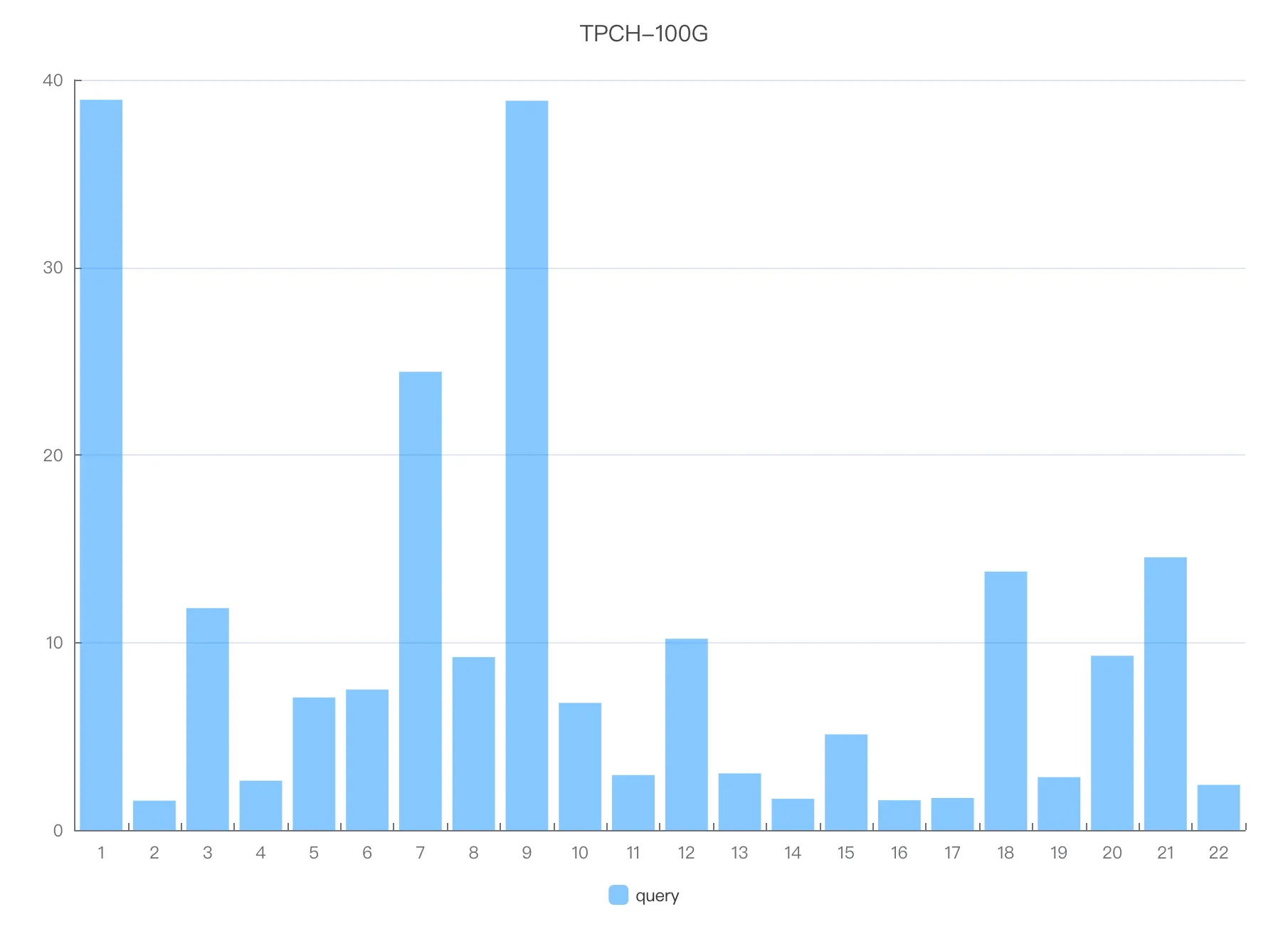
The y-axis shows execution time in seconds. Shorter bars indicate faster queries.