In PolarDB-X, every DDL statement runs as a DDL job. Use SHOW DDL to inspect active and recent DDL jobs in your instance.
Syntax
SHOW [FULL] DDL;Example
The following example shows the output of SHOW DDL\G for a paused ALTER TABLE job. The BACKFILL_PROGRESS and PHY_DDL_PROGRESS fields reflect different internal sub-phases, so their values can differ from the overall PROGRESS.
SHOW DDL\G;
*************************** 1. row ***************************
           JOB_ID: 1359947811109470208
    OBJECT_SCHEMA: d1
      OBJECT_NAME: t2
           ENGINE: DAG
         DDL_TYPE: ALTER_TABLE
            STATE: PAUSED
BACKFILL_PROGRESS: 0%
 PHY_DDL_PROGRESS: 100%
         PROGRESS: 20%
       START_TIME: 2021-08-05 11:01:25.291
         END_TIME: 2021-08-05 11:02:27.020
 ELAPSED_TIME(MS): 61729
      PHY_PROCESS:
       CANCELABLE: true
1 row in set (0.03 sec)
Response parameters
| Parameter | Description |
|---|---|
JOB_ID | The unique ID of the DDL job. A 64-bit signed integer of the LONG data type. |
OBJECT_SCHEMA | The schema name of the object on which the DDL job is performed. |
OBJECT_NAME | The name of the object on which the DDL job is performed — for example, the table name for a CREATE TABLE or ALTER TABLE job. |
ENGINE | The engine type for the DDL job. Default value: DAG. |
DDL_TYPE | The type of the DDL job, such as CREATE_TABLE or ALTER_TABLE. |
STATE | The current state of the DDL job. Valid values: QUEUED, RUNNING, COMPLETED, ROLLBACK_RUNNING, ROLLBACK_COMPLETED, PAUSED. See DDL job states for state transitions. |
BACKFILL_PROGRESS | The progress of data backfilling within the DDL job. |
PHY_DDL_PROGRESS | The progress of batch physical DDL statements being executed within the DDL job. |
PROGRESS | The overall progress of the DDL job. |
START_TIME | The time at which the DDL job started. |
END_TIME | The time at which the DDL job ended. |
ELAPSED_TIME(MS) | The time elapsed since the DDL job started, in milliseconds. |
PHY_PROCESS | The state of physical DDL statements currently being executed. |
CANCELABLE | Whether the DDL job can be canceled using CANCEL DDL. true means the job is cancelable. |
DDL job states
The STATE field reflects the current phase of a DDL job. The following diagram shows how states transition:
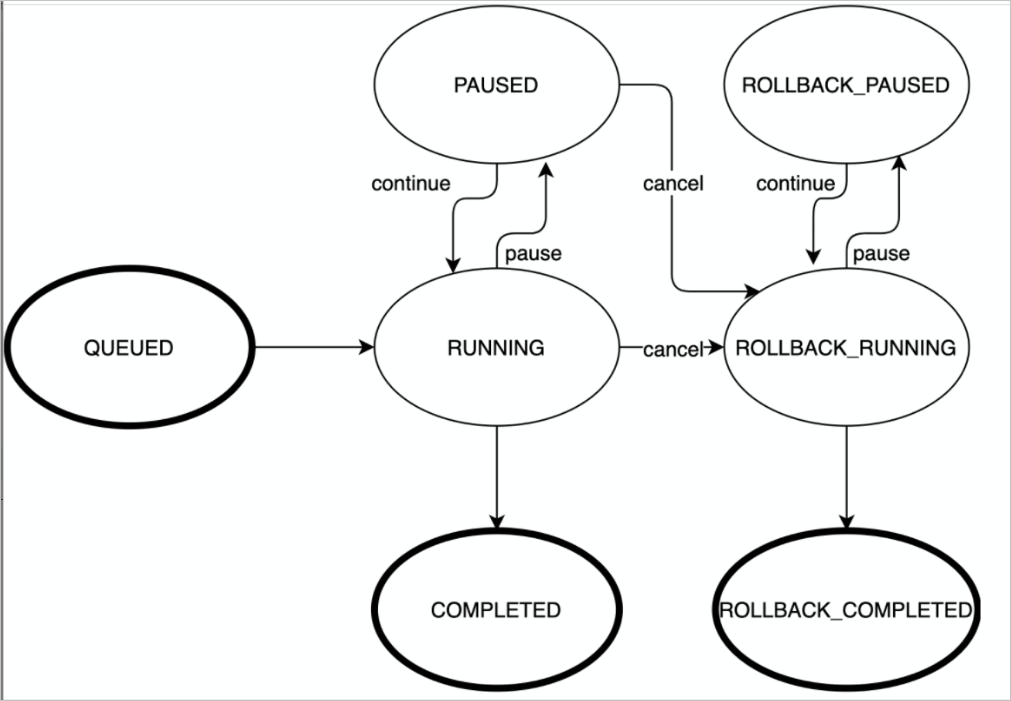
Under normal conditions, a DDL job progresses through: QUEUED → RUNNING → COMPLETED.
If an exception occurs, the job may be automatically rolled back: QUEUED → RUNNING → ROLLBACK_RUNNING → ROLLBACK_COMPLETED.
What's next
To cancel a cancelable DDL job (
CANCELABLE: true), runCANCEL DDL.