PolarDB-X allows you to view the sessions of an instance and their statistical information. If your instance encounters issues such as a CPU spike, a surge in active sessions, or increased response time, the system alerts you and provides a 10-second SQL analysis feature to help you analyze real-time SQL activities within a recent 10-second time window for rapid diagnostics and troubleshooting.
Manage sessions
Log on to the PolarDB-X console.
In the top navigation bar, select the region of the instance.
On the Instances page, click the PolarDB-X 2.0 tab.
Find the instance that you want to manage and click its name.
In the left-side navigation pane, choose . On the page that appears, you can view detailed information about instance sessions and session statistics.
You can perform the following operations in the Instance Sessions section:
View information such as exceptional sessions, active sessions, the longest execution duration, CPU utilization, and connection usage.
In the upper-right corner of the section, click 10s SQL Analysis. In the dialog box that appears, view the information about SQL statements that are executed within a 10-second time window, such as SQL statistics, slow query logs, and SQL overview. For more information, see Perform a 10-second SQL analysis.
Click SQL Throttling. In the dialog box that appears, configure the parameters to enable threshold-based SQL throttling on sessions.
Click Optimize to optimize sessions. For more information, see .
Export active sessions.
Terminate sessions.
WarningService interruptions may occur if you terminate sessions. Exercise caution when you perform this operation.
In the Session Statistics section, you can perform the following operations:
View summary information and session statistics by user, access source, or database. The summary information includes the total number of sessions, the total number of running sessions, and the longest session runtime.
NoteThe statistics information includes the total number of sessions, the total number of active sessions, the maximum session duration in seconds, the number of sessions that are active for more than 3 seconds, and the number of queries that do not use indexes.
Export summary information and session statistics by user, access source, or database.
SQL throttling
Log on to the PolarDB-X console.
In the top navigation bar, select the region of the instance.
On the Instances page, click the PolarDB-X 2.0 tab.
Find the instance that you want to manage and click its name.
In the left-side navigation pane, choose .
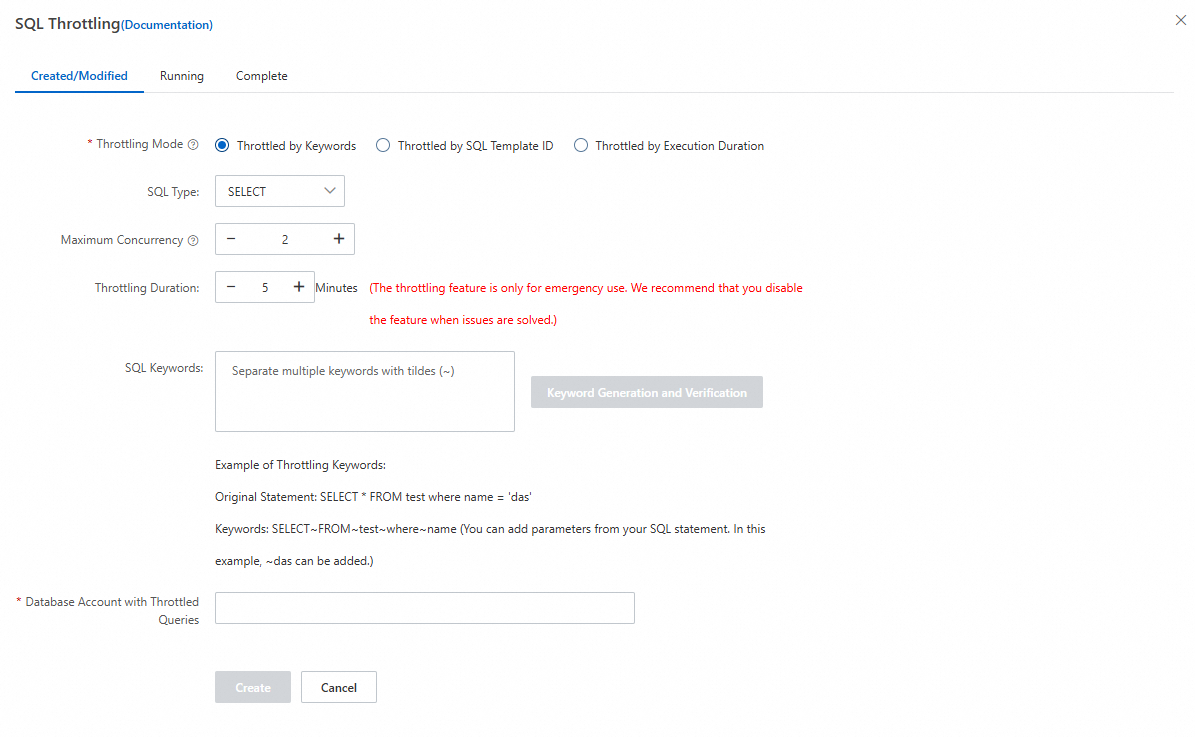
Click the SQL Throttling tab. In the dialog box that appears, configure the parameters.
Parameter
Description
Throttling Mode
The throttling mode. Valid values:
Throttled by Keywords: throttles the SQL queries that contain the specified keywords.
Throttled by SQL Template ID: throttles the SQL queries based on SQL template IDs, which are 8-character hexadecimal strings that can be obtained from SQL logs, session information, and EXPLAIN statement results. Only PolarDB-X Enterprise Edition instances support this option.
Throttled by Execution Duration: throttles the SQL queries by execution duration. If the execution duration of an SQL query of the specified type exceeds the specified threshold value, the system fetches the ID of the SQL template used by the SQL query and adds the ID to the throttling rule. Then, SQL queries that use the SQL template are executed with the specified concurrency. Only PolarDB-X Enterprise Edition instances support this option.
NoteYou can configure the maximum number of SQL template IDs. After the number of SQL template IDs added to the throttling rule reaches the upper limit, the system stops fetching SQL template IDs.
SQL Type
The type of SQL queries that you want to throttle. Valid values: SELECT, UPDATE, DELETE, and INSERT.
Maximum Concurrency
The maximum single-node concurrency for SQL queries to be throttled.
Throttling Duration
The duration during which the SQL throttling rule takes effect. The throttling feature is intended only for emergency use. We recommend that you specify the throttling duration based on your business requirements and disable throttling when it is no longer needed.
SQL Keywords
If you select the Throttled by Keywords throttling mode, you must specify the keywords that identify the SQL queries to be throttled. Separate multiple keywords with tildes (~). Example: For the original statement
SELECT * FROM test WHERE name = 'das', the keywords can be specified asSELECT~FROM~test~WHERE~name. You can also include specific parameter values in the keywords, such as adding~das.Database Account with Throttled Queries
The database account to which the throttled SQL queries belong. This parameter is required if you select the Throttled by Keywords or Throttled by SQL Template ID throttling mode.
Template ID
The ID of an SQL template used by an SQL statement that you want to throttle. Separate multiple IDs with commas (,). This parameter is required only if you select the Throttled by SQL Template ID throttling mode.
Execution Duration
The threshold value of the execution duration. If the execution duration of an SQL statement exceeds the specified threshold value, the system fetches the ID of the SQL template used by the SQL statement and adds the ID to the automatically created throttling rule. This parameter is required only if you select the Throttled by Execution Duration throttling mode.
Maximum Number of Throttled Queries
The maximum number of IDs of SQL templates used by SQL statements throttled by execution duration. After the number of SQL template IDs added to the throttling rule reaches the upper limit, the system stops fetching IDs of SQL templates used by SQL statements whose execution duration exceeds the specified threshold value. This parameter is required only if you select the Throttled by Execution Duration throttling mode.
Click Create.
After the SQL throttling rule is created, you can view the status of the rule in the list of throttling rules.
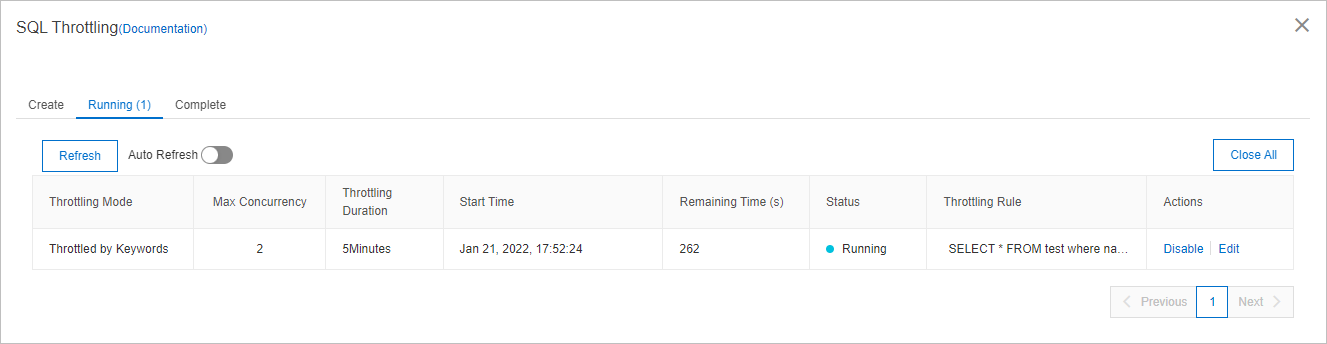
If you want to disable or modify a throttling rule before the specified throttling duration expires, click Disable or Edit in the Actions column of the throttling rule.
Perform a 10-second SQL analysis
The 10-second SQL analysis feature helps you analyze SQL statements that are executed within a 10-second time window on your instance in real time. When you perform a 10-second SQL analysis on a PolarDB-X instance, the system executes the SHOW PROCESSLIST statement at an interval of 1 second within a 10-second time window. Then, the system analyzes the returned result sets. The analysis result shows the SQL statements that are most frequently executed and whether slow SQL queries exist within the 10-second time window.
Log on to the PolarDB-X console.
In the top navigation bar, select the region of the instance.
On the Instances page, click the PolarDB-X 2.0 tab.
Find the instance that you want to manage and click its name.
In the left-side navigation pane, choose .
On the page that appears, click 10s SQL Analysis.
Wait for 10 seconds. Then, view the analysis results, including the SQL statements that are most frequently executed and whether slow SQL queries exist within this 10-second time window.