A JOIN operation connects multiple tables based on one or more shared columns to retrieve related data. This topic describes how PolarDB-X optimizes and executes JOINs.
Terms
A JOIN is a common operation in SQL queries. Logically, its semantics are equivalent to creating a Cartesian product of two tables and then retaining only the data that meets the filter conditions. Most JOINs are equi-joins, which connect two tables based on matching values in a specific column.
A subquery is a query block nested inside another SQL statement. The result of the subquery is used as input for the outer query. Subqueries can appear in many parts of an SQL statement. For example, they can be in the SELECT clause as output data, in the FROM clause as a view, or in the WHERE clause as a filter condition.
This topic discusses only JOIN operators that are not pushed down. If a JOIN is pushed down to a LogicalView, the MySQL storage layer determines the execution method.
JOIN types
PolarDB-X supports three common JOIN types: Inner Join, Left Outer Join, and Right Outer Join.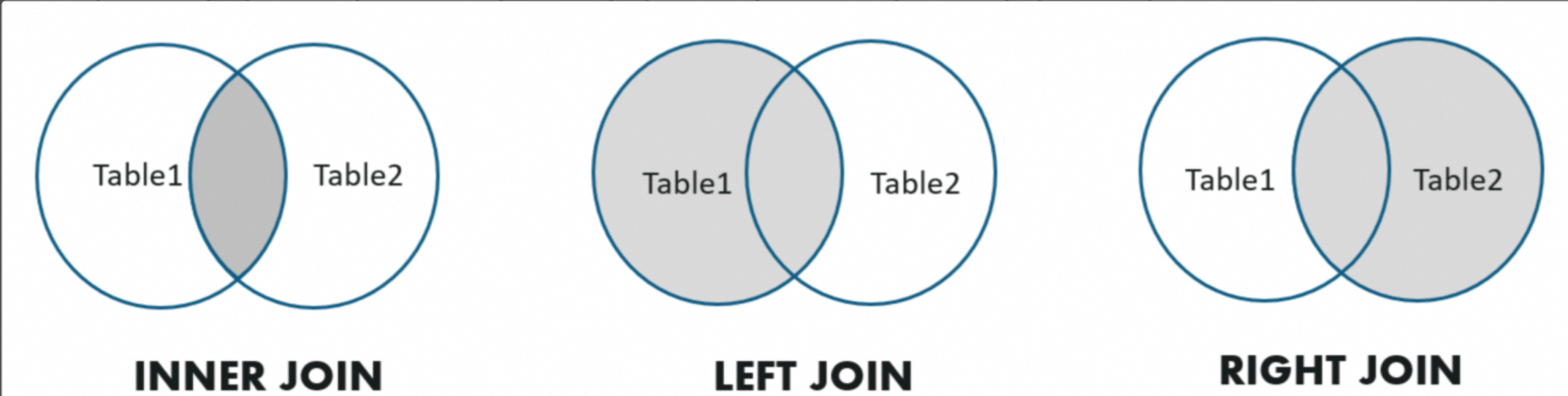 The following examples show these JOIN types:
/* Inner Join */
SELECT * FROM A, B WHERE A.key = B.key;
/* Left Outer Join */
SELECT * FROM A LEFT JOIN B ON A.key = B.key;
/* Right Outer Join */
SELECT * FROM A RIGHT OUTER JOIN B ON A.key = B.key;
PolarDB-X also supports Semi-Join and Anti-Join. You cannot express Semi-Join and Anti-Join using direct SQL statements. They are usually transformed from EXISTS or IN subqueries that contain correlated columns. The following examples show a Semi-Join and an Anti-Join.
/* Semi Join - 1 */
SELECT * FROM Emp WHERE Emp.DeptName IN (
   SELECT DeptName FROM Dept
)
 /* Semi Join - 2 */
SELECT * FROM Emp WHERE EXISTS (
  SELECT * FROM Dept WHERE Emp.DeptName = Dept.DeptName
)
/* Anti Join - 1 */
SELECT * FROM Emp WHERE Emp.DeptName NOT IN (
   SELECT DeptName FROM Dept
)
 /* Anti Join - 2 */
SELECT * FROM Emp WHERE NOT EXISTS (
  SELECT * FROM Dept WHERE Emp.DeptName = Dept.DeptName
)
JOIN algorithms
Currently, PolarDB-X supports several JOIN algorithms, such as Nested-Loop Join, Hash Join, Sort-Merge Join, and Lookup Join (BKAJoin).
Nested-Loop Join (NLJoin)
Nested-Loop Join is typically used for non-equi-joins. It works as follows:
Retrieve all data from the inner table (the right table, which is usually smaller) and cache it in memory.
Traverse the data in the outer table. For each row in the outer table:
Check each row of inner table data cached in memory.
Construct a result row. If the row meets the JOIN condition, output the row.
The following example shows a Nested-Loop Join:
> EXPLAIN SELECT * FROM partsupp, supplier WHERE ps_suppkey < s_suppkey;

NlJoin(condition="ps_suppkey < s_suppkey", type="inner")
  Gather(concurrent=true)
    LogicalView(tables="partsupp_[0-7]", shardCount=8, sql="SELECT * FROM `partsupp` AS `partsupp`")
  Gather(concurrent=true)
    LogicalView(tables="supplier_[0-7]", shardCount=8, sql="SELECT * FROM `supplier` AS `supplier`")
Nested-Loop Join is usually the least efficient JOIN operation. It is generally used only when the JOIN condition does not contain an equivalent condition or when the inner table is very small. Use the following hint to force PolarDB-X to use a Nested-Loop Join and to specify the JOIN order:
/*+TDDL:NL_JOIN(outer_table, inner_table)*/ SELECT ...The inner_table and outer_table can also be the result of a JOIN on multiple tables. For example:
/*+TDDL:NL_JOIN((outer_table_a, outer_table_b), (inner_table_c, inner_table_d))*/ SELECT ...Hash Join
Hash Join is one of the most common algorithms for equi-joins. It works as follows:
Retrieve all data from the inner table (the right table, which is usually smaller) and use it to build a hash table in memory.
Traverse the data in the outer table. For each row in the outer table:
Query the hash table based on the JOIN key of the equivalent condition to retrieve all matching rows that have the same JOIN key.
Construct a result row. If the row meets the JOIN condition, output the row.
The following example shows a Hash Join:
> EXPLAIN SELECT * FROM partsupp, supplier WHERE ps_suppkey = s_suppkey;

HashJoin(condition="ps_suppkey = s_suppkey", type="inner")
  Gather(concurrent=true)
    LogicalView(tables="partsupp_[0-7]", shardCount=8, sql="SELECT * FROM `partsupp` AS `partsupp`")
  Gather(concurrent=true)
    LogicalView(tables="supplier_[0-7]", shardCount=8, sql="SELECT * FROM `supplier` AS `supplier`")
Hash Join is often used for complex queries that join a large volume of data and cannot benefit from an index lookup. In these cases, Hash Join is the best choice. For example, in the preceding query, both the partsupp and supplier tables require a full table scan and contain a large volume of data, which makes Hash Join suitable. Because the inner table in a Hash Join is used to build a hash table in memory, the inner table is generally smaller than the outer table. The optimizer can usually select the optimal JOIN order automatically. To control the order manually, you can use a hint.
Use the following hint to force PolarDB-X to use a Hash Join and to specify the JOIN order:
/*+TDDL:HASH_JOIN(table_outer, table_inner)*/ SELECT ...Lookup Join (BKAJoin)
Lookup Join is another common algorithm for equi-joins. It is often used when the data volume is small. It works as follows:
Traverse the data in the outer table (the left table, which is usually smaller). For each batch of data, such as 1,000 rows, in the outer table:
Combine the JOIN keys from this batch into an `IN (...)` condition and add it to the query for the inner table.
Execute the query on the inner table to retrieve the matching rows.
Use a hash table to find the matching inner table rows for each outer table row, then combine and output the results.
The following example shows a Lookup Join (BKAJoin):
> EXPLAIN SELECT * FROM partsupp, supplier WHERE ps_suppkey = s_suppkey AND ps_partkey = 123;

BKAJoin(condition="ps_suppkey = s_suppkey", type="inner")
  LogicalView(tables="partsupp_3", sql="SELECT * FROM `partsupp` AS `partsupp` WHERE (`ps_partkey` = ?)")
  Gather(concurrent=true)
    LogicalView(tables="supplier_[0-7]", shardCount=8, sql="SELECT * FROM `supplier` AS `supplier` WHERE (`s_suppkey` IN ('?'))")
Lookup Join is typically used when the outer table is small. For example, in the preceding query, the left table `partsupp` contains only a few rows because of the filter condition `ps_partkey = 123`. In addition, the `s_suppkey IN ( ... )` query on the right table hits the primary key index, which further reduces the execution cost of the Lookup Join.
Use the following hint to force PolarDB-X to use a Lookup Join and to specify the JOIN order:
/*+TDDL:BKA_JOIN(table_outer, table_inner)*/ SELECT ...The inner table in a Lookup Join must be a single table. It cannot be the result of a JOIN on multiple tables.
Sort-Merge Join
Sort-Merge Join is another algorithm for equi-joins. It requires that the inputs from the left and right tables are sorted by the JOIN key. It works as follows:
Before the Sort-Merge Join starts, sort the input from both tables using MergeSort or MemSort.
Compare the current rows from the left and right tables and advance through the inputs from both sides as follows:
If the JOIN key of the left table is smaller, advance to the next row from the left table.
If the JOIN key of the right table is smaller, advance to the next row from the right table.
If the JOIN keys of the left and right tables are equal, one or more matches are found. For each match, check if the JOIN condition is met and output the result.
The following example shows a Sort-Merge Join:
> EXPLAIN SELECT * FROM partsupp, supplier WHERE ps_suppkey = s_suppkey ORDER BY s_suppkey;

SortMergeJoin(condition="ps_suppkey = s_suppkey", type="inner")
  MergeSort(sort="ps_suppkey ASC")
    LogicalView(tables="QIMU_0000_GROUP,QIMU_0001_GROUP.partsupp_[0-7]", shardCount=8, sql="SELECT * FROM `partsupp` AS `partsupp` ORDER BY `ps_suppkey`")
  MergeSort(sort="s_suppkey ASC")
    LogicalView(tables="QIMU_0000_GROUP,QIMU_0001_GROUP.supplier_[0-7]", shardCount=8, sql="SELECT * FROM `supplier` AS `supplier` ORDER BY `s_suppkey`")
The MergeSort operator and the pushed-down ORDER BY clause in the execution plan ensure that the inputs on both sides of the Sort-Merge Join are sorted by the JOIN key, which is `s_suppkey` (`ps_suppkey`).
Sort-Merge Join is usually not the optimal choice because it requires an extra sorting step. However, in some cases, such as when the client query also needs to be sorted by the JOIN key as shown in the preceding example, Sort-Merge Join is a better choice.
Use the following hint to force PolarDB-X to use a Sort-Merge Join:
/*+TDDL:SORT_MERGE_JOIN(table_a, table_b)*/ SELECT ...JOIN order
In scenarios that involve joining multiple tables, an important task for the optimizer is to determine the JOIN order of the tables. Different JOIN orders affect the size of the intermediate result set, which in turn affects the overall execution cost of the plan.
For example, for a JOIN on four tables without pushdown, the JOIN tree can have the following three forms. The tables can also be arranged in 4! = 24 ways. This results in a total of 72 possible JOIN orders.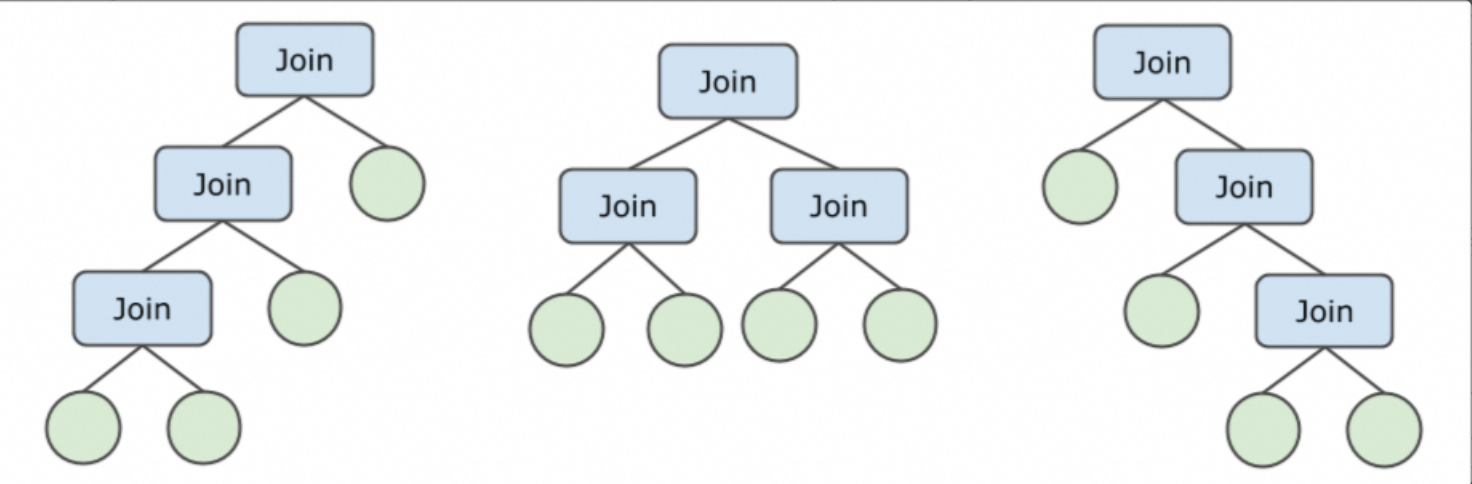
For a JOIN operation that involves N tables, PolarDB-X uses an adaptive strategy to generate an optimal JOIN plan:
When N (for non-pushed-down joins) is small, a Bushy enumeration policy is used to select the optimal plan from all possible JOIN orders.
When the number of non-pushed-down tables is large, a Zig-Zag or Left-Deep enumeration policy is used to select the optimal Zig-Zag or Left-Deep execution plan. This reduces the number and cost of enumerations.
PolarDB-X uses a Cost-based Optimizer (CBO) to select the JOIN order with the lowest total cost. For more information, see Introduction to the query optimizer.
In addition, different JOIN algorithms have different preferences for left and right inputs. For example, in a Hash Join, the right table is the inner table used to build the hash table. Therefore, the smaller table should be placed on the right. The CBO also considers these factors.
PolarDB-X supports a variety of JOIN algorithms. The optimizer selects a suitable JOIN algorithm based on statistics information. The following table lists the suitable scenarios for each JOIN algorithm.
JOIN algorithm | Scenarios |
NLJoin | Scenarios with non-equi-joins. |
HashJoin | Most equi-joins use HashJoin, unless the data is severely skewed. |
BKAJoin | The outer table is small, and the inner table is large. |
Sort-Merge-Join | Sort-Merge-Join is preferred when data is severely skewed or the input data is already sorted. |