PolarDB-X 1.0 caches and manages execution plans to reduce optimizer overhead for repeated queries and keep complex query plans stable across version upgrades.
Prerequisites
Before you begin, ensure that you have:
-
A PolarDB-X 1.0 instance
-
Access to a MySQL-compatible client connected to the instance
How it works
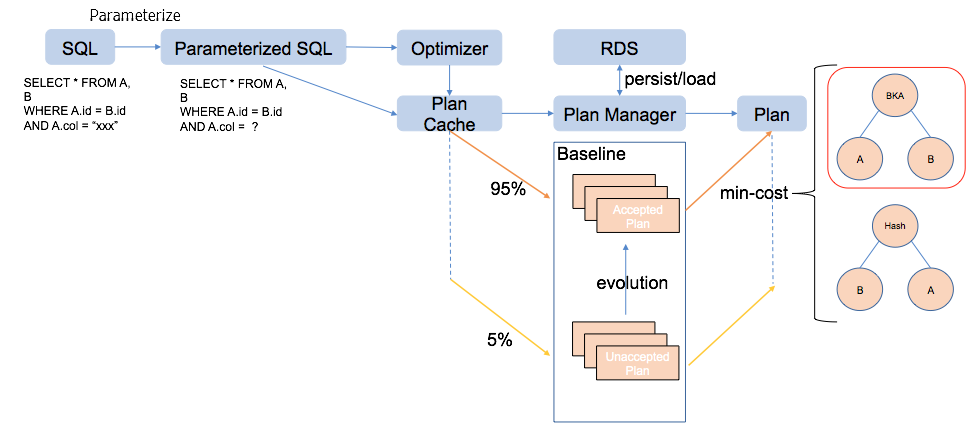
When PolarDB-X 1.0 receives a SQL statement, the following process runs:
-
Parameterize the SQL statement. All constants are replaced with placeholders (
?), and a parameter list is created. -
Check Plan Cache. The parameterized SQL is used as a cache key. If a matching execution plan exists, it is reused. If not, the optimizer generates a new plan.
-
Simple query: execute directly. Simple queries skip Plan Management and run immediately.
-
Complex query: apply Plan Management. The plan persistently stored in the Baseline is used. If multiple plans exist, the one with the lowest cost is selected.
Key concepts
Plan Cache
Plan Cache is enabled by default. It parameterizes each SQL statement—replacing constants with ?—and caches the resulting execution plan. On subsequent executions of the same query pattern, PolarDB-X 1.0 skips optimization and reuses the cached plan.
To check whether a query hits Plan Cache, run EXPLAIN on the statement and look for the HitCache field:
-
HitCache:true— the plan was served from cache. -
HitCache:false— the optimizer generated a new plan (the cache was bypassed or not yet populated).
Plan Management and Baseline
Plan Management handles complex queries that pass through Plan Cache. Each parameterized SQL statement maps to one Baseline, which holds one or more execution plans. Plans in the Baseline are persisted to disk and survive version upgrades.
When an execution plan enters Plan Management, SQL Plan Management (SPM) evaluates it as follows:
-
If the plan is known, SPM checks whether its cost is the minimum among available plans.
-
If the plan is unknown, SPM determines whether to execute it to assess its optimization degree.
SPM selects the plan with the lowest cost when multiple plans exist in a Baseline. During automatic plan evolution, SPM also adds better plans discovered by the Cost-Based Optimizer (CBO) to the Baseline as data changes or after a version upgrade.
BASELINE LIST output fields
Use BASELINE LIST to view all current baselines. The output includes the following columns:
| Column | Description |
|---|---|
BASELINE_ID |
Unique identifier for the baseline, derived from the parameterized SQL. |
PARAMETERIZED_SQL |
The parameterized SQL template (constants replaced with ?). |
PLAN_ID |
Unique identifier for an execution plan within the baseline. |
EXTERNALIZED_PLAN |
The full plan tree, showing operators such as Gather, ParallelHashJoin, and LogicalView. |
FIXED |
1 if this plan is pinned and always used, regardless of CBO cost. 0 if the plan competes with others based on cost. |
ACCEPTED |
1 if the plan is eligible for execution. |
BASELINE commands
PolarDB-X 1.0 provides the following commands to manage execution plans:
BASELINE (LOAD|PERSIST|CLEAR|VALIDATE|LIST|DELETE) [<baseline_id>, ...]
BASELINE (ADD|FIX) SQL <hint> <select_statement>| Command | Description |
|---|---|
BASELINE ADD SQL <hint> <sql> |
Adds an execution plan (generated using the hint) to the Baseline for the given SQL statement. The new plan coexists with existing plans; CBO selects based on cost. |
BASELINE FIX SQL <hint> <sql> |
Pins an execution plan. The fixed plan is always used, bypassing CBO cost selection. |
BASELINE LIST |
Lists all baselines and their associated execution plans. |
BASELINE LOAD |
Loads the specified baseline from system tables into memory. |
BASELINE LOAD_PLAN |
Loads the specified execution plan from system tables into memory. |
BASELINE PERSIST |
Flushes the specified baseline to disk. |
BASELINE PERSIST_PLAN |
Flushes the specified execution plan to disk. |
BASELINE CLEAR |
Removes the specified baseline from memory. |
BASELINE CLEAR_PLAN |
Removes the specified execution plan from memory. |
BASELINE DELETE |
Deletes the specified baseline from disk. |
BASELINE DELETE_PLAN |
Deletes the specified execution plan from disk. |
Tune an execution plan
Use this workflow when the optimizer's default plan is suboptimal—for example, after a data distribution change, or when application code cannot be modified to add hints directly.
The following example uses a join query on the lineitem and part tables:
SELECT *
FROM lineitem JOIN part ON l_partkey = p_partkey
WHERE p_name LIKE '%green%';
Step 1: Inspect the current plan
Run EXPLAIN to see the active execution plan:
mysql> EXPLAIN SELECT * FROM lineitem JOIN part ON l_partkey=p_partkey WHERE p_name LIKE '%green%';The output shows the plan uses a ParallelHashJoin and HitCache:true, confirming the plan comes from Plan Cache:
Gather(parallel=true)
  ParallelHashJoin(condition="l_partkey = p_partkey", type="inner")
    LogicalView(tables="[00-03].lineitem", ...)
    LogicalView(tables="[00-03].part", ..., sql="... WHERE (`p_name` LIKE ?)", ...)
HitCache:true
Run BASELINE LIST to confirm only one plan exists for this statement:
mysql> BASELINE LIST;
+-------------+---------------------------------------------+-----------+-------------------+-------+----------+
| BASELINE_ID | PARAMETERIZED_SQL                           | PLAN_ID   | EXTERNALIZED_PLAN | FIXED | ACCEPTED |
+-------------+---------------------------------------------+-----------+-------------------+-------+----------+
| -399023558  | SELECT * FROM lineitem JOIN part ON ...     | -935671684| Gather(...)       |     0 |        1 |
+-------------+---------------------------------------------+-----------+-------------------+-------+----------+
Step 2: Test an alternative plan with a hint
If a Batched Key Access (BKA) join performs better under certain data conditions, test it by running EXPLAIN with the hint before committing anything to the Baseline:
mysql> EXPLAIN /*+TDDL:BKA_JOIN(lineitem, part)*/ SELECT * FROM lineitem JOIN part ON l_partkey=p_partkey WHERE p_name LIKE '%green%';The output confirms the plan switches to ParallelBKAJoin. Note that HitCache:false—the hint bypasses Plan Cache:
Gather(parallel=true)
  ParallelBKAJoin(condition="l_partkey = p_partkey", type="inner")
    LogicalView(tables="[00-03].lineitem", ...)
    Gather(concurrent=true)
      LogicalView(tables="[00-03].part", ...)
HitCache:false
The hint changes the join algorithm for this one execution but does not affect the Baseline.
Step 3: Add the alternative plan to the Baseline
To make the BKA join plan available for CBO to select based on cost, add it to the Baseline:
mysql> BASELINE ADD SQL /*+TDDL:BKA_JOIN(lineitem, part)*/ SELECT * FROM lineitem JOIN part ON l_partkey=p_partkey WHERE p_name LIKE '%green%';
+-------------+--------+
| BASELINE_ID | STATUS |
+-------------+--------+
| -399023558  | OK     |
+-------------+--------+
Run BASELINE LIST again to confirm both plans are now in the Baseline (FIXED=0 for both, meaning CBO selects based on cost):
mysql> BASELINE LIST;
+-------------+--------------------+-------------+--------------------------------------+-------+----------+
| BASELINE_ID | PARAMETERIZED_SQL  | PLAN_ID     | EXTERNALIZED_PLAN                    | FIXED | ACCEPTED |
+-------------+--------------------+-------------+--------------------------------------+-------+----------+
| -399023558  | SELECT * FROM ...  | -1024543942 | Gather > ParallelBKAJoin > ...       |     0 |        1 |
| -399023558  | SELECT * FROM ...  | -935671684  | Gather > ParallelHashJoin > ...      |     0 |        1 |
+-------------+--------------------+-------------+--------------------------------------+-------+----------+
Step 4: Pin the plan (optional)
To force PolarDB-X 1.0 to always use the BKA join plan regardless of CBO cost estimates—for example, to prevent plan regression after a version upgrade—use BASELINE FIX:
mysql> BASELINE FIX SQL /*+TDDL:BKA_JOIN(lineitem, part)*/ SELECT * FROM lineitem JOIN part ON l_partkey=p_partkey WHERE p_name LIKE '%green%';
+-------------+--------+
| BASELINE_ID | STATUS |
+-------------+--------+
| -399023558  | OK     |
+-------------+--------+
Run BASELINE LIST to confirm FIXED=1 for the BKA join plan:
mysql> BASELINE LIST\G
*************************** 1. row ***************************
      BASELINE_ID: -399023558
PARAMETERIZED_SQL: SELECT * FROM lineitem JOIN part ON l_partkey = p_partkey WHERE p_name LIKE ?
          PLAN_ID: -1024543942
EXTERNALIZED_PLAN:
Gather(parallel=true)
  ParallelBKAJoin(condition="l_partkey = p_partkey", type="inner")
    LogicalView(tables="[00-03].lineitem", ...)
    Gather(concurrent=true)
      LogicalView(tables="[00-03].part", ...)
            FIXED: 1
         ACCEPTED: 1
*************************** 2. row ***************************
      BASELINE_ID: -399023558
PARAMETERIZED_SQL: SELECT * FROM lineitem JOIN part ON l_partkey = p_partkey WHERE p_name LIKE ?
          PLAN_ID: -935671684
EXTERNALIZED_PLAN:
Gather(parallel=true)
  ParallelHashJoin(condition="l_partkey = p_partkey", type="inner")
    LogicalView(tables="[00-03].lineitem", ...)
    LogicalView(tables="[00-03].part", ...)
            FIXED: 0
         ACCEPTED: 1
With FIXED=1 set, the BKA join plan is used for every execution of this query pattern, even without the hint:
mysql> EXPLAIN SELECT * FROM lineitem JOIN part ON l_partkey=p_partkey WHERE p_name LIKE '%green%';Gather(parallel=true)
ParallelBKAJoin(condition="l_partkey = p_partkey", type="inner")
LogicalView(tables="[00-03].lineitem", ...)
Gather(concurrent=true)
LogicalView(tables="[00-03].part", ...)
HitCache:trueTo remove a pinned plan and let CBO choose again, delete the Baseline entry withBASELINE DELETE <baseline_id>or clear it from memory withBASELINE CLEAR <baseline_id>.
Prevent plan regression before a version upgrade
Version upgrades may cause CBO to select different execution plans, which can affect query performance. To protect stable, well-performing plans before upgrading, pin them using BASELINE FIX as described in Step 4.
To verify which plans are currently pinned, run:
mysql> BASELINE LIST\GIn the output, any plan with FIXED: 1 is pinned and will not change after an upgrade. After the upgrade, review the pinned plans and remove those no longer needed:
-- Remove a pinned plan to let CBO choose freely again
BASELINE DELETE <baseline_id>;
To compare plan behavior before and after unpinning, run EXPLAIN on the same query while the plan is pinned (FIXED=1), then again after deleting the baseline entry.