In read-heavy workloads where most queries go through secondary indexes, the standard MySQL lookup path is a common bottleneck: each query requires two separate B-tree scans—one on the secondary index, and a second on the primary key index to fetch the row. As data volume and query concurrency grow, this double traversal compounds the I/O cost.
Guess Primary Key Page No (GPP) eliminates the second scan for most queries by embedding a predicted page location directly in each secondary index entry. When the prediction is correct, the lookup becomes a single I/O path. In practice, the GPP hit rate is above 99% in production environments, and query performance improves by over 50% in certain scenarios.
GPP is enabled by default on PolarDB-X instances. To change the setting, update the opt_index_format_gpp_enabled parameter in the PolarDB-X console.
How it works
Without GPP, a secondary index lookup follows this two-step path:
Scan the secondary index B-tree to find the matching entry and retrieve the primary key value.
Traverse the primary key B-tree from the root to locate and read the data page.
GPP augments each secondary index entry with a 4-byte hint encoding the predicted page number of the corresponding primary key record:
Without GPP:
  Secondary index scan → get primary key value
  Primary key B-tree traversal (root → data page) → read row

With GPP:
  Secondary index scan → get primary key value + page hint
  Jump directly to predicted data page → read row  (skips B-tree traversal)
When the B-tree structure has not changed since the hint was written, GPP uses the hint to jump directly to the data page. If the B-tree has changed (for example, after a page split or merge), the hint may be stale and GPP falls back to the standard two-scan path. Because fallbacks are rare (hit rate above 99% in production), the net effect is a significant reduction in per-query I/O.
Prerequisites
Before you begin, make sure your instance meets the following requirements:
Instance edition: Standard Edition or Enterprise Edition
Engine version: MySQL 8.0
Data node version:
xcluster8.4.19-20240731or later (released on or after July 31, 2024)
For version naming rules, see Release notes. To check the current version of your instance, see View and update the version of an instance.
Billing
GPP is free. However, GPP adds 4 bytes of overhead to each secondary index entry. For most tables, this increases storage by less than 5%, with a corresponding increase in storage costs.
Limits and considerations
| Consideration | Details |
|---|---|
| Version downgrade | GPP changes the underlying storage structure. After GPP is enabled, the instance cannot be downgraded to a version that does not support GPP. |
| Existing indexes | Enabling GPP does not automatically apply GPP to existing secondary indexes. Rebuild each index manually to use GPP (see procedure below). |
| Unsupported types | GPP does not apply to temporary tables, system tables, compressed tables, full-text indexes, or spatial indexes. |
Rebuild an existing secondary index for GPP
To enable GPP for an existing secondary index:
Create a replacement index:
ALTER TABLE ... ADD INDEX idx_new ...;Swap the index names:
ALTER TABLE ... RENAME idx TO idx_old, RENAME idx_new TO idx;Drop the original index:
ALTER TABLE ... DROP INDEX idx_old;
Enable GPP
GPP is enabled by default. To change the setting:
Go to the PolarDB-X console.
Navigate to Configuration Management > Parameter Settings > Storage Layer tab.
Change the value of
opt_index_format_gpp_enabled.
The change takes effect immediately without restarting the instance.
| Parameter value | Effect |
|---|---|
ON | New tables and secondary indexes are created with GPP enabled by default. |
OFF | New tables and secondary indexes use the standard secondary index format, consistent with community MySQL. |
Performance benchmark
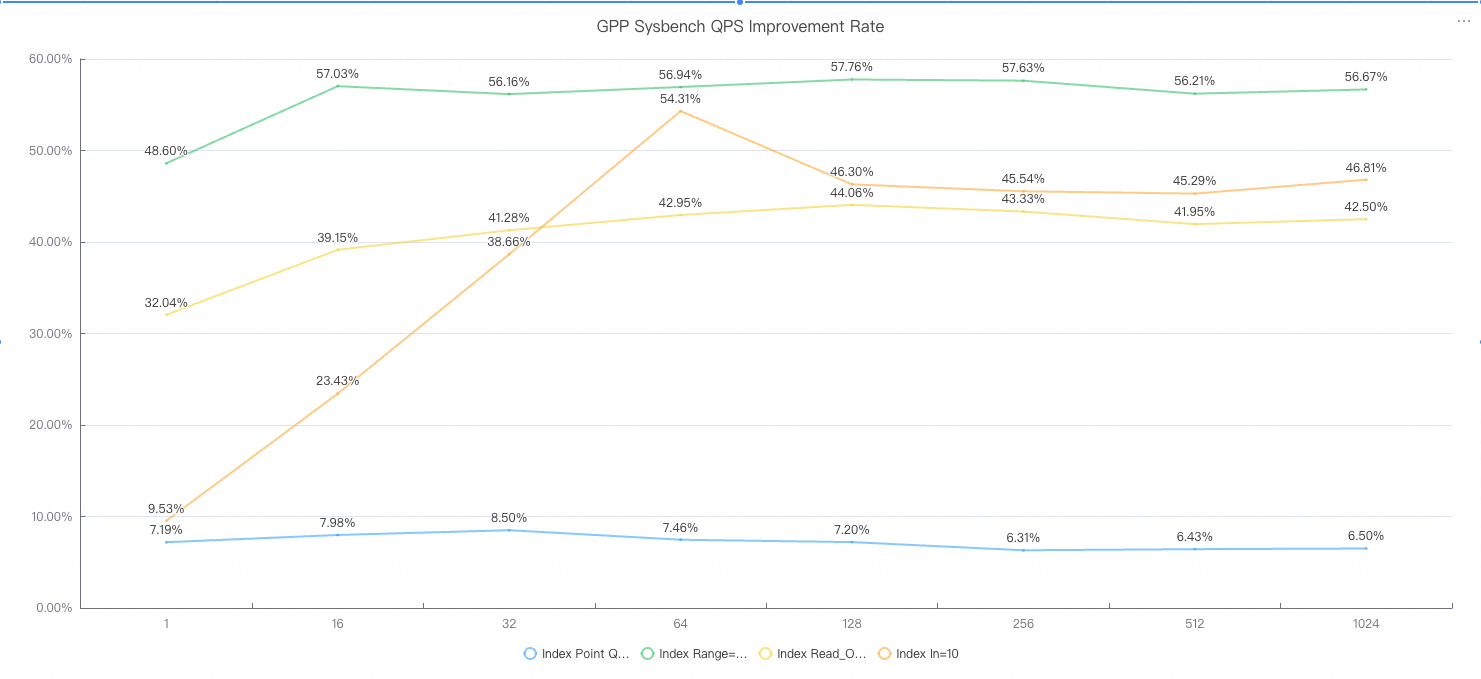
Standard benchmark tools such as Sysbench query by primary key in read-only workloads (for example, the oltp_read_only script), which bypasses secondary index lookups entirely. To measure GPP's actual impact, the following tests were run with queries targeting a secondary index key (k) instead of the primary key (id).
The chart below shows the QPS (Queries Per Second) improvement rate for a PolarDB-X instance with GPP enabled compared to one without.