Schema changes in PolarDB-X go through a distributed execution pipeline that differs from standard MySQL. Understanding the two execution modes — and knowing how to observe, tune, and manage them — lets you plan DDL operations with confidence and minimize impact on running workloads.
How it works
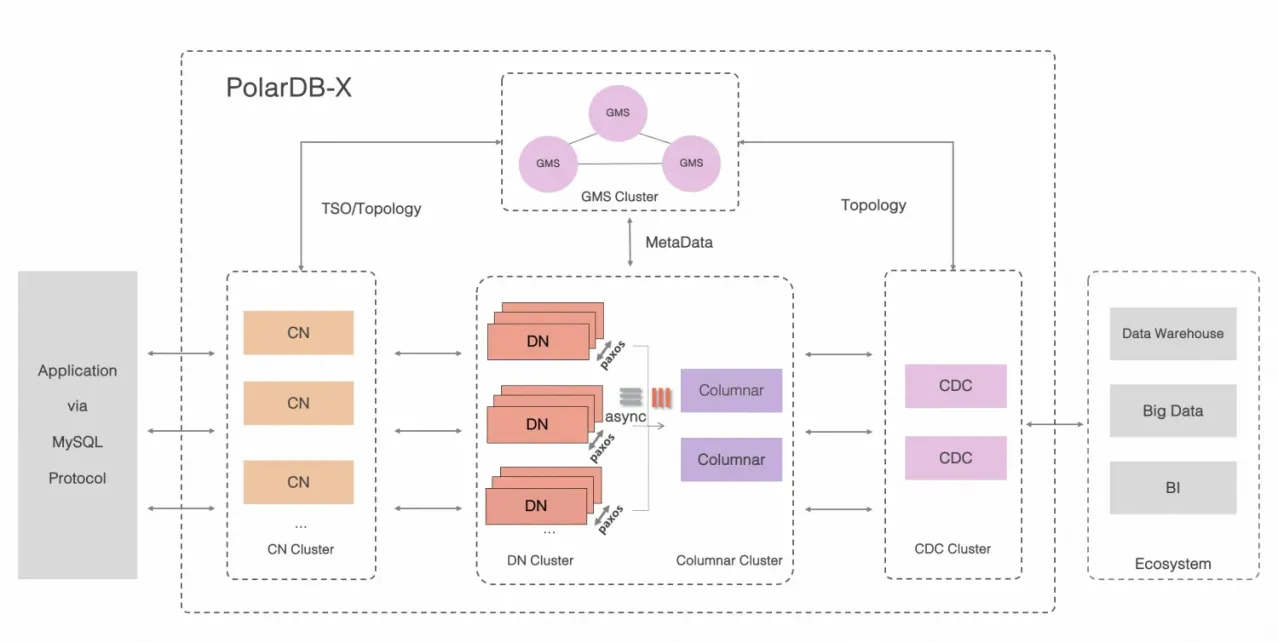
PolarDB-X has three types of nodes, each with a distinct role in DDL execution:
Global Meta Service (GMS) nodes store metadata such as table definitions, schemas, and statistics.
Compute nodes (CNs) coordinate distributed DDL execution and maintain global indexes.
Data nodes (DNs) hold the physical data and execute the DDL statements pushed down to them, such as
ALTER TABLE.
When you submit a DDL statement, it goes to a CN first. The CN converts it into one or more physical DDL statements and sends them to the relevant DNs. Throughout this guide, the statement you submit is called a user DDL statement, and what DNs actually execute is called a physical DDL statement.
DDL execution modes
PolarDB-X executes DDL statements in one of two modes: physical execution or logical execution. The mode determines whether the table is locked, how long the operation takes, and what happens to concurrent DML.
| Physical execution | Logical execution | |
|---|---|---|
| Executed by | DNs (pushed down from CN) | CN via Online Schema Change (OSC) |
| Table locking | Depends on the execution algorithm | Not required |
| Atomicity | Guaranteed across all shards | Guaranteed |
| Examples | CREATE TABLE, DROP TABLE, CREATE LOCAL INDEX, ALTER TABLE | CREATE GLOBAL INDEX, DROP GLOBAL INDEX, ONLINE MODIFY COLUMN, ADD PRIMARY KEY, partition changes |
Physical execution
In physically executed DDL, the CN converts your statement into physical DDL statements and pushes them to the corresponding DNs. Because a logical table maps to multiple physical tables (shards) distributed across DNs, the CN tracks completion status on each shard. Only after all shards complete does the CN apply the final metadata change, which guarantees atomicity. For details, see DDL atomicity.
Execution algorithms
DNs use one of three algorithms to execute physical DDL statements. The algorithm controls whether the table is locked and how long the operation takes.
| Algorithm | What it does | Table locked |
|---|---|---|
| INSTANT | Modifies only the data dictionary. No data is copied or tables recreated. Completes in seconds. | No |
| INPLACE | Copies data and recreates the table within the storage engine. Concurrent reads and writes are generally allowed, which minimizes the impact on your business. | Generally no |
| COPY | Copies all data to a new table. All writes are blocked during the copy, which has a significant impact on your business. | Yes (writes blocked) |
The algorithm used depends on the specific DDL statement and the storage engine. For the full compatibility matrix, see Online DDL.
Logical execution
Logically executed DDL uses the OSC capability built into CNs. The process follows these steps:
Create a temporary table with the target schema.
Copy historical data from the source table to the temporary table.
Sync incremental data written during the copy.
Switch metadata to the new table.
No table lock is held throughout this process, so concurrent DML is not blocked — at the cost of longer execution time. Atomicity is ensured, which prevents the situation in which execution succeeds on some shards but fails on others. Some statements, such as RENAME TABLE and RENAME GLOBAL INDEX, skip the data copy entirely and complete by modifying and syncing metadata directly.
Check the execution mode of a DDL statement
Run EXPLAIN before executing a DDL statement to see which mode it will use:
If the output resembles the original DDL statement, the statement is physically executed.
If the output includes a
CREATE TABLEstatement, the statement is logically executed.
Example: physically executed DDL
Create a table t1 with the following schema:
+-------+--------------------------------------------------------------------------+
| Table | Create Table                                                             |
+-------+--------------------------------------------------------------------------+
| t1    | CREATE TABLE `t1` (
        `a` int(11) DEFAULT NULL,
        `b` int(11) DEFAULT NULL
) ENGINE = InnoDB DEFAULT CHARSET = utf8mb4                                        |
+-------+--------------------------------------------------------------------------+
Run EXPLAIN on an ALTER TABLE that adds a local index:
explain alter table t1 add local index idx(b);
+----------------------------------------------------------------------------------+
| EXECUTION PLAN                                                                   |
+----------------------------------------------------------------------------------+
| ALTER_TABLE( tables="t1", shardCount=16, sql="ALTER TABLE ? ADD INDEX idx (b)" ) |
| EXCLUDE_RESOURCE( wumu.t1, wumu.tg17 )                                           |
| SHARE_RESOURCE( wumu.t1, wumu.tg17 )                                             |
+----------------------------------------------------------------------------------+
The output mirrors the ALTER TABLE structure — this DDL is physically executed.
Example: logically executed DDL
Run EXPLAIN on an ALTER TABLE that changes the partitioning algorithm:
explain alter table t1 partition by key(a);
+----------------------------------------------------------------------------------+
| EXECUTION PLAN                                                                   |
+----------------------------------------------------------------------------------+
| CREATE_TABLE( tables="t1_msfg", shardCount=16, sql="CREATE TABLE ? (
  `a` int(11) DEFAULT NULL,
  `b` int(11) DEFAULT NULL,
  `_drds_implicit_id_` bigint(20) NOT NULL AUTO_INCREMENT,
  PRIMARY KEY (`_drds_implicit_id_`),
  INDEX `auto_shard_key_a` USING BTREE(`a`)
) ENGINE = InnoDB DEFAULT CHARSET = utf8mb4" )                                      |
| DROP_TABLE( tables="t1_msfg", shardCount=16, sql="DROP TABLE IF EXISTS ?" )       |
| EXCLUDE_RESOURCE( wumu.t1, wumu.t1_msfg, wumu.tg17 )                              |
| SHARE_RESOURCE( wumu.t1, wumu.t1_msfg, wumu.tg17 )                                |
+-----------------------------------------------------------------------------------+
The output includes a CREATE TABLE operation — this DDL is logically executed.
Speed up logical DDL with DOP tuning
Logically executed DDL statements require copying historical data, which drives their execution time. If your CNs and DNs have available CPU and I/O headroom, increase the degree of parallelism (DOP) and the backfill rate limit to speed up execution.
For example, when creating a global secondary index (GSI), PolarDB-X backfills data from the primary table into the GSI table. The following parameters control this behavior:
| Parameter | Default | Unit | When to adjust |
|---|---|---|---|
BACKFILL_PARALLELISM | 32 | — | Global DOP for backfilling. The default suits most cases. |
PHYSICAL_TABLE_BACKFILL_PARALLELISM | 4 | — | DOP per physical shard. Increase when backfilling large tables. |
GSI_BACKFILL_SPEED_LIMITATION | 150,000 | rows/s | Rate limit for backfilling. Increase when there is no other workload on the cluster. |
To increase DDL throughput when CNs and DNs have no CPU or I/O bottlenecks:
-- Increase shard-level DOP for large tables
set global PHYSICAL_TABLE_BACKFILL_PARALLELISM = 8;

-- Increase the backfill rate limit
set global GSI_BACKFILL_SPEED_LIMITATION = 250000;

-- Global DOP (the default of 32 is sufficient in most cases)
set global BACKFILL_PARALLELISM = 32;
For additional parameters that account for table topology and data size, see Parallel DDL.
Run DDL asynchronously
By default, PolarDB-X executes DDL statements synchronously, consistent with MySQL behavior. If the client connection drops during execution, the statement may be suspended.
For DDL statements expected to run for a long time, submit them asynchronously using the PURE_ASYNC_DDL_MODE hint:
/*+TDDL:cmd_extra(PURE_ASYNC_DDL_MODE=true)*/ alter table t1 add global index gsi_a(a) partition by key(a);What's next
DDL atomicity — how PolarDB-X guarantees all-or-nothing execution across shards
Online DDL — which algorithms are supported for each DDL statement type
Parallel DDL — full parameter reference for tuning DDL performance