This topic describes how to perform a one-click migration from an RDS MySQL Enterprise Edition instance to a PolarDB-X 2.0 Standard Edition instance.
Pre-migration checks
Check for the PolarDB-X 2.0 service-linked role
Verify that the service-linked role for PolarDB-X is created:
Go to the PolarDB-X Resource Authorization page.
Click Activate Authorization to open the Authorization page.
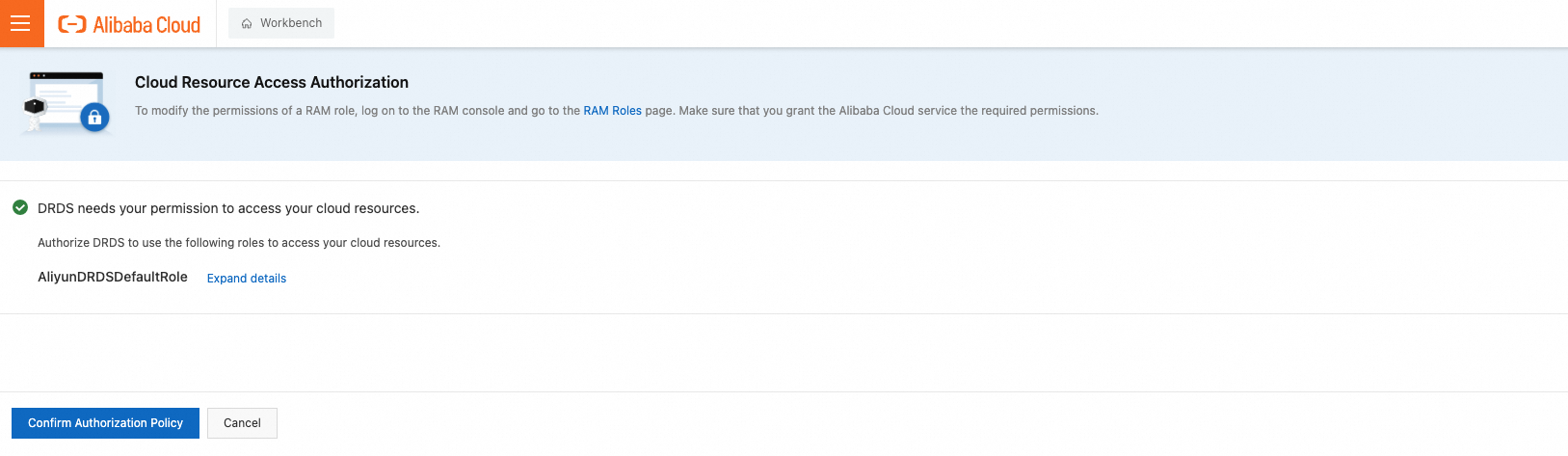
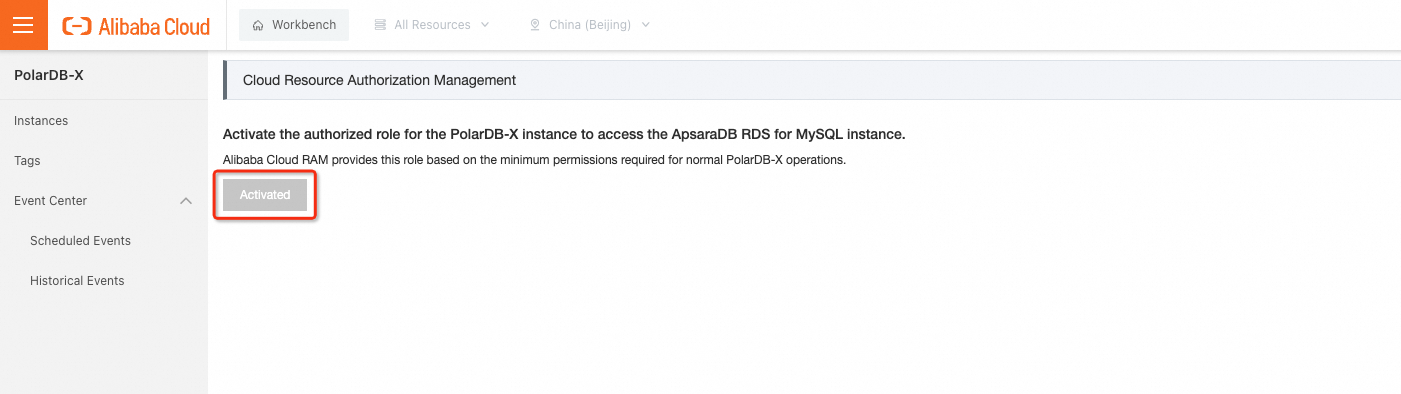
Click Agree to Authorization. You are returned to the PolarDB-X Resource Authorization page. The status changes to Activated, indicating that the permission is granted.
Has DTS been granted permission to access cloud resources?
Verify that you have granted DTS permission to access cloud resources. For more information, see View authorization results.
Delete redundant system accounts from the source RDS instance
To prevent the system accounts of the PolarDB-X 2.0 Standard Edition instance from being overwritten after migration, delete redundant root or aliyun_root accounts from the source RDS MySQL Enterprise Edition instance. Ensure that only the correct system account remains.
The correct system account names for different versions are listed below:
Database engine | Correct system account name |
MySQL 5.6 | root |
MySQL 5.7 | aliyun_root |
MySQL 8.0 | aliyun_root |
For each version, you must delete all system accounts except for the one associated with it.
These accounts may be created by users or left over from system upgrades. In some cases, they do not appear in the console.
The following example shows how to delete redundant system accounts from an RDS MySQL 5.6 Enterprise Edition instance:
Connect to the instance using a privileged account.
Find all root and aliyun_root system accounts.
SELECT * FROM mysql.user WHERE user IN ('root', 'aliyun_root');Delete the redundant system accounts. For an RDS MySQL 5.6 Enterprise Edition instance, the correct system account is root. Therefore, delete the aliyun_root account.
DELETE FROM mysql.user WHERE user = 'aliyun_root';Step 1: Data synchronization
This operation creates a PolarDB-X 2.0 Standard Edition instance that has the same data as the source RDS MySQL Enterprise Edition instance. Incremental data from the source RDS MySQL Enterprise Edition instance is synchronized to the new PolarDB-X 2.0 Standard Edition instance in real time.
Log on to the PolarDB-X console.
On the Instances page, click the PolarDB-X 2.0 tab.
In the upper-right corner of the page, click Create Instance.
On the PolarDB-X 2.0 Standard Edition instance purchase page, set the following parameters.
NoteFor parameters not described in the following table, see Purchase page parameter settings.
Parameter
Description
Region
Select the region where the source RDS MySQL Enterprise Edition instance is located.
NoteThe new PolarDB-X 2.0 Standard Edition instance is also created in this region.
Creation Method
Select Migrate from RDS.
Source RDS Version
The version of the source RDS MySQL Enterprise Edition instance. You can select MySQL 5.6, MySQL 5.7, or MySQL 8.0.
Source RDS Instance
Select the source RDS MySQL Enterprise Edition instance. Read-only instances are not included.
Node Specifications
Select specifications as needed. The specifications should be the same as or higher than the source RDS MySQL Enterprise Edition instance. For more information about the node specifications for PolarDB-X 2.0 Standard Edition instances, see Node specifications.
On the Confirm Order page, confirm the order information, read and select the Terms of Service, and then click Go to Pay.
On the Payment page, confirm the order information and payment method, and then click Purchase.
After the payment is complete, you can return to the PolarDB-X console. The new instance appears in the Instance List.
NoteMake sure that you have selected the correct region. Otherwise, the instance that you created will not be visible.
An instance is unavailable while its node status is Creating. The instance is ready for use when its status changes to Running.
Before the final Migration Switchover, the PolarDB-X 2.0 Standard Edition instance is read-only with binary logging enabled by default.
Click the instance ID to go to the Basic Information page. On the Basic Information page, locate the RDS Migration section and check the Replication Delay of the destination PolarDB-X 2.0 Standard Edition instance. If the replication delay is less than 60 seconds, you can proceed to Step 2: Switch over.
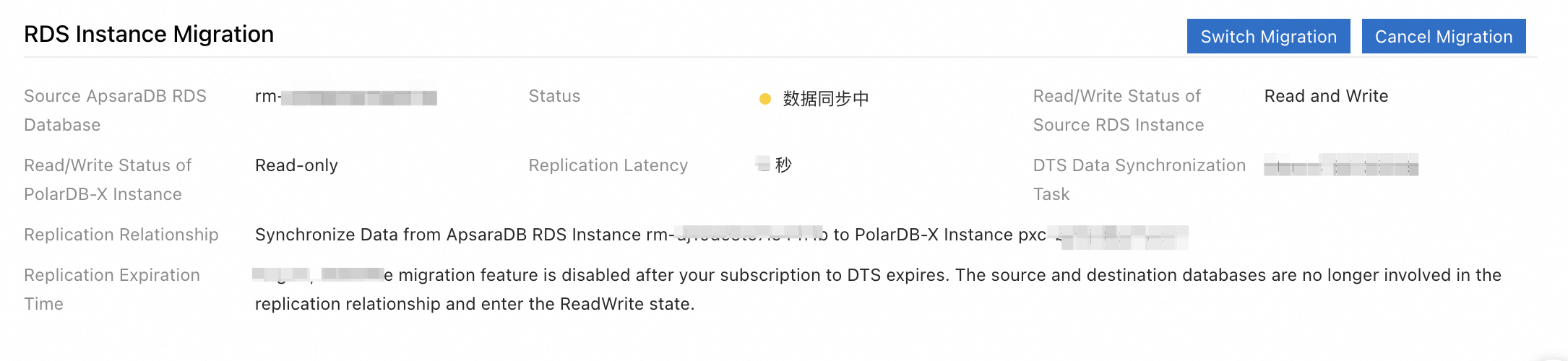
After the instance is created, data synchronization from the RDS MySQL Enterprise Edition instance begins. You must complete Step 2: Switch over and Step 3: Complete the migration within 30 days. Otherwise, the RDS Migration feature is automatically disabled. If the 30-day period expires, the data synchronization link between the RDS MySQL Enterprise Edition instance and the PolarDB-X 2.0 Standard Edition instance breaks. The two instances then become independent. You cannot continue with the remaining migration steps on the existing PolarDB-X 2.0 Standard Edition instance. To proceed, you must repeat Step 1: Data synchronization.
After the PolarDB-X 2.0 Standard Edition instance is created, if the migration status of the RDS MySQL Enterprise Edition instance changes to Precheck failed, resolve the issue based on the Error Message.
Step 2: Switch over
When the Replication Delay of the destination PolarDB-X 2.0 Standard Edition instance is less than 60 seconds, you can perform the Switch Over.
Log on to the PolarDB-X console.
In the top navigation bar, select the region where the instance is deployed.
On the Instances page, click the PolarDB-X 2.0 tab.
Find the instance and click Instance ID to go to the instance details page.
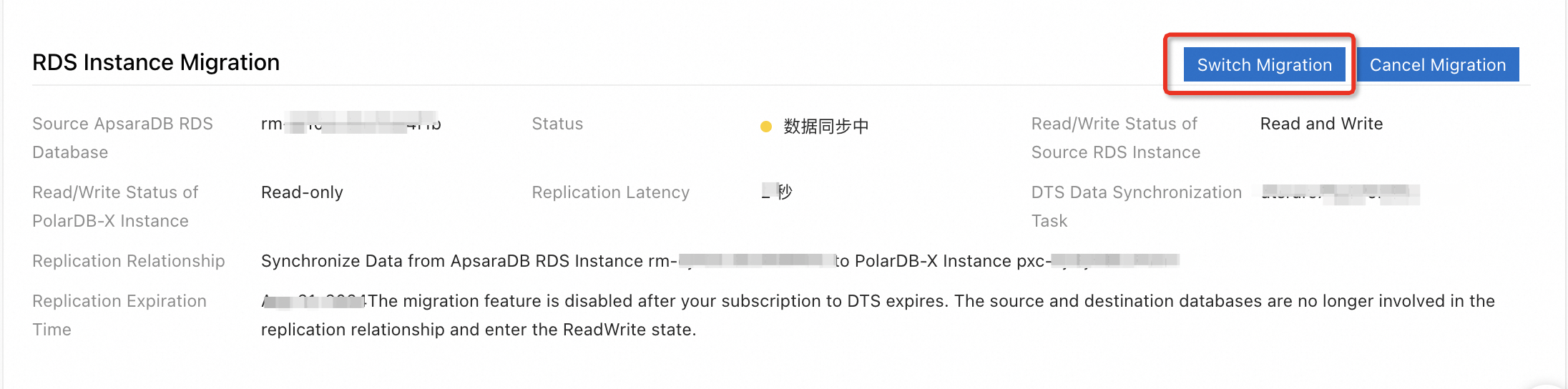
In the RDS Migration section on the Basic Information page, click Switch Over.
 Note
NoteThe Switch Over operation typically takes less than 5 minutes.
The Switch Over operation triggers the following actions:
Swaps the read/write status of the source RDS MySQL Enterprise Edition instance and the destination PolarDB-X 2.0 Standard Edition instance. The source RDS MySQL Enterprise Edition instance is set to read-only, and the PolarDB-X 2.0 Standard Edition instance is set to read/write. This method prevents data inconsistency and write conflicts during the endpoint switch.
This operation reverses the data replication direction by inverting the replication relationship between the source RDS MySQL Enterprise Edition instance and the PolarDB-X 2.0 Standard Edition instance. Data is then synchronized from the PolarDB-X 2.0 Standard Edition instance to the source RDS MySQL Enterprise Edition instance to ensure data consistency after the switchover.
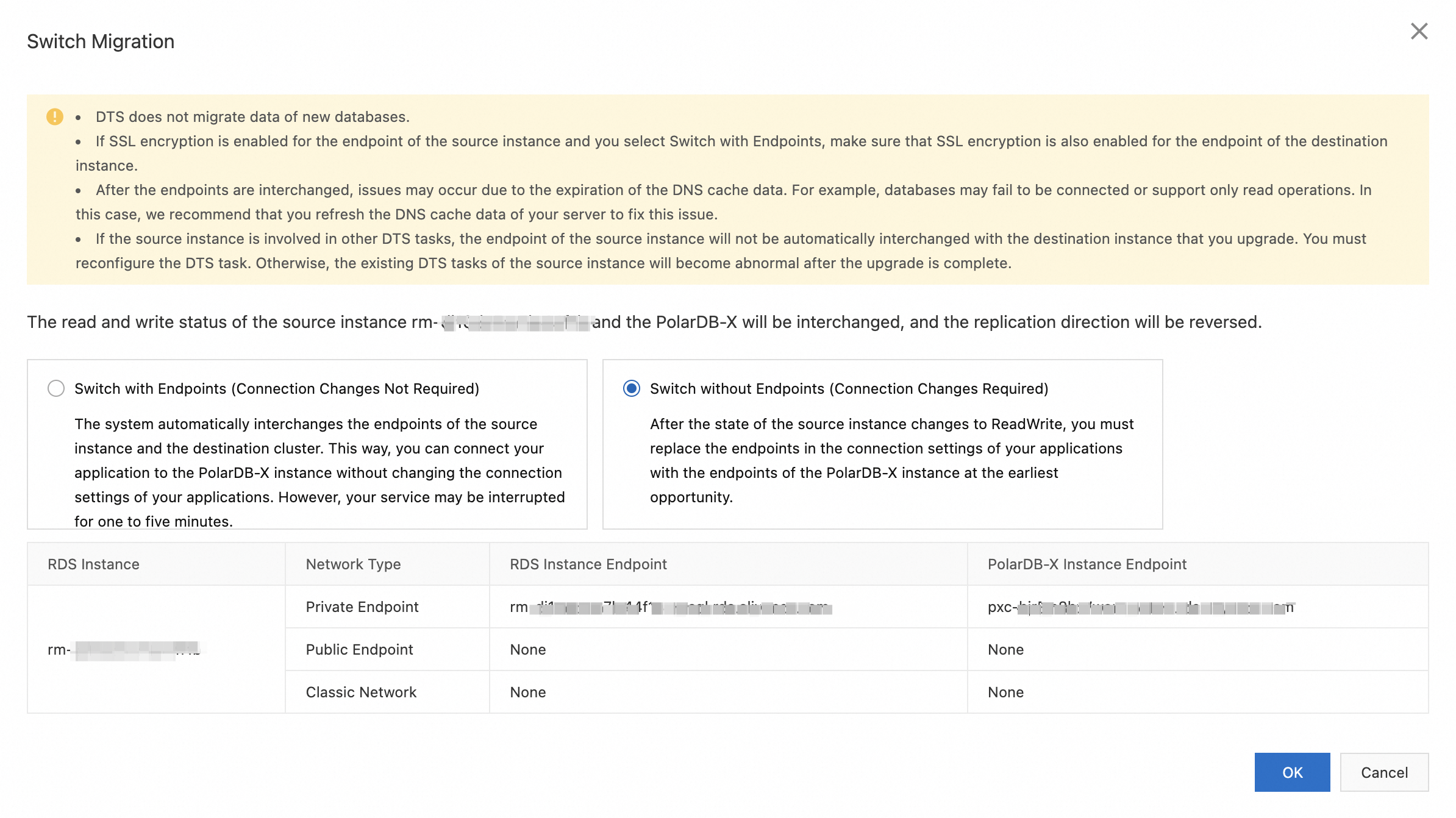
In the Switch Over dialog box, you can select Switch with Endpoint Switch (No application configuration changes required) or Switch without Endpoint Switch (Application must be reconfigured to use the new PolarDB-X endpoint).
Endpoint Switch (No application configuration changes required): The system automatically swaps the endpoints of the RDS MySQL Enterprise Edition instance and the PolarDB-X 2.0 Standard Edition instance. You do not need to modify your application configuration to connect to the PolarDB-X 2.0 Standard Edition instance.
ImportantBefore you use Switch with Endpoint Switch (No application configuration changes required), read Switch with endpoint switch.
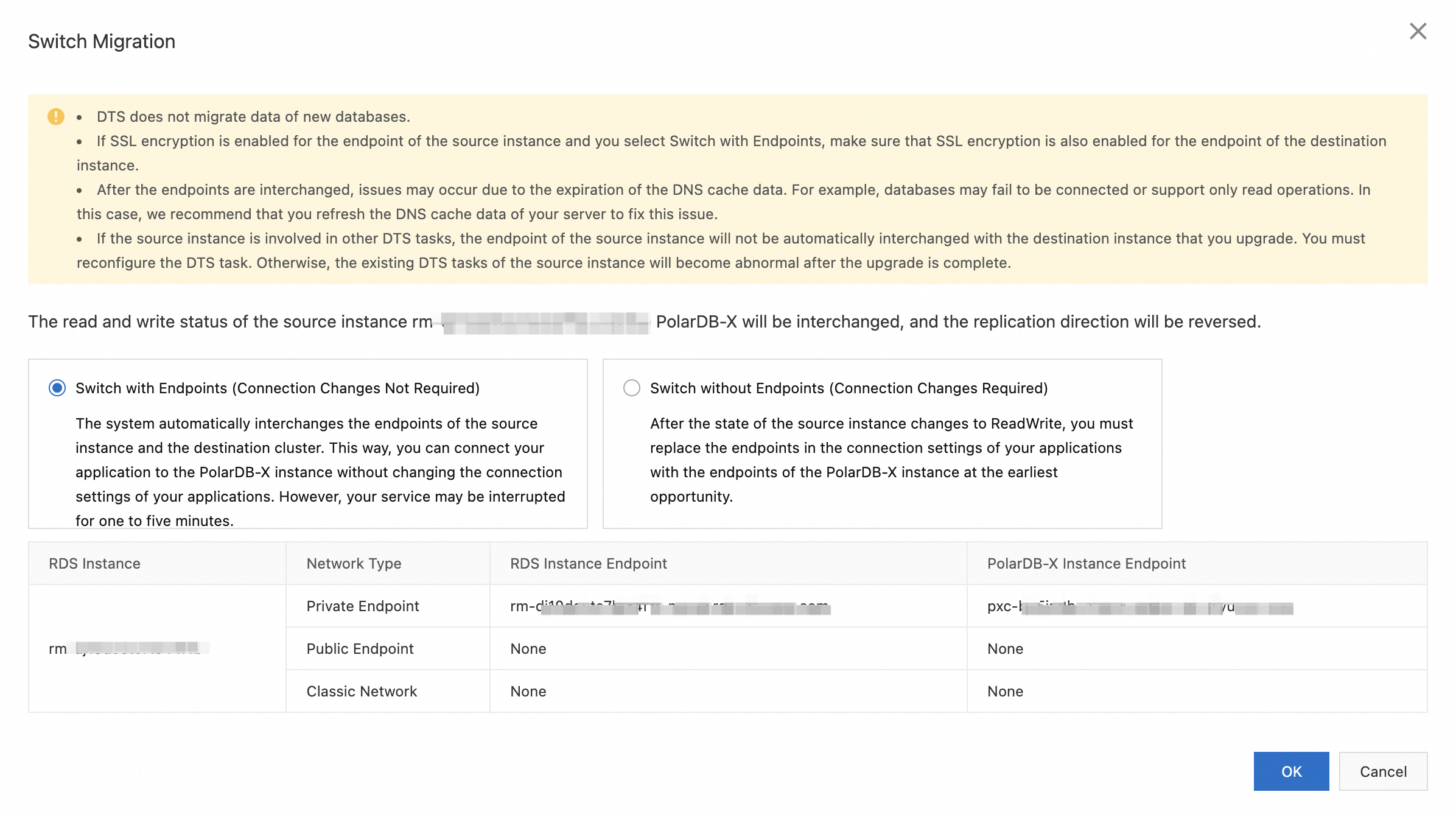
Switch without Endpoint Switch: You must reconfigure your application to use the new endpoint for the PolarDB-X 2.0 Standard Edition instance.
ImportantAfter the Switch Over is complete, immediately update the database endpoint in your application to prevent a prolonged connection interruption.
Click OK. The Status changes to Switching.
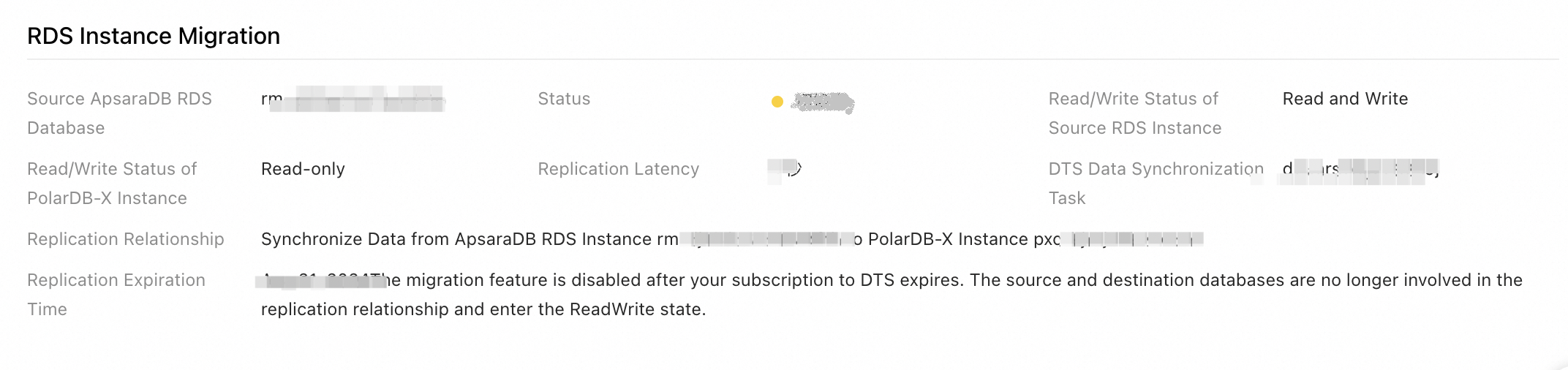
Wait for the Switch Over to complete.
NoteIf you selected Switch without Endpoint Switch (Application must be reconfigured to use the new PolarDB-X endpoint), once the Read/Write Status of the PolarDB-X 2.0 Standard Edition instance changes to Read/Write, immediately update the database endpoint in your application to the endpoint of the PolarDB-X 2.0 Standard Edition instance.
After the Switch Over is complete, if you find issues such as data anomalies, you can perform a migration rollback to quickly restore the pre-migration state.
Step 3: Complete the migration
Before you complete the migration, ensure that data synchronization is complete and that the task is no longer needed. After you complete the migration, the system deletes the data synchronization task.
This operation removes the data synchronization link between the PolarDB-X 2.0 Standard Edition instance and the RDS MySQL Enterprise Edition instance. The Roll back migration (Optional) option will no longer be available. We recommend that you use the PolarDB-X 2.0 Standard Edition instance for a period of time to confirm that it works as expected before you perform this operation.
Log on to the PolarDB-X console.
In the top navigation bar, select the region where the instance is deployed.
On the Instances page, click the PolarDB-X 2.0 tab.
Find the instance and click Instance ID to go to the instance details page.
In the RDS Migration section on the Basic Information page, click Complete Migration. In the dialog box that appears, click OK.
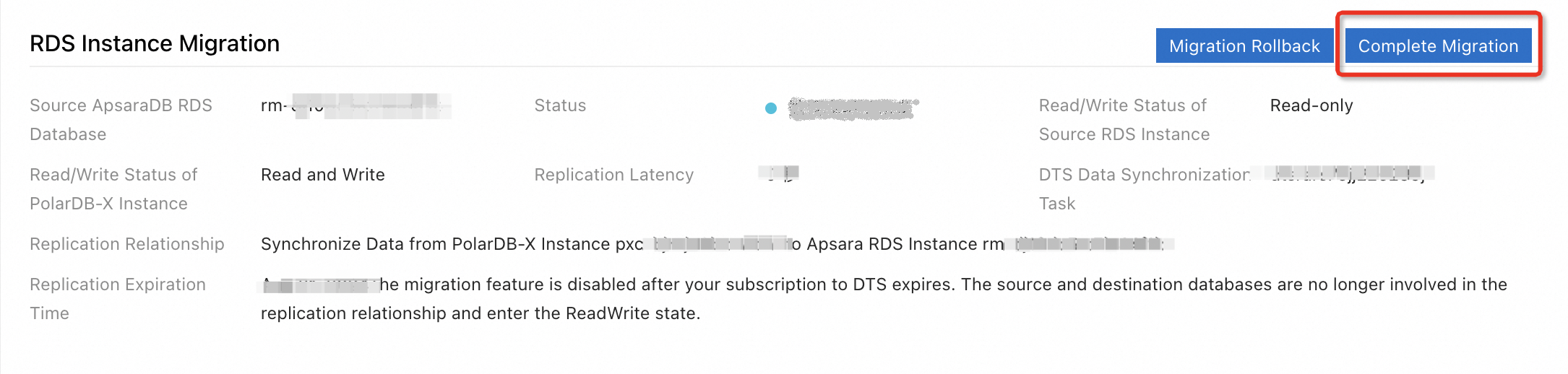 Note
NoteAfter you click OK, the system takes about 2 minutes to break the synchronization. During this time, the migration status is Closing Sync. Wait for the migration to complete.
After you complete the migration, we recommend that you keep the source RDS MySQL Enterprise Edition instance for one to two weeks. Monitor the PolarDB-X 2.0 Standard Edition instance for compatibility, stability, and data correctness. After you confirm that the instance is stable, you can release the source instance.
View data synchronization task details (Optional)
During the one-click migration, if you encounter migration errors, such as a precheck failure, or other issues, such as an unusually high replication delay, you can view the details of the corresponding DTS data synchronization task for more information.
Log on to the PolarDB-X console.
In the top navigation bar, select the region where the instance is deployed.
On the Instances page, click the PolarDB-X 2.0 tab.
Find the instance and click Instance ID to go to the instance details page.
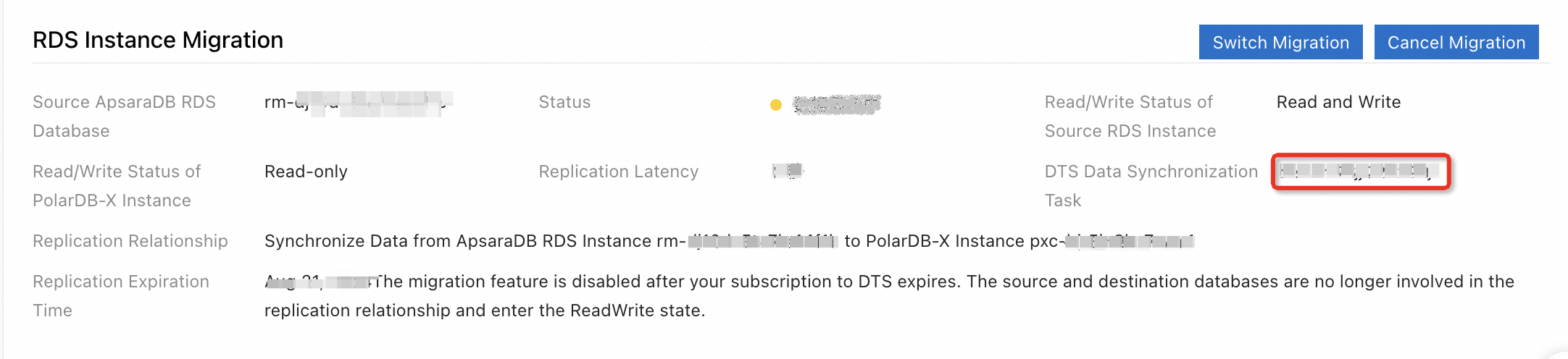
In the RDS Migration section on the Basic Information page, click the name of the DTS data sync task to navigate to the data synchronization list in the DTS console.
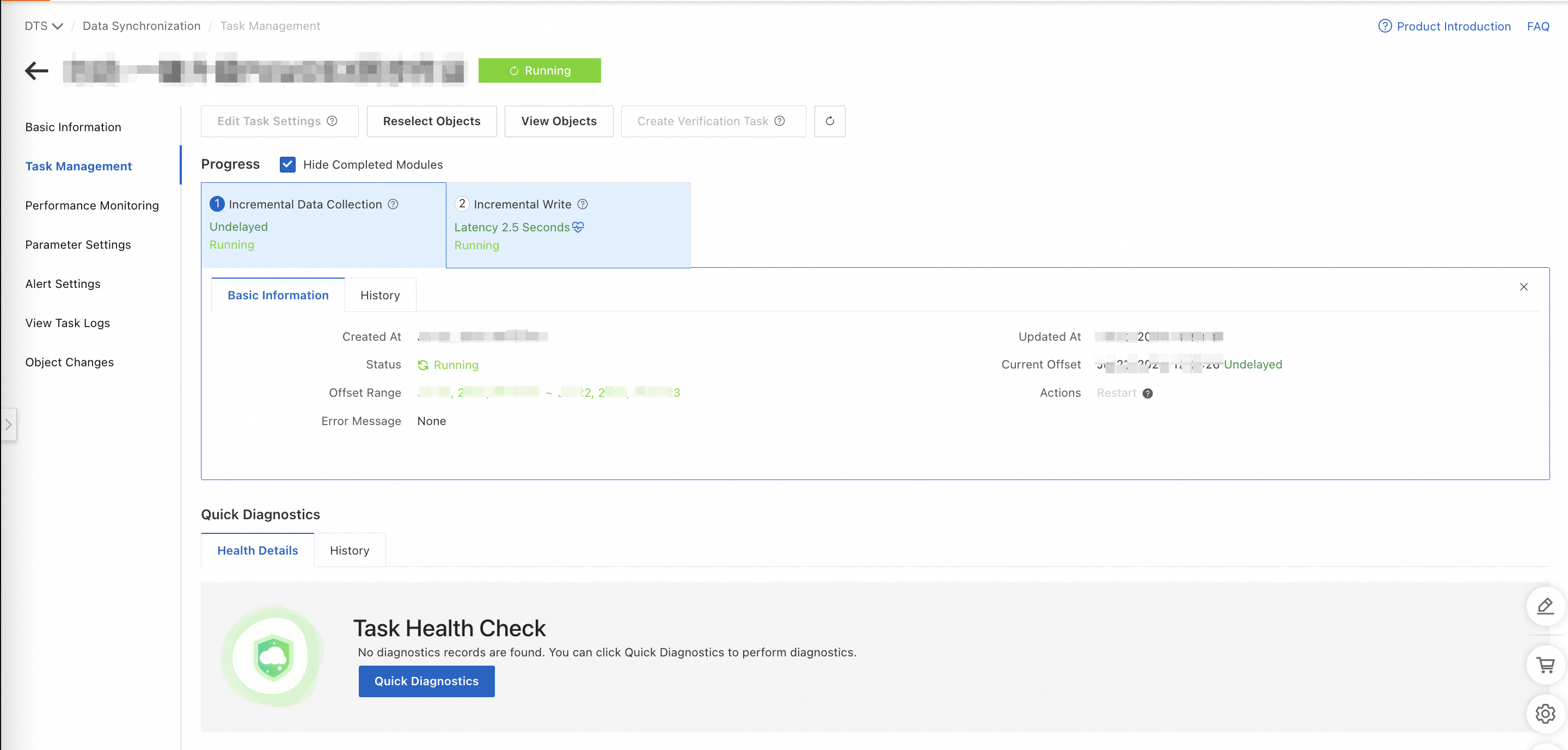
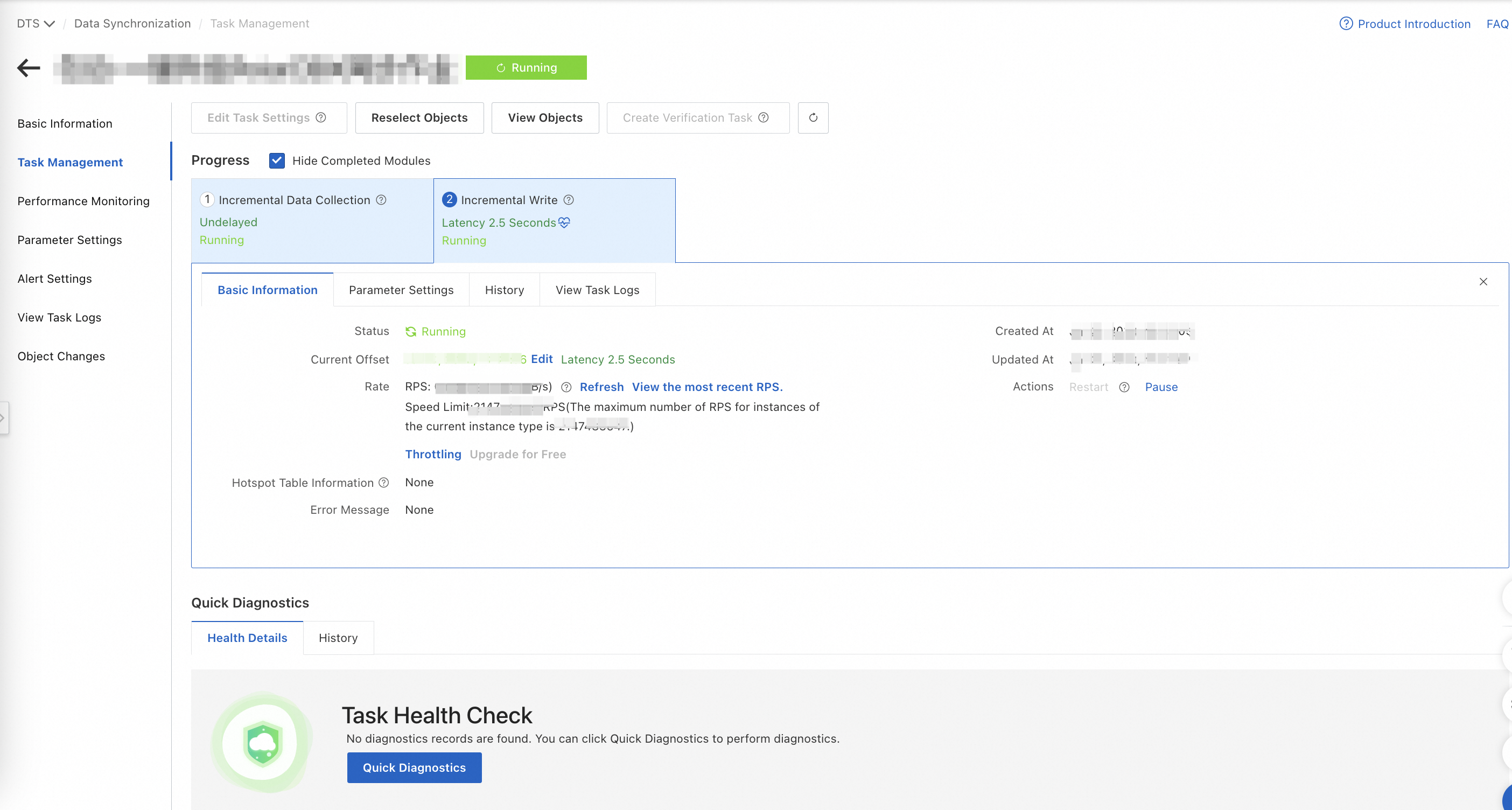
Find the corresponding data synchronization task. You can view precheck failure details, sync task details, and task logs.
Roll back the migration (Optional)
If you find issues such as data anomalies before you complete the migration, you can perform a rollback. A rollback quickly restores the system to its state before the migration. The RDS MySQL Enterprise Edition instance becomes read/write, and the PolarDB-X 2.0 Standard Edition instance becomes read-only. Data is automatically synchronized from the RDS MySQL Enterprise Edition instance to the PolarDB-X 2.0 Standard Edition instance.
Log on to the PolarDB-X console.
In the top navigation bar, select the region where the instance is deployed.
On the Instances page, click the PolarDB-X 2.0 tab.
Find the instance and click Instance ID to go to the instance details page.
In the RDS Migration section on the Basic Information page, click Roll Back Migration.
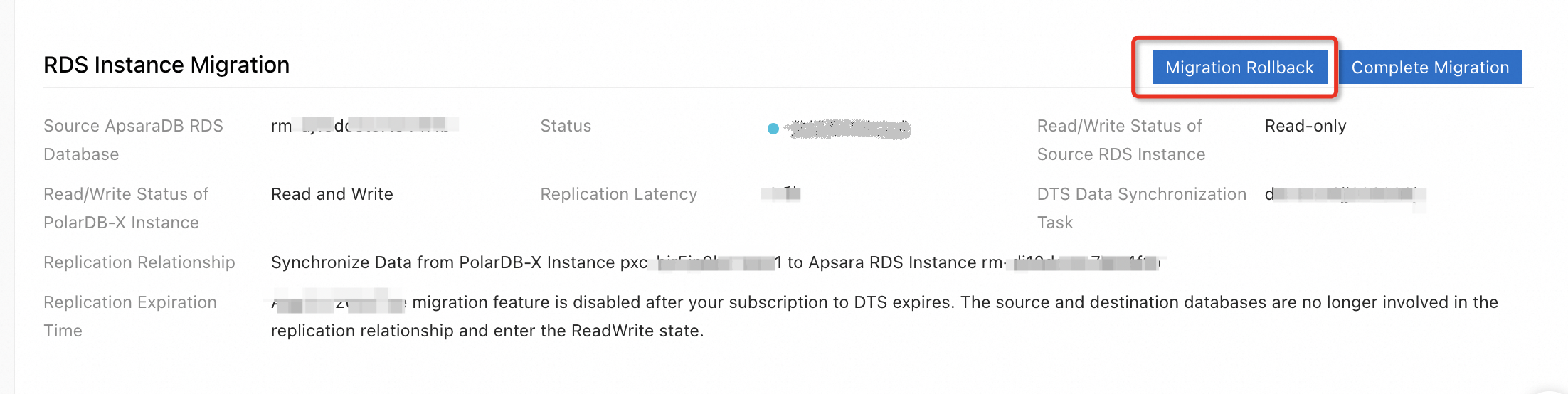
In the Start Failback dialog box, select Failback with Endpoint Switch (No application configuration changes required) or Failback without Endpoint Switch (Application must be reconfigured to use the source instance endpoint).
Failback with Endpoint Switch (No application configuration changes required): The system automatically swaps the endpoints of the RDS MySQL Enterprise Edition instance and the PolarDB-X 2.0 Standard Edition instance. You do not need to modify any configurations in your application to automatically fail back to the RDS MySQL Enterprise Edition instance.
Failback without Endpoint Switch (Application must be reconfigured to use the source instance endpoint): You must modify the configuration in your application to connect to the RDS MySQL Enterprise Edition instance.
Click OK. The RDS MySQL Enterprise Edition instance is set to read/write, and the PolarDB-X 2.0 Standard Edition instance is set to read-only. Data is then synchronized from the RDS MySQL Enterprise Edition instance to the PolarDB-X 2.0 Standard Edition instance.
Wait for the migration rollback to complete.
NoteIf you selected Failback without Endpoint Switch (Application must be reconfigured to use the source instance endpoint), change the database endpoint in your application to the endpoint of the RDS MySQL Enterprise Edition instance as soon as the Read/Write Status of the source RDS MySQL Enterprise Edition instance changes to Read/Write.