Computes a viewshed for a given viewpoint within an OSG scene object and returns the visible geometry as a meshgeom value.
Syntax
meshgeom ST_ComputeViewShed(scene sc, cstring viewpoint);Parameters
| Parameter | Description |
|---|---|
sc | The scene object. Must be of the osg type. |
viewpoint | The viewpoint configuration in JSON format. See the field reference below. |
Viewpoint JSON fields
A viewpoint is defined by four groups of properties: position (x, y, z, h), orientation (azimuth, pitch), distance (distance), and field of view (horizontalFov, verticalFov, depthMapSize).
{
  "x": 0,
  "y": 0,
  "z": 0,
  "h": 0,
  "azimuth": 0,
  "pitch": 0,
  "distance": 100,
  "horizontalFov": 90,
  "verticalFov": 60,
  "depthMapSize": 128
}| Field | Description | Default | Valid values |
|---|---|---|---|
x | X-coordinate of the viewpoint. | 0 | (-inf, +inf) |
y | Y-coordinate of the viewpoint. | 0 | (-inf, +inf) |
z | Z-coordinate of the viewpoint. | 0 | (-inf, +inf) |
h | Height of the viewpoint. | 0 | [0, +inf) |
azimuth | Horizontal rotation in degrees, measured clockwise from north (the positive y-axis). A value of 0 points the view toward north; 90 points it east. | 0 | [-180, 180] |
pitch | Vertical tilt in degrees relative to the XOY plane. Positive values tilt the view upward; negative values tilt it downward. | 0 | [-90, 90] |
distance | Maximum viewing distance. Larger values produce a wider view frustum. | 100 | (0, +inf) |
horizontalFov | Horizontal field of view (FOV) in degrees. Values closer to 0 narrow the horizontal scope; values closer to 180 widen it. | 90 | (0, 180) |
verticalFov | Vertical FOV in degrees. | 60 | (0, 180) |
depthMapSize | Resolution of the depth map. Larger values produce a finer view frustum. | 128 | (0, 2048] |
How it works
ST_ComputeViewShed first computes a view frustum for the given viewpoint—the pyramid-shaped volume visible from the viewpoint—and then retains only the geometry within that frustum that is not occluded by other surfaces. The result is the visible geometry, known as the viewshed.
The function returns a meshgeom value representing the visible surface patches. Use functions such as ST_NumPatches to query the number of patches, or pass the result to other Ganos 3D functions for further spatial analysis.
For details on the view frustum calculation, see ST_ComputeFrustum.
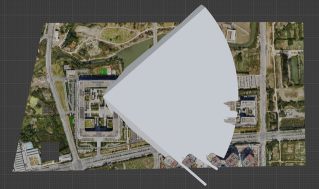
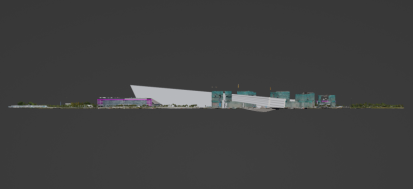
The following figures illustrate the view frustum shape from two perspectives.
View frustum (top view)
View frustum (side view)
Usage notes
Supported scene type: This function supports only scene objects of the osg type.
Performance tradeoffs: Two parameters directly affect computation time:
distance— Set this to the maximum distance relevant to your analysis. Unnecessarily large values increase the size of the view frustum and slow down computation.depthMapSize— Larger values produce finer results but require more processing. For exploratory queries, start with a smaller value (such as 64 or 128) and increase it only when you need higher precision.
Example
The following example computes the viewshed for a viewpoint at coordinates (2938, 750, 90) with a 1.8-unit observer height, looking east (azimuth 90°) at a downward pitch of 35°, with a 90°×60° field of view and a maximum distance of 600 units. It then counts the number of visible patches.
SELECT ST_NumPatches(
  ST_ComputeViewShed(
    scene,
    '{"x": 2938, "y": 750, "z": 90, "h": 1.8, "azimuth": 90, "pitch": -35,
      "horizontalFov": 90, "verticalFov": 60, "distance": 600, "depthMapSize": 128}'
  )
)
FROM t;
Output:
 st_numpatches
---------------
         32766
What's next
ST_ComputeFrustum — Compute the full view frustum geometry without viewshed filtering