Returns pixel values for all bands at a specific location in a raster object.
Syntax
SETOF record ST_PointValues(raster raster_obj, integer column_sn, integer row_sn, boolean exclude_nodata DEFAULT true, OUT integer* band, OUT float8 value)

SETOF record ST_PointValues(raster raster_obj, float8 x, float8 y, boolean exclude_nodata DEFAULT true, text options DEFAULT '{}', OUT integer band, OUT float8 value)
The first overload locates a pixel by its column and row index. The second overload locates a pixel by longitude and latitude, with optional resampling.
Parameters
| Parameter | Description |
|---|---|
raster_obj | The raster object. |
column_sn | The column index of the target pixel, starting from the upper-left corner. |
row_sn | The row index of the target pixel, starting from the upper-left corner. |
x | The longitude of the target pixel. |
y | The latitude of the target pixel. |
exclude_nodata | Specifies whether to exclude NoData values. If set to true, pixels with NoData values are not returned. Default value: true. |
options | The resampling method, specified as a JSON string. See the resample sub-parameter below. Default value: '{}'. |
band | Output parameter. The band number of the pixel. |
value | Output parameter. The pixel value. |
options sub-parameter: resample
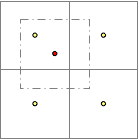
When resample is configured, the four neighboring pixels are used in the calculation.
| Value | Description |
|---|---|
none | No resampling. |
idw | Inverse distance weighting (IDW) resampling. |
mean | Mean value resampling. |
max | Maximum value resampling. |
min | Minimum value resampling. |
Example: '{"resample": "idw"}'
Return values
| Field | Type | Description |
|---|---|---|
band | integer | The band number. |
value | float8 | The pixel value for the band. |
Description
ST_PointValues returns the pixel values of all bands at a given location. Specify the location either by pixel coordinates (column_sn, row_sn) or by geographic coordinates (x for longitude, y for latitude).
When you specify the resample option, the function uses the four neighboring pixels to compute the returned value:
Examples
Query by geographic coordinates
The following examples query pixel values from the raster stored in t_pixel where id = 3, using longitude/latitude coordinates.
Query with NoData exclusion disabled (`exclude_nodata = false`):
SELECT * FROM
    (SELECT (st_pointValues(rast, 125.84382034243441, 47.67709555783107, false)).*
     FROM t_pixel WHERE id = 3) a
ORDER BY band;
Result:
 band | value
------+-------
    0 |    66
    1 |    87
    2 |    28
Query using whole-number coordinates:
SELECT * FROM
    (SELECT (st_pointValues(rast, 125, 47)).*
     FROM t_pixel WHERE id = 3) a
ORDER BY band;
Result:
 band | value
------+-------
    0 |    39
    1 |    66
    2 |    11
Query with IDW resampling
Specify the idw resampling method.
SELECT * FROM
    (SELECT (st_pointValues(rast, 125.84382034243441, 47.67709555783107, false, '{"resample": "idw"}')).*
     FROM t_pixel WHERE id = 3) a
ORDER BY band;
Result:
 band | value
------+--------------------
    0 |  60.81401293159196
    1 |  85.23822259113626
    2 | 26.300926205142165