PolarDB Supabase is a fully managed Supabase service built on PolarDB for PostgreSQL. It integrates a real-time database, RESTful API, GoTrue Identity Authentication (Auth), file storage, and log collection—eliminating complex parameter management and application O&M. Use it to build web applications, SaaS platforms, and AI-integrated applications.
This guide walks through building a meeting note system with PolarDB Supabase, covering database design, real-time collaboration, security, and client integration.
Capabilities
| Capability | Description |
|---|---|
| Full database features | Built on PolarDB for PostgreSQL: relational tables with foreign key constraints and transactions, JSONB for semi-structured data, full-text search, and PostgreSQL extension support (UUID generation, timestamp processing) |
| Realtime Subscriptions | Real-time data sync via PostgreSQL logical replication. Listens for INSERT, UPDATE, and DELETE events across multiple independent channels, with event filtering and automatic reconnection |
| Identity Authentication (Auth) | Built-in auth with email/password, social login, and magic links. Handles JWT token refresh, session persistence, user registration, password reset, email verification, and anonymous user access |
| Row-Level Security (RLS) | PostgreSQL-native row-level access control. Define SQL policies that filter data at the database level—queries apply policies automatically |
| Storage Service | File storage built on the PolarDB file system. Supports large file uploads, resumable uploads, RLS-based access control, and folder and metadata management |
| Edge Functions | Server-side functions running on Deno with native TypeScript support, direct database access, and third-party API integration |
| APIs (REST and GraphQL) | Auto-generated REST API for full CRUD operations. GraphQL support is available on the Enterprise Edition |
Build a meeting note system
Prerequisites
Before you begin, make sure you have:
A PolarDB Supabase application. Note the public network address and
secret.jwt.anonKeyfrom the application details page.Node.js installed. Download it from the official Node.js website.
pnpm installed. After installing Node.js, run
npm install -g pnpm.
Technology stack
The meeting note system uses the following components:
| Component | Role |
|---|---|
| PolarDB for PostgreSQL cluster | Stores meetings, notes, tasks, tags, and user presence data |
| Realtime Subscriptions | Synchronizes note edits and user online status in real time |
| Row-Level Security (RLS) | Controls per-user access to meetings and notes |
| Storage Service | Handles meeting file uploads and downloads |
| Identity Authentication (Auth) | Manages user sign-in and session lifecycle |
Frontend: Next.js 15 + React 18 + TypeScript
Backend: PolarDB Supabase (PostgreSQL + authentication + Realtime Subscriptions + Storage)
UI: Tailwind CSS + Radix UI
State management: React Hooks + local state
Step 1: Design the database
The system uses seven tables linked by foreign key constraints to maintain data consistency.
Open the scripts/01-create-tables.sql file from the sample project and run it in the SQL Editor in the Supabase Dashboard. The SQL creates the following tables:
Step 2: Enable Row-Level Security
Enable RLS on every table before writing application queries. Enable RLS and define policies that match your access model:
-- Enable RLS
ALTER TABLE meetings ENABLE ROW LEVEL SECURITY;

-- Allow all authenticated users to view meetings
CREATE POLICY "Users can view all meetings" ON meetings
  FOR SELECT USING (true);

-- Allow any authenticated user to create a meeting
CREATE POLICY "Users can create meetings" ON meetings
  FOR INSERT WITH CHECK (true);

-- Restrict updates to the meeting creator
CREATE POLICY "Users can update their own meetings" ON meetings
  FOR UPDATE USING (auth.uid() = created_by);
Apply similar policies to notes, tasks, tags, user_presence, meeting_activities, and meeting_files based on the access rules your application requires. Use auth.uid() in RLS policies to tie data access to the authenticated user identity.
Step 3: Configure Realtime Subscriptions
Enable Realtime on each table
Add all tables to the supabase_realtime publication:
ALTER PUBLICATION supabase_realtime ADD TABLE meetings;
ALTER PUBLICATION supabase_realtime ADD TABLE notes;
ALTER PUBLICATION supabase_realtime ADD TABLE user_presence;
ALTER PUBLICATION supabase_realtime ADD TABLE tags;
ALTER PUBLICATION supabase_realtime ADD TABLE tasks;
ALTER PUBLICATION supabase_realtime ADD TABLE meeting_activities;
ALTER PUBLICATION supabase_realtime ADD TABLE meeting_files;
Subscribe from the client
Use one dedicated channel per business concern to keep logic decoupled. The following example creates a custom React hook that manages channel subscriptions and cleanup:
// Create a custom Hook to manage Realtime subscriptions
export function useRealtime(meetingId: string, callbacks: RealtimeCallbacks) {

  const channelsRef = useRef<any[]>([])

  const cleanup = useCallback(() => {
    channelsRef.current.forEach((channel) => {
      supabase.removeChannel(channel)
    })
    channelsRef.current = []
  }, [])

  useEffect(() => {
    if (!meetingId) return

    // Clean up previous connections
    cleanup()

    // Subscribe to user presence changes for this meeting
    const presenceChannel = supabase
      .channel(`presence:${meetingId}`)
      .on(
        "postgres_changes",
        {
          event: "*",
          schema: "public",
          table: "user_presence",
          filter: `meeting_id=eq.${meetingId}`,
        },
        (payload) => {
          console.log("User presence change:", payload)
          if (callbacks.onUserPresenceChange) {
            loadOnlineUsers()
          }
        },
      )
      .subscribe()

    // Save channel references for cleanup
    channelsRef.current = [presenceChannel, /* other channels */]
  }, [meetingId, callbacks])

  return { cleanup }
}
Design principles for Realtime subscriptions:
Isolate by business concern: Create one channel per scenario (presence, document edits, task notifications) to keep logic decoupled.
Filter events: Use the
filterparameter (for example,meeting_id=eq.${meetingId}) to limit events to relevant rows and reduce unnecessary traffic.Release resources: Call
removeChannelwhen a component unmounts or the user navigates away. TheuseEffectcleanup above handles this automatically.Handle errors gracefully: Monitor channel status and implement retry or graceful degradation for disconnections and timeouts.
Step 4: Set up the client
Initialize the Supabase client
Create a shared client instance in lib/supabase.ts:
// lib/supabase.ts
import { createClient } from '@supabase/supabase-js'

const supabaseUrl = process.env.NEXT_PUBLIC_SUPABASE_URL!
const supabaseAnonKey = process.env.NEXT_PUBLIC_SUPABASE_ANON_KEY!

export const supabase = createClient(supabaseUrl, supabaseAnonKey)

// Type definition
export interface Meeting {
  id: string
  created_at: string
  title: string
  description: string | null
}
Configure environment variables
Create .env.local in the project root:
NEXT_PUBLIC_SUPABASE_URL=<YOUR_SUPABASE_PUBLIC_URL>
NEXT_PUBLIC_SUPABASE_ANON_KEY=<YOUR_SUPABASE_ANON_KEY>
Replace the placeholders with values from your PolarDB Supabase application:
| Placeholder | Value | Where to find it |
|---|---|---|
<YOUR_SUPABASE_PUBLIC_URL> | Public network address of the application | AI Capabilities > AI Applications — click Application ID — Topology tab |
<YOUR_SUPABASE_ANON_KEY> | Value of secret.jwt.anonKey | AI Capabilities > AI Applications — click Application ID — Configuration tab |
Add user authentication
The following example shows sign-in and user profile mapping:
const login = useCallback(async (email: string, password: string) => {
  try {
    const { data, error } = await supabase.auth.signInWithPassword({ email, password })
    if (error) throw error
    if (data.user) {
      const userData = transformSupabaseUser(data.user)
      setUser(userData)
      localStorage.setItem("meeting_user", JSON.stringify(userData))
      return { success: true, user: userData }
    }
    return { success: false, error: 'Login failed' }
  } catch (error: any) {
    return { success: false, error: error.message || 'Login failed' }
  }
}, [])

const transformSupabaseUser = (supabaseUser: SupabaseUser): User => ({
  id: supabaseUser.id,
  email: supabaseUser.email || null,
  name: supabaseUser.user_metadata?.name || supabaseUser.email?.split('@')[0] || 'User',
  avatar_url: supabaseUser.user_metadata?.avatar_url || null,
  created_at: supabaseUser.created_at,
  is_anonymous: supabaseUser.user_metadata?.is_anonymous || false,
})
Step 5: Run the project
Download the sample project: PolarDB-Supabase-App-Demo.
Create
.env.localin the project root and add your PolarDB Supabase configuration (see Configure environment variables).Run the database initialization SQL. Open
scripts/01-create-tables.sql, then paste and run it in the SQL Editor in the right-side navigation of the Supabase Dashboard.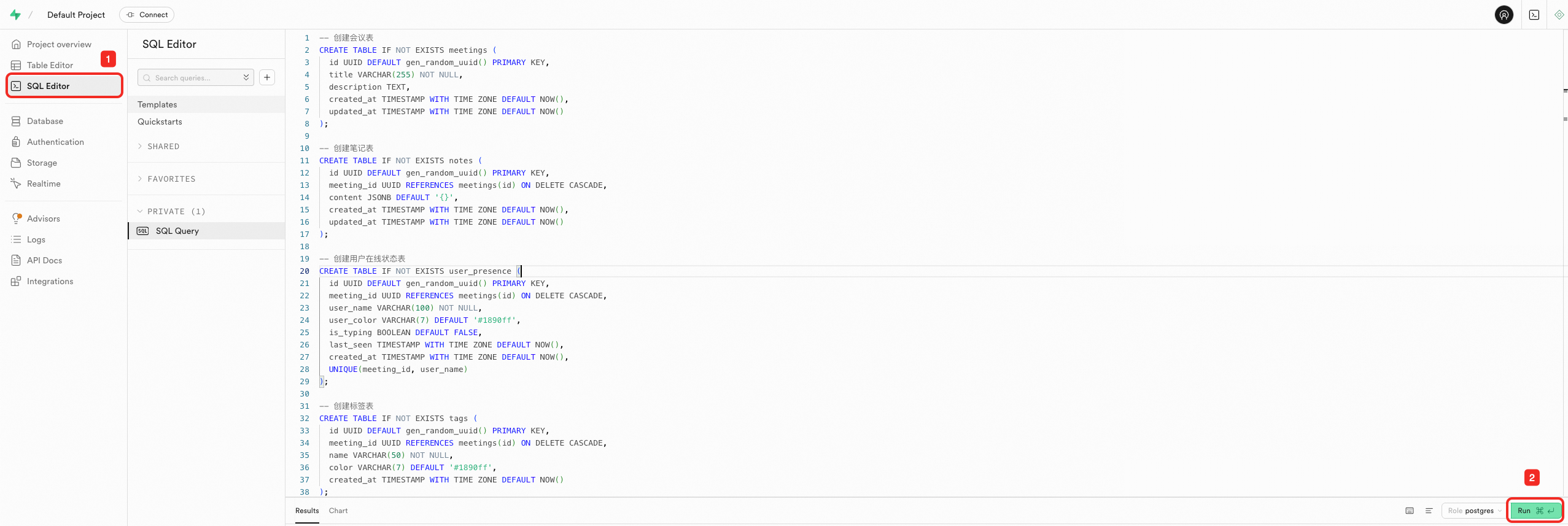
Install dependencies and start the project:
pnpm install
pnpm dev
The application is available at
http://localhost:3000.
Best practices
Database design:
Define foreign key constraints between related tables to enforce data integrity at the database level.
Add indexes on frequently filtered columns, such as
meeting_id, to support efficient queries.Use JSONB columns for flexible, schema-less data (for example, rich text content in
notes.content).
Realtime subscriptions:
Separate channels by business concern—presence, document edits, and notifications each get their own channel.
Always filter by a specific row identifier (for example,
meeting_id) to avoid receiving events for unrelated data.Clean up channels explicitly when components unmount to prevent connection leaks.
Security:
Enable RLS on every table before writing application queries.
Write the narrowest policy possible. Default to denying access and grant only what each role needs.
Use
auth.uid()in RLS policies to tie data access to the authenticated user identity.
Deployment:
Store all credentials in environment variables. Never hardcode
NEXT_PUBLIC_SUPABASE_URLorNEXT_PUBLIC_SUPABASE_ANON_KEYin source code.Test RLS policies in a staging environment before deploying to production.
What's next
Explore Edge Functions to add server-side processing. Edge Functions run on Deno with native TypeScript support:
import { serve } from "https://deno.land/std@0.168.0/http/server.ts"
import { createClient } from 'https://esm.sh/@supabase/supabase-js@2'

serve(async (req) => {
  const supabase = createClient(
    Deno.env.get('SUPABASE_URL') ?? '',
    Deno.env.get('SUPABASE_ANON_KEY') ?? ''
  )

  const { data } = await supabase.from('meetings').select('*')
  return new Response(JSON.stringify(data), {
    headers: { 'Content-Type': 'application/json' }
  })
})
Enable the Storage Service to let users attach files to meetings. The sample project uses the
meeting-filesbucket:const { data, error } = await supabase.storage .from('meeting-files') .upload('document.pdf', file, { cacheControl: '3600', upsert: false })Review the REST API for querying meeting data with joins and GraphQL (Enterprise Edition) for external services:
const { data, error } = await supabase
  .from('meetings')
  .select('*, notes(*)')
  .eq('id', meetingId)
  .single()