PolarDB for PostgreSQL Distributed Editionintegrates the DuckDB analytical engine into its columnstore index (IMCI) feature, which improves analytical query performance by more than 60 times. Combined with the transparent sharding mechanism of the distributed architecture, queries can be pushed down to multiple data nodes (DNs) for parallel processing, so analytical performance scales linearly with the number of nodes. For big data volumes at the TB or PB scale, the combination of the distributed architecture and IMCI improves overall analytical performance by nearly 100 times compared with the row store, which meets the requirements of HTAP (hybrid transactional and analytical processing) scenarios.
Architecture

The distributed architecture with IMCI includes the following core components:
Coordinator node (CN): Processes requests, generates distributed execution plans, pushes query SQL down to each data node, and finally aggregates the results from all DNs before returning them to the client.
Data node (DN): Stores data in both row-store and column-store (IMCI) formats. Row-store data is asynchronously written to the column store through the logical replication mechanism, which ensures that analytical acceleration is compatible with real-time data writes.
The following example describes the overall workflow of a typical analytical aggregate query:
The CN generates a distributed plan and dispatches SQL: A business SQL request is sent to the CN. The CN generates a distributed execution plan based on global metadata and determines how to split the query SQL and push it down to each data node.
DNs run parallel queries on IMCI column-store data: The CN pushes the query down to each target DN. Each DN runs an efficient parallel query and performs preliminary aggregation on its local IMCI column-store data, and then returns the intermediate results to the CN.
The CN performs secondary aggregation and returns the final result: The CN collects the query results from all DNs, performs final aggregation and sorting as required, and returns the aggregated result to the user or application.
Scenarios
This feature applies to multi-tenant database scenarios, especially when tenant data must be rolled up and aggregated globally with high efficiency, which significantly improves analytical performance. It applies to the following two sharding scenarios:
Horizontal sharding (sharding by tenant_id)
Assume that a business table orders exists and uses tenant_id as the sharding key.
Single-tenant aggregation: Calculates the total and average amounts of the local orders of a specific tenant.
SELECT SUM(amount) AS total_amount, AVG(amount) AS avg_amount
FROM orders
WHERE tenant_id = 1001;
Global tenant statistics: Calculates the total and average order amounts of all tenants, grouped by tenant.
SELECT tenant_id, SUM(amount) AS total_amount, AVG(amount) AS avg_amount
FROM orders
GROUP BY tenant_id;
Vertical sharding (sharding by schema)
Assume that the data of each tenant is stored in a separate schema and that the table is named orders in every schema.
Single-schema aggregation: Aggregates the total and average order amounts of a specific schema.
SELECT SUM(amount) AS total_amount, AVG(amount) AS avg_amount
FROM tenant_a.orders;
Global tenant statistics: Aggregates the total and average order amounts of all tenants by using UNION ALL.
SELECT 'tenant_a' AS tenant, SUM(amount) AS total_amount, AVG(amount) AS avg_amount FROM tenant_a.orders
UNION ALL
SELECT 'tenant_b' AS tenant, SUM(amount) AS total_amount, AVG(amount) AS avg_amount FROM tenant_b.orders;
Prerequisites
Create a PolarDB for PostgreSQL Distributed Edition cluster.
Sharding is configured for the tenant tables. For more information about the sharding methods, see Create and manage distributed tables.
Required cluster version:
PostgreSQL 16 with a minor engine version of 2.0.16.11.14.0 or later.
PostgreSQL 14 with a minor engine version of 2.0.14.20.43.0 or later.
Configure the distributed columnstore index
Step 1: Enable the distributed IMCI feature
You can modify the parameters in the PolarDB console or in a database session:
Parameter | Description |
| Specifies whether to enable the distributed columnstore index.
|
| Specifies whether IN expressions in WHERE conditions can use the distributed columnstore index.
|
| Specifies whether to enable the distributed hint feature.
|
SET polar_cluster_enable_imci = on;
SET polar_csi.enable_anyall_to_in = on;
SET pg_hint_plan.polar_enable_distributed_hint = on;
Step 2: Create replication slots for row-to-column synchronization
Use an account with high privileges to run the following command on the primary CN to create replication slots for row-to-column synchronization on all nodes:
SELECT run_command_on_all_nodes($$ SELECT polar_csi_start_sync() $$);This operation is idempotent and can be run multiple times without side effects.
Step 3: Create and shard tenant tables
Horizontal sharding
Create a distributed table that uses tenant_id as the sharding key:
If you use tenant_id as the sharding key, it must be the primary key or part of the primary key.
-- Create the initial business table with tenant_id as part of the primary key
CREATE TABLE orders (
  order_id   bigint,
  tenant_id  int NOT NULL,
  amount     numeric(20,2),
  status     text,
  create_time timestamp,
  PRIMARY KEY (tenant_id, order_id)
);

-- Convert the table to a distributed sharded table
SELECT create_distributed_table('orders', 'tenant_id');
Vertical sharding
The data of each tenant is stored in a separate schema:
-- Create the tenant schema
CREATE SCHEMA tenant1;

-- Enable distributed management for the schema
SELECT polar_cluster_schema_distribute('tenant1');

-- Create the business table
SET search_path TO tenant1;

CREATE TABLE orders (
  order_id   bigint,
  tenant_id  int NOT NULL,
  amount     numeric(20,2),
  status     text,
  create_time timestamp,
  PRIMARY KEY (tenant_id, order_id)
);
Step 4: Create a columnstore index
Create a CSI columnstore index on the table:
-- Create a columnstore index on all columns
CREATE INDEX csi_orders ON orders USING CSI;

-- Create a columnstore index on specific columns only (for example, when queries involve only tenant_id and amount)
CREATE INDEX csi_orders_part ON orders1 USING CSI(tenant_id, order_id, amount);

-- Create a columnstore index without locking the table (recommended)
CREATE INDEX CONCURRENTLY csi_orders ON orders USING CSI;(Recommended) Create a CSI on all columns to prevent column-store queries from becoming ineffective due to missing columns.
Step 5: Run queries by using the columnstore index
Two parameters control whether a column-store query is run:
Parameter | Description |
| Specifies whether query statements can use a columnstore index.
|
| The cost threshold of a query. If the query cost is lower than the specified threshold, the row-store engine is used. Otherwise, the column-store engine is used.
|
(Recommended) Use a hint to force a specific query to use the columnstore index:
/*+SET (polar_csi.enable_query on) SET(polar_csi.cost_threshold 0)*/
SELECT tenant_id, SUM(amount) AS total_amount, AVG(amount) AS avg_amount
FROM orders
GROUP BY tenant_id;
You can also set the parameters globally or per account. To set the parameters globally, modify them in the console. To set the parameters per account, run the following statements on the primary CN:
-- Prioritize the columnstore index for the test user
ALTER ROLE test SET polar_csi.enable_query = ON;
ALTER ROLE test SET polar_csi.cost_threshold = 0;
Step 6: Check whether a query uses the columnstore index
You can use EXPLAIN for analysis. If CSI Executor appears in the execution plan, the query uses the columnstore index:
/*+SET (polar_csi.enable_query on) SET(polar_csi.cost_threshold 0)*/
EXPLAIN (COSTS OFF) SELECT tenant_id, SUM(amount) AS total_amount, AVG(amount) AS avg_amount
FROM orders
GROUP BY tenant_id;
Example output snippet (the presence of CSI Executor indicates that the column-store query is used):
                       QUERY PLAN
---------------------------------------------------------
 Custom Scan (PolarCluster Adaptive)
   Task Count: 32
   Tasks Shown: One of 32
   ->  Task
         Node: host=127.0.0.1 port=45719 dbname=postgres
         ->  CSI Executor:
             ┌───────────────────────────┐
             │       HASH_GROUP_BY       │
             │    ────────────────────   │
             │        Aggregates:        │
             │          sum(#1)          │
             │          avg(#2)          │
             └─────────────┬─────────────┘
             ┌─────────────┴─────────────┐
             │         SEQ_SCAN          │
             │    ────────────────────   │
             │    Table: orders_102008   │
             │   Type: Sequential Scan   │
             └───────────────────────────┘
Performance
The following performance tests demonstrate the horizontal scaling capability and performance of the distributed architecture with IMCI in different data processing scenarios. In the test environment, each DN has 16 cores and 64 GB of memory.
Sysbench OLTP (online transaction processing) test: This test is mainly used to evaluate database performance under transactional operations such as inserts, updates, and deletes with high concurrency. As the number of data nodes (DNs) increases, the write capacity of the system scales almost linearly to meet the requirements of growing service traffic.
TPC-H OLAP (online analytical processing) test: This test focuses on the performance of large-scale data aggregation and complex query analysis. IMCI significantly improves the analytical capability of a single node, and the distributed architecture further pushes queries down to multiple DNs for parallel processing. As a result, overall query performance scales linearly with the number of nodes, which is suitable for analyzing and gaining insights from massive data volumes.
TPC-H performance test
The query latency is tested with 1, 2, 4, 8, and 12 DNs by using a 1 TB TPC-H dataset.
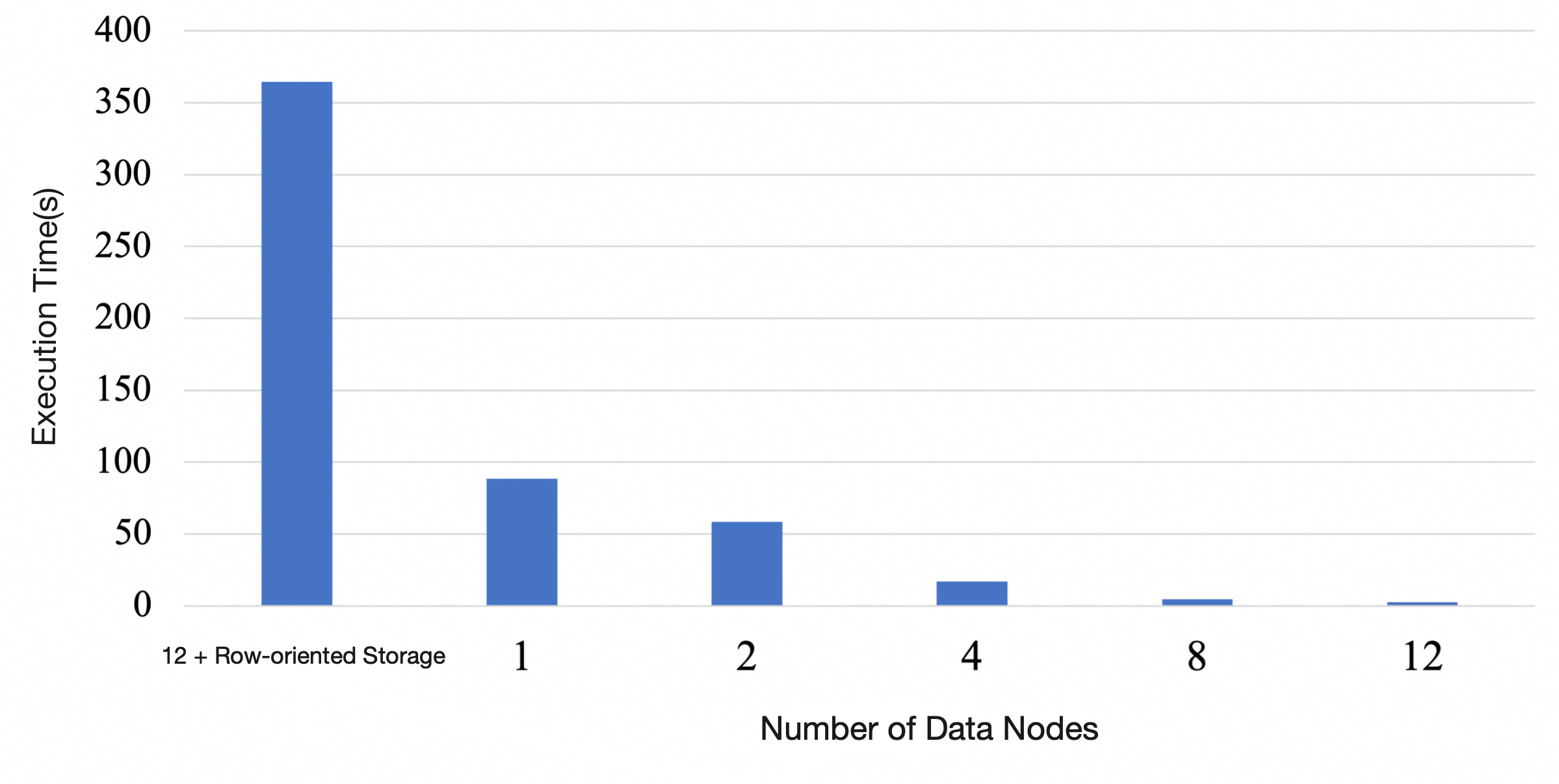
The test results show that:
The query latency of the distributed column store can be improved by more than 100 times compared with the distributed row store, and it scales linearly.
Compared with a column-store query on a single node, the distributed architecture with IMCI also achieves linear multiplicative gains as the number of DNs increases. A 12-DN configuration improves performance by several tens of times compared with a single node.
Sysbench OLTP_INSERT test
The write QPS of the distributed cluster is measured with 1, 2, 4, 8, and 12 DNs.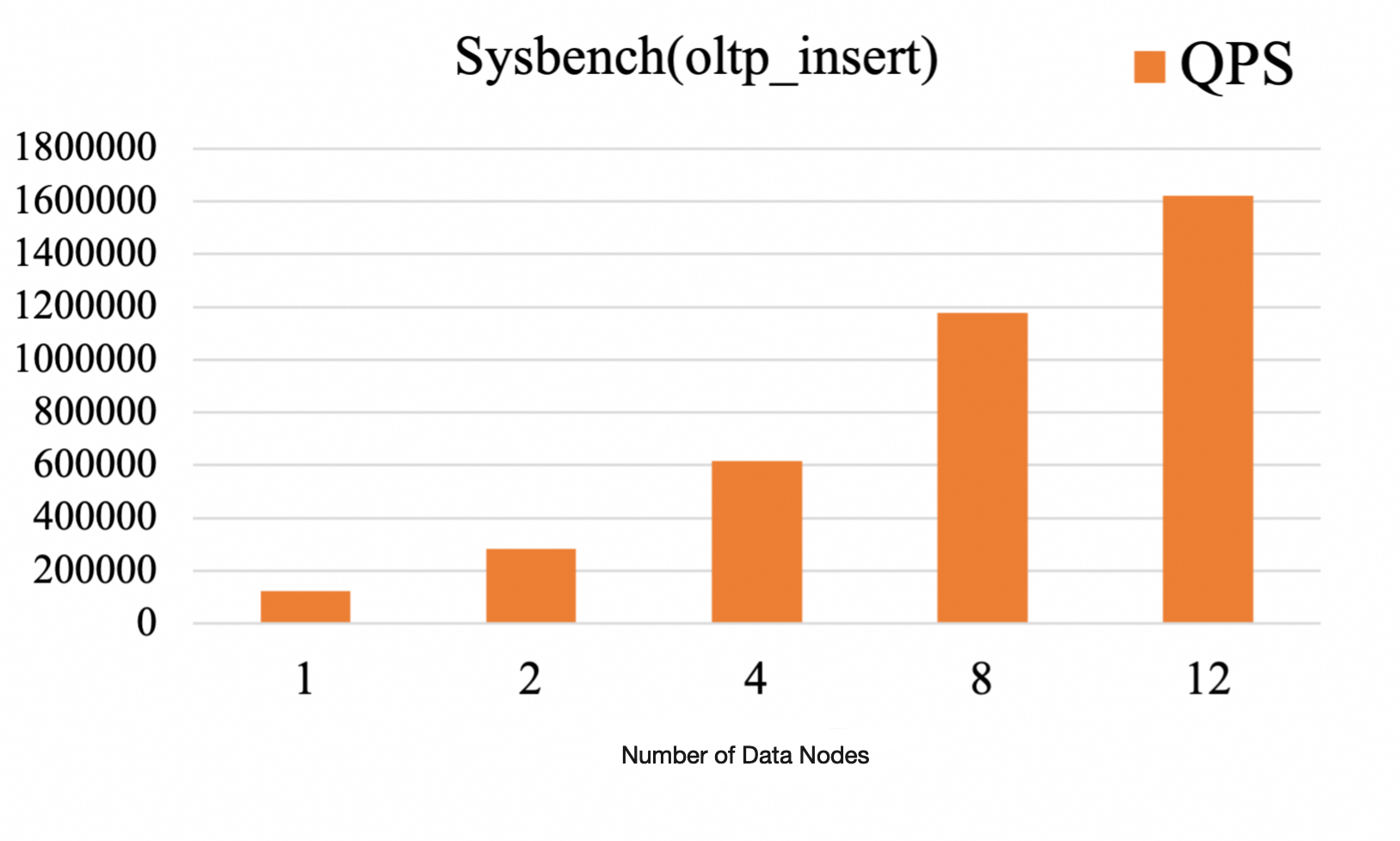
The test results show that:
Write QPS scales linearly with the number of DNs: As the number of DNs increases from 1 to 12, the write QPS grows almost linearly and reaches a maximum of 1.6 million QPS with 12 DNs.
The distributed architecture horizontally scales row-to-column synchronization: The parallel multi-DN architecture improves write performance and significantly enhances logical replication replay, which makes the data synchronization latency from the row store to the column store (IMCI) near real time.